
Unity Control Protocol
Give your AI agent full control of the Unity Editor.
Scenes, objects, assets, builds, tests, profiling - everything, from the terminal.


Documentation · Releases · Discord · npm
What is UCP
Unity has no CLI. If an agent wants to move assets, run tests, tweak a material, or trigger a build - it can't. The editor is a GUI-only black box.
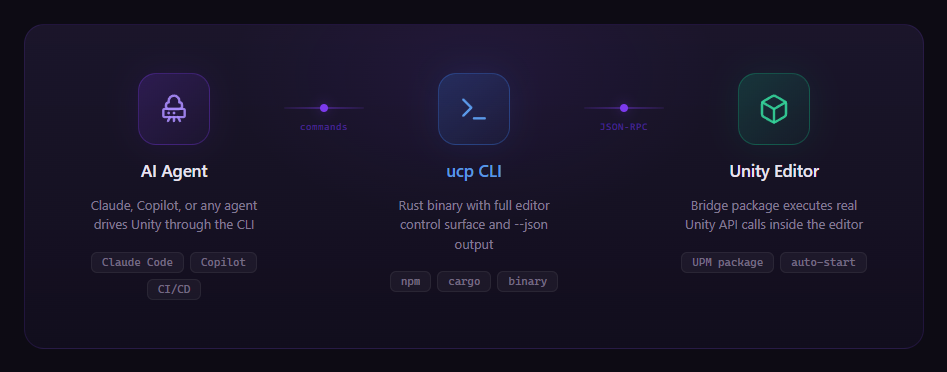
UCP opens that box. It's a Rust CLI that connects to a bridge package running inside the Unity Editor over localhost WebSocket. Every editor operation becomes a structured command with --json output. The agent talks to the CLI, the CLI talks to Unity, and Unity does the work.
No cloud. No accounts. No plugins to configure. Install the bridge, connect, and the agent has the editor.
What the agent gets
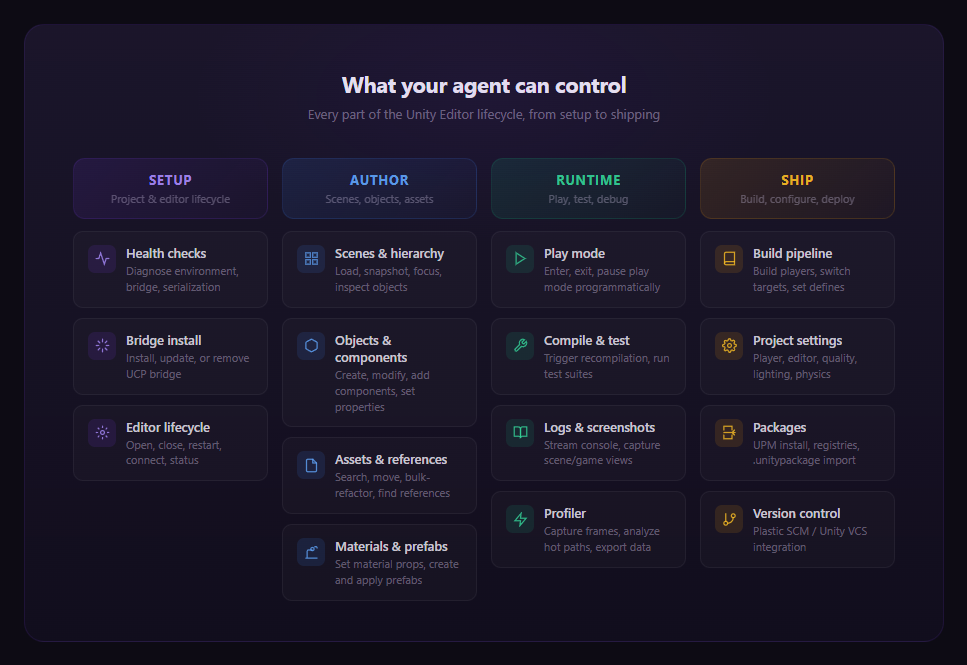
The entire Unity Editor lifecycle - from bootstrapping a project to shipping a build - exposed as structured, automatable operations.
What this enables
Autonomous refactoring
An agent can search every reference to a material, rename and relocate hundreds of assets in a single batch, verify nothing broke, recompile, and run the full test suite - without a human touching the editor. Moves go through Unity's AssetDatabase, so GUIDs, .meta files, and serialized references stay intact.
End-to-end feature implementation
Write scripts in the workspace, recompile through the bridge, assemble GameObjects and components in the live scene, persist them as prefabs, capture screenshots for visual verification, and run tests - all in one continuous agent loop. The agent never leaves the terminal.
Automated testing and CI/CD
Connect to the editor, trigger compilation, run edit-mode or play-mode test suites with structured JSON results, configure scripting defines, build the player, and shut down cleanly. Every step is gated and machine-readable.
Live profiling and debugging
Start a profiler session, enter play mode, capture frame data, analyze hot paths and hierarchy timings, export structured snapshots - all programmatically. The agent can diagnose performance issues without a human opening the profiler window.
Visual iteration loops
Snapshot the scene hierarchy to discover objects, focus the scene camera, capture screenshots, modify properties, capture again. The agent gets spatial awareness of the Unity scene and can iterate visually.
Install
npm install -g @mflrevan/ucp
pnpm / cargo / binary
# pnpm
pnpm add -g @mflrevan/ucp && pnpm approve-builds

# From source
git clone https://github.com/mflRevan/unity-control-protocol.git
cd unity-control-protocol/cli && cargo build --release
Or download a binary from GitHub Releases.
Then in any Unity project:
ucp install    # add the bridge package
ucp open       # launch Unity and connect
ucp doctor validates your setup - Unity resolution, bridge health, and project serialization settings.
Agent integration
UCP ships as a Claude Code plugin. The skill file (not limited to Claude Code, can be used in other harnesses too) teaches the agent the full control surface, common workflows, and edge-case handling.

 yucchiy
 bigdra50
 taconotsandwich
 nowsprinting
 Dev-GOM
 Nice-Wolf-Studio
'%20stop-opacity%3D'0.16'%2F%3E%3Cstop%20offset%3D'1'%20stop-color%3D'rgb(200%2C90%2C60)'%20stop-opacity%3D'0.03'%2F%3E%3C%2FlinearGradient%3E%3C%2Fdefs%3E%3Crect%20width%3D'320'%20height%3D'200'%20fill%3D'url(%23g)'%2F%3E%3Ccircle%20cx%3D'250'%20cy%3D'56'%20r%3D'92'%20fill%3D'rgb(200%2C90%2C60)'%20fill-opacity%3D'0.06'%2F%3E%3Ccircle%20cx%3D'64'%20cy%3D'172'%20r%3D'58'%20fill%3D'rgb(200%2C90%2C60)'%20fill-opacity%3D'0.05'%2F%3E%3C%2Fsvg%3E)