Stats
Actions
Available In
Tags

Accelerate Unity C# game development by generating optimized MonoBehaviour scripts and tests, fixing compilation errors from VSCode diagnostics, validating best practices, refactoring code with SOLID principles, optimizing scenes for rendering/physics/memory, running CLI tests, and architecting scalable systems with expert agents.
You are a Unity C# scripting expert. Generate a new Unity script using best practices and appropriate templates.
You are a Unity performance optimization expert. Analyze the current Unity scene or project and provide comprehensive performance optimization recommendations.
You are a Unity testing expert. Set up comprehensive test environments and generate test cases for Unity projects.
Unity architecture expert for game system design and project structure
Unity performance optimization specialist for game profiling and optimization
Unity code refactoring specialist for improving code quality, maintainability, and applying design patterns
Unity C# scripting expert for writing clean, performant game code
Detect and resolve Unity C# compilation errors using VSCode diagnostics. Use this skill when Unity projects have compilation errors that need diagnosis and automated fixes. Analyzes errors from VSCode Language Server, proposes solutions based on error patterns, and handles version control conflicts for Unity projects.
Analyzes scenes for performance bottlenecks (draw calls, batching, textures, GameObjects). Use when optimizing scenes or investigating performance issues.
Validates C# scripts for best practices, performance, and Unity patterns. Use when reviewing scripts or checking code quality.
Generates production-ready C# script templates (MonoBehaviour, ScriptableObject, Editor, tests). Use when creating new scripts or setting up project structure.
Execute and analyze Unity Test Framework tests from the command line. This skill automates test execution for Unity projects by detecting the Unity Editor, configuring test parameters (EditMode/PlayMode), running tests via CLI, parsing XML results, and generating detailed failure reports. Use this when running Unity tests, validating game logic, or debugging test failures.
Uses power tools
Uses Bash, Write, or Edit tools
Own this plugin?
Verify ownership to unlock analytics, metadata editing, and a verified badge. GitHub access is read-only (username + org membership).
Sign in to claimOwn this plugin?
Verify ownership to unlock analytics, metadata editing, and a verified badge. GitHub access is read-only (username + org membership).
Sign in to claimBased on adoption, maintenance, documentation, and repository signals. Not a security audit or endorsement.
Version: 2.31.0 | Last Updated: 2025-12-02
⚠️ Important Notice (>= v2.0.17) There is a known issue where hook logs stack in the chat window. Until this is resolved, PostToolUse hook outputs are hidden using
suppressOutput: truein hooks.json. Stop hook messages can be controlled via.plugin-config/[plugin-name].jsonwith"showLogs": false(default). Set totrueto enable. See Configuration for details.
A collection of powerful productivity plugins for Claude Code to automate common development workflows.
Automatically creates git commits after each Claude Code session to prevent work loss.
Quick Info: Auto-commits all changes with timestamps when session ends | Hook: Stop
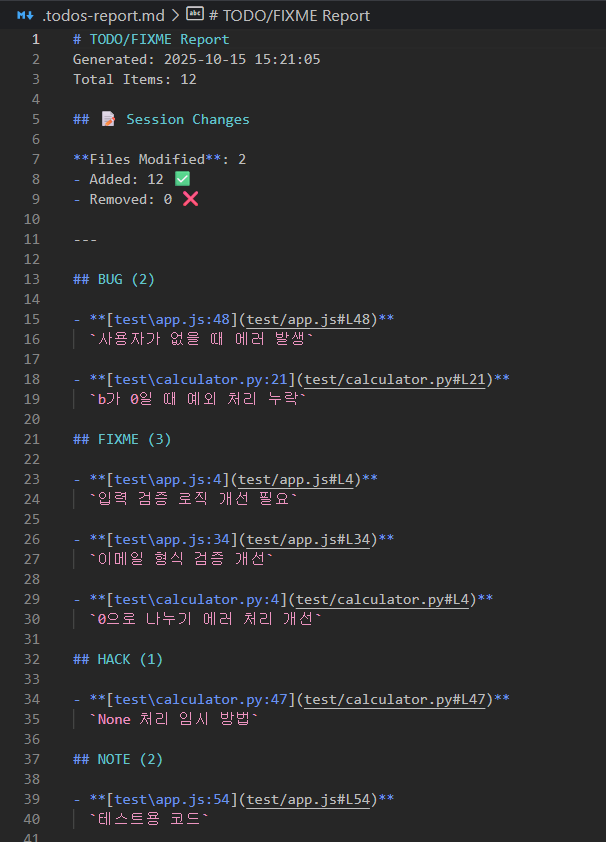
Scans your entire project and collects all TODO, FIXME, HACK, XXX, NOTE, and BUG comments into a detailed report.
Quick Info: Supports multiple languages, generates markdown report | Hooks: PostToolUse (Write|Edit|NotebookEdit), Stop
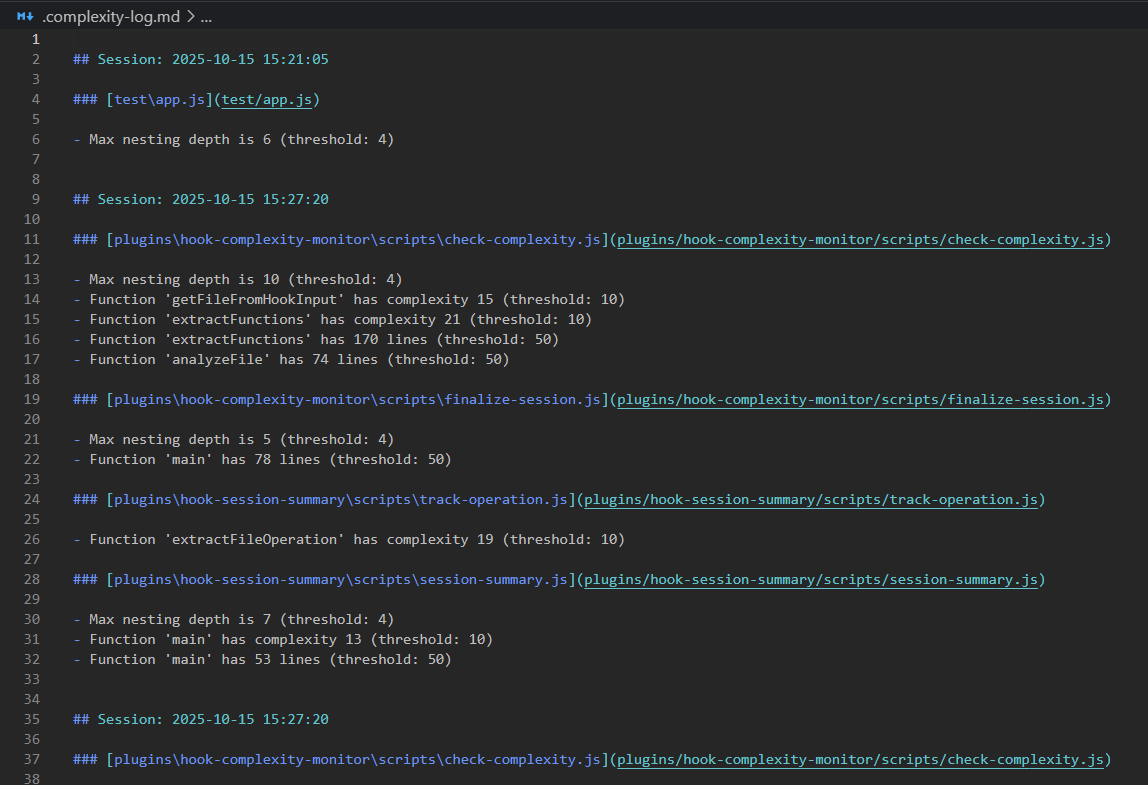
Monitors code complexity metrics and warns when thresholds are exceeded.
Quick Info: Tracks cyclomatic complexity, function/file length, nesting depth | Hook: PostToolUse (Edit|Write)
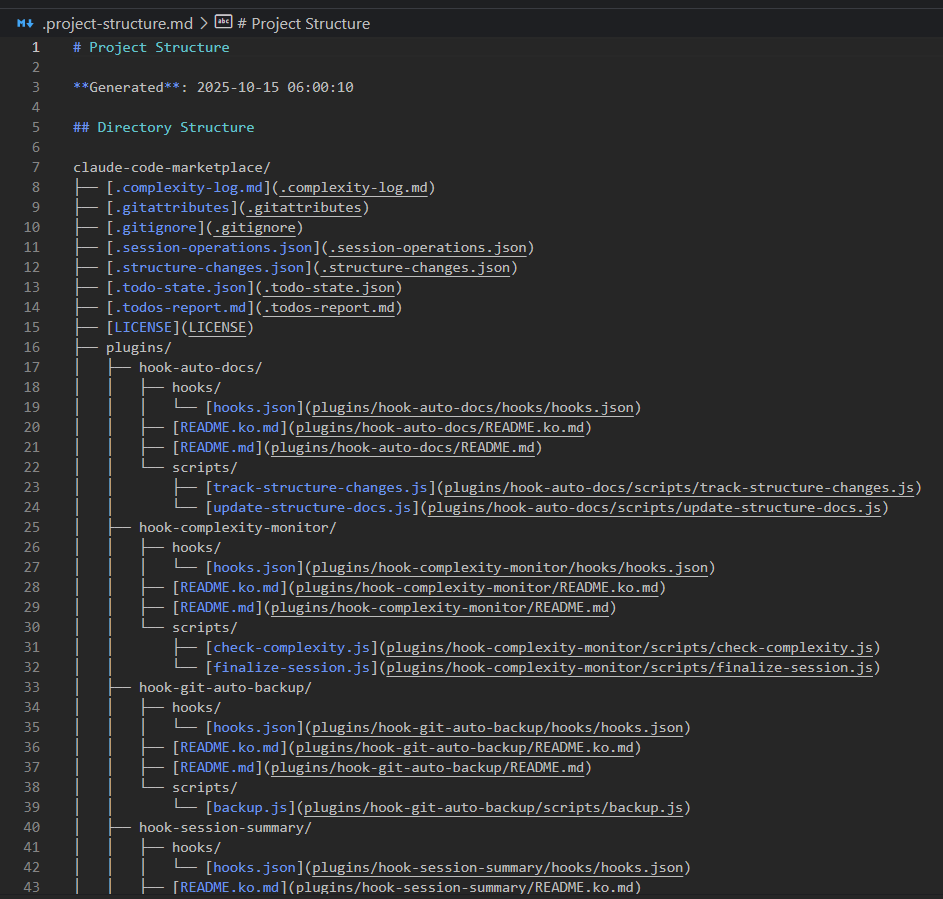
Automatically scans and documents your project structure with directory tree, scripts, and dependencies.
Quick Info: Generates project structure documentation, tracks file changes, extracts package.json info | Hooks: PostToolUse (Write), Stop
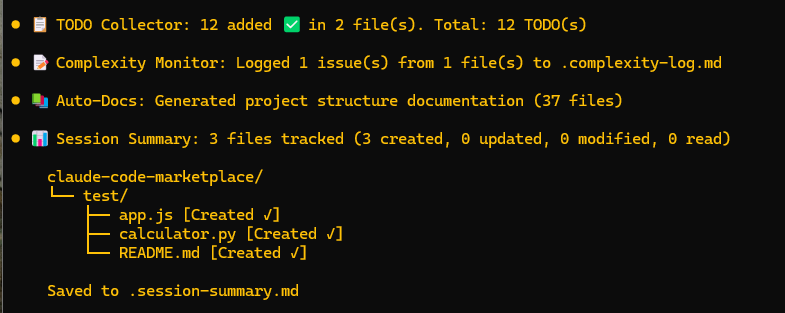
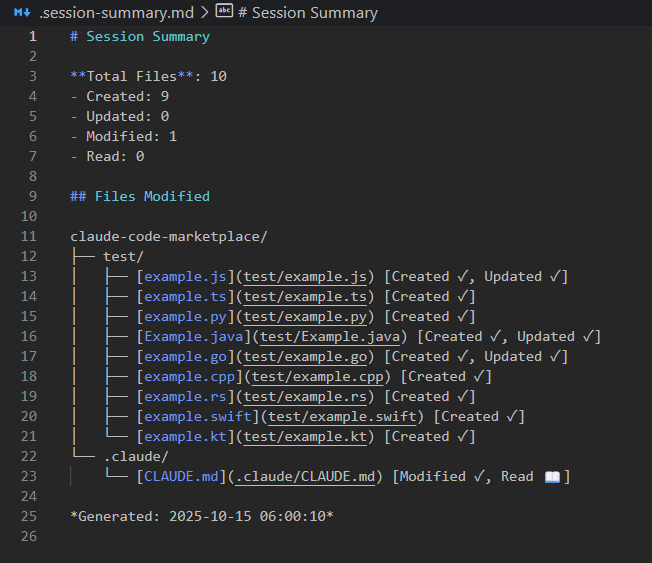
Tracks all file operations during a session and generates a summary report with directory tree visualization.
Quick Info: Classifies files by operation type (Created, Modified, Read) | Hooks: PostToolUse (Write|Edit|Read|NotebookEdit), Stop
Complete AI pair programming experience with slash commands, expert agents, and intelligent hooks integrated together.
Quick Info: 5 slash commands + 4 expert agents + 3 intelligent hooks | Commands: /pair, /review, /suggest, /fix, /explain | Agents: @code-reviewer, @bug-hunter, @architect, @performance-expert
GitHub Spec-Kit integration for Specification-Driven Development (SDD). Define WHAT and HOW before coding.
Quick Info: 10 slash commands for structured development workflow | Commands: /spec-kit:init, /spec-kit:constitution, /spec-kit:specify, /spec-kit:plan, /spec-kit:tasks, /spec-kit:implement | Workflow: Constitution → Specification → Plan → Tasks → Implementation
Comprehensive Unity game development toolkit with intelligent scripting assistance, code refactoring, performance optimization, UI Toolkit support, compile error resolution, and test automation.
npx claudepluginhub Dev-GOM/claude-code-marketplace --plugin unity-dev-toolkitAutomatically backup your work with git commits after each Claude session
 Dev-GOM
Git diff review integration for Claude Code with VSCode extension. Provides inline diff view, browser diff editor, and auto-open files.
Dev-GOMAutomatically update project documentation based on code changes
Dev-GOMAI Pair Programming Suite - Intelligent code review, bug hunting, and real-time programming assistance
Dev-GOMChrome DevTools Protocol (CDP) browser automation, web scraping, and crawling with React compatibility
Dev-GOMSkills and agents for developing Unity projects with Claude Code — maintainable test design and implementation, test-first workflow, coding guidelines, scene editing, and more.
 nowsprinting
Commands for game development workflows
 davepoon
Comprehensive Unity 6 game engine development skills. 35 skills covering scripting, physics, graphics, animation, UI, audio, 2D, ECS/DOTS, Cinemachine, performance profiling, multiplayer, XR, editor tools, 5 Tier 1 correctness skills, 5 Tier 2 architecture skills, and 5 Tier 3 domain translation skills (game loop, NPC behavior, UI patterns, level design, procedural generation). Based on Unity 6.3 LTS official documentation.
 Nice-Wolf-Studio
Claude Code plugin to integrate unity-cli into Unity development workflows
 bigdra50
Unity Editor automation plugin powered by the Unity Control Protocol base skill.
 mflRevan
Complete Unity game development expertise. Covers C# scripting, MonoBehaviour lifecycle, UI systems (UGUI, UI Toolkit), physics, animation, networking (Netcode, Mirror, Photon), modding support, ECS/DOTS, shader development (ShaderLab, HLSL, Shader Graph), editor scripting, performance optimization, build pipelines, and Unity Gaming Services integration.
 JosiahSiegel
'%20stop-opacity%3D'0.16'%2F%3E%3Cstop%20offset%3D'1'%20stop-color%3D'rgb(200%2C90%2C60)'%20stop-opacity%3D'0.03'%2F%3E%3C%2FlinearGradient%3E%3C%2Fdefs%3E%3Crect%20width%3D'320'%20height%3D'200'%20fill%3D'url(%23g)'%2F%3E%3Ccircle%20cx%3D'250'%20cy%3D'56'%20r%3D'92'%20fill%3D'rgb(200%2C90%2C60)'%20fill-opacity%3D'0.06'%2F%3E%3Ccircle%20cx%3D'64'%20cy%3D'172'%20r%3D'58'%20fill%3D'rgb(200%2C90%2C60)'%20fill-opacity%3D'0.05'%2F%3E%3C%2Fsvg%3E)