Stats
Actions
Available In
Tags
Add AI-assisted structured logging, runtime debug commands, and real-time variable monitoring to Unity via the Jahro console, with tools for safe production deployment and snapshot-based bug capture.
Analyzes C# classes and generates [JahroCommand] attributes with correct syntax, RegisterObject patterns, and group organization. Use when the user wants to add runtime commands, cheats, or debug actions to Unity classes, or mentions JahroCommand, console commands, runtime cheats, or debug actions.
Reviews and improves Debug.Log usage in Unity C# projects following structured logging principles: context tags, severity contracts, boundary-based placement, and criticality tiers. Detects common antipatterns (naked Debug.Log, logging in Update, stringly-typed errors), adds missing logs at system/state/error/external boundaries, and scaffolds project-wide logging infrastructure (LogTag constants, formatting helpers, conventions). Use when the user mentions logging, Debug.Log, log messages, debugging, or asks to improve observability in Unity code.
Analyzes existing debug systems (IMGUI menus, custom loggers, cheat frameworks, performance HUDs) and generates incremental migration plans to Jahro equivalents. Use when the user wants to replace a custom debug UI, migrate from an existing console or cheat system, switch to Jahro, or has OnGUI debug code they want to modernize.
Configures Jahro lifecycle controls for safe production deployment including JAHRO_DISABLE, auto-disable, and build validation. Use when the user mentions production builds, release builds, disabling Jahro, shipping, CI/CD, lifecycle controls, or production safety.
Detects Jahro in Unity projects and guides installation, API key configuration, and feature overview. Use when the user mentions Jahro setup, installation, getting started, debug console, or asks what Jahro can do. Also triggers when no Jahro references are found in a Unity project and the user asks about debugging.
Own this plugin?
Verify ownership to unlock analytics, metadata editing, and a verified badge. GitHub access is read-only (username + org membership).
Sign in to claimOwn this plugin?
Verify ownership to unlock analytics, metadata editing, and a verified badge. GitHub access is read-only (username + org membership).
Sign in to claimBased on adoption, maintenance, documentation, and repository signals. Not a security audit or endorsement.
Your AI coding assistant becomes a Unity debugging expert.
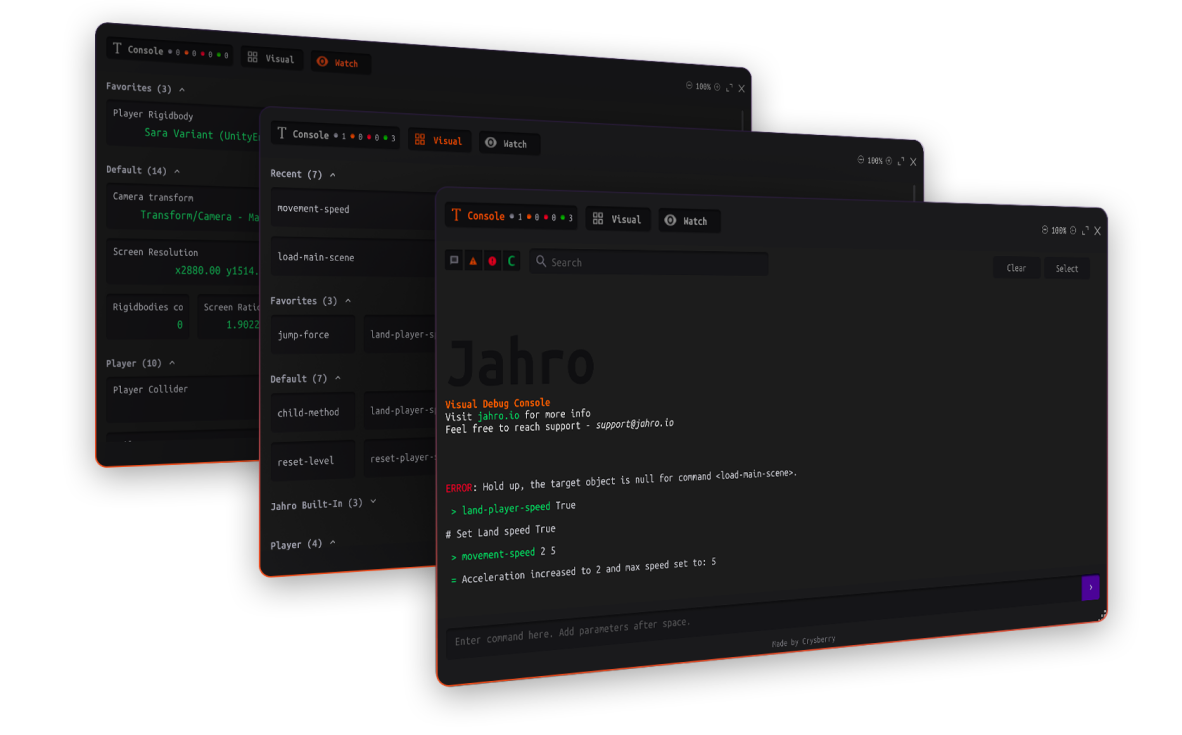
8 skills that teach Claude Code, Cursor, and other AI assistants how to generate correct Jahro and Unity debugging code — commands, watchers, snapshots, structured logging, production config, migration, and troubleshooting.


Jahro is an in-game debugging console for Unity — runtime commands, variable watching, and log capture.
Agent skills are markdown files that give AI coding assistants domain-specific knowledge. Instead of your AI guessing at Unity debugging APIs, these skills provide exact attribute syntax, registration patterns, lifecycle rules, and diagnostic decision trees — so the generated code works on the first try.
Install the skills, then talk to your AI naturally:
[Tag] Action — key=value logs at every boundary[JahroCommand] attributes with correct naming, groups, parameter types, and RegisterObject/UnregisterObject lifecycle[JahroWatch] attributes with supported types and performance-safe patterns| Skill | What Your AI Can Do |
|---|---|
| jahro-logging | Review and improve Debug.Log usage: structured format, context tags, severity contracts, criticality tiers, boundary-based placement, and antipattern detection |
| jahro-setup | Detect Jahro in your project, guide installation, configure API keys, recommend which features to adopt first |
| jahro-commands | Generate [JahroCommand] attributes with correct syntax, RegisterObject boilerplate, group organization, and Visual/Text Mode guidance |
| jahro-watcher | Generate [JahroWatch] attributes with supported types, group strategies, and performance implications |
| jahro-snapshots | Configure snapshot capture modes (Recording vs Streaming), QA workflows, team sharing, and web console setup |
| jahro-production | Set up production safety: JAHRO_DISABLE define, auto-disable in release builds, lifecycle controls, and build validation |
| jahro-troubleshooting | Diagnose common issues using decision trees — commands missing, watcher not updating, console not opening, snapshots failing |
| jahro-migration | Analyze existing debug systems (IMGUI menus, custom loggers, cheat frameworks) and generate incremental migration plans |
Each skill is a self-contained SKILL.md file (~300-450 lines). Most skills are backed by shared reference files with the complete Jahro API and common code patterns. The jahro-logging skill is principle-driven and tool-agnostic — it works with raw Debug.Log and doesn't require Jahro.
git clone https://github.com/jahro-console/unity-agent-skills.git .agents/skills/jahro
Then ask your AI: "Help me add Jahro commands to my PlayerController"
That's it. Claude Code discovers skills automatically. For Cursor and other assistants, see detailed installation below.
Clone into your project's skills directory:
git clone https://github.com/jahro-console/unity-agent-skills.git .agents/skills/jahro
Or clone to a shared location and symlink into each project:
git clone https://github.com/jahro-console/unity-agent-skills.git ~/jahro-agent-skills
ln -s ~/jahro-agent-skills .agents/skills/jahro
Claude Code automatically discovers skills in .agents/skills/ and activates them based on each skill's description field.
Copy skill files into Cursor's rules directory:
git clone https://github.com/jahro-console/unity-agent-skills.git /tmp/jahro-skills
npx claudepluginhub rondorkerin/gamestack --plugin unity-jahroUnity Development Toolkit - Expert agents for scripting/refactoring/optimization, script templates, and Agent Skills for Unity C# development
 Dev-GOM
Claude Code plugin to integrate unity-cli into Unity development workflows
 bigdra50
Skills and subagents for developing Unity projects with Claude Code — maintainable test design and implementation, test-first workflow, coding guidelines, scene editing, and more.
 nowsprinting
Comprehensive Unity 6 game engine development skills. 35 skills covering scripting, physics, graphics, animation, UI, audio, 2D, ECS/DOTS, Cinemachine, performance profiling, multiplayer, XR, editor tools, 5 Tier 1 correctness skills, 5 Tier 2 architecture skills, and 5 Tier 3 domain translation skills (game loop, NPC behavior, UI patterns, level design, procedural generation). Based on Unity 6.3 LTS official documentation.
 Nice-Wolf-Studio
Unity Editor automation plugin powered by the Unity Control Protocol base skill.
 mflRevan
CLI for reading and editing Unity scenes, prefabs, and assets with minimal token usage. Native Rust backend for efficient parsing of large game engine files.
 taconotsandwich
'%20stop-opacity%3D'0.16'%2F%3E%3Cstop%20offset%3D'1'%20stop-color%3D'rgb(200%2C90%2C60)'%20stop-opacity%3D'0.03'%2F%3E%3C%2FlinearGradient%3E%3C%2Fdefs%3E%3Crect%20width%3D'320'%20height%3D'200'%20fill%3D'url(%23g)'%2F%3E%3Ccircle%20cx%3D'250'%20cy%3D'56'%20r%3D'92'%20fill%3D'rgb(200%2C90%2C60)'%20fill-opacity%3D'0.06'%2F%3E%3Ccircle%20cx%3D'64'%20cy%3D'172'%20r%3D'58'%20fill%3D'rgb(200%2C90%2C60)'%20fill-opacity%3D'0.05'%2F%3E%3C%2Fsvg%3E)
