Stats
Actions
Available In
Tags

Compress LLM-facing Markdown files (CLAUDE.md, ARCHITECTURE.md) to reduce token usage via lossless structural optimization or lossy semantic rewriting, with automatic reviewer verification to prevent information loss.
Recursively find and compress all matching markdown files in a repository — auto-approve mode with batched processing
Compress a markdown file to reduce token usage — lossless (structural) or lossy (semantic) modes with section-by-section review
Use this agent to review a compressed markdown section against its original. This agent catches information loss, over-aggressive compression, and broken references. It is spawned by the /compress command after the section-compressor — not invoked directly by users. <example> Context: The /compress command just received a compressed section from section-compressor and needs quality review. user: "Compress my CLAUDE.md file" assistant: "I'll dispatch the compression-reviewer agent to verify no critical information was lost." <commentary> After section-compressor returns a compressed version, the compression-reviewer compares original and compressed text to catch information loss before presenting to the user. </commentary> </example> <example> Context: Lossy compression of an agent instruction file — reviewer checks the aggressive compression. user: "/compress agents/code-reviewer.md" assistant: "The compression-reviewer agent will verify the compressed version preserves all behavioral rules and specifics." <commentary> The reviewer is especially critical in lossy mode where semantic changes are expected. It verifies that essential information survived compression. </commentary> </example>
Use this agent to compress a single markdown section during the /compress workflow. This agent receives one section at a time and returns the compressed version. It is spawned by the /compress command — not invoked directly by users. <example> Context: The /compress command is processing a CLAUDE.md file section-by-section in lossy mode. user: "Compress my CLAUDE.md file" assistant: "I'll dispatch the section-compressor agent to compress this section." <commentary> The /compress command splits the file into sections and dispatches section-compressor for each one. The agent applies compression techniques from the markdown-compression skill and returns the compressed text. </commentary> </example> <example> Context: The /compress command is processing an agent instruction file in lossless mode. user: "/compress agents/code-reviewer.md --lossless" assistant: "I'll use the section-compressor agent to apply lossless transformations to this section." <commentary> In lossless mode, the section-compressor applies only structural transformations. In lossy mode, it applies semantic compression. The mode is specified in the agent's task prompt. </commentary> </example>
No model invocation
Executes directly as bash, bypassing the AI model
Own this plugin?
Verify ownership to unlock analytics, metadata editing, and a verified badge. GitHub access is read-only (username + org membership).
Sign in to claimOwn this plugin?
Verify ownership to unlock analytics, metadata editing, and a verified badge. GitHub access is read-only (username + org membership).
Sign in to claimBased on adoption, maintenance, documentation, and repository signals. Not a security audit or endorsement.


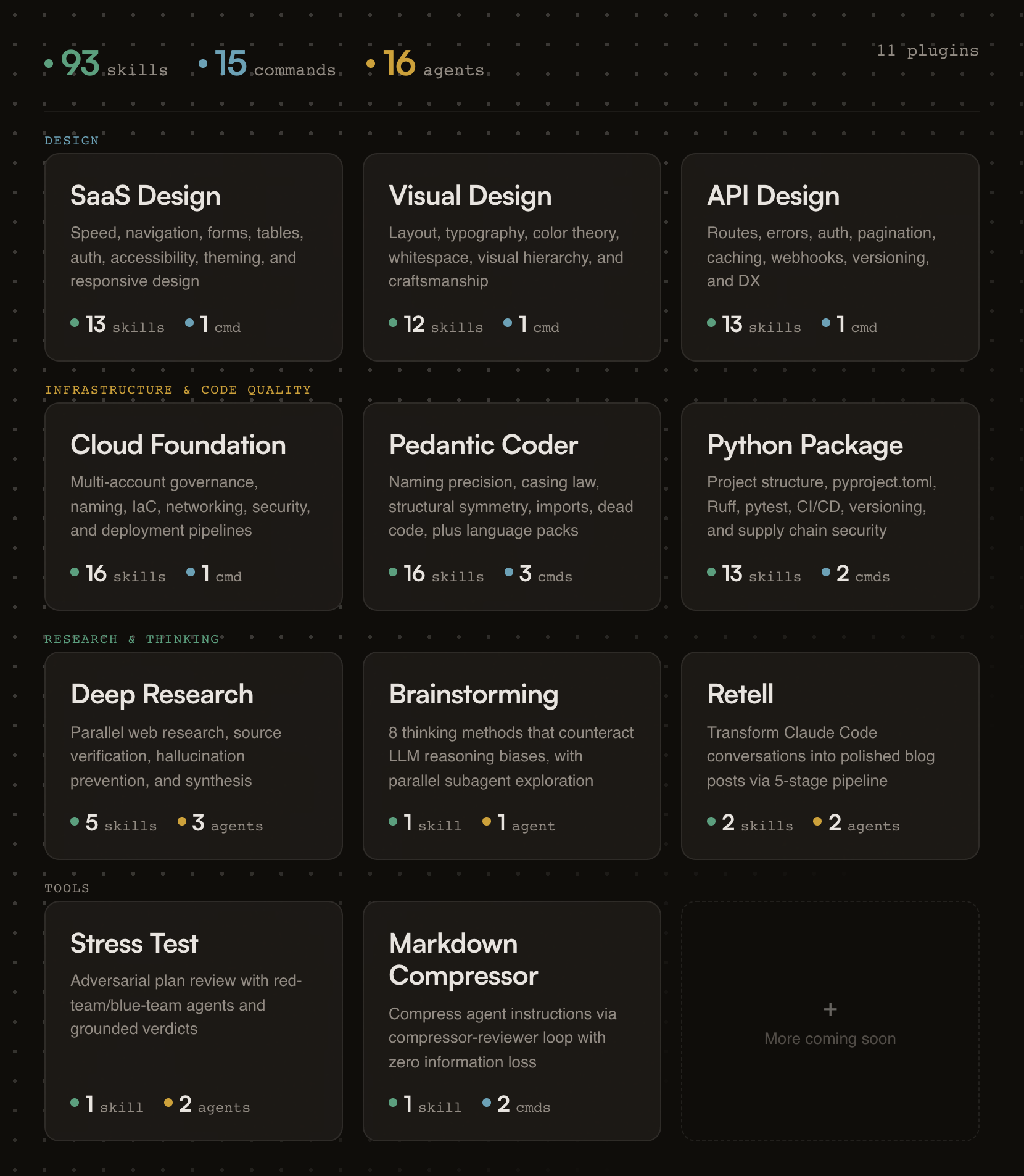
93 skills, 15 commands, and 16 agents across 11 plugins. Opinionated, research-backed Claude Code plugins for building SaaS products that ship.
Designed for Claude Code and Cowork. Skills compatible with other AI assistants.
Building a form? Skills activate automatically.
Need an API review? /api-review
Auditing code quality? /pedantic-review
Researching a topic? /research "your question"
Stress-testing a plan? /stress-test path/to/plan.md
Compressing your CLAUDE.md? /compress path/to/file.md
If this project helps you, star the repo.
Generic AI gives you suggestions. fractional-cto gives you standards.
Each skill encodes a proven engineering principle (naming precision, API design patterns, cloud governance) and enforces it the moment Claude detects relevant work. You get the rigor of Stripe's API design, Nielsen Norman's usability research, and production cloud architecture baked into every session. No bookshelf required.
The skills are deliberately opinionated. They don't present five options and ask you to choose. They tell you what to do, cite why, and show you the code. If you disagree, edit the skill. It's just markdown.
Every plugin activates the moment your Claude session starts. A session hook fires, reads the plugin's skill index, and injects it into context. From that point on, Claude knows what principles exist and when to apply them.
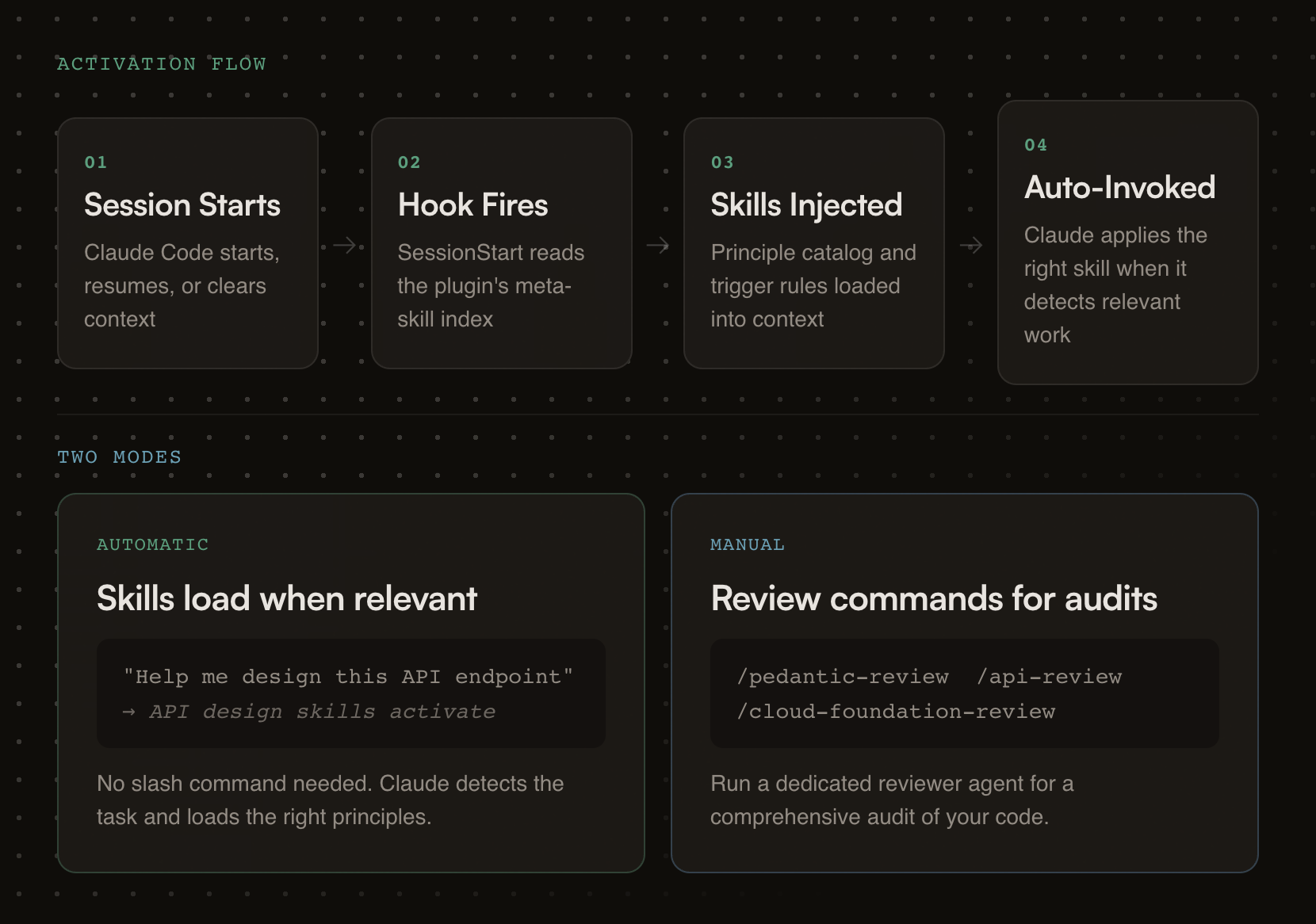
Each plugin carries review checklists, good/bad pattern comparisons, working code examples, and a dedicated reviewer agent for deeper audits.
# Step 1: Add the marketplace
/plugin marketplace add oborchers/fractional-cto

# Step 2: Install individual plugins
/plugin install saas-design-principles@fractional-cto
/plugin install visual-design-principles@fractional-cto
/plugin install api-design-principles@fractional-cto
/plugin install cloud-foundation-principles@fractional-cto
/plugin install pedantic-coder@fractional-cto
/plugin install python-package@fractional-cto
/plugin install deep-research@fractional-cto
/plugin install structured-brainstorming@fractional-cto
/plugin install retell@fractional-cto
/plugin install stress-test@fractional-cto
/plugin install markdown-compressor@fractional-cto
The skills/*/SKILL.md files follow the universal skill format and work with any tool that reads it. Commands and agents are Claude-specific.
| Tool | How to use | What works |
|---|---|---|
| Gemini CLI | Copy skill folders to .gemini/skills/ | Skills only |
| OpenCode | Copy skill folders to .opencode/skills/ | Skills only |
| Cursor | Copy skill folders to .cursor/skills/ | Skills only |
| Codex CLI | Copy skill folders to .codex/skills/ | Skills only |
| Kiro | Copy skill folders to .kiro/skills/ | Skills only |
# Example: copy all skills for Gemini CLI (project-level)
for plugin in */; do
  [ -d "$plugin/skills" ] && cp -r "$plugin/skills/"* .gemini/skills/ 2>/dev/null
done
claude --plugin-dir /path/to/fractional-cto/<plugin-name>
Research-backed SaaS design principles drawn from Linear, Stripe, Shopify Polaris, and Nielsen Norman Group research.
Skills (13):
npx claudepluginhub oborchers/fractional-cto --plugin markdown-compressorManage Claude Code's plan-mode artifacts, author multi-phase master planning documents, walk through Open Questions interactively, and synthesize dense progress entries to markdown / Linear / GitHub. Provides /plan-context (pre-load with optional ticket fetch), /plan-master (draft with optional ticket fetch), /plan-open-questions (interactive Open-Questions walkthrough with batch apply), /plan-verify (audit), /plan-tick (auto-tick provenly-achieved phases), /plan-progress (per-branch progress entry with SHA-based idempotency), and /plan-delete (per-session cleanup). Integer-only phases, no sizing, project-agnostic.
 oborchers
Chain work across two independent agent processes that share no parent session. One agent passes a baton (a completion signal file) when done, optionally carrying a free-form payload; another waits for it, with a deadline, then starts its dependent task. Harness-agnostic protocol — each agent picks its own waiting mechanism. The baton tells you when, never what: the payload is content, not instructions. Provides /baton-pass and /baton-wait.
oborchersThe holy principles of SaaS design: research-backed, opinionated guidance for building fast, predictable, and progressively powerful SaaS products
oborchersResearch-backed, opinionated guidance for designing world-class RESTful APIs — routes, naming, errors, auth, caching, webhooks, and more, distilled from Stripe, GitHub, Twilio, Shopify, Google, and Microsoft
oborchersAdversarial plan review using red-team/blue-team agents -- generates what-if questions and grounds answers in plan artifacts with configurable tool scope
oborchersDocumentation and authoring workflow router: audit docs vs code drift, sync docs after changes, optimize prompts and SKILL.md files, validate GLFM and Markdown formatting, summarize files/URLs/images with fidelity enforcement. Use when: docs are out of date, CLAUDE.md needs improving, SKILL.md needs optimizing, checking if documentation matches code, summarizing files or URLs.
 Jamie-BitFlight
Trim and optimize markdown files for LLM agent consumption
 diegomarino
jusTokenMax — token-reduction toolkit for Claude Code. Compresses attachments (PDF→Markdown, images), verbose logs, and provides a code symbol index plus chat-branching workflows so the agent reads and writes fewer tokens.
 Kalmantic
Markdown documentation skills and linting with markdownlint.
 TheBushidoCollective
Verdict-first communication mode. Cuts output tokens while keeping full technical accuracy.
 0p9b
0p9bDocumentation review, cleanup, generation, voice extraction, and human-quality writing enforcement with AI slop detection and SICO-based voice profiling
 athola
'%20stop-opacity%3D'0.16'%2F%3E%3Cstop%20offset%3D'1'%20stop-color%3D'rgb(200%2C90%2C60)'%20stop-opacity%3D'0.03'%2F%3E%3C%2FlinearGradient%3E%3C%2Fdefs%3E%3Crect%20width%3D'320'%20height%3D'200'%20fill%3D'url(%23g)'%2F%3E%3Ccircle%20cx%3D'250'%20cy%3D'56'%20r%3D'92'%20fill%3D'rgb(200%2C90%2C60)'%20fill-opacity%3D'0.06'%2F%3E%3Ccircle%20cx%3D'64'%20cy%3D'172'%20r%3D'58'%20fill%3D'rgb(200%2C90%2C60)'%20fill-opacity%3D'0.05'%2F%3E%3C%2Fsvg%3E)
