Stats
Actions
Available In
Tags

Manage Claude Code's plan-mode artifacts, author multi-phase master planning documents, walk through Open Questions interactively, and synthesize dense progress entries to markdown / Linear / GitHub. Provides /plan-context (pre-load with optional ticket fetch), /plan-master (draft with optional ticket fetch), /plan-open-questions (interactive Open-Questions walkthrough with batch apply), /plan-verify (audit), /plan-tick (auto-tick provenly-achieved phases), /plan-progress (per-branch progress entry with SHA-based idempotency), and /plan-delete (per-session cleanup). Integer-only phases, no sizing, project-agnostic.
Based on adoption, maintenance, documentation, and repository signals. Not a security audit or endorsement.
Pre-load context for a master plan — Triage proposes domains, user confirms, parallel Explore agents investigate, direct Reads verify findings. Emits a scope report. No plan file written.
Clear the current session's plan file in ~/.claude/plans/ — delete, recreate empty, re-read to prime the next plan
Draft a multi-phase master planning document. Runs Triage + Confirm + Parallel Explore + Verify (or reuses a /plan-context report), then dispatches plan-master-architect to synthesize. Writes to a project-local path.
Walk through a master plan's Open Questions one by one. For each question, read cited evidence, compose a context block with 2–4 alternatives (always including a Defer path), and capture the user's choice via a dedicated AskUserQuestion call per question (exactly one question per call — never batched). Apply all resolutions to the plan in one batch — moving answered questions from Open to Resolved. Runs entirely in the main conversation; no subagent dispatch.
Synthesize a dense progress entry for the current branch and append/update it at the configured destination (markdown file, Linear ticket comment, or GitHub issue/PR comment). SHA-based idempotency means safe to re-run between phases.
Use this agent for parallel context discovery during master-plan creation. Each worker investigates one confirmed domain (e.g., backend, frontend, analytics, research, ADRs) and returns well-cited findings with concrete path:line references (as its final message; best-effort persisted to a scratch file). Spawn multiple instances simultaneously — one per confirmed domain — to investigate in parallel. <example> Context: User invoked /plan-context for a new master plan. After Triage + Confirm, the main conversation has a list of 4 confirmed domains. user: "/plan-context CI-21" assistant: "Domains confirmed: backend, frontend, analytics, research. Dispatching plan-context-worker agents in parallel — one per domain." <commentary> The /plan-context command decomposes the scope into confirmed domains and dispatches plan-context-worker agents in parallel. Each worker reads files within its domain slice and writes a findings document with concrete path:line references. </commentary> </example> <example> Context: User invoked /plan-master without a prior /plan-context report. The architect needs context first. user: "/plan-master add-keyboard-nav" assistant: "Running the same Triage + Confirm + Parallel Explore pre-flight as /plan-context. Dispatching workers." <commentary> Both /plan-context and /plan-master use plan-context-worker for the parallel discovery stage. Workers are domain-scoped; they investigate one slice deeply rather than the entire codebase shallowly. </commentary> </example> <example> Context: Follow-up context discovery for a single missed domain. user: "We forgot to check the i18n layer. Can you investigate that?" assistant: "Dispatching one plan-context-worker scoped to the i18n domain." <commentary> plan-context-worker agents can be spawned individually for gap-filling, not just in initial parallel dispatch. </commentary> </example>
Use this agent to synthesize a multi-phase master planning document from a topic + worker findings. Runs after plan-context-worker agents have completed (or after a /plan-context report is passed via --context). Composes the universal core sections plus trigger-based optional sections, writes the plan to a project-local path, and returns its location to the main conversation. <example> Context: All plan-context-workers have completed for a /plan-master invocation. user: "/plan-master CI-21" assistant: "All 4 workers finished. Dispatching plan-master-architect to synthesize the multi-phase plan." <commentary> The main conversation dispatches the architect after the parallel discovery stage. The architect reads all worker findings, picks trigger-based optional sections, and writes the plan in the user's standard template. </commentary> </example> <example> Context: User re-runs /plan-master with a fresh /plan-context report as input. user: "/plan-master CI-21 --context ./scope-report.md" assistant: "Reusing the prior /plan-context report. Dispatching plan-master-architect to synthesize." <commentary> The architect can synthesize from worker findings OR from a /plan-context report — same template, same trigger logic. </commentary> </example>
Use this agent to audit a drafted master plan against the plan-verification-checklist. Runs after /plan-master writes a plan, and on demand via /plan-verify. Emits Critical/Important/Suggestion findings with file:line refs and a PASS/FAIL verdict — never modifies the plan itself. <example> Context: User invoked /plan-verify on a drafted plan. user: "/plan-verify context/tickets/CI-21-PLAN.md" assistant: "Dispatching plan-verifier to audit the plan." <commentary> The verifier reads the plan, audits against every checklist dimension, and writes a verification report. The main conversation reads the report and (on PASS) asks the user via AskUserQuestion whether to append the Verified marker. </commentary> </example> <example> Context: Re-verifying a plan after the user accepted findings and edited it. user: "I fixed the Critical findings. Re-verify." assistant: "Dispatching plan-verifier for a second pass." <commentary> The verifier is idempotent — re-run after edits to confirm the plan now passes. </commentary> </example>
This skill should be used when authoring, reviewing, or modifying a multi-phase master planning document via the planning-tools plugin (especially the /plan-master and /plan-verify commands). Codifies the universal core sections, trigger-based optional sections, integer-only phase numbering, Open Questions placement, one-PR-per-plan rule, status conventions, evidence attribution, callouts, cross-reference formats, the v0.3.0 list-shape mandate (phases and questions are heading + bulleted list, never markdown tables), the v0.3.1 per-phase TL;DR requirement (1–3 sentence what/why summary under each phase heading for glance-ability), the v0.3.2 plain-bullet scope shape (`- <action>` items, no `- [ ]` checkboxes — the phase status emoji is the sole tick signal), and the v0.3.3 context-block shape (a plan-level `**TL;DR:**` + a bulleted metadata list instead of a `>` blockquote; legacy blockquote blocks accepted silently). Project-agnostic — no ticket-prefix or plan-type taxonomy.
This skill should be used by the plan-verifier agent and the /plan-verify command to audit a drafted master plan against a fixed checklist. Covers universal-core completeness, the v0.3.0+ no-tables-for-phases-or-questions rule, trigger-based section-coverage gaps, phase actionability (heading + per-phase TL;DR + bulleted scope + exit criteria), the v0.3.1+ per-phase TL;DR requirement, the v0.3.2+ plain-bullet scope shape (legacy `- [ ]`/`- [x]` accepted silently), the v0.3.3+ context-block shape (plan-level `**TL;DR:**` + bulleted metadata, legacy `>` blockquote accepted silently), integer phase numbering enforcement, dependency traceability, citation resolution, callout/evidence convention compliance, Open Questions placement, and the one-PR-per-master-plan rule. Single-owner of the audit checklist.
This skill should be used when authoring or applying a progress update via the planning-tools plugin (the /planning-tools:plan-progress command). Codifies the dense-paragraph progress style, sub-markers (Piggybacked / Verification / Out of scope / Shipped), entry-key marker convention, SHA-tracking idempotency rule, three-way entry detection (no / in-flight / completed), comment-fetch policy (all, no cap), and the read-only source adapter + read-write destination adapter contracts (v1: markdown file, Linear comment, GitHub issue/PR comment).
This skill should be used when the user invokes any /plan-* command from the planning-tools plugin (/plan-context, /plan-master, /plan-open-questions, /plan-verify, /plan-tick, /plan-progress, /plan-delete), asks how Claude Code's plan files work, asks where plans are stored, asks to author or audit a multi-phase master planning document, asks how to walk through a plan's Open Questions interactively, asks how to write progress entries, or mentions ~/.claude/plans/ or .claude/planning-tools.local.md. Provides the index of planning-tools commands, the master-plan workflow lifecycle, the v0.3.0+ list-shape mandate (phases and questions as headings + bulleted scope items, never tables), the v0.3.2+ plain-bullet shape (no `- [ ]` checkboxes — heading emoji is the sole tick signal), the progress-entry methodology, and the mechanics of Claude Code's plan-mode file storage.
Uses power tools
Uses Bash, Write, or Edit tools


98 skills, 24 commands, and 19 agents across 13 plugins. Opinionated, research-backed Claude Code plugins for building SaaS products that ship.
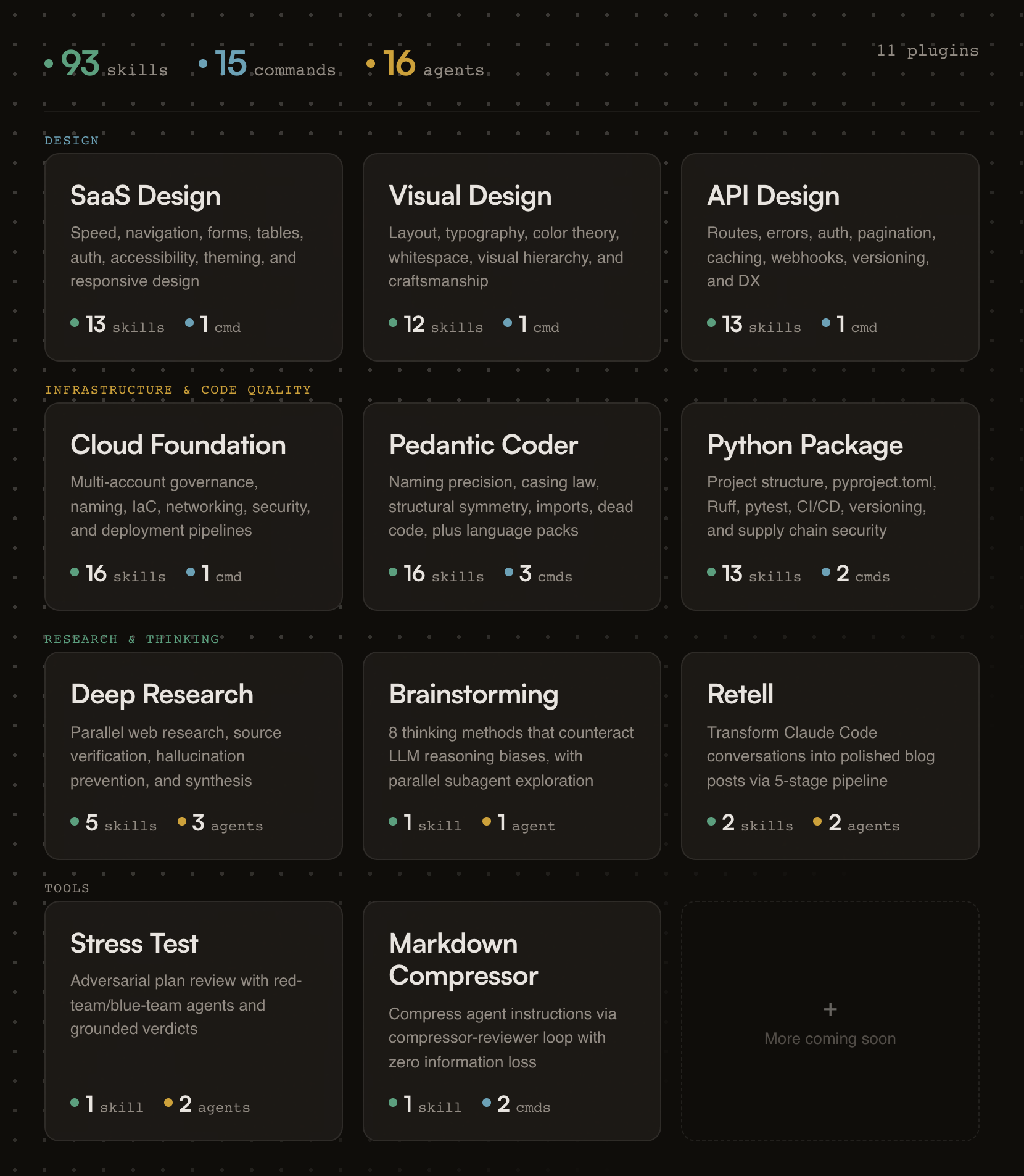
Designed for Claude Code and Cowork. Every skill also installs into 70+ other agents with one command — see Other AI assistants.
Building a form? Skills activate automatically.
Need an API review? /api-design-principles:api-review
Auditing code quality? /pedantic-coder:pedantic-review
Researching a topic? /deep-research:research "your question"
Stress-testing a plan? /stress-test:stress-test path/to/plan.md
Compressing your CLAUDE.md? /markdown-compressor:compress path/to/file.md
Resetting your plan file? /planning-tools:plan-delete
Chaining two agents across terminals? /agent-baton:baton-pass and /agent-baton:baton-wait
If this project helps you, star the repo.
Generic AI gives you suggestions. fractional-cto gives you standards.
Each skill encodes a proven engineering principle (naming precision, API design patterns, cloud governance) and enforces it the moment Claude detects relevant work. You get the rigor of Stripe's API design, Nielsen Norman's usability research, and production cloud architecture baked into every session. No bookshelf required.
The skills are deliberately opinionated. They don't present five options and ask you to choose. They tell you what to do, cite why, and show you the code. If you disagree, edit the skill. It's just markdown.
Every plugin activates the moment your Claude session starts. A session hook fires, reads the plugin's skill index, and injects it into context. From that point on, Claude knows what principles exist and when to apply them.
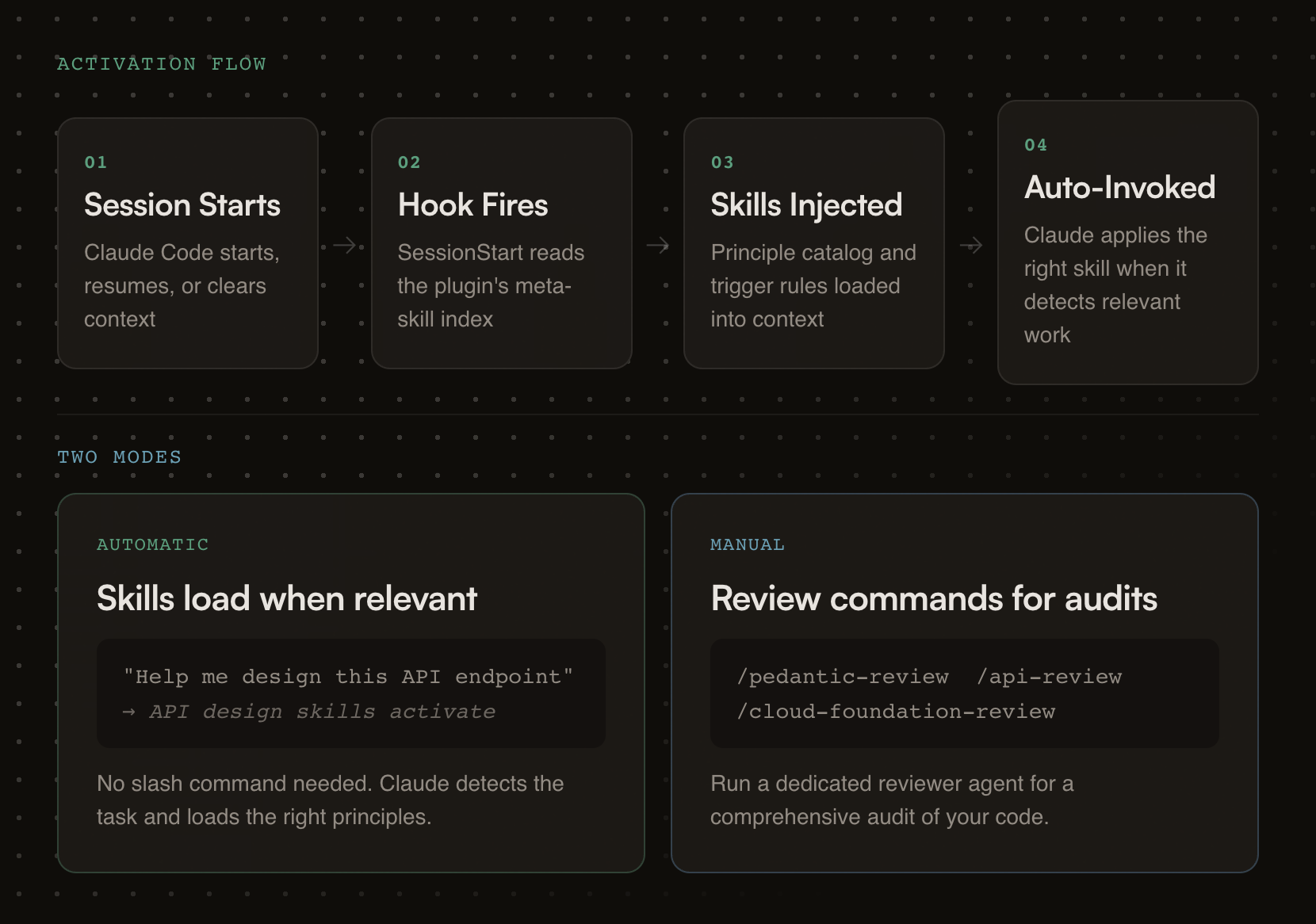
Each plugin carries review checklists, good/bad pattern comparisons, working code examples, and a dedicated reviewer agent for deeper audits.
# Step 1: Add the marketplace
/plugin marketplace add oborchers/fractional-cto

# Step 2: Install individual plugins
/plugin install saas-design-principles@fractional-cto
/plugin install visual-design-principles@fractional-cto
/plugin install api-design-principles@fractional-cto
/plugin install cloud-foundation-principles@fractional-cto
/plugin install pedantic-coder@fractional-cto
/plugin install python-package@fractional-cto
/plugin install deep-research@fractional-cto
/plugin install structured-brainstorming@fractional-cto
/plugin install retell@fractional-cto
/plugin install stress-test@fractional-cto
/plugin install markdown-compressor@fractional-cto
/plugin install planning-tools@fractional-cto
/plugin install agent-baton@fractional-cto
All 98 skills install into any of 70+ agents with the skills CLI — Gemini CLI, Cursor, Codex, OpenCode, Copilot, Cline, Windsurf, and the rest. No copying, no npm package, nothing to keep in sync.
# Browse every skill in this marketplace without installing
npx skills add oborchers/fractional-cto --list

# Install one skill
npx skills add oborchers/fractional-cto --skill agent-baton

# Install a few
npx skills add oborchers/fractional-cto --skill naming-precision,form-design

# Install everything, for every agent it detects
npx skills add oborchers/fractional-cto --all
Add -g for user-level instead of project-level, and -a <agent> to target specific agents. The CLI symlinks to a canonical copy by default, so npx skills update pulls new versions; pass --copy for independent files.
What you get: skills only. Commands (/plugin-name:command) and agents are Claude-specific and do not travel — but every skill is written to stand on its own, so the guidance is complete without them.
Prefer to vendor the files yourself? The */skills/*/SKILL.md files follow the universal skill format and can simply be copied into your agent's skills directory (.gemini/skills/, .cursor/skills/, .codex/skills/, …).
claude --plugin-dir /path/to/fractional-cto/<plugin-name>
Research-backed SaaS design principles drawn from Linear, Stripe, Shopify Polaris, and Nielsen Norman Group research.
Skills (13):
Own this plugin?
Verify ownership to unlock analytics, metadata editing, and a verified badge. GitHub access is read-only (username + org membership).
Sign in to claimOwn this plugin?
Verify ownership to unlock analytics, metadata editing, and a verified badge. GitHub access is read-only (username + org membership).
Sign in to claimnpx claudepluginhub oborchers/fractional-cto --plugin planning-toolsChain work across two independent agent processes that share no parent session. One agent passes a baton (a completion signal file) when done, optionally carrying a free-form payload; another waits for it, with a deadline, then starts its dependent task. Harness-agnostic protocol — each agent picks its own waiting mechanism. The baton tells you when, never what: the payload is content, not instructions. Provides /baton-pass and /baton-wait.
 oborchers
The holy principles of SaaS design: research-backed, opinionated guidance for building fast, predictable, and progressively powerful SaaS products
oborchersResearch-backed, opinionated guidance for designing world-class RESTful APIs — routes, naming, errors, auth, caching, webhooks, and more, distilled from Stripe, GitHub, Twilio, Shopify, Google, and Microsoft
oborchersAdversarial plan review using red-team/blue-team agents -- generates what-if questions and grounds answers in plan artifacts with configurable tool scope
oborchersResearch-backed, opinionated guidance for building cloud infrastructure that doesn't rot — multi-account governance, naming conventions, IaC organization, security, deployment pipelines, and operational hygiene, distilled from production experience across multiple cloud migrations
oborchersIterative plan review and execution workflow for Claude Code
 serbanghita
Structured implementation planning, interactive annotation review, and autonomous plan execution
 umputun
Persistent file-based planning for AI coding agents. Crash-proof markdown plans (task_plan.md, findings.md, progress.md) that survive context loss and /clear, with an opt-in completion gate and multi-agent shared state. Manus-style. Works with Claude Code, Codex CLI, Cursor, Kiro, OpenCode and 60+ agents via the SKILL.md standard. Includes Arabic, German, Spanish, and Chinese (Simplified and Traditional).
 OthmanAdi
Harness-native ECC operator layer - 67 agents, 278 skills, 94 legacy command shims, reusable hooks, rules, selective install profiles, and production-ready workflows for Claude Code, Codex, OpenCode, Cursor, and related agent harnesses
 affaan-m
v9.54.1 — Reliability wave: tangle contextual review correction loop with hard round ceiling, progress-supervised review rounds (per-agent stall watch, descendant-tree kills), council diversity and agy pin fixes, marketplace generator source-of-truth fix, provider troubleshooting runbook and cost-expectations docs. Run /octo:setup.
 nyldn
nyldnEvidence-gated AI coding workflow: scan → analyze → plan → TDD → execute → fix → verify → review, powered by Codebase Memory MCP >= 0.9.0 with optional Serena LSP intelligence. Includes blast-radius planning, test/cycle gates, independent review, and Windows Git Bash hook auto-resolution.
 datit309
'%20stop-opacity%3D'0.16'%2F%3E%3Cstop%20offset%3D'1'%20stop-color%3D'rgb(200%2C90%2C60)'%20stop-opacity%3D'0.03'%2F%3E%3C%2FlinearGradient%3E%3C%2Fdefs%3E%3Crect%20width%3D'320'%20height%3D'200'%20fill%3D'url(%23g)'%2F%3E%3Ccircle%20cx%3D'250'%20cy%3D'56'%20r%3D'92'%20fill%3D'rgb(200%2C90%2C60)'%20fill-opacity%3D'0.06'%2F%3E%3Ccircle%20cx%3D'64'%20cy%3D'172'%20r%3D'58'%20fill%3D'rgb(200%2C90%2C60)'%20fill-opacity%3D'0.05'%2F%3E%3C%2Fsvg%3E)