Stats
Actions
Available In
Tags

Review and build SaaS UIs following 12 research-backed design principles — accessibility, auth flows, data tables, forms, navigation, permissions, error states, performance patterns, theming, notifications, onboarding, and responsive layouts — with actionable code audits and fix suggestions
This skill should be used when the user is building or reviewing sidebar navigation, command palette (Cmd+K), breadcrumbs, organization or workspace switching, multi-tenancy UI, or top bar layout. Covers navigation structure decisions, power-user keyboard patterns, and drill-down navigation.
This skill should be used when the user is building or reviewing accessibility (a11y), WCAG 2.2 AA compliance, keyboard navigation, focus management, screen reader support, ARIA attributes, color contrast, or SPA accessibility. Covers legal requirements, accessible component primitives, and the unique focus challenges of single-page applications.
This skill should be used when the user is building or reviewing login flows, magic links, SSO (SAML/OIDC), multi-factor authentication (MFA), OTP input fields, password reset, or session management. Covers the modern auth stack hierarchy, MFA fatigue prevention, session expiry UX, and GDPR compliance for authentication.
This skill should be used when the user is building or reviewing data tables, pagination, column alignment, bulk actions, sorting, filtering, row selection, or table-to-card responsive patterns. Covers the pagination vs infinite scroll decision, DataTable vs IndexTable patterns, and column default strategy.
This skill should be used when the user is building or reviewing theming systems, design tokens, dark mode implementation, CSS custom properties, color naming conventions, or theme switching architecture. Covers the three-tier token model (primitive/semantic/component), purpose-based naming, and the DTCG specification.
Uses power tools
Uses Bash, Write, or Edit tools
Own this plugin?
Verify ownership to unlock analytics, metadata editing, and a verified badge. GitHub access is read-only (username + org membership).
Sign in to claimOwn this plugin?
Verify ownership to unlock analytics, metadata editing, and a verified badge. GitHub access is read-only (username + org membership).
Sign in to claimBased on adoption, maintenance, documentation, and repository signals. Not a security audit or endorsement.
No model invocation
Executes directly as bash, bypassing the AI model
No model invocation
Executes directly as bash, bypassing the AI model


98 skills, 24 commands, and 19 agents across 13 plugins. Opinionated, research-backed Claude Code plugins for building SaaS products that ship.
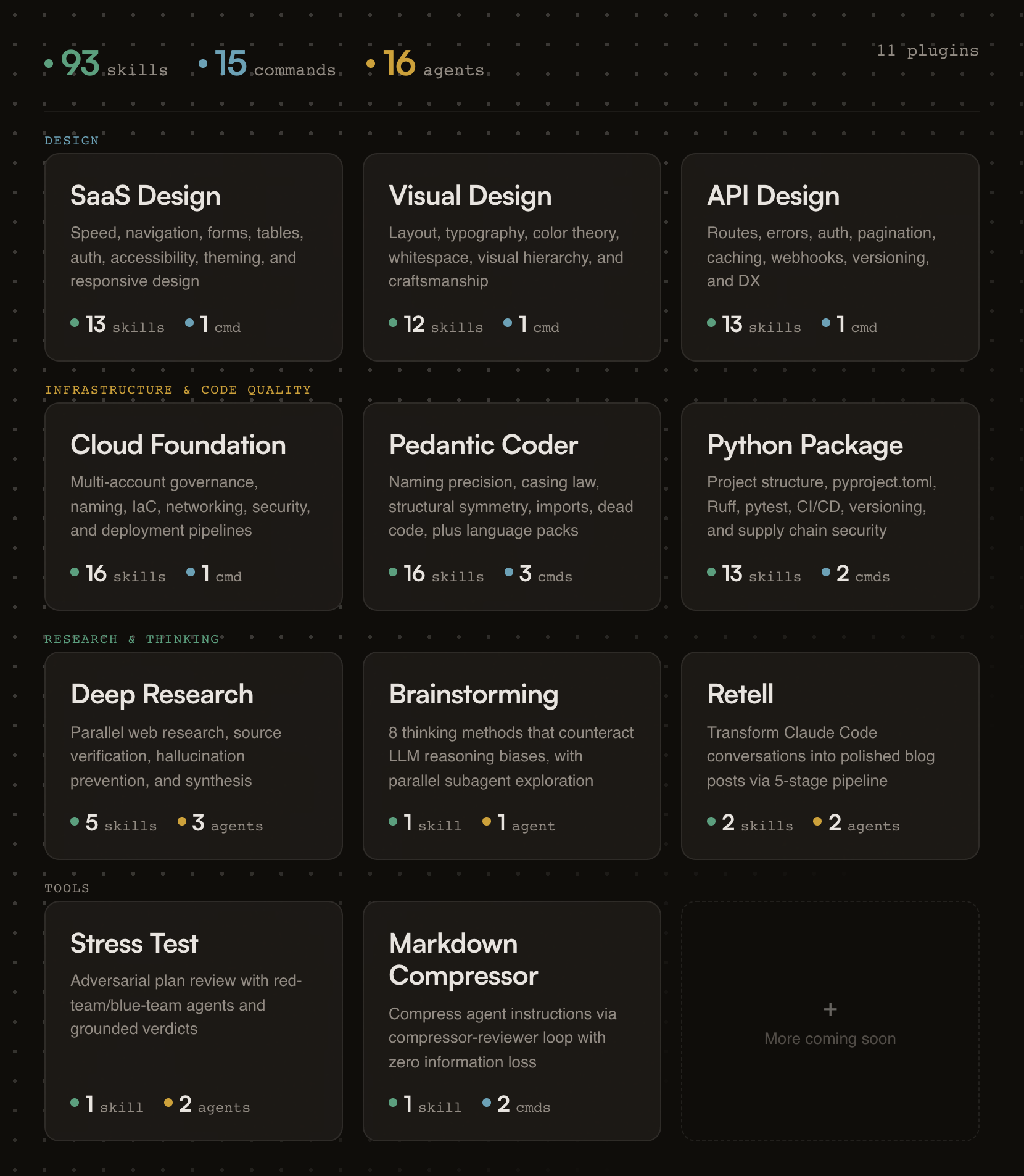
Designed for Claude Code and Cowork. Every skill also installs into 70+ other agents with one command — see Other AI assistants.
Building a form? Skills activate automatically.
Need an API review? /api-design-principles:api-review
Auditing code quality? /pedantic-coder:pedantic-review
Researching a topic? /deep-research:research "your question"
Stress-testing a plan? /stress-test:stress-test path/to/plan.md
Compressing your CLAUDE.md? /markdown-compressor:compress path/to/file.md
Resetting your plan file? /planning-tools:plan-delete
Chaining two agents across terminals? /agent-baton:baton-pass and /agent-baton:baton-wait
If this project helps you, star the repo.
Generic AI gives you suggestions. fractional-cto gives you standards.
Each skill encodes a proven engineering principle (naming precision, API design patterns, cloud governance) and enforces it the moment Claude detects relevant work. You get the rigor of Stripe's API design, Nielsen Norman's usability research, and production cloud architecture baked into every session. No bookshelf required.
The skills are deliberately opinionated. They don't present five options and ask you to choose. They tell you what to do, cite why, and show you the code. If you disagree, edit the skill. It's just markdown.
Every plugin activates the moment your Claude session starts. A session hook fires, reads the plugin's skill index, and injects it into context. From that point on, Claude knows what principles exist and when to apply them.
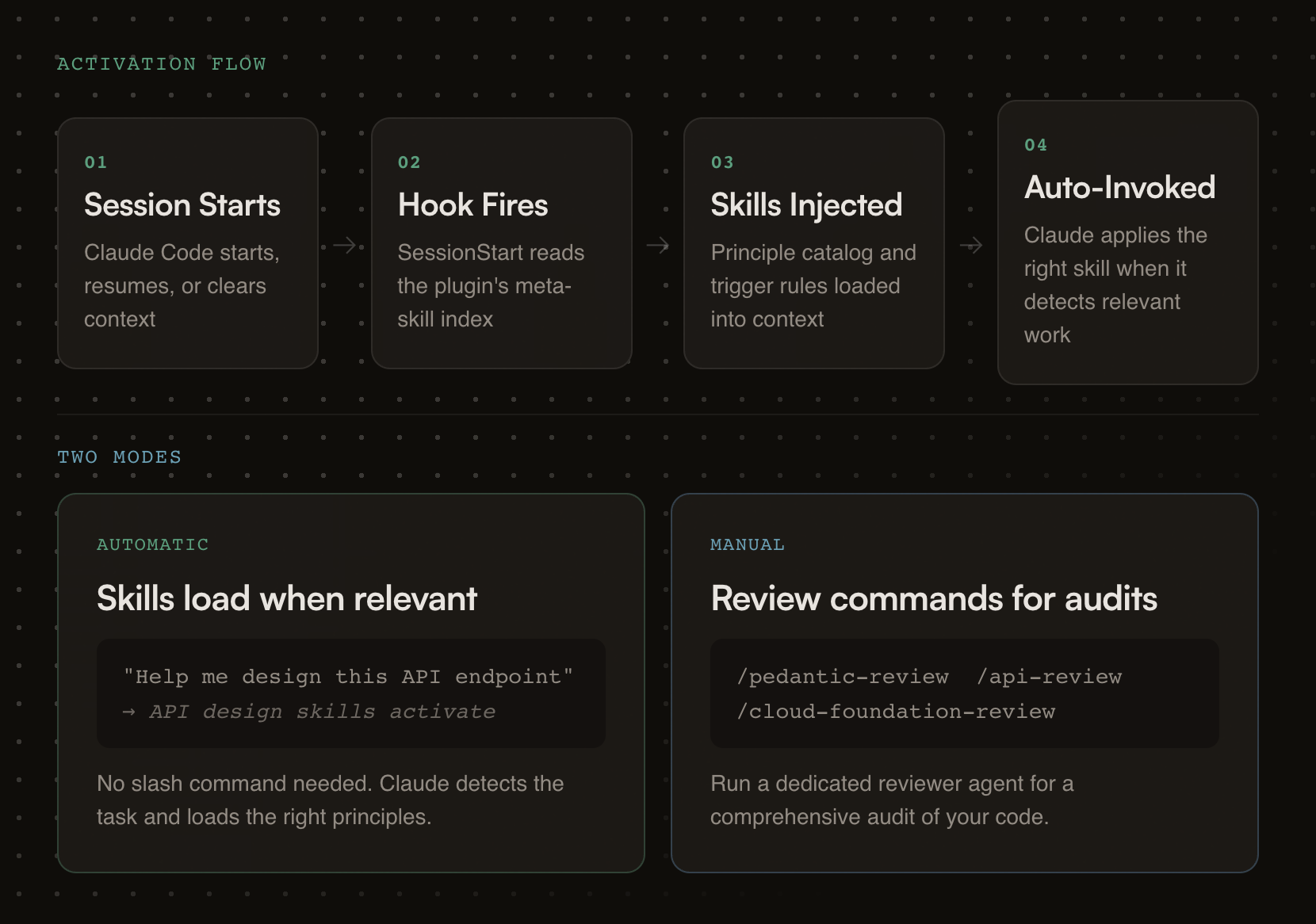
Each plugin carries review checklists, good/bad pattern comparisons, working code examples, and a dedicated reviewer agent for deeper audits.
# Step 1: Add the marketplace
/plugin marketplace add oborchers/fractional-cto

# Step 2: Install individual plugins
/plugin install saas-design-principles@fractional-cto
/plugin install visual-design-principles@fractional-cto
/plugin install api-design-principles@fractional-cto
/plugin install cloud-foundation-principles@fractional-cto
/plugin install pedantic-coder@fractional-cto
/plugin install python-package@fractional-cto
/plugin install deep-research@fractional-cto
/plugin install structured-brainstorming@fractional-cto
/plugin install retell@fractional-cto
/plugin install stress-test@fractional-cto
/plugin install markdown-compressor@fractional-cto
/plugin install planning-tools@fractional-cto
/plugin install agent-baton@fractional-cto
All 98 skills install into any of 70+ agents with the skills CLI — Gemini CLI, Cursor, Codex, OpenCode, Copilot, Cline, Windsurf, and the rest. No copying, no npm package, nothing to keep in sync.
# Browse every skill in this marketplace without installing
npx skills add oborchers/fractional-cto --list

# Install one skill
npx skills add oborchers/fractional-cto --skill agent-baton

# Install a few
npx skills add oborchers/fractional-cto --skill naming-precision,form-design

# Install everything, for every agent it detects
npx skills add oborchers/fractional-cto --all
Add -g for user-level instead of project-level, and -a <agent> to target specific agents. The CLI symlinks to a canonical copy by default, so npx skills update pulls new versions; pass --copy for independent files.
What you get: skills only. Commands (/plugin-name:command) and agents are Claude-specific and do not travel — but every skill is written to stand on its own, so the guidance is complete without them.
Prefer to vendor the files yourself? The */skills/*/SKILL.md files follow the universal skill format and can simply be copied into your agent's skills directory (.gemini/skills/, .cursor/skills/, .codex/skills/, …).
claude --plugin-dir /path/to/fractional-cto/<plugin-name>
Research-backed SaaS design principles drawn from Linear, Stripe, Shopify Polaris, and Nielsen Norman Group research.
Skills (13):
npx claudepluginhub oborchers/fractional-cto --plugin saas-design-principlesManage Claude Code's plan-mode artifacts, author multi-phase master planning documents, walk through Open Questions interactively, and synthesize dense progress entries to markdown / Linear / GitHub. Provides /plan-context (pre-load with optional ticket fetch), /plan-master (draft with optional ticket fetch), /plan-open-questions (interactive Open-Questions walkthrough with batch apply), /plan-verify (audit), /plan-tick (auto-tick provenly-achieved phases), /plan-progress (per-branch progress entry with SHA-based idempotency), and /plan-delete (per-session cleanup). Integer-only phases, no sizing, project-agnostic.
 oborchers
Chain work across two independent agent processes that share no parent session. One agent passes a baton (a completion signal file) when done, optionally carrying a free-form payload; another waits for it, with a deadline, then starts its dependent task. Harness-agnostic protocol — each agent picks its own waiting mechanism. The baton tells you when, never what: the payload is content, not instructions. Provides /baton-pass and /baton-wait.
oborchersResearch-backed, opinionated guidance for designing world-class RESTful APIs — routes, naming, errors, auth, caching, webhooks, and more, distilled from Stripe, GitHub, Twilio, Shopify, Google, and Microsoft
oborchersAdversarial plan review using red-team/blue-team agents -- generates what-if questions and grounds answers in plan artifacts with configurable tool scope
oborchersResearch-backed, opinionated guidance for building cloud infrastructure that doesn't rot — multi-account governance, naming conventions, IaC organization, security, deployment pipelines, and operational hygiene, distilled from production experience across multiple cloud migrations
oborchersUse this agent when creating user interfaces, designing components, building design systems, or improving visual aesthetics. This agent specializes in creating beautiful, functional interfaces that can be implemented quickly within 6-day sprints. Examples:\n\n<example>\nContext: Starting a new app or feature design
 devsforge
59 expert skills for non-technical founders building SaaS with AI tools. Covers the full lifecycle: planning, design, build, database, integrations, AI features, security, testing, debugging, deployment, monitoring, plus marketing, pricing, growth, and business strategy.
 whawkinsiv
Research-backed, opinionated guidance for designing world-class RESTful APIs — routes, naming, errors, auth, caching, webhooks, and more, distilled from Stripe, GitHub, Twilio, Shopify, Google, and Microsoft
oborchersSaaS Builder Guide - Build production-ready SaaS from design to deployment with 11 skill guides, 5 AI agents, and beginner-friendly FAQ
 ananddtyagi
Agent skills for creating smooth, professional UI animations and transitions in web applications.
 mblode
Comprehensive UI/UX design plugin for mobile (iOS, Android, React Native) and web applications with design systems, accessibility, and modern patterns
 wshobson
'%20stop-opacity%3D'0.16'%2F%3E%3Cstop%20offset%3D'1'%20stop-color%3D'rgb(200%2C90%2C60)'%20stop-opacity%3D'0.03'%2F%3E%3C%2FlinearGradient%3E%3C%2Fdefs%3E%3Crect%20width%3D'320'%20height%3D'200'%20fill%3D'url(%23g)'%2F%3E%3Ccircle%20cx%3D'250'%20cy%3D'56'%20r%3D'92'%20fill%3D'rgb(200%2C90%2C60)'%20fill-opacity%3D'0.06'%2F%3E%3Ccircle%20cx%3D'64'%20cy%3D'172'%20r%3D'58'%20fill%3D'rgb(200%2C90%2C60)'%20fill-opacity%3D'0.05'%2F%3E%3C%2Fsvg%3E)
