Stats
Actions
Available In
Tags

Enforce strict code quality conventions across Python, TypeScript, and Go codebases — naming precision, casing rules, import discipline, declaration ordering, symmetry, dead code elimination, and magic value refactoring. Audit repositories or files for violations and generate fix reports.
Scan all CLAUDE.md files in the repository and check code for compliance with project-specific guidelines
Audit an entire repository for pedantic violations — systematically scans the codebase for naming, casing, symmetry, ordering, consistency, and structural issues
Review the current code for pedantic violations — naming, casing, symmetry, ordering, consistency, dead code, and every small detail that matters
This skill should be used when the user is abbreviating identifiers, using acronyms, or when a codebase has inconsistent short forms like btn/button, msg/message, req/request. Covers the abbreviation decision framework, approved short forms, and the rule that consistency beats brevity.
This skill should be used when the user is naming boolean variables, writing predicate functions, using flags or toggles, or when code contains ambiguous boolean names like flag, status, check, active without proper prefixes. Covers is/has/can/should prefixes, positive naming, and the rule that a boolean's name must read as a true/false question.
This skill should be used when the user is writing code with mixed casing conventions, choosing casing for identifiers, enforcing casing consistency across a codebase, or when camelCase and snake_case appear in the same file. Covers per-context casing rules, acronym handling, and the absolute prohibition of mixed conventions.
This skill should be used when the user's code contains commented-out code blocks, unused imports, unreachable branches, TODO/FIXME comments that have been sitting for more than a day, or comments referencing removed functionality. Covers the elimination of dead code and the rule that version control remembers so you don't have to.
This skill should be used when the user is organizing code within a file, ordering class members, structuring module exports, or when a file has constants mixed with functions mixed with classes in no predictable order. Covers file-level ordering, class member ordering, and the rule that every file should have the same shape.
Uses power tools
Uses Bash, Write, or Edit tools
Own this plugin?
Verify ownership to unlock analytics, metadata editing, and a verified badge. GitHub access is read-only (username + org membership).
Sign in to claimOwn this plugin?
Verify ownership to unlock analytics, metadata editing, and a verified badge. GitHub access is read-only (username + org membership).
Sign in to claimBased on adoption, maintenance, documentation, and repository signals. Not a security audit or endorsement.
No model invocation
Executes directly as bash, bypassing the AI model
No model invocation
Executes directly as bash, bypassing the AI model


93 skills, 15 commands, and 16 agents across 11 plugins. Opinionated, research-backed Claude Code plugins for building SaaS products that ship.
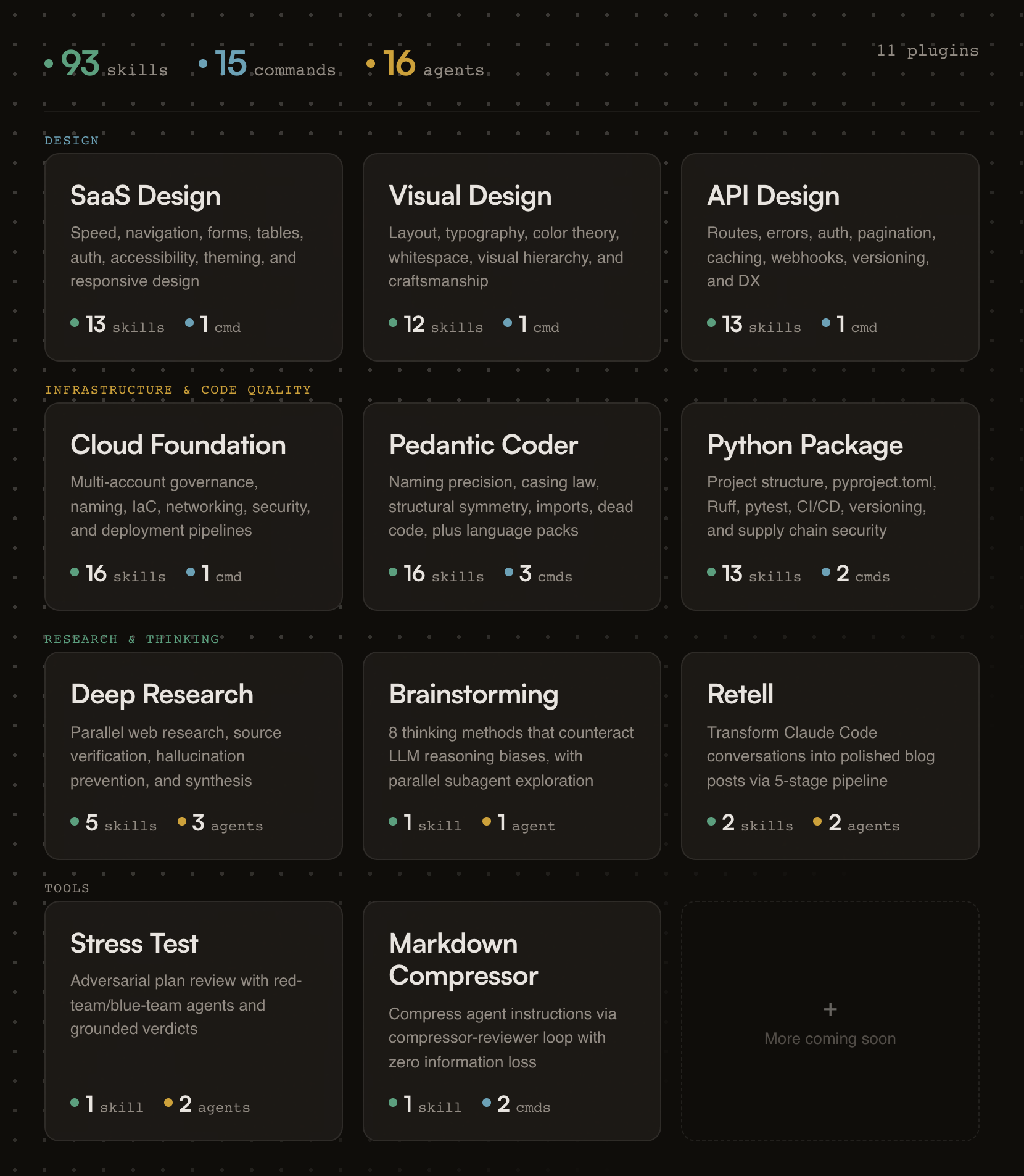
Designed for Claude Code and Cowork. Skills compatible with other AI assistants.
Building a form? Skills activate automatically.
Need an API review? /api-review
Auditing code quality? /pedantic-review
Researching a topic? /research "your question"
Stress-testing a plan? /stress-test path/to/plan.md
Compressing your CLAUDE.md? /compress path/to/file.md
If this project helps you, star the repo.
Generic AI gives you suggestions. fractional-cto gives you standards.
Each skill encodes a proven engineering principle (naming precision, API design patterns, cloud governance) and enforces it the moment Claude detects relevant work. You get the rigor of Stripe's API design, Nielsen Norman's usability research, and production cloud architecture baked into every session. No bookshelf required.
The skills are deliberately opinionated. They don't present five options and ask you to choose. They tell you what to do, cite why, and show you the code. If you disagree, edit the skill. It's just markdown.
Every plugin activates the moment your Claude session starts. A session hook fires, reads the plugin's skill index, and injects it into context. From that point on, Claude knows what principles exist and when to apply them.
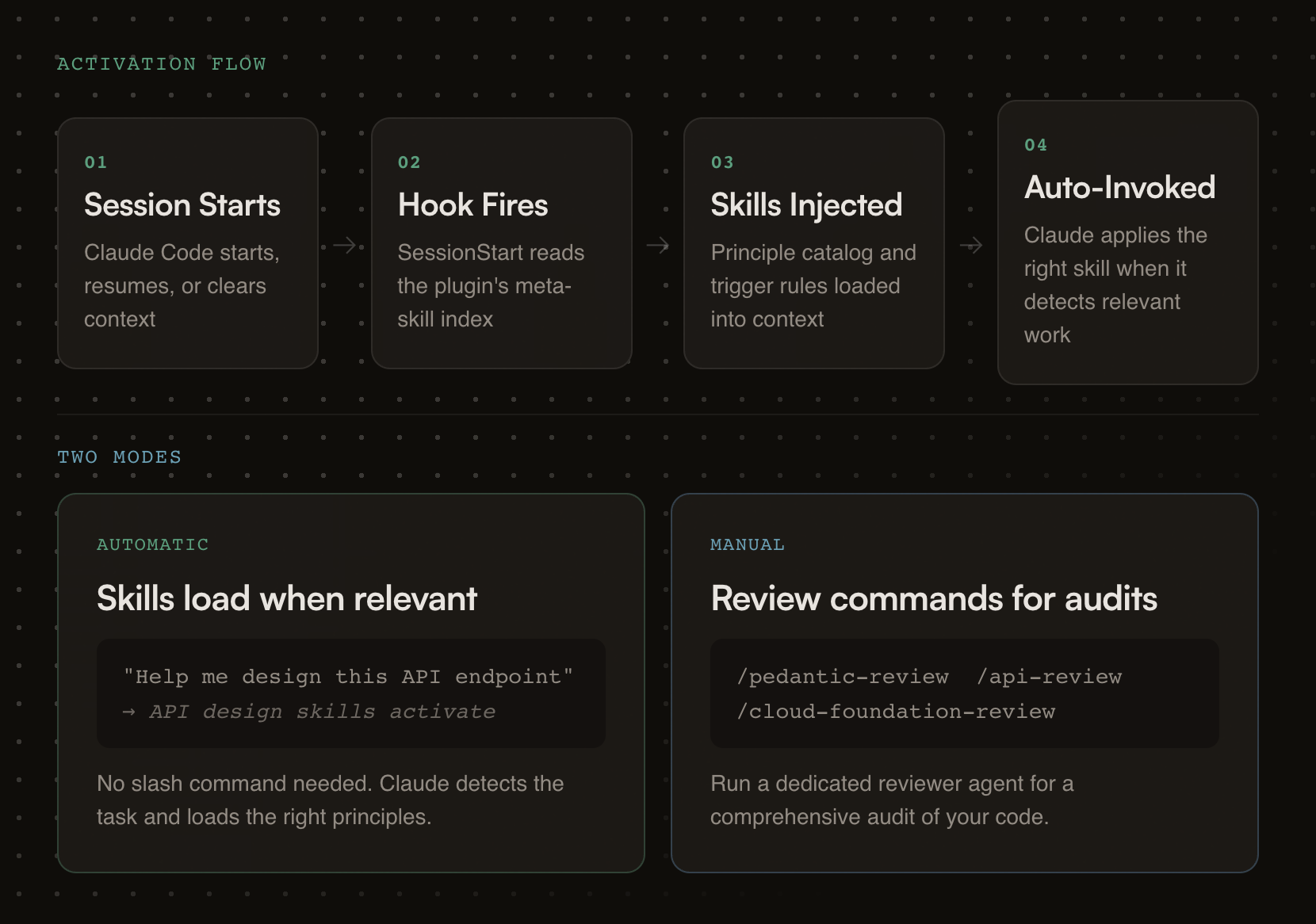
Each plugin carries review checklists, good/bad pattern comparisons, working code examples, and a dedicated reviewer agent for deeper audits.
# Step 1: Add the marketplace
/plugin marketplace add oborchers/fractional-cto

# Step 2: Install individual plugins
/plugin install saas-design-principles@fractional-cto
/plugin install visual-design-principles@fractional-cto
/plugin install api-design-principles@fractional-cto
/plugin install cloud-foundation-principles@fractional-cto
/plugin install pedantic-coder@fractional-cto
/plugin install python-package@fractional-cto
/plugin install deep-research@fractional-cto
/plugin install structured-brainstorming@fractional-cto
/plugin install retell@fractional-cto
/plugin install stress-test@fractional-cto
/plugin install markdown-compressor@fractional-cto
The skills/*/SKILL.md files follow the universal skill format and work with any tool that reads it. Commands and agents are Claude-specific.
| Tool | How to use | What works |
|---|---|---|
| Gemini CLI | Copy skill folders to .gemini/skills/ | Skills only |
| OpenCode | Copy skill folders to .opencode/skills/ | Skills only |
| Cursor | Copy skill folders to .cursor/skills/ | Skills only |
| Codex CLI | Copy skill folders to .codex/skills/ | Skills only |
| Kiro | Copy skill folders to .kiro/skills/ | Skills only |
# Example: copy all skills for Gemini CLI (project-level)
for plugin in */; do
  [ -d "$plugin/skills" ] && cp -r "$plugin/skills/"* .gemini/skills/ 2>/dev/null
done
claude --plugin-dir /path/to/fractional-cto/<plugin-name>
Research-backed SaaS design principles drawn from Linear, Stripe, Shopify Polaris, and Nielsen Norman Group research.
Skills (13):
npx claudepluginhub oborchers/fractional-cto --plugin pedantic-coderManage Claude Code's plan-mode artifacts, author multi-phase master planning documents, walk through Open Questions interactively, and synthesize dense progress entries to markdown / Linear / GitHub. Provides /plan-context (pre-load with optional ticket fetch), /plan-master (draft with optional ticket fetch), /plan-open-questions (interactive Open-Questions walkthrough with batch apply), /plan-verify (audit), /plan-tick (auto-tick provenly-achieved phases), /plan-progress (per-branch progress entry with SHA-based idempotency), and /plan-delete (per-session cleanup). Integer-only phases, no sizing, project-agnostic.
 oborchers
Chain work across two independent agent processes that share no parent session. One agent passes a baton (a completion signal file) when done, optionally carrying a free-form payload; another waits for it, with a deadline, then starts its dependent task. Harness-agnostic protocol — each agent picks its own waiting mechanism. The baton tells you when, never what: the payload is content, not instructions. Provides /baton-pass and /baton-wait.
oborchersThe holy principles of SaaS design: research-backed, opinionated guidance for building fast, predictable, and progressively powerful SaaS products
oborchersResearch-backed, opinionated guidance for building cloud infrastructure that doesn't rot — multi-account governance, naming conventions, IaC organization, security, deployment pipelines, and operational hygiene, distilled from production experience across multiple cloud migrations
oborchersStructured deep research methodology for Claude Code — query decomposition, parallel web research with source verification, hallucination prevention, and synthesis into well-sourced documents
oborchersThe Church of Clean Code - Purist subagents and crusade commands for code quality enforcement
 btachinardi
Enhances code agents with Go best practices covering performance, modern syntax, generics, patterns, testing, error handling, and concurrency.
 mhmtszr
Full-spectrum design patterns skill: Detect anti-patterns, diagnose architectural debt, and generate production-ready refactored code. Covers GoF, SOLID, Clean Architecture, DDD, CQRS, Microservices, and Cloud patterns.
 VoDaiLocz
This skill should be used when the model needs to ensure code quality through comprehensive linting and formatting. It provides automatic linting workflows for orchestrators (format → lint → resolve via concurrent agents) and sub-agents (lint touched files before task completion). Prevents claiming "production ready" code without verification. Includes linting rules knowledge base for ruff, mypy, and bandit, plus the linting-root-cause-resolver agent for systematic issue resolution.
 Jamie-BitFlight
Mindful AI coding framework — discipline over cleverness. Skill + 21 slash commands + 8 specialist agents + 5 runtime hooks + 15 default checklists + Master Orchestrator + Gravity hub. Works on any model tier (Opus/Sonnet/Haiku). Integrates Claude Design for visual work.
 kasidit-wansudon
Lumin Repo Lens: evidence-backed TS/JS repo structure lens for Claude Code.
 annyeong844
'%20stop-opacity%3D'0.16'%2F%3E%3Cstop%20offset%3D'1'%20stop-color%3D'rgb(200%2C90%2C60)'%20stop-opacity%3D'0.03'%2F%3E%3C%2FlinearGradient%3E%3C%2Fdefs%3E%3Crect%20width%3D'320'%20height%3D'200'%20fill%3D'url(%23g)'%2F%3E%3Ccircle%20cx%3D'250'%20cy%3D'56'%20r%3D'92'%20fill%3D'rgb(200%2C90%2C60)'%20fill-opacity%3D'0.06'%2F%3E%3Ccircle%20cx%3D'64'%20cy%3D'172'%20r%3D'58'%20fill%3D'rgb(200%2C90%2C60)'%20fill-opacity%3D'0.05'%2F%3E%3C%2Fsvg%3E)
