Stats
Actions
Available In
Tags

Monitor, debug, and control AI coding agents in Claude Code sessions by emitting typed events, querying hook logs and tool call logs, searching the knowledge base, and managing the lm-assist service stack.
View context-inject hook logs
View MCP tool call logs
Search the lm-assist knowledge base
Install lm-assist services, claude-code-multisession skills, statusline, and optionally MCP/hooks
Show lm-assist component status
Executables (bin/) — files in this plugin's bin/directory are added to the Bash tool's PATH while the plugin is enabled.
Own this plugin?
Verify ownership to unlock analytics, metadata editing, and a verified badge. GitHub access is read-only (username + org membership).
Sign in to claimOwn this plugin?
Verify ownership to unlock analytics, metadata editing, and a verified badge. GitHub access is read-only (username + org membership).
Sign in to claimBased on adoption, maintenance, documentation, and repository signals. Not a security audit or endorsement.
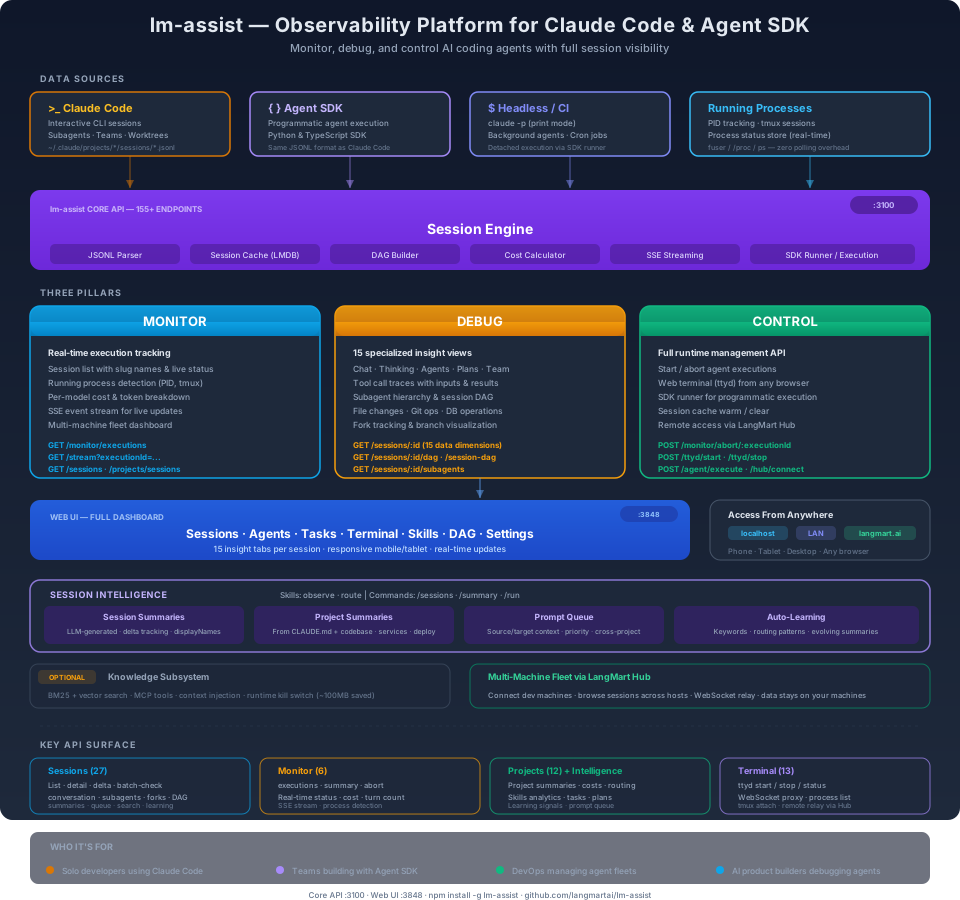
Monitor, debug, and control AI coding agents with full session visibility, real-time execution tracking, and 155+ REST API endpoints.
/plugin marketplace add langmartai/lm-assist
/plugin install lm-assist@langmartai
Then open a new Claude Code session and run /assist-setup.
Read: Inside Claude Code: The Session File Format and How to Inspect It — technical breakdown of the JSONL session format, message types, subagent trees, and how lm-assist surfaces it all.
Claude Code and the Agent SDK have no built-in dashboard. You get a terminal or logs. When you're running multiple agents, debugging a failed execution, or tracking costs across a fleet of machines — you need full visibility into every session, every subagent, every tool call, every token spent.
| Without lm-assist | With lm-assist |
|---|---|
| Scroll through terminal output | 15 specialized views per session |
| No cost visibility | Per-model token & cost breakdown |
| Can't see what agents are doing | Real-time execution dashboard |
| No way to inspect subagent trees | Full DAG visualization |
| Terminal-only access | Web UI from any device, anywhere |
| Agent SDK runs are black boxes | Same session inspection as CLI |
Real-time execution tracking via REST API.
GET /stream)Key endpoints: GET /monitor/executions · GET /stream · GET /sessions · GET /projects/sessions
15 data dimensions per session, all accessible via API.
Key endpoints: GET /sessions/:id · GET /sessions/:id/dag · GET /sessions/:id/subagents · GET /sessions/:id/conversation
Full runtime management API.
Claude Code OAuth (14 endpoints) — proxies api.anthropic.com using Claude Code's OAuth token from ~/.claude/.credentials.json. See docs/claude-code-routes.md for the full per-endpoint reference. Quick map: /claude-code/{oauth-status, usage, profile, roles, account-settings, cli-bootstrap, grove, penguin, policy-limits, settings, user-settings, team-memory, mcp-servers, mcp-registry}.
claude.ai web-session (28 endpoints) — proxies claude.ai's web backend via a cookie file OR a real Chrome tab through MCP. See docs/claude-ai-routes.md for both paths, the health-check interface, and the via-chrome agent loop pattern. Quick map: /claude-ai/{healthz, account-profile, conversations[/:uuid[/{completion,title}]], projects, memory, bootstrap, artifacts/:uuid/versions, org, org/{subscription, usage, skills, mcp-bootstrap, styles, model-config/:model, memory-settings, cowork-settings, sync-settings, sync/gdrive-progress, notifications}, account/invites, user-access, sessions-active} · POST /claude-ai/via-chrome[/...].
Other key endpoints: POST /monitor/abort/:executionId · POST /ttyd/start · POST /agent/execute · POST /agent/session/:sessionId/resume · POST /hub/connect
See claude-code-webui for the full web dashboard with 15 insight tabs, web terminal, task kanban, and mobile support.

npx claudepluginhub langmartai/lm-assist --plugin lm-assistWeb dashboard for Claude Code — browse sessions, debug agents, control terminals from any browser
 langmartai
One prompt to control all your Claude Code sessions across every project
langmartaiReal-time observability dashboard for Claude Code agents
 simple10
Mission Control for Claude Code — auto-starts a web dashboard, provides 90 MCP tools (sessions, stats, live monitoring, projects, teams, insights, coaching, and more), and adds 9 skills including /session-recap, /daily-cost, /standup, /coaching, /insights, and /team-status.
 tombelieber
LLM observability tooling for agent development and Claude Code
 comet-ml
Provides an agent, skill, hook, and slash command related to the `aichat` tool-set for searching and resuming CLI-agent sessions
 pchalasani
Claude Code plugin for Moraine MCP session search, realtime agent awareness, and sanitized bug reports.
 eric-tramel
Reports Claude Code agent status to OpenUI for real-time status display
 Fallomai
'%20stop-opacity%3D'0.16'%2F%3E%3Cstop%20offset%3D'1'%20stop-color%3D'rgb(200%2C90%2C60)'%20stop-opacity%3D'0.03'%2F%3E%3C%2FlinearGradient%3E%3C%2Fdefs%3E%3Crect%20width%3D'320'%20height%3D'200'%20fill%3D'url(%23g)'%2F%3E%3Ccircle%20cx%3D'250'%20cy%3D'56'%20r%3D'92'%20fill%3D'rgb(200%2C90%2C60)'%20fill-opacity%3D'0.06'%2F%3E%3Ccircle%20cx%3D'64'%20cy%3D'172'%20r%3D'58'%20fill%3D'rgb(200%2C90%2C60)'%20fill-opacity%3D'0.05'%2F%3E%3C%2Fsvg%3E)
