Stats
Links
Categories
Plugins by langmartai
npx claudepluginhub langmartai/lm-assistOne prompt to control all your Claude Code sessions across every project
 langmartai
Web dashboard for Claude Code — browse sessions, debug agents, control terminals from any browser
langmartaiObservability platform for Claude Code and Agent SDK — monitor, debug, and control AI coding agents
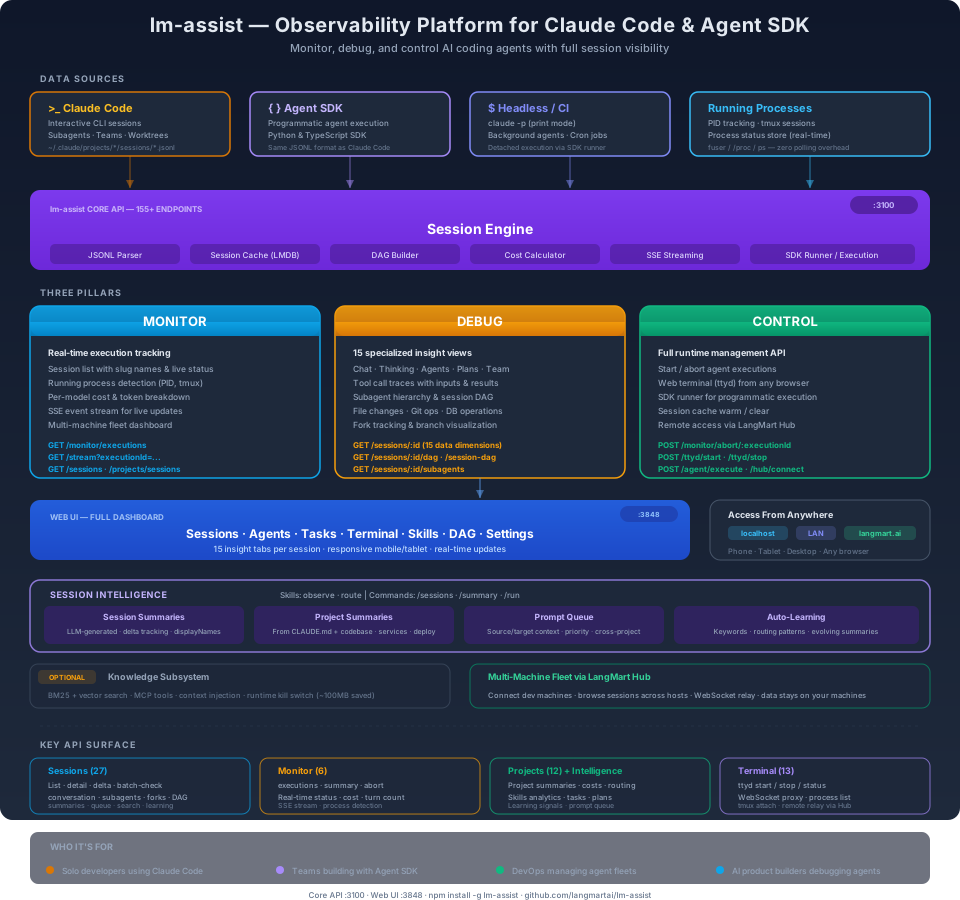
langmartaiMonitor, debug, and control AI coding agents with full session visibility, real-time execution tracking, and 155+ REST API endpoints.
/plugin marketplace add langmartai/lm-assist
/plugin install lm-assist@langmartai
Then open a new Claude Code session and run /assist-setup.
Read: Inside Claude Code: The Session File Format and How to Inspect It — technical breakdown of the JSONL session format, message types, subagent trees, and how lm-assist surfaces it all.
Claude Code and the Agent SDK have no built-in dashboard. You get a terminal or logs. When you're running multiple agents, debugging a failed execution, or tracking costs across a fleet of machines — you need full visibility into every session, every subagent, every tool call, every token spent.
| Without lm-assist | With lm-assist |
|---|---|
| Scroll through terminal output | 15 specialized views per session |
| No cost visibility | Per-model token & cost breakdown |
| Can't see what agents are doing | Real-time execution dashboard |
| No way to inspect subagent trees | Full DAG visualization |
| Terminal-only access | Web UI from any device, anywhere |
| Agent SDK runs are black boxes | Same session inspection as CLI |
Real-time execution tracking via REST API.
GET /stream)Key endpoints: GET /monitor/executions · GET /stream · GET /sessions · GET /projects/sessions
15 data dimensions per session, all accessible via API.
Key endpoints: GET /sessions/:id · GET /sessions/:id/dag · GET /sessions/:id/subagents · GET /sessions/:id/conversation
Full runtime management API.
Key endpoints: POST /monitor/abort/:executionId · POST /ttyd/start · POST /agent/execute · POST /hub/connect
See claude-code-webui for the full web dashboard with 15 insight tabs, web terminal, task kanban, and mobile support.

lm-assist reads the same JSONL session files regardless of how they were created:
| Source | What It Produces | lm-assist Coverage |
|---|---|---|
| Claude Code CLI | Interactive sessions with subagents, teams, worktrees | Full parsing — all message types, tool calls, metadata |
| Agent SDK (Python/TypeScript) | Programmatic agent executions | Same JSONL format — full session inspection |
Headless mode (claude -p) | Background/CI runs | Detected via process status store |
| Running processes | Live PID, tmux, terminal state | Real-time monitoring with zero polling overhead |
npm install -g lm-assist
The postinstall script automatically starts services, installs the statusline, and installs the Claude Code Multisession plugin.
Open a new Claude Code session and type /sessions to verify.
Add the marketplace once — then install any combination of plugins:
/plugin marketplace add langmartai/lm-assist
Three packages work together:
Claude Code marketplace entries for the plugin-safe Agentic Awesome Skills library and its compatible editorial bundles.
Production-ready workflow orchestration with 94 marketplace plugins, 203 local specialized agents, and 175 local skills - optimized for granular installation and minimal token usage
Directory of popular Claude Code extensions including development tools, productivity plugins, and MCP integrations

'%20stop-opacity%3D'0.16'%2F%3E%3Cstop%20offset%3D'1'%20stop-color%3D'rgb(200%2C90%2C60)'%20stop-opacity%3D'0.03'%2F%3E%3C%2FlinearGradient%3E%3C%2Fdefs%3E%3Crect%20width%3D'320'%20height%3D'200'%20fill%3D'url(%23g)'%2F%3E%3Ccircle%20cx%3D'250'%20cy%3D'56'%20r%3D'92'%20fill%3D'rgb(200%2C90%2C60)'%20fill-opacity%3D'0.06'%2F%3E%3Ccircle%20cx%3D'64'%20cy%3D'172'%20r%3D'58'%20fill%3D'rgb(200%2C90%2C60)'%20fill-opacity%3D'0.05'%2F%3E%3C%2Fsvg%3E)