Stats
Actions
Available In
Tags

Installs a unified AI coding assistant configuration system with rules, skills, and commands to enforce coding standards, automate code reviews, commit messages, project setup, and generate documentation across multiple languages and frameworks (Go, Java, Python, TypeScript, Vue, etc.).
> **参数说明**:`$ARGUMENTS` 由 Claude Code 自动传递,对应用户输入的参数部分(如 `/cache-patch status` 中的 `status`)。
检查 ToolSearch(WebSearch)是否可用
分析未提交的代码变更,生成结构化的 commit message。
技术设计(doc 文档框架 / checklist 质量检查)
问题修复(fix 快速修复 / debug 系统化调试)
当设计或修改 REST API 响应结构、处理 API 返回值时触发。防止 API 设计缺陷导致的字段错位、类型歧义等问题。
当用户操作 .sh、Dockerfile、Makefile、.yml、.yaml 文件,或在 Markdown 中编写 bash 代码块时触发。提供 Bash 编写规范。
当重构涉及字段映射(dataIndex、枚举映射、类型转换)时触发。防止字段名推测错误,确保字段映射的正确性。
前端开发规范,包含 Vue 3 编码规范、UI 风格约束、TypeScript 规范等
Go 开发规范,包含命名约定、错误处理、并发编程、测试规范等
Own this plugin?
Verify ownership to unlock analytics, metadata editing, and a verified badge. GitHub access is read-only (username + org membership).
Sign in to claimOwn this plugin?
Verify ownership to unlock analytics, metadata editing, and a verified badge. GitHub access is read-only (username + org membership).
Sign in to claimBased on adoption, maintenance, documentation, and repository signals. Not a security audit or endorsement.
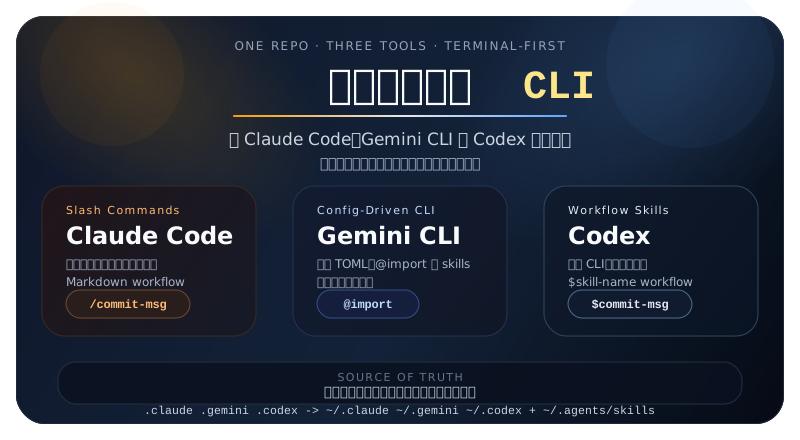
保留你熟悉的 CLI/IDE,让 Claude Code、Gemini CLI、Codex、Cursor、GitHub Copilot 开箱即用
按费力度从低到高,用最少操作获得最大帮助







不是提示词集合,而是一套可维护的 AI 协作配置系统。
本项目的重点不是继续堆更长的提示词,而是把长期会反复出现的协作约定拆成可维护的结构:全局原则、审批规则、语言技能和任务 workflow 各司其职。
一些高频问题并不是业务逻辑复杂,而是前后端接口契约已经漂移,却被临时兼容掩盖了。例如:
这类问题的根因通常不是“前端容错不够”,而是后端没有遵守项目统一成功响应格式,或列表、详情、选项接口各自返回了不同结构。为减少这类问题在不同项目里反复出现,建议把治理拆成三层:
cc-api-contract-safety 检查成功响应包装、分页结构、筛选项来源和临时兼容退出条件方式 1:Plugin Marketplace(推荐,一键安装)
在 Claude Code 会话中执行:
/plugin marketplace add doccker/cc-use-exp
/plugin install cc-use-exp@cc-use-exp
💡 完全自动化:无需手动下载,Claude Code 会自动从 GitHub 克隆并安装
更新配置:
/plugin update cc-use-exp@cc-use-exp
方式 2:完整同步(需要先安装方式 1)
安装方式 1 后,可使用自定义命令进行更完整的同步:
/skill-install
💡 区别:方式 1 仅安装 skills + commands,方式 2 额外同步 rules + templates,并支持跨工具使用(Gemini/Codex/Cursor)
更新配置:
/skill-update
两种方式对比:
| 特性 | 方式 1:Plugin Marketplace | 方式 2:完整同步 |
|---|---|---|
| 前置条件 | 无 | 需要先安装方式 1 |
| 安装命令 | /plugin marketplace add + /plugin install | /skill-install |
| 同步内容 | skills + commands | rules + skills + commands + templates |
| 跨工具支持 | ❌ 仅 Claude Code | ✅ 支持 Gemini/Codex/Cursor |
| 更新方式 | /plugin update | /skill-update |
| 适用场景 | 仅需 Claude Code 扩展 | 需要完整配置体系 |
方式 1:会话内安装(推荐)
在 Codex 会话中执行:
$skill-installer install https://github.com/doccker/cc-use-exp/.codex/skills/cc-skill-installer
更新配置:重新执行上述命令
方式 2:Shell 脚本(无需进入 Codex 会话)
在终端执行:
bash <(curl -sL https://raw.githubusercontent.com/doccker/cc-use-exp/main/tools/install-codex.sh)
说明:
- 方式 1 需要在 Codex 会话中执行,适合已经在使用 Codex 的用户
- 方式 2 可以在任何终端执行,无需进入 Codex 会话
在终端执行:
bash <(curl -sL https://raw.githubusercontent.com/doccker/cc-use-exp/main/tools/install-gemini.sh)
更新配置:重新运行安装脚本
说明:
install-gemini.sh/sync-config.sh会自动检测并同时为新版 Antigravity CLI(~/.gemini/config)和旧版 Gemini CLI(~/.gemini)配置规则和 Skills。
在终端执行:
bash <(curl -sL https://raw.githubusercontent.com/doccker/cc-use-exp/main/tools/install-cursor.sh)
更新配置:重新运行安装脚本
在终端执行:
bash <(curl -sL https://raw.githubusercontent.com/doccker/cc-use-exp/main/tools/install-copilot.sh)
更新配置:重新运行安装脚本
macOS/Linux:
git clone https://github.com/doccker/cc-use-exp.git
cd cc-use-exp
./tools/sync-config.sh
Windows:
git clone https://github.com/doccker/cc-use-exp.git
cd cc-use-exp
tools\sync-config.bat
脚本会自动同步六套工具配置:
npx claudepluginhub doccker/cc-use-exp --plugin cc-use-expInteractive setup wizard for configuring any repository with Claude Code best practices, based on Boris Cherny's workflow
 Uniswap
Complete collection of battle-tested Claude Code configs from an Anthropic hackathon winner - agents, skills, hooks, and rules evolved over 10+ months of intensive daily use
 xu-xiang
End-to-end autonomous build. File an issue with /issue (optionally after /challenge, /research, and /think), hand the issue number to the build workflow, and get a draft PR after Load / Code / Audit / Polish / Ship. Bundles the full reviewer and critic agent set, the code / audit / polish / shake / assert / adrift workflows, and the planning and git skills (/think, /research, /commit, /pr).
 thkt
thktCommands for syncing CLAUDE.md, permissions allowlist, and refreshing context. Hooks for marketplace-to-plugin sync.
 fcakyon
The mentor framework for Claude Code: a self-contained process layer with per-session modes, a work-item lifecycle with a hard Definition of Done, budget-aware autonomy, visual verification, and safety rules that travel into every subagent
 Marcel-Bich
English-first 12-rule behavior contract for Claude Code, Cursor, and agent skills
 twj515895394
'%20stop-opacity%3D'0.16'%2F%3E%3Cstop%20offset%3D'1'%20stop-color%3D'rgb(200%2C90%2C60)'%20stop-opacity%3D'0.03'%2F%3E%3C%2FlinearGradient%3E%3C%2Fdefs%3E%3Crect%20width%3D'320'%20height%3D'200'%20fill%3D'url(%23g)'%2F%3E%3Ccircle%20cx%3D'250'%20cy%3D'56'%20r%3D'92'%20fill%3D'rgb(200%2C90%2C60)'%20fill-opacity%3D'0.06'%2F%3E%3Ccircle%20cx%3D'64'%20cy%3D'172'%20r%3D'58'%20fill%3D'rgb(200%2C90%2C60)'%20fill-opacity%3D'0.05'%2F%3E%3C%2Fsvg%3E)
