By sd0xdev
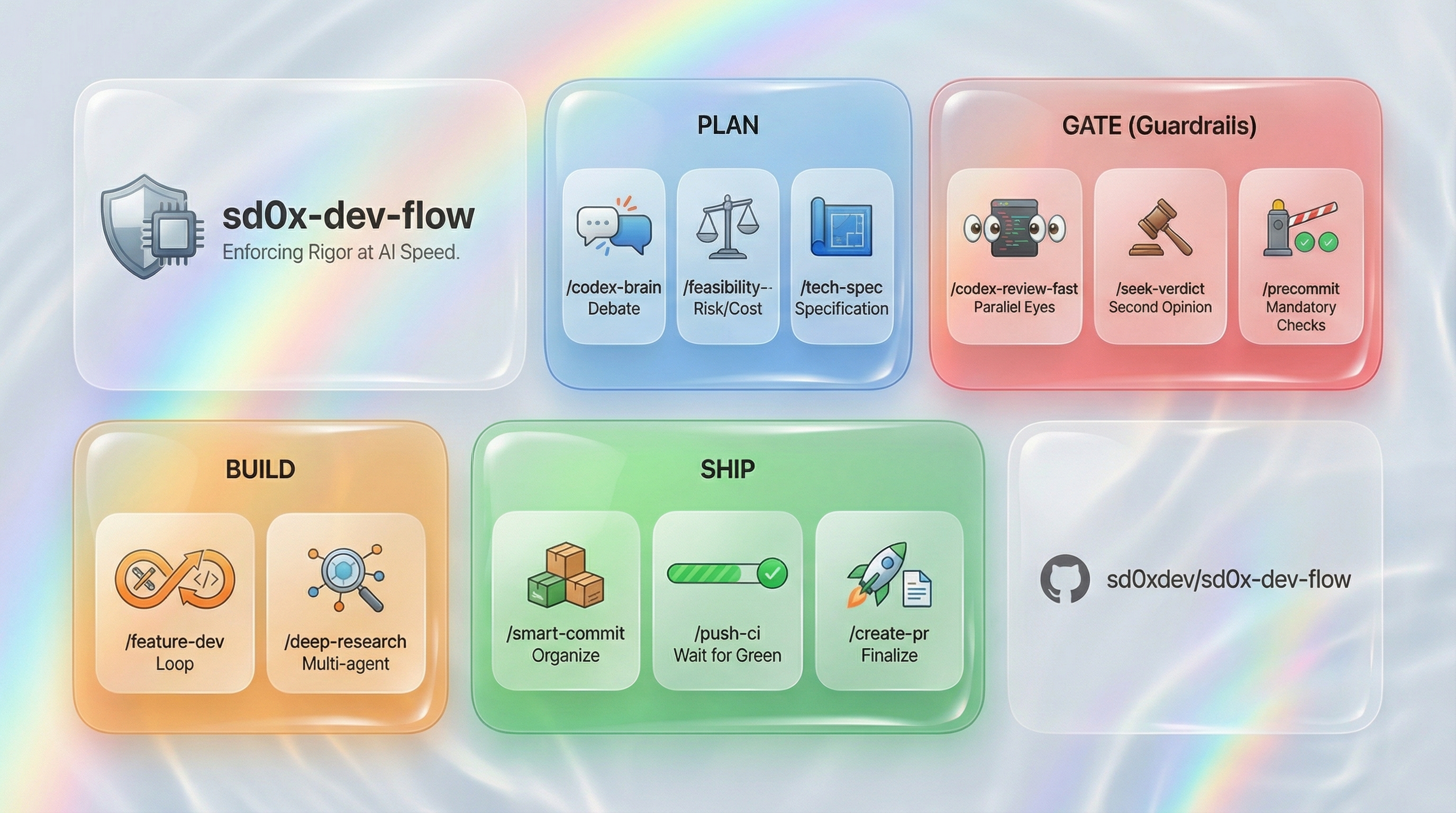
Enforce dual Claude-Codex reviewed dev workflows in Claude Code: investigate codebases/bugs via git/grep, implement features with tests/reviews/gates, audit security/code quality, generate docs/architecture, manage git ops/PRs/CI with pre-commit hooks and fail-closed safety.
npx claudepluginhub sd0xdev/sd0x-dev-flow --plugin sd0x-dev-flowDocument refactoring expert. Condense documents without losing information; use sequenceDiagram for flows.
Feasibility analysis expert. Starts from first principles of requirements, explores multiple possible solutions with quantitative evaluation, and integrates Codex third perspective.
Code archaeology expert. Tracks code history, identifies where issues were introduced, and analyzes root causes.
Architecture design expert. Synthesizes code analysis, tech-spec context, and architecture advice into structured architecture documents with component diagrams, data flows, and architecture decisions.
PM/CTO executive summary expert. Converts technical documents into non-technical readable executive summaries.
Cleanup refactoring expert. Simplifies code, eliminates duplication, preserves behavior.
Codex architecture consulting expert (third brain). Uses Codex CLI to obtain architecture advice and integrates dual perspectives.
Codex implementation expert. Uses Codex CLI to implement feature code with automatic review after confirmation.
Test coverage analysis expert. Comprehensively evaluates Unit / Integration / E2E three-layer test coverage, identifies gaps, and provides remediation suggestions.
Performance optimization expert. Identifies N+1 queries, memory leaks, and slow queries.
Refactoring review expert. Evaluates refactoring risk and verifies behavior preservation.
Solution deepening expert. Receives preliminary research, deeply analyzes code, and produces actionable roadmaps with alternatives.
Strict code reviewer. Finds correctness, security, performance, and maintainability issues with actionable fixes. Use proactively after code changes.
Technical spec review expert. Reviews technical documents for completeness, feasibility, and risk assessment, and provides improvement suggestions.
Verification expert. Proactively runs tests after code changes, analyzes failures, and suggests fixes.
Architecture design and documentation. Produces 3-architecture.md with component diagrams, data flow, integration points, and architecture decisions. Reads existing tech-spec as input. Use when: designing system architecture, documenting component interactions, creating architecture docs, producing 3-architecture.md. Not for: tech spec writing (use tech-spec), code implementation (use feature-dev), architecture consulting only (use codex-architect).
Context-aware Q&A with auto context gathering. Use when: user has a quick question about codebase, git history, rules, docs, or skills during development. Not for: code changes (use feature-dev), code review (use codex-review-fast), deep research (use deep-research), full code trace (use code-explore). Output: structured answer with source attribution.
Industry best practices conformance audit with mandatory adversarial debate. Produces audit artifact: verdict (OK/WARN/FAIL) + gap roadmap + debate proof. Use when: auditing current implementation against industry standards, checking compliance with best practices, benchmarking implementation quality, verifying a codebase meets a standard. Not for: broad research/discovery without audit target (use /deep-research), code review (use /codex-review), architecture design (use /codex-architect).
Bug fix workflow. Use when: fixing bugs, resolving issues, regression fixes. Not for: new features (use feature-dev), understanding code (use code-explore). Output: fix + regression test + review gate.
Bump package and plugin version in sync. Updates package.json, .claude-plugin/plugin.json, and install-state manifest to the same version. Use when: user says 'bump version', 'update version', '更新版本', '版本 +1', or /bump-version
Comprehensive assessment of Unit / Integration / E2E three-layer test coverage, identify gaps and provide actionable recommendations.
Claude Code config health check + plugin sync. Use when: auditing .claude/ structure, checking naming, verifying hook setup, detecting plugin version drift, syncing installed assets. Not for: skill quality (use skill-health-check), code review (use codex-code-review). Output: health report + fix recommendations.
Pure Claude code investigation. Use when: tracing execution paths, understanding architecture, diagnosing issues. Not for: dual-perspective review (use code-investigate), code review (use codex-code-review). Output: analysis report with findings.
Dual-perspective code investigation. Use when: deep code analysis needing both Claude and Codex perspectives. Not for: quick exploration (use code-explore), code review (use codex-code-review). Output: integrated findings from dual analysis.
Codex architecture consulting. Use when: designing features, evaluating architecture, getting second opinion on design. Not for: implementation (use codex-implement), code review (use codex-code-review). Output: architecture advice + design recommendations.
Adversarial brainstorming via Claude+Codex debate. Use when: exploring solutions, feasibility analysis, exhaustive enumeration. Not for: implementation (use feature-dev), architecture only (use codex-architect). Output: Nash equilibrium consensus + action items.
Code review via Codex CLI with full disk access. Use when: deep review needing full codebase read, uncommitted change review. Not for: quick diff review (use codex-code-review), doc review (use doc-review). Output: severity-grouped findings + merge gate.
Code review using Codex MCP. Use when: PR review, code audit, second opinion on changes. Not for: doc review (use doc-review), security audit (use security-review). Output: severity-grouped findings + merge gate.
Explain complex code via Codex MCP. Use when: understanding complex logic, tracing data flow, onboarding to unfamiliar code. Not for: code review (use codex-code-review), exploration (use code-explore). Output: structured explanation at chosen depth.
Implement features via Codex MCP. Use when: writing new code from specs, implementing features, Codex-driven development. Not for: code review (use codex-code-review), architecture advice (use codex-architect). Output: implemented code + review loop.
Fully automated review of an entire feature branch using Codex MCP
Review documents using Codex MCP. Supports review loop with context preservation.
Quick second-opinion using Codex MCP (diff only, no tests). Supports review loop with context preservation.
Full second-opinion using Codex MCP (with lint:fix + build). Supports review loop with context preservation.
OWASP Top 10 security review using Codex MCP. Supports review loop with context preservation.
Initialize sd0x-dev-flow infrastructure for Codex CLI and other non-Claude agents. Generates AGENTS.md, installs git hooks, copies runner scripts. Use when setting up a new project or after updating skills.
Generate unit tests for specified functions using Codex MCP
Review test case sufficiency using Codex MCP, suggest additional edge cases. Supports review loop with context preservation.
EVM contract error and calldata decoder. Use when: user pastes hex revert data, calldata, function selector, or mentions custom error, execution reverted, 4byte, decode. Input contains 0x + 8+ hex chars.
Create or update GitHub PR with gh CLI. Auto-extracts ticket ID from branch name, generates title/summary from commits. Auto-detects existing PR and switches to update mode. Default: --dry-run (show command, don't execute). Use when: user asks to open/create/update a PR, says /create-pr, wants to refresh PR description after new commits, or says 'update pr', 'update PR title', 'refresh PR body'.
Create, update, or scan per-task request tickets for progress tracking. These are date-prefixed non-lifecycle docs under requests/, NOT feature-level requirements (use /req-analyze for those). Use when: tracking task progress, updating completion status, scanning incomplete requests, checking request status dashboard. Not for: feature-level problem-space analysis (use req-analyze for 1-requirements.md lifecycle doc), tech specs (use tech-spec), code implementation (use feature-dev). Output: request ticket with status tracking, referencing parent tech-spec.
Remove AI artifacts from documents. Use when: cleaning AI-generated text, removing tool names, fixing boilerplate patterns. Not for: doc review (use doc-review), doc refactoring (use doc-refactor). Output: cleaned document preserving original intent.
Interactive debugging workflow with hypothesis-driven probe loop. Use when: unknown bugs, script errors, silent failures, troubleshooting. Not for: known bugs (use bug-fix), GitHub issue analysis (use issue-analyze), code understanding (use code-explore). Output: debug report with probe journal + root cause + fix.
Deep-dive analysis of an initial proposal — research code implementation, produce an actionable roadmap and alternatives
Multi-wave parallel code exploration orchestrator. Use when: large-scale codebase research, understanding complex cross-domain systems, deep investigation needing multiple perspectives simultaneously. Not for: quick lookup (use code-explore), dual confirmation (use code-investigate), code review (use codex-code-review). Output: unified exploration report with completeness scoring.
Universal multi-source research orchestration. Use for any research/investigate/analyze request needing synthesis across web, codebase, and community evidence — especially broad, mixed, or ambiguous intent. Triggers on: 'research this', 'deep research', 'investigate', 'analyze from multiple angles', 'comprehensive analysis', 'explore this topic', 'study', 'survey the landscape', 'look into', 'understand deeply', '了解', '調查', '分析', '研究'. When intent is clearly single-dimension (code-only tracing, checklist-style compliance audit, or bounded option-ranking), dispatcher may prefer a narrower skill. Otherwise route here. Supports low/medium/high budget tiers.
Audit dependency security risks
Comprehensive developer workstation security audit — scans for exposed credentials, compromised application data, persistence mechanisms, and supply chain attack indicators. Use this skill whenever the user suspects their machine may be compromised, wants to check for exposed secrets, asks about supply chain attacks, or wants a full security audit of their development environment. Also triggers on: 'am I compromised', 'check my security', 'scan for leaked keys', 'credential audit', 'supply chain attack', 'supply chain check', 'check if I was hacked'.
Refactor documents — simplify without losing information, visualize flows with sequenceDiagram.
Document review via Codex MCP. Use when: reviewing .md docs, tech spec audit, document quality check. Not for: code review (use codex-code-review), test review (use test-review). Output: 5-dimension rating table + gate.
Sequential squash-merge of stacked PR chains into an epic branch. Handles dependency-ordered rebase, collision-safe backup tags, CI monitoring (delegates to /watch-ci), and post-merge verification. Use when: merging a chain of stacked PRs into an epic branch, collapsing a linear PR stack into per-PR squash commits, preparing an epic branch for final review. Triggers on: 'merge PRs into epic', 'squash chain', 'collapse PR stack', 'epic merge', or when user has a linear PR dependency chain (PR A -> B -> C) targeting an epic branch. Not for: single PR merge (use /create-pr + GitHub UI), simple rebase (use /smart-rebase), pre-merge analysis (use /merge-prep). Output: chain analysis table + backup tag manifest + per-iteration AskUserQuestion gate + verification log.
Feasibility analysis from first principles. Use when: evaluating solutions before tech-spec, comparing approaches, risk assessment. Not for: implementation (use feature-dev), architecture advice (use codex-architect). Output: quantitative comparison + recommendation.
Feature development workflow. Use when: implementing features, writing code, running dev loop. Not for: understanding code (use code-explore), reviewing code (use codex-code-review). Output: implemented feature + tests + review gate.
Feature verification (READ-ONLY, P0-P5). Use when: verifying feature behavior after deployment, validating API responses, diagnosing production issues, post-deploy smoke test. Not for: modifying data (use feature-dev), code review (use codex-review-fast), writing tests (use codex-test-gen), security audit (use codex-security).
First-principles briefing from technical documents. Use when: understanding why decisions were made, onboarding to feature reasoning, reviewing decision chains, explaining doc from first principles. Not for: PM/CTO summary (use project-brief), pre-doc analysis (use feasibility-study), code explanation (use codex-explain). Output: structured reasoning chain with sensitivity analysis.
Generate a customized precommit runner for any ecosystem. Use when: non-Node projects need a runner, eject from generic runner, customize runner for project. Not for: running precommit (use /precommit), installing runner (handled by auto-install). Output: customized runner script with eject header.
Git history investigation. Use when: tracking code changes, finding where bugs were introduced, root cause analysis. Not for: code exploration (use code-explore), issue analysis (use issue-analyze). Output: history trace + root cause report.
Git identity and GPG signing profile manager. Discovers profiles from GPG + git config, switches local identity, checks signing health. Use when: user says 'switch identity', 'git profile', 'check signing', 'gpg key status', 'which identity', or /git-profile
Install plugin hooks into project .claude/ for persistent use without plugin loaded
Install plugin rules into project .claude/rules/ for persistent use without plugin loaded
Install plugin runner scripts into project .claude/scripts/ for persistent use without plugin loaded
GitHub Issue and PR review thread deep analysis with Codex blind verdict. Use when: analyzing issue root cause, classifying problems, investigation planning, triaging PR review comments for actionability. Not for: fixing bugs (use bug-fix), code exploration (use code-explore). Output: classified analysis + verdict assessment + investigation strategy.
Jira integration — view issues, generate branches, create tickets, transition status. Use when: user mentions Jira ticket key (XX-123), says /jira, wants to create branch from ticket, create a new ticket, or update Jira status. Not for: GitHub issues (use issue-analyze).
Load GitHub PR review comments into AI session — analyze, triage, plan. Default: analysis-only (no auto-fix). Use when: reviewing PR feedback, planning fixes, addressing review comments, replying to reviewers. Not for: creating reviews (use codex-review-fast), creating PRs (use create-pr), viewing PR status (use pr-summary).
Pre-merge analysis and preparation. Analyzes source branch vs target branch: commit stats, conflict detection, file impact. Analysis-only v1 — outputs report + suggested commands, does not auto-merge. Use when: user says 'merge prep', 'pre-merge', 'merge analysis', or /merge-prep
Necessity audit for over-designed spec elements. Use when: auditing lifecycle spec (1-requirements / 2-tech-spec / 3-architecture) for YAGNI/KISS violations, challenging necessity of FRs/NFRs/abstractions/configs via Codex adversarial debate. Not for: FP reasoning validity (use /codex-review-spec), completeness check (use /feature-completeness), detail review (use /codex-review-doc), or code-level simplification (use /simplify).
Change-aware next step advisor. Use when: user asks what to do next, workflow progression is unclear, session just started with dirty worktree. Not for: executing the suggested command (user decides), auto-loop decisions (hooks handle that). Output: findings-based suggestions or session summary with commit seed.
Obsidian vault integration via official CLI. Use when: capturing dev artifacts to Obsidian vault, searching vault for context, appending to daily note, managing tasks in vault. Not for: general note-taking without Obsidian (use regular files), browsing Obsidian docs (use agent-browser). Output: vault search results, captured notes, task updates.
Initialize 1Password CLI session for Claude Code. Use when: starting a session that needs 1Password secrets, op CLI keeps prompting biometric auth, setting up OP_SESSION token. Solves: Claude Code's no-TTY subprocess model triggers 1Password biometric auth on every op call. Supports both token-based and App Integration auth modes — auto-detects which mode to use.
Portfolio system knowledge base. Use when: position queries, routing strategy questions, provider integration. Not for: general code exploration (use code-explore), code review (use codex-code-review). Output: domain-specific analysis + recommendations.
Post-development recap wrapper. Use when: AI/Codex just finished implementing a feature and the user wants a guided walkthrough with scope detection + doc generation + follow-up Q&A. Not for: generating only a doc (use /recap-doc), Q&A over an existing recap (use /recap-ask), technical share-out (use /tech-brief), first-principles reasoning of an existing doc (use /fp-brief), general code tracing (use /code-explore). Output: ScopeReport → briefing-recap-<date>.md → interactive Q&A session.
Post-development test completion. Use when: checking test coverage after feature-dev, writing missing integration/e2e tests. Not for: unit test generation (use codex-test-gen), test review (use test-review). Output: test files + coverage report.
Post friendly review comments to a GitHub PR — prepare locally, preview, then submit as atomic review. Use when: posting code review comments, giving PR feedback, sending inline suggestions. Not for: reading existing reviews (use load-pr-review), creating PRs (use create-pr), PR status (use pr-summary).
PR self-review — review changes, produce checklist, update rules
List open PRs, filter automation PRs, group by ticket ID, format as Markdown. Use when: user asks for PR summary, PR status, or /pr-summary
Pre-PR confidence audit with 5-dimension scoring. Use when: final check before commit/push/PR, evaluating PR readiness, assessing test quality + risk + coverage holistically. Triggers: pre-pr, readiness check, confidence audit, final verification, ready to PR, how confident. Not for: code review (use codex-review-fast), post-deploy verification (use feature-verify), periodic health (use project-audit).
Quick pre-commit checks — lint:fix -> test
Pre-commit checks — lint:fix -> build -> test
Project health audit with deterministic scoring. Use when: evaluating project quality, onboarding to new codebase, periodic health checks. Not for: runtime performance analysis, security-specific audits (use /codex-security). Output: 5-dimension score + actionable findings.
Convert a technical spec into a PM/CTO-readable executive summary. Simplify technical details, focus on business value.
Project configuration initialization. Use when: first-time setup, auto-detecting framework, replacing CLAUDE.md placeholders. Not for: ongoing config checks (use claude-health), skill creation (use skill-creator). Output: configured CLAUDE.md + project settings + rules + hooks.
Push to remote and monitor CI. Validates branch safety, executes git push WITH explicit user approval, then monitors CI run status via gh CLI. Use when: user says 'push', 'push and watch CI', 'ship it', 'push-ci'. Not for: committing (use /smart-commit), creating PRs (use /create-pr), merging (use /merge-prep).
Interactive Q&A over an existing recap document. Use when: user wants to ask follow-up questions about a briefing-recap-<date>.md produced by /recap-doc, with recap-bounded context + out-of-scope redirect + optional promote-to-request. Not for: generating a new recap (use /recap-doc), general project Q&A (use /ask), code tracing (use /code-explore). Output: per-turn answer referencing file:line + end-of-session promote prompt.
Post-development recap document generator. Use when: AI/Codex has implemented a feature and the user needs a guided walkthrough of what changed and why, with blind-spot detection and anticipated questions. Not for: Q&A follow-up (use /recap-ask), technical share-out for teammates (use /tech-brief), or generic code explanation (use /codex-explain). Output: briefing-recap-<YYYY-MM-DD>.md with file-level walkthrough, design intents, spec drift, blind spots (mandatory), and anticipated questions.
Multi-target refactoring orchestrator. Use when: cleaning up messy code/docs, simplifying code, restructuring documents, batch cleanup. Not for: new features (use feature-dev), bug fixes (use bug-fix), code understanding (use code-explore). Output: refactored code/docs + review gate.
Lightweight model correction with context-aware rule loading. Use when: model forgot a rule, skipped a required step, edited code/docs without running review, needs to re-read CLAUDE.md or rules. Triggers on: 'you forgot', 'remind', 'check rules', 'what did you miss', '你忘了', 'did you skip review', 'why didn't you run precommit', or /remind. Also use PROACTIVELY after editing files if unsure whether auto-loop was followed — running /remind costs nothing and catches drift early. Not for: full code review (use codex-review-fast), next step advice (use next-step), workflow progression (use feature-dev).
Project initialization inventory (one-time). Use when: first onboarding a project, rebuilding cache after structural changes. Not for: day-to-day development (read cache directly), finding specific files (use code-explore). Output: project map with entrypoints + test map + next steps.
Requirements analysis — problem decomposition, stakeholder scan, requirement structuring. Produces 1-requirements.md (Phase 1 lifecycle doc, NOT the per-task request ticket — for those use /create-request). Use when: analyzing needs before tech spec, decomposing requirements, stakeholder analysis, 需求分析. Not for: solution comparison (use feasibility-study), tech design (use tech-spec), per-task tracking tickets (use create-request), issue root cause (use issue-analyze).
Request tracking knowledge base. Use when: querying request status, managing document references, tracking progress. Not for: creating requests (use create-request), tech specs (use tech-spec). Output: status report + progress tracking.
Review technical spec documents from completeness, feasibility, risk, and code consistency perspectives.
Uncommitted code risk assessment with breaking change detection, blast radius analysis, and scope metrics. Use when: evaluating PR risk, pre-commit risk check, large refactoring review. Not for: security vulnerabilities (use /codex-security), code correctness (use /codex-review-fast). Output: 3-dimension weighted score + risk level + gate.
Generate and update feature release runbooks from existing docs and codebase. Use when: creating operational runbook, release handbook, deployment checklist, pre-release preparation. Not for: incident response (v2), code review (use codex-code-review), architecture design (use architecture).
Safely remove plugin assets (skill/agent/rule/script/hook) with dependency detection and reference cleanup. Use when: user says 'remove skill', 'delete skill', 'deprecate', 'clean up unused', or /safe-remove. Not for: code refactoring (use /simplify), feature removal requiring architecture changes (manual).
Security review via Codex MCP. Use when: OWASP Top 10 audit, dependency vulnerability check, security-sensitive changes. Not for: code review (use codex-code-review), test review (use test-review). Output: security findings + audit report.
Independent second-opinion verification for any finding. Use when: Claude or user wants independent Codex verification of a review finding — dismiss (false positive check), confirm (does this issue exist?), or clarify (what's the impact?). Triggers: dismiss verification, seek verdict, verify dismiss, false positive check, second opinion, confirm finding, clarify impact. Not for: general code review (use codex-code-review), architecture debates (use codex-brainstorm). Output: [DISMISS_VERDICT] or [SEEK_VERDICT] audit trail with verdict, confidence, and evidence refs.
Replicate knowledge from any source as sd0x-dev-flow skill definition. Use when: copying skills from repos, adapting patterns from articles/papers/code, converting knowledge to skill format. Not for: research without skill output (use deep-research), creating skills from scratch (use skill-creator), project onboarding (use repo-intake). Output: analysis report + generated SKILL.md files with 3-layer validation.
Wrap-up refactoring — simplify code, eliminate duplication, preserve behavior
Validate skill quality against routing, progressive loading, and verification criteria. Use when: auditing skills, checking skill health, reviewing skill design. Not for: code review (use codex-code-review) or doc review (use doc-review). Output: health report with per-skill ratings + Gate.
Smart batch commit. Analyzes uncommitted changes, groups by cohesion, generates commit messages matching project style. Default: output git commands for manual execution. With --execute: directly run git add + git commit (requires user approval). Use when: user says 'commit', 'batch commit', 'prepare commit', 'write commit message', or /smart-commit
Smart partial rebase for squash-merge repositories. Auto-detect which commits to keep/drop when base branch was squash-merged into target. Use when: user says 'rebase', 'partial rebase', 'base already merged', 'smart rebase', or /smart-rebase. Not for: simple git rebase (use git directly), merge conflict resolution (use /merge-prep), branch switching (use git checkout). Output: rebase plan table + copy-pasteable git rebase --onto command.
Customize Claude Code statusline. Use when: user says 'statusline', 'status line', 'customize statusline', 'modify statusline', 'statusline settings', 'statusline theme', 'change theme', 'color scheme', wants to add/remove/change segments (cost, git, model, context), switch color themes (catppuccin, dracula, nord), or asks what can be shown in the statusline.
Technical briefing for developer sharing. Use when: sharing implementation findings with technical colleagues, post-development knowledge transfer, documenting what was built and why. Not for: PM/CTO summary (use project-brief), first-principles reasoning (use fp-brief), design-phase specs (use tech-spec). Output: 6-section technical brief with source provenance.
Tech spec generation and review. Use when: designing features, writing specs, spec review. Not for: requirements analysis (use req-analyze), implementation (use feature-dev), architecture advice (use codex-architect). Output: numbered tech spec document.
Context-aware test orchestration. Use when: smart test selection, failure triage, progressive test ladder, test failure analysis. Not for: writing tests (use post-dev-test), reviewing tests (use codex-test-review), generating tests (use codex-test-gen), full manual run (use verify). Output: test results + triage report + fixer actions.
Holistic test coverage measurement. Use when: assessing test health, measuring coverage trends, quantitative + qualitative test audit. Not for: running tests (use verify), reviewing test sufficiency only (use codex-test-review), generating tests (use codex-test-gen). Output: multi-dimensional dashboard with coverage metrics + test inventory + trend.
Test coverage review via Codex MCP. Use when: reviewing test sufficiency, identifying coverage gaps, test quality audit. Not for: generating tests (use codex-test-gen), code review (use codex-code-review). Output: coverage analysis + gap report.
First-principles UI/IA reasoning: turns a `<scenario>` + API field set into JTBD analysis, principle-anchored field-priority decisions, anti-pattern findings, and a bidirectional UI↔API gap report. Trigger: UI、UX、資訊架構、IA、scenario-driven UI、欄位優先級、information hierarchy. Not for: visual/CSS work (use `/frontend-design`), post-build critique (use `/critique`), or simplifying existing layouts (use `/distill`).
Research current code state then update corresponding docs, ensuring docs stay in sync with code.
Verification loop — lint -> typecheck -> unit -> integration -> e2e
Monitor GitHub Actions CI runs until completion. Use when: watching CI after push, checking build status, monitoring PR checks, waiting for CI completion, user says 'watch CI', 'check CI', 'CI status', 'monitor build', or /watch-ci. Not for: pushing code (use push-ci), creating PRs (use create-pr). Output: per-run verdict (pass/fail/timeout).
Rewrite the previous reply in Traditional Chinese
Multi-AI orchestration pipeline with Task-based enforcement and Codex final gate
Code review practices with technical rigor and verification gates. Use for receiving feedback, requesting code-reviewer subagent reviews, or preventing false completion claims in pull requests.
SDLC enforcement for AI agents — TDD, planning, self-review, CI shepherd
Agentic development framework for Claude Code — disciplined workflow routing, TDD enforcement, safety hooks, systematic debugging, and code review
PROJECT.md-first autonomous development with hybrid auto-fix documentation. 8-agent pipeline, auto-orchestration, docs auto-update on commit (true vibe coding). Knowledge base system with 90% faster repeat research. Strict mode enforces SDLC best practices automatically. Works for ANY Python/JavaScript/TypeScript/Go project.
Autonomous session orchestrator for Claude Code - manages multi-phase development workflows
Executes bash commands
Hook triggers when Bash tool is used
Modifies files
Hook triggers on file write and edit operations
Share bugs, ideas, or general feedback.
Uses power tools
Uses power tools
Uses Bash, Write, or Edit tools
Share bugs, ideas, or general feedback.
Own this plugin?
Verify ownership to unlock analytics, metadata editing, and a verified badge.
Sign in to claimOwn this plugin?
Verify ownership to unlock analytics, metadata editing, and a verified badge.
Sign in to claim