Stats
Actions
Available In
Tags

Discord server admin via natural language — channels, roles, embeds, AutoMod, welcome screens, scheduled events, and full server templates
Discord server admin — build servers, apply templates, create channels/roles, send messages and embeds, manage AutoMod and webhooks. Use for any Discord-related task.
Set up the Discord plugin — capture and verify the bot token, list guilds, pick the active server. Run when starting fresh, switching guilds, or troubleshooting auth.
This plugin requires configuration values that are prompted when the plugin is enabled. Sensitive values are stored in your system keychain.
mfa_enabledAdmin access level
Server config contains admin-level keywords
Uses power tools
Uses Bash, Write, or Edit tools
Own this plugin?
Verify ownership to unlock analytics, metadata editing, and a verified badge. GitHub access is read-only (username + org membership).
Sign in to claimOwn this plugin?
Verify ownership to unlock analytics, metadata editing, and a verified badge. GitHub access is read-only (username + org membership).
Sign in to claimBased on adoption, maintenance, documentation, and repository signals. Not a security audit or endorsement.
Enable if your Discord account has 2FA on. Some destructive actions (kick/ban/delete) require this flag in production servers.
${user_config.mfa_enabled}Describe what you want and Claude builds it: a whole community, a single channel, a new role, a welcome screen, an automod rule. No menus, no settings panels, no clicking around.
Quick Start · Try it · Discord · Demo
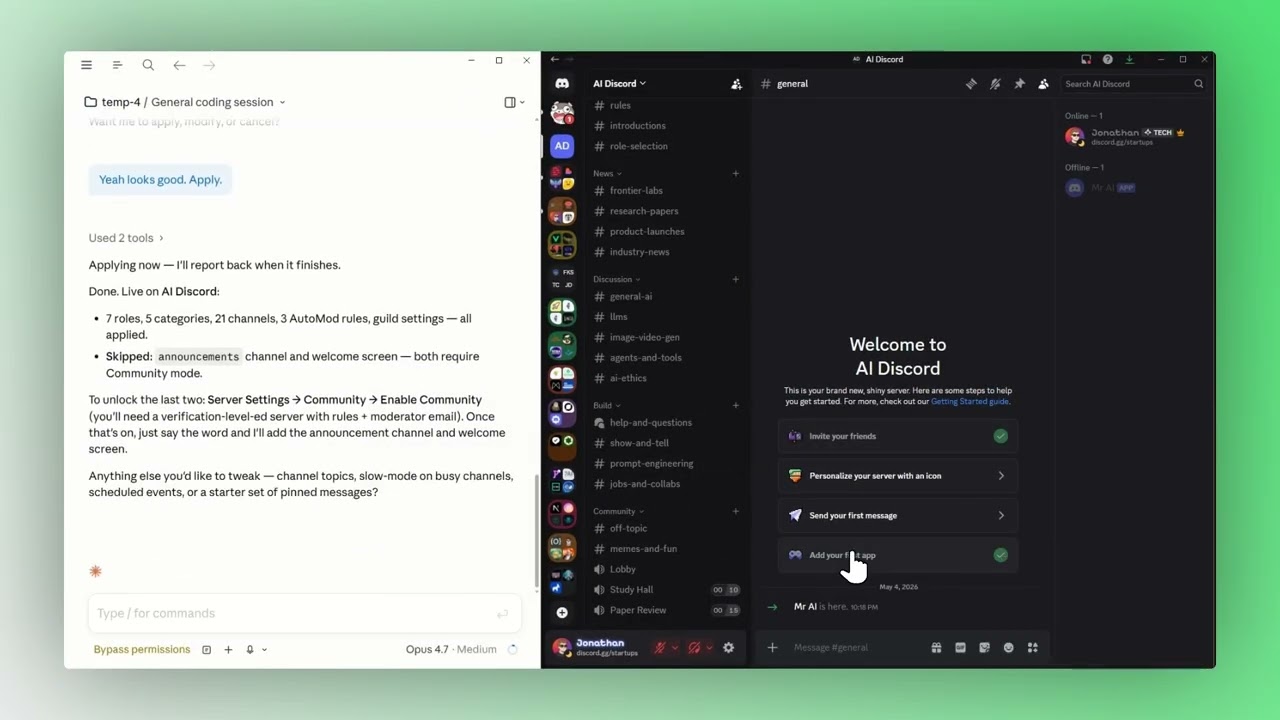
Click the image to watch the walkthrough.
1. Install the plugin — inside Claude Code, run:
/plugin marketplace add JCodesMore/jcodesmore-plugins
/plugin install discord@jcodesmore-plugins
Then fully restart Claude Code (quit the app and reopen) so the new skills load.
2. Run the setup wizard — type:
/discord:setup
Claude walks you through creating a Discord bot (or grabbing the token from one you already own), pasting it in, inviting it to a server, and locking in an active guild. The whole thing happens in chat.
3. That's it. Type /discord anytime — that's the do-anything front door. Talk to Claude like a friend who knows Discord inside-out.
Everything routes through /discord. Talk to Claude like a friend who happens to know Discord inside-out:
/discord make me a Magic: The Gathering trading server." — designs and applies a full server template/discord apply the dev-community template to this server." — picks a starter template, dry-runs, applies/discord create a #welcome channel under a category called Info, with a topic of 'Read the rules first.'"/discord add a Moderator role with kick and ban perms, blurple color, and grant it to me."/discord drop an embed announcement in #announcements with the stream schedule and a thumbnail."/discord set up an AutoMod rule that blocks invite links for non-mods."/discord configure the welcome screen with three intro channels and a friendly description."/discord schedule a community game night in the Lobby voice channel for next Friday at 7pm."You can also just type /discord with no arguments to see the current bot + active server and get a menu of suggestions. The agent figures out which Discord primitives to call, validates inputs, and reports back what changed (and what failed, with Discord's actual error messages).
51 Discord tools wrapped in two skills and one agent — covering channels, roles, messages, embeds, AutoMod, onboarding, welcome screens, scheduled events, members, webhooks, and bulk server templates. /discord is the do-anything front door; /discord:setup is the one-shot configuration wizard.
| Capability | Try saying |
|---|---|
| Build a server from a prompt | "/discord make me a server for [X]" |
| Apply a starter template | "/discord apply the gaming-community template" |
| Channels & categories | "/discord create a #general channel under Welcome" |
| Roles & permissions | "/discord add a Mod role with kick perms and grant it to me" |
| Messages & embeds | "/discord send a multi-field embed to #announcements" |
| AutoMod rules | "/discord block invite links from non-mods" |
| Welcome screen | "/discord set up a welcome screen with rules and intros" |
| Scheduled events | "/discord schedule a movie night for Saturday at 8pm" |
| Members & moderation | "/discord kick the user named X with reason: spam" |
| Webhooks | "/discord create a webhook in #releases and post the changelog" |
| Anything else | discord_raw_request — direct REST escape hatch |
Bundled server templates: gaming-community, study-group, dev-community, content-creator. Compose your own as a JSON spec or describe what you want and let the architect agent draft one.
Discord — chat, help, show-and-tell · Issues — bugs & feature requests · More plugins
discord_apply_template is create-onlyTemplates and the architect agent never delete or modify existing entities. Anything matching an existing channel/role/AutoMod rule by name is silently skipped. If you want a clean slate before applying, ask Claude to delete the existing channels first — but only do that on a fresh test guild, never on something with active conversations.
YouTube tools — search, transcripts, video info, channel browsing, playlists
 JCodesMore
Interactive wizard that fixes and optimizes Claude Code performance -- sourced from dozens of community posts and official docs.
JCodesMoreDiscover, recommend, and track movies in Claude Code. TMDB-powered via moviedb-promise, with a taste profile and watch history that follow you across projects.
JCodesMoreHand Claude a bot token and admin a Slack workspace in plain English — channels, usergroups, Block Kit messages, scheduled posts, canvases, and full workspace templates from a one-line brief
JCodesMoreSearch your past Claude Code conversations — ranked results, resumable in one command
JCodesMorenpx claudepluginhub jcodesmore/jcodesmore-plugins --plugin discordMemory compression system for Claude Code - persist context across sessions
 thedotmack
Ultra-compressed communication mode. Cuts ~75% of tokens while keeping full technical accuracy by speaking like a caveman.
 JuliusBrussee
Multi-model consensus engine integrating OpenAI Codex CLI, Gemini CLI, and Claude CLI for collaborative code review and problem-solving.
 xrf9268-hue
Curate auto-memory, promote learnings to CLAUDE.md and rules, extract proven patterns into reusable skills.
 alirezarezvani
Standalone image generation plugin using Nano Banana MCP server. Generates and edits images, icons, diagrams, patterns, and visual assets via Gemini image models. No Gemini CLI dependency required.
 Lucklyric
Comprehensive UI/UX design plugin for mobile (iOS, Android, React Native) and web applications with design systems, accessibility, and modern patterns
 wshobson