Stats
Actions
Available In
Tags

Orchestrates multi-model LLM consensus protocol using Claude, OpenAI Codex, and Gemini CLIs for collaborative code review, problem-solving, and decision-making. Automates three-phase deliberation, peer review, and synthesis of verdicts.
Clean up the LLM Council working directory and temporary files created in .council/.
View and manage LLM Council configuration settings.
Display comprehensive help information for the LLM Council plugin.
Check the availability and readiness of all LLM Council components.
Verify all dependencies for LLM Council plugin (jq, Claude CLI, optional CLIs)
Executes bash commands
Hook triggers when Bash tool is used
Uses power tools
Uses Bash, Write, or Edit tools
Own this plugin?
Verify ownership to unlock analytics, metadata editing, and a verified badge. GitHub access is read-only (username + org membership).
Sign in to claimOwn this plugin?
Verify ownership to unlock analytics, metadata editing, and a verified badge. GitHub access is read-only (username + org membership).
Sign in to claimBased on adoption, maintenance, documentation, and repository signals. Not a security audit or endorsement.
A multi-model consensus engine that integrates OpenAI Codex CLI, Google Gemini CLI, and Claude CLI for collaborative code review and problem-solving.
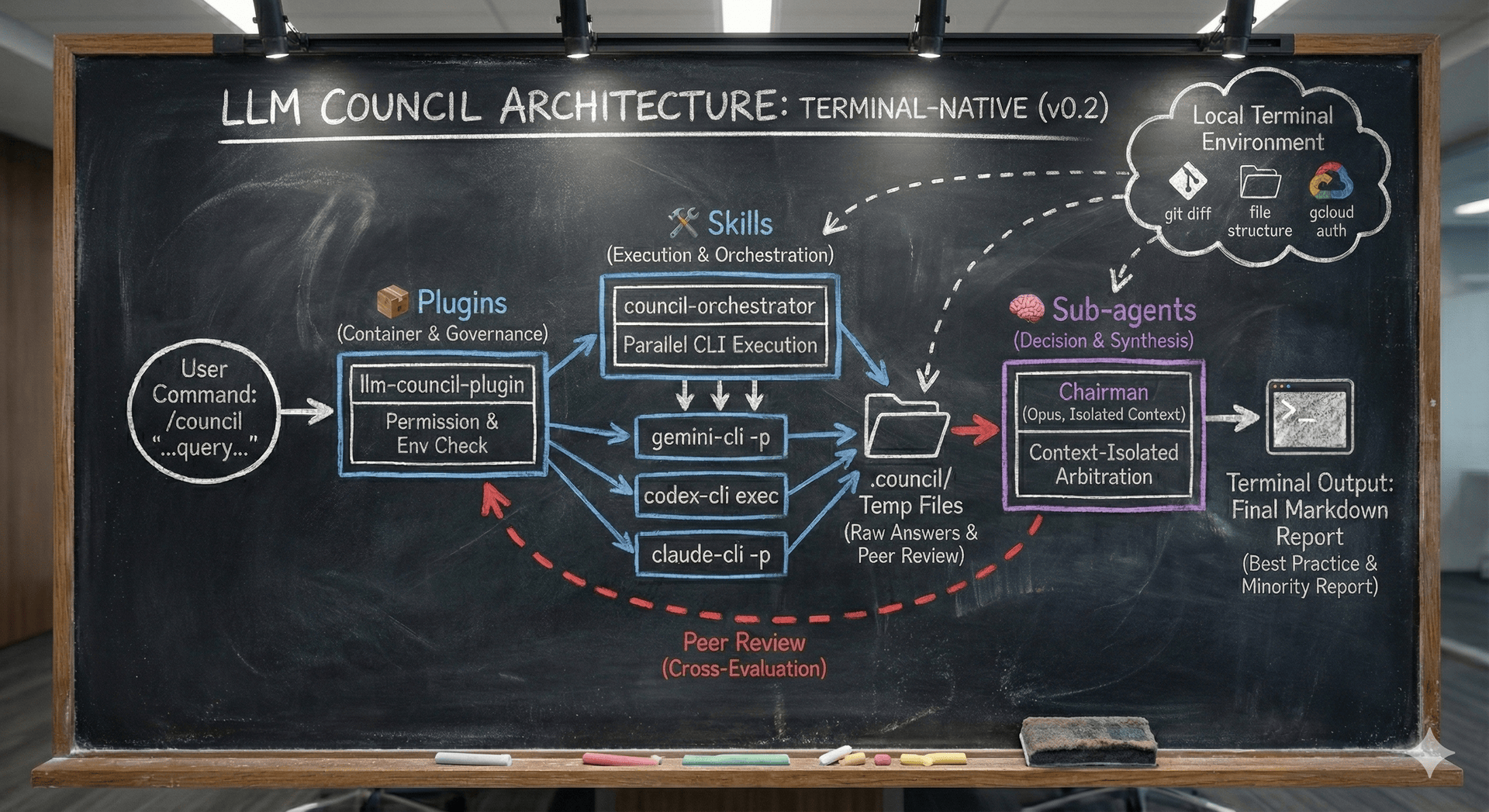
The LLM Council summons multiple AI models to deliberate on your technical questions. Each model provides its perspective, reviews its peers' answers, and a chairman synthesizes everything into a final verdict.
┌─────────────────────────────────────────────────────────────┐
│                    LLM COUNCIL WORKFLOW                      │
├─────────────────────────────────────────────────────────────┤
│                                                             │
│  Stage 1: Opinion Collection (Parallel)                     │
│  ┌─────────┐   ┌─────────┐   ┌─────────┐                   │
│  │ Claude  │   │  Codex  │   │ Gemini  │                   │
│  └────┬────┘   └────┬────┘   └────┬────┘                   │
│       │             │             │                         │
│       v             v             v                         │
│  Stage 2: Peer Review (Cross-examination)                   │
│  ┌─────────────────────────────────────┐                   │
│  │ Each model reviews others' answers  │                   │
│  └─────────────────────────────────────┘                   │
│                      │                                      │
│                      v                                      │
│  Stage 3: Chairman Synthesis                                │
│  ┌─────────────────────────────────────┐                   │
│  │ Claude Opus synthesizes the verdict │                   │
│  └─────────────────────────────────────┘                   │
│                                                             │
└─────────────────────────────────────────────────────────────┘
Before installing the plugin, ensure these critical dependencies are available:
| Dependency | Purpose | Installation |
|---|---|---|
| jq | JSON parsing for hook security validations | macOS: brew install jqUbuntu/Debian: sudo apt-get install jqAlpine: apk add jqVerify: jq --version |
| Claude CLI | Required for council deliberations | See code.claude.com/docs/setup |
⚠️ IMPORTANT: Without jq, all security validations are disabled:
For full three-model council functionality, install these optional CLIs:
| CLI | Installation | Purpose |
|---|---|---|
| Codex | npm install -g @openai/codex | Adds OpenAI perspective |
| Gemini | npm install -g @google/gemini-cli | Adds Google perspective |
Note: The plugin works with Claude CLI alone, but multi-model deliberation provides richer perspectives.
For a full installation and debugging walkthrough, see docs/INSTALL.md.
In Claude Code, run these commands:
# Add the marketplace
/plugin marketplace add xrf9268-hue/llm-council-plugin

# Install the plugin
/plugin install llm-council-plugin@llm-council
Alternatively, you can add via Git URL:
/plugin marketplace add https://github.com/xrf9268-hue/llm-council-plugin.git
Clone this repo:
git clone https://github.com/xrf9268-hue/llm-council-plugin.git .claude-plugins/llm-council
Note: Scripts already have execute permissions set in the repository. They should work immediately after cloning on Linux/Mac systems. Only run chmod +x if you encounter permission errors (e.g., on Windows or after extracting from ZIP):
# Only needed if scripts aren't executable:
chmod +x .claude-plugins/llm-council/hooks/*.sh .claude-plugins/llm-council/skills/council-orchestrator/scripts/*.sh
If you see errors like "BLOCKED: Detected potentially dangerous pattern: &&", your cached plugin is outdated.
Quick fix:
# Run diagnostic script
./scripts/verify-plugin-version.sh

# Or manually update cache
rm -rf ~/.claude/plugins/cache/llm-council-plugin
# Then reinstall the plugin
See docs/TROUBLESHOOTING.md for comprehensive troubleshooting guidance.
In Claude Code, use the /council command:
/council "How should I implement rate limiting in a Node.js API?"
Each /council run:
.council/ working directory for this session..council/final_report.md.npx claudepluginhub xrf9268-hue/llm-council-plugin --plugin llm-council-pluginUltra-compressed communication mode. Cuts 65% of output tokens (measured) while keeping full technical accuracy by speaking like a caveman.
 JuliusBrussee
Comprehensive UI/UX design plugin for mobile (iOS, Android, React Native) and web applications with design systems, accessibility, and modern patterns
 wshobson
Unified capability management center for Skills, Agents, and Commands.
 guanyang
Memory compression system for Claude Code - persist context across sessions
 thedotmack
Standalone image generation plugin using Nano Banana MCP server. Generates and edits images, icons, diagrams, patterns, and visual assets via Gemini image models. No Gemini CLI dependency required.
 Lucklyric
45% cost reduction measured. Cache expiry prevention, SubTask auto-delegation, zero-cost context restoration, real-time cost dashboard. The only Claude Code plugin built from CC source analysis.
 ww-w-ai
'%20stop-opacity%3D'0.16'%2F%3E%3Cstop%20offset%3D'1'%20stop-color%3D'rgb(200%2C90%2C60)'%20stop-opacity%3D'0.03'%2F%3E%3C%2FlinearGradient%3E%3C%2Fdefs%3E%3Crect%20width%3D'320'%20height%3D'200'%20fill%3D'url(%23g)'%2F%3E%3Ccircle%20cx%3D'250'%20cy%3D'56'%20r%3D'92'%20fill%3D'rgb(200%2C90%2C60)'%20fill-opacity%3D'0.06'%2F%3E%3Ccircle%20cx%3D'64'%20cy%3D'172'%20r%3D'58'%20fill%3D'rgb(200%2C90%2C60)'%20fill-opacity%3D'0.05'%2F%3E%3C%2Fsvg%3E)