Stats
Actions
Available In
Tags

Manage Roblox game development through Claude Code: create and sync assets, generate terrain and backgrounds, control Studio operations, and access Roblox platform data via the Weppy API.
Use when creating, importing, reviewing, uploading, updating, or reusing Roblox assets through WEPPY Asset Library, Studio-local asset workflows, AI-generated images or models, and Roblox Open Cloud.
Use when building natural Roblox backgrounds through WEPPY Roblox MCP - generating realistic terrain with biome presets, applying environment mood presets (lighting, atmosphere, sky, water), scattering props, and iterating with screenshot verification.
Use when controlling Roblox Studio through WEPPY Roblox MCP, choosing MCP tool actions, selecting among multiple connected Studio targets, creating or checking UI Studio interfaces, running playtests, inspecting logs, or verifying direct Studio workflows.
Use when working with WEPPY Roblox MCP Studio-local sync, bidirectional file mirrors, sync directions, multi-place project folders, conflicts, reverse apply and delete safety, sourcemaps, detector recovery, or Roblox Explorer context.
Based on adoption, maintenance, documentation, and repository signals. Not a security audit or endorsement.
WEPPY Roblox AI Toolkit is a Roblox Studio AI development product. It includes the WEPPY MCP Server for AI app connections and the WEPPY Roblox Studio Plugin for live Studio control. Claude Code, Codex, and Antigravity can also install the optional WEPPY AI Agent Plugin for client-native setup and workflow guidance.
Multi-Place Studio work · Generated assets to Roblox · Bidirectional sync · Automated playtest · UI Studio
English | 한국어 | 日本語 | Español | Português | Bahasa Indonesia | Deutsch
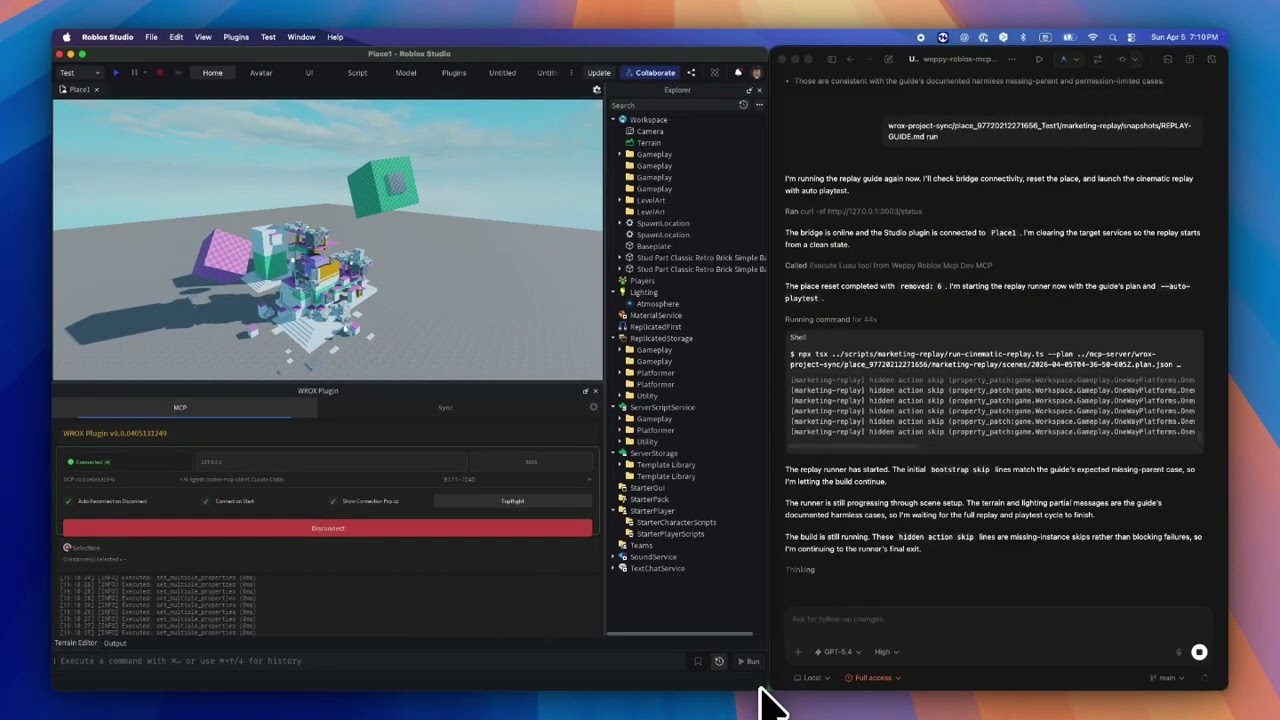
AI coding agents like Claude, Codex, and Gemini are powerful, but they cannot see or modify anything inside Roblox Studio. The DataModel, scripts, terrain, and lighting are invisible to external tools. Without a bridge, AI can only generate code snippets that you must paste manually.
The WEPPY MCP Server connects AI agents to the WEPPY Roblox Studio Plugin. AI directly creates and modifies instances, scripts, properties, terrain, and more inside Studio, and the changes are reflected immediately in Studio and the dashboard so you can see exactly what changed.
WEPPY is also built for Roblox experiences that are split across several Places. Open up to five Studio windows for Lobby, Game, Shop, Tutorial, or other Places, then tell the agent which Studio ID to use. One request can update several Places without re-explaining context or copying changes by hand.
For assets, an agent can create or prepare an image, save it to the Asset Library, upload it through Roblox Open Cloud, and apply the returned asset URI to a Place. The result is a shorter path from "make this icon/decal" to "it is visible in Studio."
No copy-pasting code or asset IDs. AI does the work, you review the results.
Start from the web install page. It shows the recommended one-line script for your platform first.
On the install page, copy the one-line script and run it in Terminal or PowerShell.
macOS / Linux
curl -fsSL https://raw.githubusercontent.com/hope1026/weppy-roblox-mcp/main/install.sh | bash
Windows (PowerShell)
irm https://raw.githubusercontent.com/hope1026/weppy-roblox-mcp/main/install.ps1 | iex
Then reopen your AI app and restart Roblox Studio.
Automatic WEPPY MCP Server registration supports Claude Code, Claude Desktop, Cursor, Codex CLI/App, Gemini CLI, and Antigravity / Antigravity IDE / Antigravity CLI.
For Claude Code, the installer also installs the WEPPY AI Agent Plugin. For Codex, it adds the plugin marketplace and then asks you to install WEPPY AI Agent Plugin from Plugin Directory. For Antigravity, the AI agent plugin is installed only when Antigravity CLI and agy plugin are available; otherwise the installer preserves the direct MCP connection.
If terminal or PowerShell is uncomfortable, use the terminal-free web installer on the same install page.
If the one-line install or terminal-free web installer does not work, register the WEPPY MCP Server manually with your AI app.
Use this server command:
npx -y @weppy/roblox-mcp@latest
Supported AI apps are Claude Code, Claude Desktop, Cursor, Codex CLI, Codex App, Gemini CLI, and Antigravity / Antigravity IDE / Antigravity CLI.
Any MCP-compatible AI client works. The server command is
npx -y @weppy/roblox-mcp@latest.
The WEPPY Roblox AI Toolkit connects to every supported AI app through the WEPPY MCP Server. Claude Code, Codex, and Antigravity can additionally install the WEPPY AI Agent Plugin for client-native setup and workflow guidance for Studio control, sync, and assets.
Claude Code
claude plugin marketplace add hope1026/weppy-roblox-mcp --scope user
claude plugin install weppy-roblox-ai-toolkit@hope1026-roblox-mcp --scope user
Codex
codex plugin marketplace add hope1026/weppy-roblox-mcp
After adding the Codex marketplace, restart Codex, open Plugin Directory, and install WEPPY AI Agent Plugin.
Antigravity
Antigravity CLI is required to install the WEPPY AI Agent Plugin. The one-line installer uses agy plugin install with the latest public GitHub release, verifies it with agy plugin list, and publishes the verified skill-only payload to supported IDE surfaces. Existing installs are replaced on every run so they can converge on the latest release.
npx claudepluginhub hope1026/weppy-roblox-mcp --plugin weppy-roblox-ai-toolkitBuild s&box games by talking to Claude — now on s&box's NATIVE editor MCP server (streamable HTTP, no Node required for the main path). 232 bridge tools across 28 organized toolsets, discovered live via search_tools: full-round-trip prefabs (serialize/instantiate with components+children), batch operations with dry-run validation (set-property/delete/add-component/reparent), scene checkpoints (snapshot + rollback — the agent-side undo), scene & project health scans (find_broken_references, describe_project, lints), inline-PNG screenshots (single, framed, multi-angle orbit), a playtest harness that runs scripted gameplay in play mode with in-frame assertions (+ abort), 40+ compile-verified gameplay scaffolds (economy/rounds/saves/inventory/loot/cinematics/dialogue/game-feel), networking codegen + lints, terrain/forest/cave world tools, vehicles (drivable raycast cars with driver seats, handling presets, physgun grab), and character/citizen authoring. Read-only tools carry permission hints; scene mutations are play-mode guarded. Ships a lifeline stdio server for editor-down diagnostics (read_log/get_compile_errors), the sbox-build-feature screenshot-driven workflow skill, the schema-grounded sbox-api skill, the sbox-cookbook recipe router (51 open-source games), a sbox-scaffold-game starter, and the sbox-game-dev specialist agent. The s&box editor addon installs from the Asset Library (see README).
 LouSputthole
Agent tooling for Summer Engine: game-dev skills, lifecycle hooks, and a 56-tool MCP bridge to the local desktop app.
 SummerEngine
Developer tools for three.ws — scaffold agents, configure MCP servers, and get runnable code examples for paid MCP tools.
 nirholas
MCP server development helper with tool and resource scaffolding
 rohitg00
Editorial "Agent Architect" bundle for Claude Code from Antigravity Awesome Skills.
 sickn33
Blender automation toolkit with CLI for geometry, materials, modifiers, collections, animation retargeting, and WebSocket-based real-time control
 Dev-GOM
'%20stop-opacity%3D'0.16'%2F%3E%3Cstop%20offset%3D'1'%20stop-color%3D'rgb(200%2C90%2C60)'%20stop-opacity%3D'0.03'%2F%3E%3C%2FlinearGradient%3E%3C%2Fdefs%3E%3Crect%20width%3D'320'%20height%3D'200'%20fill%3D'url(%23g)'%2F%3E%3Ccircle%20cx%3D'250'%20cy%3D'56'%20r%3D'92'%20fill%3D'rgb(200%2C90%2C60)'%20fill-opacity%3D'0.06'%2F%3E%3Ccircle%20cx%3D'64'%20cy%3D'172'%20r%3D'58'%20fill%3D'rgb(200%2C90%2C60)'%20fill-opacity%3D'0.05'%2F%3E%3C%2Fsvg%3E)