Stats
Actions
Available In
Tags
Multi-agent orchestration for Claude Code. Coordinate teams of agents with shared tasks, messaging, and 7 proven patterns including RLM for large-file analysis beyond context limits.
Efficient chunk-level analysis agent for RLM workflow. Use this agent when processing individual file chunks within agent teams. Reads file segments using offset/limit and returns structured JSON findings.
Code-aware chunk analyzer for RLM workflow. Analyzes source code partitions with understanding of functions, classes, imports, and code patterns. Returns structured JSON findings.
Data-aware chunk analyzer for RLM workflow. Analyzes structured data partitions (CSV/TSV) reporting frequency counts, distributions, outliers, and patterns. Returns structured JSON findings.
JSON-aware chunk analyzer for RLM workflow. Analyzes JSON or JSONL partitions reporting schema patterns, field distributions, structural anomalies, and data characteristics. Returns structured JSON findings.
Result aggregation agent for RLM workflow. Use this agent to synthesize findings from multiple chunk analyses into a coherent, comprehensive answer.
Choose the right agent type for each task including built-in agents (Bash, Explore, Plan, general-purpose) and plugin agents (review, research, refactoring, SDLC). Use when selecting agent types, understanding agent capabilities, or matching agents to tasks.
Debug and recover from agent team errors including common errors, hooks for quality gates, known limitations, and recovery strategies. Use when encountering team errors, enforcing quality gates with hooks, understanding limitations, or debugging agent issues.
Analyze large JSONL log files using schema-aware partitioned analysis. Discovers field schema, generates tailored jq extraction recipes, and orchestrates parallel chunk analysts with synthesis. Use when processing JSONL logs exceeding context limits, performing log analytics, or investigating incident logs.
Send messages between agents using SendMessage including direct messages, broadcasts, shutdown requests/responses, and plan approvals. Use when communicating between agents, understanding message formats, or handling structured protocol messages.
Master multi-agent orchestration using Claude Code's agent teams and task system. Use when coordinating multiple agents, running parallel code reviews, creating pipeline workflows with dependencies, building self-organizing task queues, or any task benefiting from divide-and-conquer patterns. Routes to specialized sub-skills for team management, tasks, messaging, patterns, backends, and error handling.
Own this plugin?
Verify ownership to unlock analytics, metadata editing, and a verified badge. GitHub access is read-only (username + org membership).
Sign in to claimOwn this plugin?
Verify ownership to unlock analytics, metadata editing, and a verified badge. GitHub access is read-only (username + org membership).
Sign in to claimBased on adoption, maintenance, documentation, and repository signals. Not a security audit or endorsement.






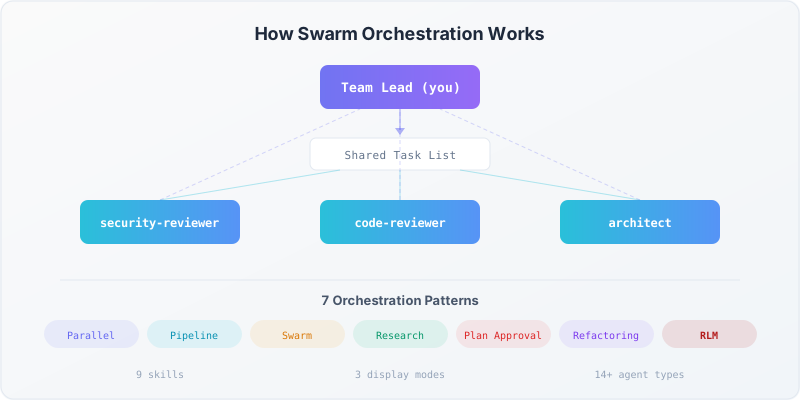
Multi-agent orchestration plugin for Claude Code. Coordinate teams of agents with shared tasks, inter-agent messaging, and proven patterns for parallel reviews, pipelines, self-organizing swarms, and large-file analysis via the RLM pattern.
Official docs: Agent Teams
Before installing, make sure you have:
Install and authenticate Claude Code. See the quickstart guide.
claude --version # Verify installed, must be 1.0.33+
Agent teams are experimental and disabled by default. Enable them by adding this to your settings.json:
{
  "env": {
    "CLAUDE_CODE_EXPERIMENTAL_AGENT_TEAMS": "1"
  }
}
Or set the environment variable directly:
export CLAUDE_CODE_EXPERIMENTAL_AGENT_TEAMS=1
Split-pane mode lets you see all teammates working side-by-side. It requires tmux.
macOS:
brew install tmux
Linux (Debian/Ubuntu):
sudo apt install tmux
Why tmux? Background agents need terminal multiplexing to run in visible, persistent panes. Without tmux, agents run in-process (invisible but functional). See docs/getting-started.md for details on display modes.
If you use iTerm2, install the it2 CLI for native split panes:
uv tool install it2
# Then: iTerm2 -> Settings -> General -> Magic -> Enable Python API
claude /plugin install https://github.com/zircote/claude-team-orchestration
Clone the repo and load it directly:
git clone https://github.com/zircote/claude-team-orchestration.git
claude --plugin-dir ./claude-team-orchestration
Start Claude Code and run:
/help
You should see swarm skills listed under the swarm: namespace:
swarm:orchestrating
swarm:team-management
swarm:task-system
swarm:messaging
swarm:agent-types
swarm:orchestration-patterns
swarm:spawn-backends
swarm:error-handling
swarm:rlm-pattern
swarm:jsonl-log-analyzer
| Problem | Fix |
|---|---|
| Skills don't appear | Restart Claude Code after installing |
swarm: prefix missing | Verify .claude-plugin/plugin.json exists in the plugin directory |
| Agent teams not working | Check CLAUDE_CODE_EXPERIMENTAL_AGENT_TEAMS is set to 1 |
| Split panes not showing | Run which tmux to verify tmux is installed |
Here's a minimal example that spawns a parallel code review team with three specialists:
Create an agent team called "review" to review the src/ directory.
Spawn three reviewers in parallel:
- "security" using sdlc:security-reviewer — check for vulnerabilities
- "quality" using feature-dev:code-reviewer — check for bugs and performance
- "simplicity" using code-simplifier:code-simplifier — check for unnecessary complexity

Have each reviewer send findings to team-lead when done.
Synthesize all findings into a summary, then shut down the team.
What success looks like:
For more examples, see docs/patterns.md and skills/orchestration-patterns/examples/complete-workflows.md.
To get the most out of swarm orchestration, add the following to your project's CLAUDE.md (or your personal ~/.claude/CLAUDE.md). This tells Claude to prefer parallel agent teams over sequential work whenever appropriate:
npx claudepluginhub zircote-plugins/claude-team-orchestrationSignal Intelligence - Comprehensive market research toolkit with report generation, GitHub issue creation, and trend-based analysis using three-valued logic
 zircote-plugins
Software Development Lifecycle standards and requirements for project quality, security, and compliance
zircote-pluginsComplete lifecycle management for Architectural Decision Records (ADRs): create, update, supersede, search, audit compliance, and export
zircote-pluginsVerify and enforce use of latest stable library and package versions using live documentation lookups. Prevents outdated version recommendations, security vulnerabilities from stale dependencies, and deprecated API usage across 13+ package ecosystems.
zircote-pluginsComprehensive documentation management: review, create, update, and maintain high-quality documentation with Diataxis framework support
zircote-pluginsOrchestrate multi-agent teams for parallel code review, hypothesis-driven debugging, and coordinated feature development using Claude Code's Agent Teams
 wshobson
Multi-agent orchestration via li o flow and li o fanout
 ohdearquant
Multi-agent task decomposition and coordination for Claude Code
 joelhooks
Multi-agent team orchestration for Claude Code. Set up parallel AI agent teams with file-based planning, progress tracking, and role-based collaboration.
 jessepwj
Repowire mesh usage skills for AI coding agents: cross-agent review and planning, delegate, usage patterns, and install/update. Backend-agnostic and parameterised on the agent you choose.
 prassanna-ravishankar
Multi-agent orchestration for Claude Code. 12 specialized agents working in parallel — planning, building, reviewing, debugging. Plus a Hub for always-alive multi-project sessions controllable from Telegram or Slack.
 erkandogan
'%20stop-opacity%3D'0.16'%2F%3E%3Cstop%20offset%3D'1'%20stop-color%3D'rgb(200%2C90%2C60)'%20stop-opacity%3D'0.03'%2F%3E%3C%2FlinearGradient%3E%3C%2Fdefs%3E%3Crect%20width%3D'320'%20height%3D'200'%20fill%3D'url(%23g)'%2F%3E%3Ccircle%20cx%3D'250'%20cy%3D'56'%20r%3D'92'%20fill%3D'rgb(200%2C90%2C60)'%20fill-opacity%3D'0.06'%2F%3E%3Ccircle%20cx%3D'64'%20cy%3D'172'%20r%3D'58'%20fill%3D'rgb(200%2C90%2C60)'%20fill-opacity%3D'0.05'%2F%3E%3C%2Fsvg%3E)