cowork-semantic-search




If you find this useful, consider giving it a ⭐ — it helps others discover the project.
Local semantic search for your documents. No API keys. No cloud. Works with any MCP client.
Why
AI coding tools are powerful, but they have blind spots when it comes to your local files:
- Frozen knowledge -- training data has a cutoff. Your latest reports, notes, and contracts don't exist in the model's world.
- Context window limits -- you can't paste 500 documents into a prompt.
- No cross-file search -- your AI tool can read one file at a time, but can't search across your entire document library for the relevant pieces.
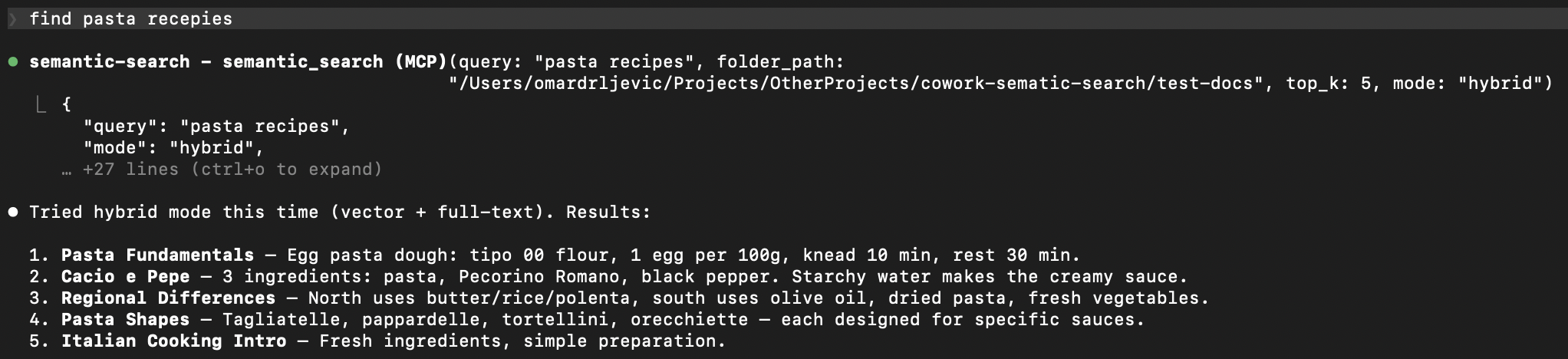
This plugin bridges that gap. It indexes your local documents into a small, fast vector database. When you ask a question, it retrieves only the relevant pieces -- so your AI tool can answer with your actual data.
Your documents --> chunked --> embedded --> local vector DB
                                                 |
         Your question --> embedded --> similarity search --> relevant chunks --> AI answers
Features
- Fully offline -- one-time model download (~120MB), then no network calls. No data leaves your machine.
- Incremental indexing -- SHA-256 content hashing. Only changed files get reprocessed. Re-indexing 1000 files where 3 changed takes seconds.
- Multilingual -- handles 50+ languages natively. Search in one language, find results in another.
- Hybrid search -- combines semantic similarity with full-text keyword search via Reciprocal Rank Fusion. Catches what pure vector search misses.
- Multiple formats -- txt, md, pdf, docx, pptx, csv out of the box.
- Any MCP client -- works with Claude Code, Cursor, Windsurf, Cline, and any other MCP-compatible tool.
- Zero infrastructure -- LanceDB stores everything as local files. No server, no Docker, no database to manage.
Supported Formats
| Format | Extension | Details |
|---|
| Plain text | .txt | UTF-8 with fallback |
| Markdown | .md | Raw text preserved |
| PDF | .pdf | Page-level extraction with metadata |
| Word | .docx | Full paragraph extraction |
| PowerPoint | .pptx | Slide-level extraction with metadata |
| CSV | .csv | Row-based text extraction |
Quick Start
1. Install
git clone https://github.com/ZhuBit/cowork-semantic-search.git
cd cowork-semantic-search
python3 -m venv .venv && source .venv/bin/activate
pip install -e ".[all]"
2. Configure your MCP client
Add the server to your MCP client's config. Replace paths with your own.
Claude Code -- .mcp.json in your project root
{
  "mcpServers": {
    "semantic-search": {
      "command": "/absolute/path/to/.venv/bin/python",
      "args": ["-m", "server.main"],
      "cwd": "/absolute/path/to/cowork-semantic-search",
      "env": {
        "PYTHONPATH": "/absolute/path/to/cowork-semantic-search"
      }
    }
  }
}
Cursor -- .cursor/mcp.json in your project root or ~/.cursor/mcp.json globally
{
  "mcpServers": {
    "semantic-search": {
      "command": "/absolute/path/to/.venv/bin/python",
      "args": ["-m", "server.main"],
      "env": {
        "PYTHONPATH": "/absolute/path/to/cowork-semantic-search"
      }
    }
  }
}
Windsurf -- ~/.codeium/windsurf/mcp_config.json
{
  "mcpServers": {
    "semantic-search": {
      "command": "/absolute/path/to/.venv/bin/python",
      "args": ["-m", "server.main"],
      "env": {
        "PYTHONPATH": "/absolute/path/to/cowork-semantic-search"
      }
    }
  }
}
Cline -- MCP Servers settings in the Cline VS Code extension
Open Cline > MCP Servers icon > Configure > Advanced MCP Settings, then add:
{
  "mcpServers": {
    "semantic-search": {
      "command": "/absolute/path/to/.venv/bin/python",
      "args": ["-m", "server.main"],
      "env": {
        "PYTHONPATH": "/absolute/path/to/cowork-semantic-search"
      }
    }
  }
}
3. Restart your MCP client and go
"Index all documents in ~/Documents/projects"
"Search for 'quarterly revenue report'"
First run downloads the embedding model (~120MB), then everything runs offline.

 hongsw
 dahatake
 tobi
tobi outfitter-dev
 iagocavalcante
 nicholasglazer
'%20stop-opacity%3D'0.16'%2F%3E%3Cstop%20offset%3D'1'%20stop-color%3D'rgb(200%2C90%2C60)'%20stop-opacity%3D'0.03'%2F%3E%3C%2FlinearGradient%3E%3C%2Fdefs%3E%3Crect%20width%3D'320'%20height%3D'200'%20fill%3D'url(%23g)'%2F%3E%3Ccircle%20cx%3D'250'%20cy%3D'56'%20r%3D'92'%20fill%3D'rgb(200%2C90%2C60)'%20fill-opacity%3D'0.06'%2F%3E%3Ccircle%20cx%3D'64'%20cy%3D'172'%20r%3D'58'%20fill%3D'rgb(200%2C90%2C60)'%20fill-opacity%3D'0.05'%2F%3E%3C%2Fsvg%3E)