Stats
Actions
Available In
Tags

Decompose project requirements into well-scoped planning units for /shipwright-plan, scaffold project structure, and generate CLAUDE.md and agent documentation
Modifies files
Hook triggers on file write and edit operations
Based on adoption, maintenance, documentation, and repository signals. Not a security audit or endorsement.
Ship right, not just fast.

AI can build your software now. The hard part is keeping it true to what you already decided, on every change, not just the first.
Shipwright is the harness your AI follows. On every change it checks the work back against your baseline (requirements, architecture, past decisions) and won't let through a change that silently drops a requirement or reverses a call you already made. That is enforced in code, not left to the model to remember; the traceability and audit trail just fall out of it.
/shipwright-iterate "Add a dark mode toggle"
What comes with it: a failing test written first, the change, your specs and traceability updated to match, and a clean Conventional-Commit PR, security-scanned and gated on green checks. Nothing you'd already settled gets quietly undone.
Not a stack framework, not autonomous codegen, just the discipline layer that makes whatever generates your code something you can stand behind. Use it from the Claude Code VSCode Extension or CLI terminal, or for multi-project work through the Shipwright Command Center web UI. Built for daily iteration, not one-shot generation. It scales from a one-line change to a whole new app:
/shipwright-run "A SaaS time tracking app with Supabase and Next.js"
Beta: Shipwright is in active beta. It builds itself daily, but you're an early user, so expect the occasional rough edge. Report issues and feedback are very welcome.
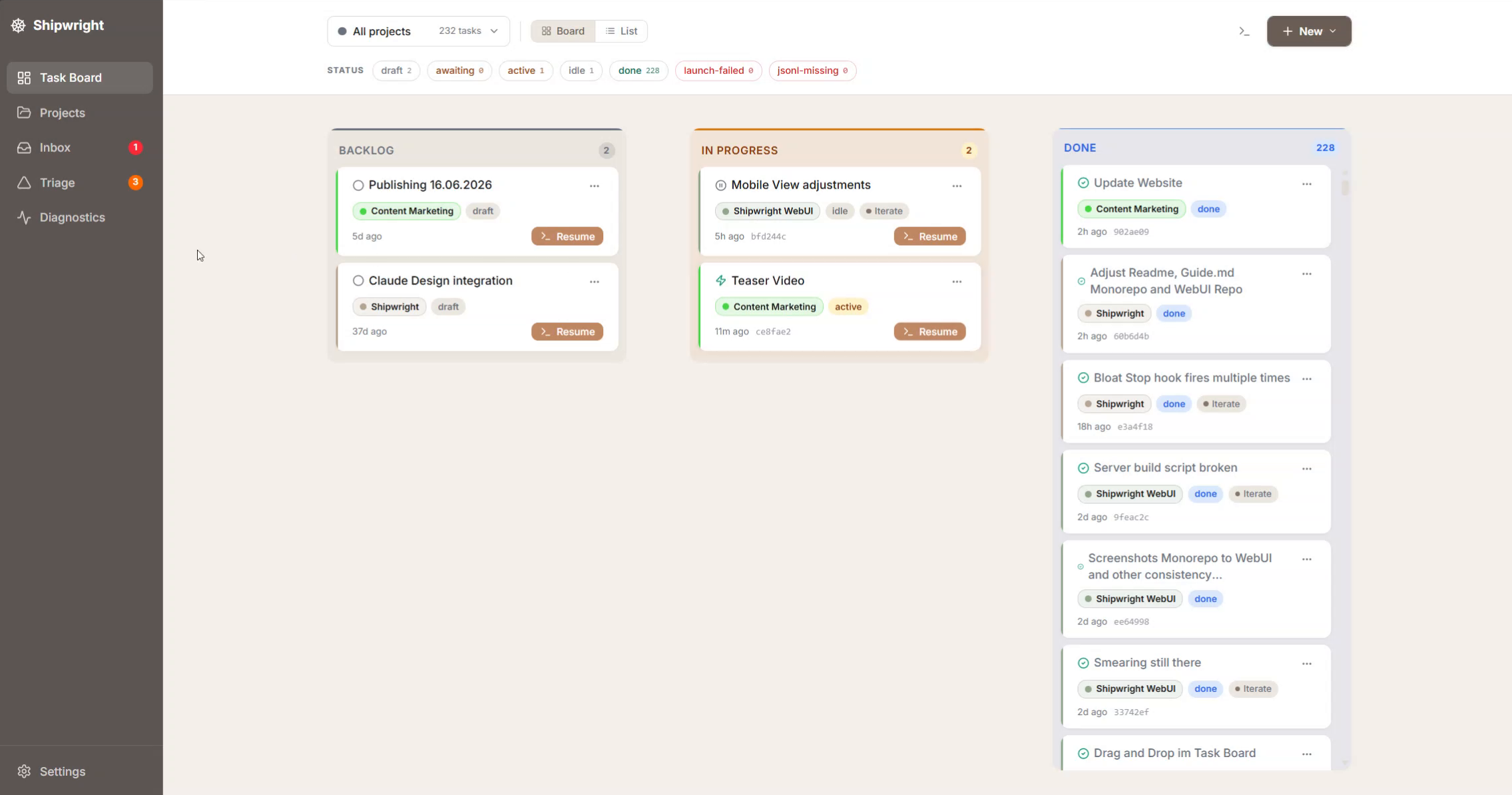 | 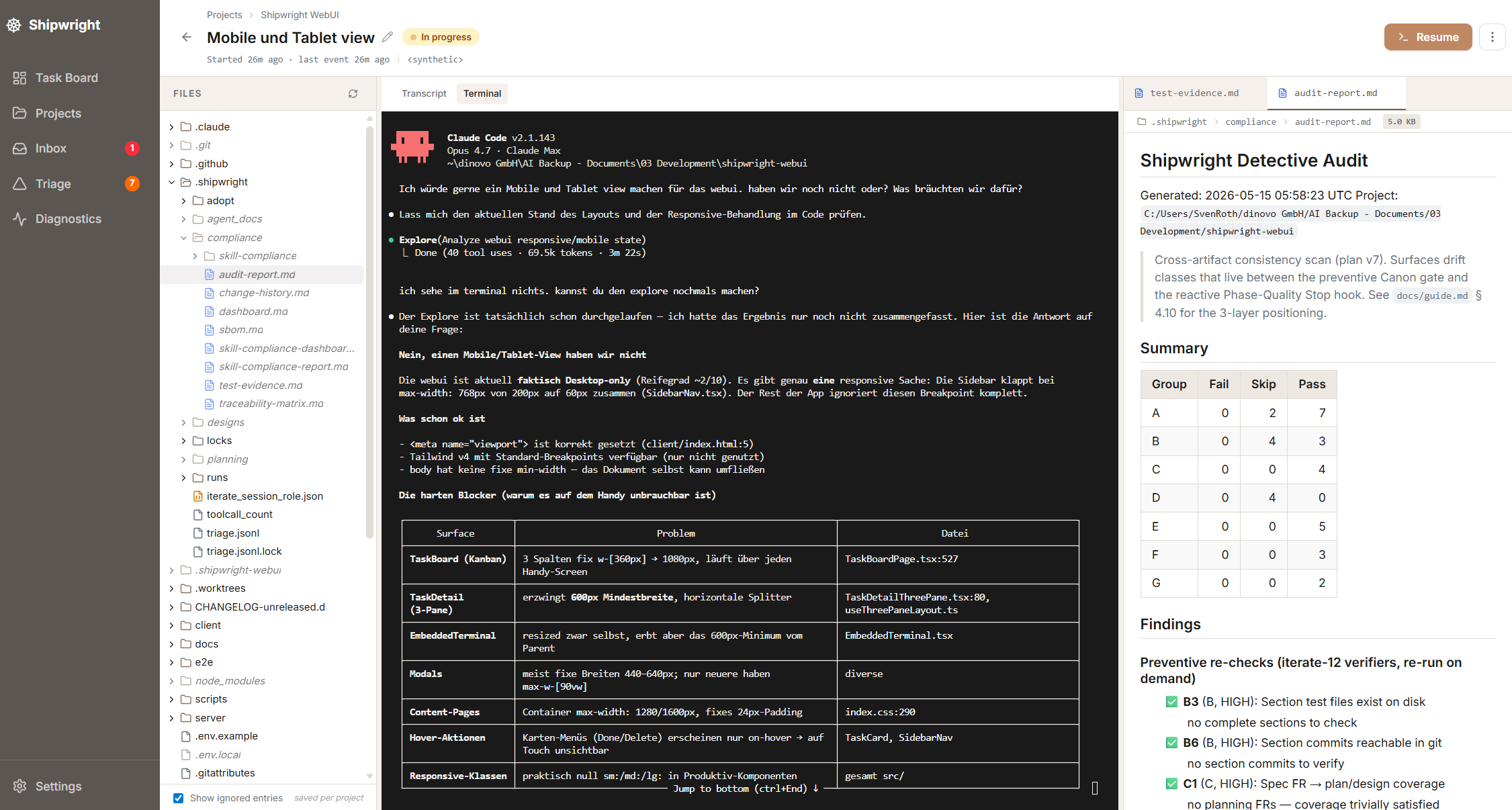 |
| Kanban board across every Shipwright project: Backlog, In Progress, In Review, Done. One place to see where everything stands. | Task detail: embedded terminal, Project File Viewer, Markdown Editor. |
The Command Center is the browser surface for the same skills you run in the terminal or VS Code Extension. Instead of keeping 4 terminal windows or VS Code sessions open for 4 projects, you get one kanban board, one inbox for agent questions, and one place to launch a new pipeline or iterate. When you launch, the claude command runs in an embedded terminal on the task page, and the Command Center follows the session live. It lives in its own repo. See Start the Command Center.
/shipwright-run, iterate daily with /shipwright-iterate, or invoke any single skill on its own.main runs through the same pipeline, scanner chain, and compliance gates it ships to you.npx claudepluginhub svenroth-ai/shipwright --plugin shipwright-projectImplement code from /shipwright-plan sections with TDD, code review, Conventional Commits, and git workflow
 svenroth-ai
AI-assisted deep planning with research, interview, external LLM review, and TDD approach
svenroth-aiComplexity-adaptive SDLC for ongoing changes. Auto-detects intent + complexity, scales from quick fix to structured feature with specs, plans, reviews, and testing.
svenroth-aiGrade any git repository against the Control Grade rubric — a read-only, deterministic cold-repo grader that reuses the same scoring engine as the compliance dashboard and certification. Underivable dimensions render honest n/a.
svenroth-aiLocal browser preview for Shipwright projects — starts dev server and shows URL
svenroth-aiUltra-compressed communication mode. Cuts 65% of output tokens (measured) while keeping full technical accuracy by speaking like a caveman.
 JuliusBrussee
Memory compression system for Claude Code - persist context across sessions
 thedotmack
Multi-model consensus engine integrating OpenAI Codex CLI, Gemini CLI, and Claude CLI for collaborative code review and problem-solving.
 xrf9268-hue
45% cost reduction measured. Cache expiry prevention, SubTask auto-delegation, zero-cost context restoration, real-time cost dashboard. The only Claude Code plugin built from CC source analysis.
 ww-w-ai
'%20stop-opacity%3D'0.16'%2F%3E%3Cstop%20offset%3D'1'%20stop-color%3D'rgb(200%2C90%2C60)'%20stop-opacity%3D'0.03'%2F%3E%3C%2FlinearGradient%3E%3C%2Fdefs%3E%3Crect%20width%3D'320'%20height%3D'200'%20fill%3D'url(%23g)'%2F%3E%3Ccircle%20cx%3D'250'%20cy%3D'56'%20r%3D'92'%20fill%3D'rgb(200%2C90%2C60)'%20fill-opacity%3D'0.06'%2F%3E%3Ccircle%20cx%3D'64'%20cy%3D'172'%20r%3D'58'%20fill%3D'rgb(200%2C90%2C60)'%20fill-opacity%3D'0.05'%2F%3E%3C%2Fsvg%3E)
