Stats
Actions
Available In
Tags

Status-line indicator showing whether the headroom MCP context-compression is being used this session — idle until headroom_compress runs, then active with the tokens AND money it saved (priced against the session model), decaying back to idle after a quiet period. Tracks an all-time money-saved total across sessions. Idle badges also nudge with a count of large tool results that went uncompressed. Includes Dangi, a real-time PostToolUse detector that nudges Claude (and optionally you) the moment a big uncompressed output lands.
Use when the headroom setup needs a health check or repair — the statusline badge never appears, hcat is missing from PATH, the headroom MCP tools are unavailable, hooks seem to fire twice, right after installing or updating the headroom-usage-indicator plugin, or whenever the user says headroom is not working or asks to check, fix, verify, or bootstrap their headroom install. Runs the plugin's read-only doctor script, explains the findings in plain language, and re-runs with --fix only after explicit user consent.
Use when you want a persistent visual reminder of whether the headroom MCP compression is actually being used this session — an always-visible status line that stays "idle" until headroom_compress is called, flips to "active" with the tokens AND money it saved (priced against the session's model), then decays back to idle after a quiet period. When idle, it also counts large tool results that were never compressed and shows them as an actionable nudge. Also shows an all-time money-saved total across sessions. A companion PostToolUse hook ("Dangi") nudges Claude in real time when a big uncompressed output lands, with an optional desktop notification (macOS or Linux), and a 😴/🤖 mascot sits at the end of the badge.
Executables (bin/) — files in this plugin's bin/directory are added to the Bash tool's PATH while the plugin is enabled.
Matches all tools
Hooks run on every tool call, not just specific ones
Admin access level
Server config contains admin-level keywords
Own this plugin?
Verify ownership to unlock analytics, metadata editing, and a verified badge. GitHub access is read-only (username + org membership).
Sign in to claimOwn this plugin?
Verify ownership to unlock analytics, metadata editing, and a verified badge. GitHub access is read-only (username + org membership).
Sign in to claimBased on adoption, maintenance, documentation, and repository signals. Not a security audit or endorsement.
Executes bash commands
Hook triggers when Bash tool is used
Executes bash commands
Hook triggers when Bash tool is used
A tiny status-line indicator for Claude Code that shows — at a glance, at the bottom of your screen — whether the headroom context-compression MCP is actually being used in your current session, and how many tokens it has saved you.
No more wondering "did I remember to compress that huge file, or did I just burn context?" — the indicator tells you, honestly, in real time.
Type these into the Claude Code prompt:
/plugin marketplace add Ship-Wright/headroom-plugin
/plugin install headroom-usage-indicator@headroom-tools
Then ask Claude, in plain English: "run the headroom doctor" (or invoke it directly: /headroom-usage-indicator:doctor). It checks everything — jq, the headroom compression engine, the MCP server, the hooks, the status line — and, with your consent, fixes whatever is missing, including the one thing a plugin can't do by itself: writing the statusLine entry into your ~/.claude/settings.json.
That's it. As of v2.5 the plugin is self-contained: the hooks (Dangi and the hcat gate) register themselves the moment the plugin is enabled, hcat is already on Claude's Bash PATH, and the headroom MCP server registration comes bundled — no scripts to copy, no settings.json hook surgery. If you installed an earlier version by hand, see Migrating from a pre-v2.5 install.
Paste this into the Claude Code prompt:
Create a roughly 100 KB JSON file at /tmp/hr-demo.json (an array of a few thousand small objects), then show me what's in it.
You should see, in order:
hcat /tmp/hr-demo.json;── hcat: /tmp/hr-demo.json · 1 lines · 98.3 KB · ~25000 tok → ~7500 tok (70.0% saved) · original on disk …;● headroom · ~17.5k tok · $… · 1× ….If any of those three don't happen, ask Claude to run the headroom doctor — diagnosing exactly this is its whole job.
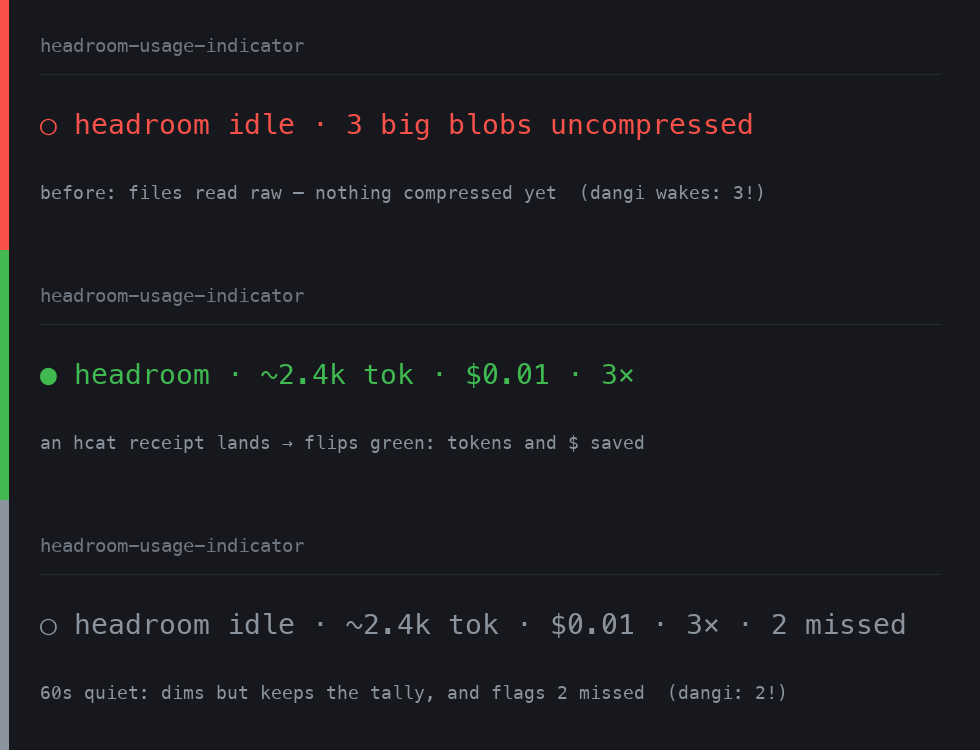
The badge across its three real states — red idle (big files read raw), green active (an hcat receipt just landed: tokens and $ saved), grey decayed (quiet 60s, keeps the tally and flags what was missed).
This plugin does not compress anything by itself — the actual compression is done by headroom, a local Python engine (→ https://github.com/headroomlabs-ai/headroom). Think of it like a fuel gauge: headroom is the engine, this plugin is the gauge (plus, since v2.3, a hand that reaches for the fuel-saver button for you).
The good news: you no longer have to plumb the engine in yourself. The plugin bundles the MCP server registration (its tools appear as mcp__headroom__headroom_compress and friends), and if the engine itself is missing, the doctor offers to bootstrap it into ~/.headroom-venv. If headroom is absent and you decline, everything stays politely silent — the badge sits at "idle", the gate lets Reads through — nothing breaks.
Every second, it looks at what your Claude session has actually done and updates a small badge in your status line. It reads the real session activity (not guesses), so it can't be fooled — just looking at headroom's stats does not make it say "active"; only a real compression does.
| Badge | Colour | Meaning |
|---|---|---|
○ headroom idle (not compressing yet) — or ○ headroom idle · 4 big blobs uncompressed | 🔴 red | headroom hasn't compressed anything yet this session; the count appears when large tool outputs are going uncompressed |
● headroom · ~2.4k tok · $0.01 · 3× | $1.83 all-time 😴 dangi | 🟢 green | a compression just happened — tokens saved, money saved, how many times, and your all-time total |
○ headroom idle · ~2.4k tok · $0.01 · 3× · 2 missed | $1.83 all-time 🤖 dangi: 2! | ⚪ grey | quiet for 60s — dims, but keeps the totals; · N missed counts big results beyond what you've compressed |
npx claudepluginhub ship-wright/headroom-plugin --plugin headroom-usage-indicatorMemory compression system for Claude Code - persist context across sessions
 thedotmack
Standalone image generation plugin using Nano Banana MCP server. Generates and edits images, icons, diagrams, patterns, and visual assets via Gemini image models. No Gemini CLI dependency required.
 Lucklyric
Ultra-compressed communication mode. Cuts 65% of output tokens (measured) while keeping full technical accuracy by speaking like a caveman.
 JuliusBrussee
Multi-model consensus engine integrating OpenAI Codex CLI, Gemini CLI, and Claude CLI for collaborative code review and problem-solving.
 xrf9268-hue
Streamline people operations — recruiting, onboarding, performance reviews, compensation analysis, and policy guidance. Maintain compliance and keep your team running smoothly.
 anthropics
Unified capability management center for Skills, Agents, and Commands.
 guanyang
'%20stop-opacity%3D'0.16'%2F%3E%3Cstop%20offset%3D'1'%20stop-color%3D'rgb(200%2C90%2C60)'%20stop-opacity%3D'0.03'%2F%3E%3C%2FlinearGradient%3E%3C%2Fdefs%3E%3Crect%20width%3D'320'%20height%3D'200'%20fill%3D'url(%23g)'%2F%3E%3Ccircle%20cx%3D'250'%20cy%3D'56'%20r%3D'92'%20fill%3D'rgb(200%2C90%2C60)'%20fill-opacity%3D'0.06'%2F%3E%3Ccircle%20cx%3D'64'%20cy%3D'172'%20r%3D'58'%20fill%3D'rgb(200%2C90%2C60)'%20fill-opacity%3D'0.05'%2F%3E%3C%2Fsvg%3E)