Claude STT
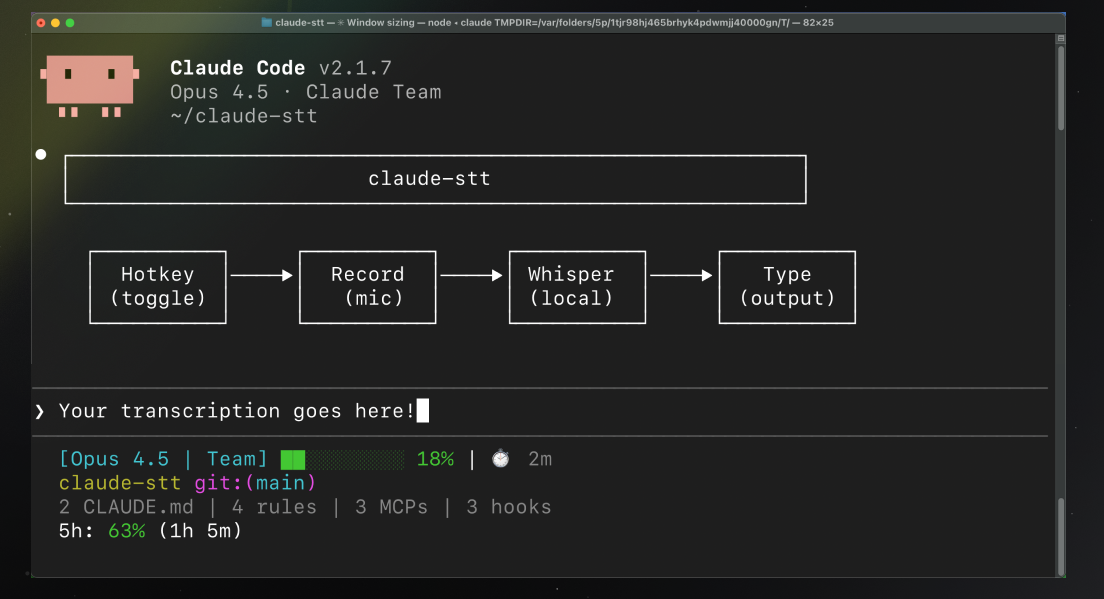
Speech-to-text input for Claude Code. Hold a hotkey, speak, and your words appear in the input field — all processed locally.


Install
Inside a Claude Code instance, run the following commands:
Step 1: Add the marketplace
/plugin marketplace add jarrodwatts/claude-stt
Step 2: Install the plugin
/plugin install claude-stt
Step 3: Run setup
/claude-stt:setup
Done! Press Ctrl+Shift+Space to start recording, press again to stop and transcribe.
Note: Setup installs dependencies (uv if available, otherwise a local .venv),
downloads the Moonshine model (~200MB), and checks microphone permissions.
What is Claude STT?
Claude STT gives you voice input directly into Claude Code. No typing required — just speak naturally.
| What You Get | Why It Matters |
|---|
| Local processing | All audio processed on-device using Moonshine STT |
| Low latency | ~400ms transcription time |
| Push-to-talk | Hold hotkey to record, release to transcribe |
| Cross-platform | macOS, Linux, Windows |
| Privacy first | No audio or text sent to external services |
How It Works
Press Ctrl+Shift+Space → start recording
        ↓
Audio captured from microphone
        ↓
Press Ctrl+Shift+Space → stop recording
        ↓
Moonshine STT processes locally (~400ms)
        ↓
Text inserted into Claude Code input
Key details:
- Audio is processed in memory and immediately discarded
- Uses Moonshine ONNX for fast local inference
- Keyboard injection or clipboard fallback
- Native system sounds for audio feedback
Configuration
Customize your settings anytime:
/claude-stt:config
Options
| Option | Values | Default | Description |
|---|
hotkey | Key combo | ctrl+shift+space | Trigger recording |
mode | toggle, push-to-talk | toggle | Press to toggle vs hold to record |
engine | moonshine, whisper | moonshine | STT engine |
moonshine_model | moonshine/tiny, moonshine/base, other Moonshine model IDs | moonshine/base | Model size |
output_mode | auto, injection, clipboard | auto | How text is inserted |
sound_effects | true, false | true | Play audio feedback |
max_recording_seconds | 1-600 | 300 | Maximum recording duration |
Settings stored in ~/.claude/plugins/claude-stt/config.toml.
Requirements
- Python 3.10-3.13
- ~200MB disk space for STT model
- Microphone access
Platform-Specific
| Platform | Additional Requirements |
|---|
| macOS | Accessibility permissions (System Settings > Privacy & Security) |
| Linux | xdotool for window management; X11 recommended (Wayland has limitations); WSL not supported |
| Windows | pywin32 for window tracking |
Commands
| Command | Description |
|---|
/claude-stt:setup | First-time setup: check environment, install deps, download model |
/claude-stt:start | Start the STT daemon |
/claude-stt:stop | Stop the STT daemon |
/claude-stt:status | Show daemon status and readiness checks |
/claude-stt:config | Change settings |
You can also use the CLI directly:
claude-stt setup
claude-stt start --background
How the Daemon Works
The STT daemon runs as a system-wide background process, independent of any Claude Code session:
- Persists until explicitly stopped (
/claude-stt:stop) or system reboot
- Listens globally for hotkeys (works when any window is focused)
- Status and logs stored in
~/.claude/plugins/claude-stt/
Check if it's running:
ps aux | grep claude_stt
# Or
cat ~/.claude/plugins/claude-stt/daemon.pid
Troubleshooting
 rymalia
 JuliusBrussee
 xrf9268-hue
'%20stop-opacity%3D'0.16'%2F%3E%3Cstop%20offset%3D'1'%20stop-color%3D'rgb(200%2C90%2C60)'%20stop-opacity%3D'0.03'%2F%3E%3C%2FlinearGradient%3E%3C%2Fdefs%3E%3Crect%20width%3D'320'%20height%3D'200'%20fill%3D'url(%23g)'%2F%3E%3Ccircle%20cx%3D'250'%20cy%3D'56'%20r%3D'92'%20fill%3D'rgb(200%2C90%2C60)'%20fill-opacity%3D'0.06'%2F%3E%3Ccircle%20cx%3D'64'%20cy%3D'172'%20r%3D'58'%20fill%3D'rgb(200%2C90%2C60)'%20fill-opacity%3D'0.05'%2F%3E%3C%2Fsvg%3E)