Stats
Actions
Available In
Tags

Author, edit, validate, test, and deploy Microsoft Copilot Studio agents using YAML files, with schema validation, evaluation runs, and lifecycle management.
[THIS IS A SUB-AGENT] Advisory agent for Copilot Studio. Recommends design patterns before authoring, reviews existing agent YAML against patterns and known pitfalls, and troubleshoots validation errors and unexpected behavior. Use for design guidance, agent review, and debugging. USE FOR: design recommendations, pattern suggestions, agent review, audit, troubleshooting, validation errors, wrong topic triggered, unexpected behavior, best practices. DO NOT USE FOR: building or modifying YAML files (use author), deploying agents (use manage), testing agents (use test).
[THIS IS A SUB-AGENT] Copilot Studio YAML authoring specialist. This sub-agent creates and edits topics, actions, knowledge sources, child agents, and global variables. Use when building or modifying Copilot Studio agent YAML files. Always use this in case there's overlap with a skill. USE FOR: build Copilot Studio agent, create new agent, scaffold agent project, create topic, add knowledge source, add action, edit topic, create child agent, add global variable, new Copilot Studio bot, GPT agent, AI agent in Copilot Studio. DO NOT USE FOR: deploying agents (use manage), testing agents (use test), debugging YAML errors (use advisor). Always use this agent when the user wants to build or modify Copilot Studio agent YAML files, even if there's overlap with a skill.
[THIS IS A SUB-AGENT] ALM operations for Copilot Studio agents. Clones, pushes and pulls agent content between local YAML files and the cloud, publishes agents to make drafts live, lists environments and agents, and shows pending changes. Use for sync, deploy, publish, and lifecycle tasks.
[THIS IS A SUB-AGENT] Testing agent for Copilot Studio agents. Runs PPAPI evaluations against draft agents (no publish needed), batch test suites via the Kit, point-tests via DirectLine or SDK, and analyzes exported evaluation CSVs. Drives the edit-push-eval loop for fast iterative testing without publishing.
Guide users through adding a new connector action to a Copilot Studio agent. Connector actions require UI-based connection setup, so this skill walks users through the Copilot Studio portal steps, then delegates to edit-action for YAML modifications.
Generate and insert an Adaptive Card into a Copilot Studio topic using AdaptiveCardPrompt. Use when the user asks to add an adaptive card, rich card, form card, info card, confirmation card, or interactive card to a topic.
Add generative answer nodes (SearchAndSummarizeContent or AnswerQuestionWithAI) to a Copilot Studio topic. Use this instead of /add-node when the user asks to add grounded answers, knowledge search, generative answers, or AI-powered responses — these nodes require specific patterns (ConditionGroup follow-up, knowledge source references, autoSend, responseCaptureType) that /add-node does not cover.
Add a global variable to a Copilot Studio agent. Use when the user needs a variable that persists across topics in the same conversation and can optionally be visible to the AI orchestrator.
Add a knowledge source (public website or SharePoint) to a Copilot Studio agent. Use when the user asks to add a knowledge source, documentation URL, website, or SharePoint site for the agent to search.
Uses power tools
Uses Bash, Write, or Edit tools
Own this plugin?
Verify ownership to unlock analytics, metadata editing, and a verified badge. GitHub access is read-only (username + org membership).
Sign in to claimOwn this plugin?
Verify ownership to unlock analytics, metadata editing, and a verified badge. GitHub access is read-only (username + org membership).
Sign in to claimnpx claudepluginhub microsoft/skills-for-copilot-studio --plugin copilot-studioBased on adoption, maintenance, documentation, and repository signals. Not a security audit or endorsement.
A plugin for Claude Code, GitHub Copilot CLI, and VS Code that enables authoring, testing, and troubleshooting Microsoft Copilot Studio agents through YAML files — directly from your terminal or editor.
/plugin marketplace add microsoft/skills-for-copilot-studio
/plugin install copilot-studio@skills-for-copilot-studio
Search for Skills for Copilot Studio in the VS Code Extensions using the @agentPlugins filter to view and click Install.
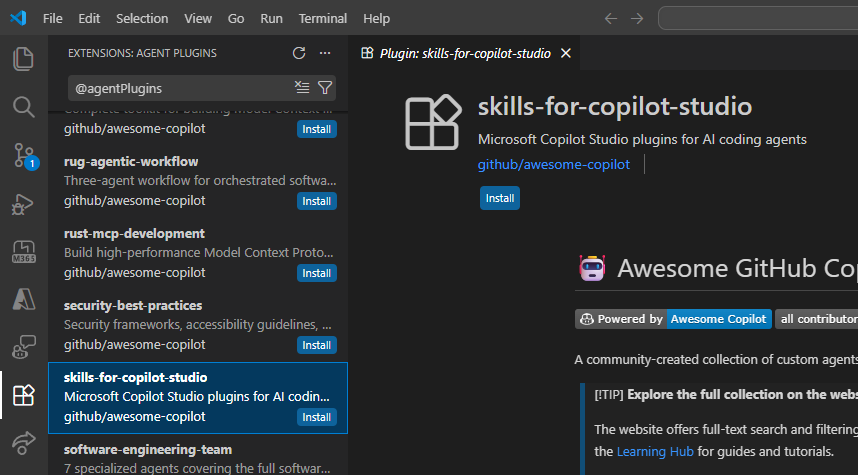
git clone https://github.com/microsoft/skills-for-copilot-studio.git

# Load for a single session
claude --plugin-dir /path/to/skills-for-copilot-studio

# Or install persistently (user-wide)
claude plugin install /path/to/skills-for-copilot-studio --scope user

# Or install for a specific project
claude plugin install /path/to/skills-for-copilot-studio --scope project
The update process depends on how you installed the plugin:
| Interface | Update Method | Details |
|---|---|---|
| Claude Code CLI | Auto-update (recommended) | Marketplace plugins update automatically. No action needed. |
| GitHub Copilot CLI | Manual | Run /plugin update skills-for-copilot-studio in an interactive session, or copilot plugin update skills-for-copilot-studio from the terminal. |
| VS Code | Extension auto-update | VS Code handles updates automatically when extension auto-update is enabled in settings. |
The plugin provides four sub-agents, each backed by a specialized agent:
/copilot-studio:copilot-studio-manage       Clone, push, pull, and sync agent content between local files and the cloud
/copilot-studio:copilot-studio-author       Create and edit YAML (topics, actions, knowledge, triggers, variables)
/copilot-studio:copilot-studio-test         Test published agents — point-tests, batch suites, or evaluation analysis
/copilot-studio:copilot-studio-advisor Design guidance, agent review, and troubleshooting
# Clone an agent from the cloud (guided flow — opens browser for sign-in)
/copilot-studio:copilot-studio-manage clone

# Design and build topics
/copilot-studio:copilot-studio-author Create a topic that handles IT service requests

# Pull latest, push your changes
/copilot-studio:copilot-studio-manage pull
/copilot-studio:copilot-studio-manage push

# Publish in Copilot Studio UI, then test
/copilot-studio:copilot-studio-test Send "How do I request a new laptop?" to the published agent

# Get design advice and review
/copilot-studio:copilot-studio-advisor Review my agent for improvements and known pitfalls
See SETUP_GUIDE.md for a full end-to-end walkthrough including validation, testing options, and troubleshooting.
This plugin is an experimental research project, not an officially supported Microsoft product. The Copilot Studio YAML schema may change without notice. Always review and validate generated YAML before pushing to your environment — AI-generated output may contain errors or unsupported patterns.
See CONTRIBUTING.md for local development setup, building bundled scripts, and project structure.
Turn your coding agent into a SOTA browser agent. Drives a local Playwright workspace via one bash command at a time, saving screenshots and an action log into final_runs/run_<id>/, and visually self-verifies the result.
 microsoft
AGT governance hooks and MCP tools for Claude Code sessions
microsoftAzure SDK patterns and best practices for .NET developers covering AI, resource management, identity, messaging, and Key Vault libraries.
microsoftAI-powered wiki generator for code repositories. Generates comprehensive, Mermaid-rich documentation with dark-mode VitePress sites, onboarding guides, deep research, and source citations. Inspired by OpenDeepWiki and deepwiki-open.
microsoftAzure SDK patterns and best practices for Java developers covering AI, communication, storage, identity, monitoring, and management libraries.
microsoftAutomatically detects and loads AGENTS.md files to provide agent-specific instructions alongside CLAUDE.md. Enables specialized agent behaviors without manual intervention.
 jeremylongshore
Create and maintain GitHub Copilot CLI plugins — skills, agents, prompts, instructions, and MCP servers with authoritative spec references and templates
 danielscholl
Unified capability management center for Skills, Agents, and Commands.
 guanyang
Skills for building agents with the Microsoft 365 Agents SDK for TypeScript/JavaScript
microsoftComplete plugin development toolkit for creating, refactoring, and validating Claude Code plugins and agents. Use when creating new plugins/skills/agents, refactoring existing plugins/skills, validating frontmatter, or restructuring plugin components. Includes specialized agents for assessment, planning, execution, and validation workflows.
 Jamie-BitFlight
Comprehensive .NET development skills for modern C#, ASP.NET, MAUI, Blazor, Aspire, EF Core, Native AOT, testing, security, performance optimization, CI/CD, and cloud-native applications
 wshaddix
'%20stop-opacity%3D'0.16'%2F%3E%3Cstop%20offset%3D'1'%20stop-color%3D'rgb(200%2C90%2C60)'%20stop-opacity%3D'0.03'%2F%3E%3C%2FlinearGradient%3E%3C%2Fdefs%3E%3Crect%20width%3D'320'%20height%3D'200'%20fill%3D'url(%23g)'%2F%3E%3Ccircle%20cx%3D'250'%20cy%3D'56'%20r%3D'92'%20fill%3D'rgb(200%2C90%2C60)'%20fill-opacity%3D'0.06'%2F%3E%3Ccircle%20cx%3D'64'%20cy%3D'172'%20r%3D'58'%20fill%3D'rgb(200%2C90%2C60)'%20fill-opacity%3D'0.05'%2F%3E%3C%2Fsvg%3E)