Stats
Actions
Available In
Tags

Run an interactive wizard to set up Starship statusline for Claude Code: automatically checks and installs Starship if needed, configures ~/.claude/starship.toml, and verifies Nerd Font support for enhanced terminal prompts.

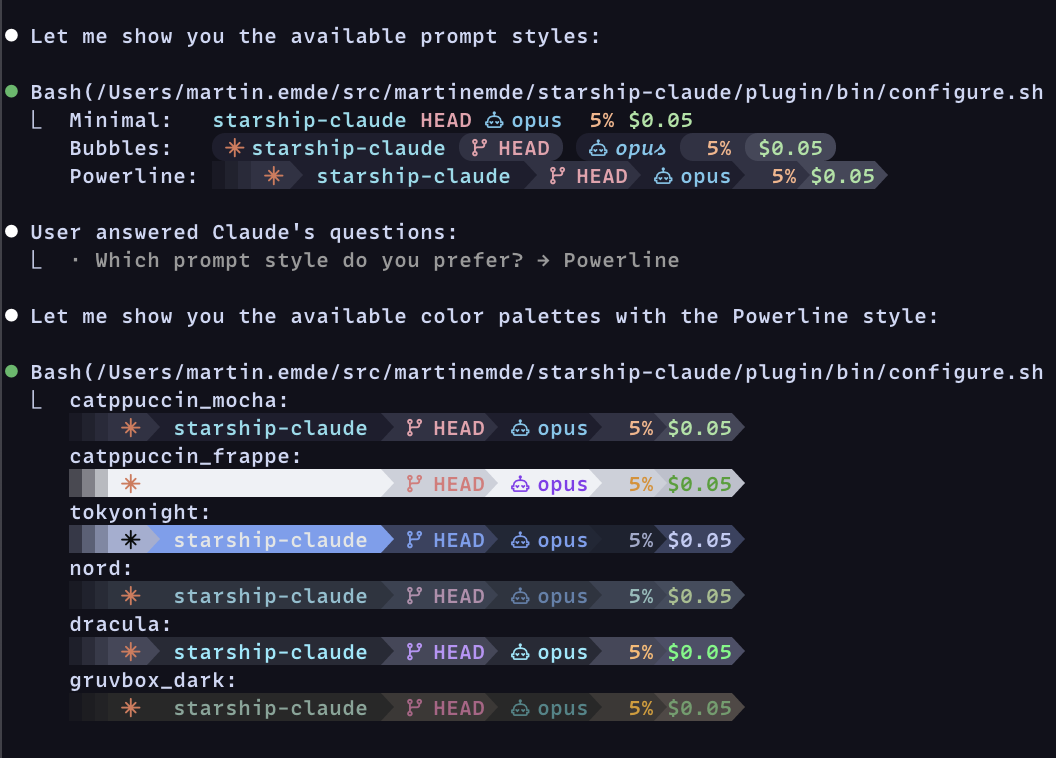
Use Starship for your claude code status line.
[!TIP] Run each of the following commands in
claudeone at a time.
/plugin marketplace add martinemde/starship-claude
/plugin install starship-claude@starship-claude
Then run the setup wizard:
/starship
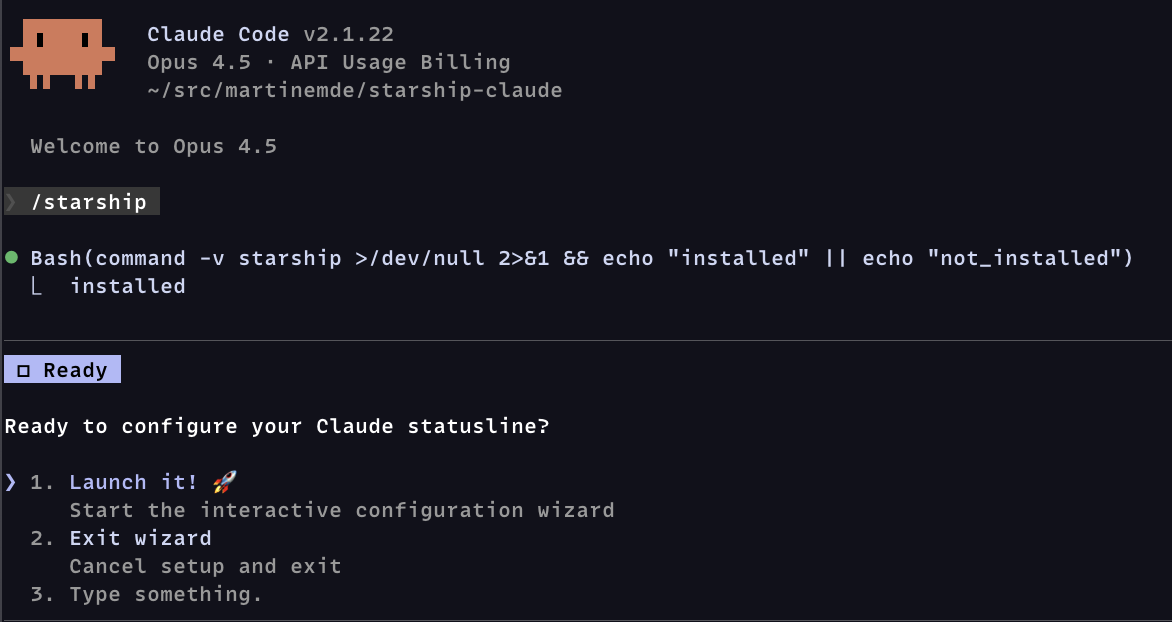
The wizard is just instructions to claude that will help with setup:
You'll need starship to render the statusline:
# If you don't already have starship...
curl -sS https://starship.rs/install.sh | sh
You'll probably want a Nerd Font (optional) for the robot icons.
When you're ready to install, run these in your terminal (not in claude):
# Download the script from this repository
mkdir -p ~/.local/bin
curl -fsSL https://raw.githubusercontent.com/martinemde/starship-claude/main/plugin/bin/starship-claude \
  -o ~/.local/bin/starship-claude && chmod +x ~/.local/bin/starship-claude

# Get the config file that you can customize
mkdir -p ~/.claude
curl -fsSL https://raw.githubusercontent.com/martinemde/starship-claude/main/plugin/templates/minimal-nerd.toml \
  -o ~/.claude/starship.toml
Add the statusline in your Claude Code settings (~/.claude/settings.json):
{
  // ... other stuff
  "statusLine": {
    "type": "command",
    "command": "~/.local/bin/starship-claude",
  },
}
Run it directly to test it out but you'll need to grab a test fixture JSON file.
./plugin/bin/starship-claude < test/fixtures/low_cost_session.json
Show progress bars for context usage percentages in terminals like Ghostty. (I love it!)
We use Dex Horthy's "dumb zone" (video) to start warning at 40%.
Warning does not mean stop, but be aware of your context usage.
[!NOTE] This doesn't work in tmux even if you are using Ghostty. Let me know if you find a workaround.
Add these options to the ~/.claude/settings.json if you want do things differently.
# custom config file
starship-claude --config ~/.config/starship/claude.toml

# disable terminal context progress bar (maybe it's printing weird characters?)
starship-claude --no-progress
Install BATS and run tests:
# Install BATS via mise
mise use bats@latest
mise install

# Run all tests
mise exec -- bats test/

# Run specific test file
mise exec -- bats test/model_extraction.bats
MIT License © 2026 Martin Emde
Own this plugin?
Verify ownership to unlock analytics, metadata editing, and a verified badge. GitHub access is read-only (username + org membership).
Sign in to claimOwn this plugin?
Verify ownership to unlock analytics, metadata editing, and a verified badge. GitHub access is read-only (username + org membership).
Sign in to claimBased on adoption, maintenance, documentation, and repository signals. Not a security audit or endorsement.
npx claudepluginhub martinemde/starship-claude --plugin starship-claudeA minimal, opinionated and non-configurable, Claude Code status line
 fredrikaverpil
Claude Powerline statusline setup wizard
 Owloops
Lightweight Claude Code status-line monitor with switchable styles, themes, and slash commands. v3.14.1 lowers the projection red line to 85% (yellow now 70–84) so a 7d window heading for →99% reads red instead of merely warm. v3.14.0 colours the 5h/7d bars by where usage is HEADED, not where it is now: once an end-of-window projection exists, the bar fill, label, and reset clock take their severity from the projected % against the cap (green <80, yellow 80–99, red ≥100) while the fill length still shows current usage — so a 7d window at 24% but on track for →96% reads yellow instead of a falsely-healthy green (all three styles). It also fixes the →NN% projection reading far too low for the first ~15 min after a reset (it was seeded from the used=0 first tick and lagged); it now holds `→--` until MIN_ELAPSED, then seeds from the first trustworthy reading. v3.13.3–v3.13.5 fix the 5h/7d bars sticking at a stale high % after Anthropic re-baselines usage mid-window (e.g. weekly limit raised): the cross-session merge now accepts an official downward revision once the old reading goes unconfirmed for 120s, idle windows replaying hours-old rate_limits blobs (expired 5h reset) can no longer overwrite or re-confirm the shared reading, and the →NN% projection drops its old-denominator samples and relearns after a re-baseline instead of freezing for the rest of the window. v3.13.0 adds a ⚙ session-mode line — effort (low/medium/high/xhigh/max/ultracode/auto) · thinking · fast · output-style — with a distinct static colour gradient per effort tier. v3.12.0 adds an always-on end-of-window projection (→NN%, learned from your local work rhythm) + an at-risk `⚠eta` forecast after each reset timer, session lines on by default, and a faint on-bar version that shows a `↑` hint when a newer release is on PyPI. v3.10.0 adds an opt-in live-activity line (in-progress todo, active tool, completed-tool rollup), git ahead/behind + session duration/lines on the project line, running-subagent lines, an opt-in `bar_shimmer` starfield on the battery bars, and a self-hosted plugin marketplace — plus a reliability fix so auto-update actually runs in daemon mode (detached, non-blocking) and the cache countdown is now per-session-correct. v3.9.0 makes the `cache` countdown auto-detect the real prompt-cache TTL (5m vs 1h) from the transcript, fixing a ~55-minute early `cache COLD` for Claude subscription users (Claude Code requests the 1-hour TTL automatically). v3.7.0 defends against status-line hijacking: a new `cs --setup --project [PATH]` writes a project-level override so another tool stealing the global `~/.claude/settings.json` slot can't kick `cs` out of this project; when displacement is detected, the bar also surfaces a one-line warning. v3.6.0 makes daemon (fast) mode the default for `cs --setup` — under 1% CPU continuously instead of ~3% inline at refreshInterval=1; pass `--inline` to opt back. Requires the `cs` CLI from PyPI (`pip install claude-statusbar` or `uv tool install claude-statusbar`).
 leeguooooo
A Claude Code statusline that shows reasoning effort (⚡) and thinking (💡). 5 presets (xsmall-xlarge), Catppuccin theme, no Node/Nerd Font, native PowerShell on Windows.
 AwesomeJun
A rich statusline for Claude Code — context, rate limits, tool activity, token costs. Pure bash, no dependencies beyond jq.
 JungHoonGhae
Claude Code statusline showing info at a glance: tokens, context, model, subagents, burn rate, skills, plugins, OpenSpec specs, task lists, and more
 tmck-code
'%20stop-opacity%3D'0.16'%2F%3E%3Cstop%20offset%3D'1'%20stop-color%3D'rgb(200%2C90%2C60)'%20stop-opacity%3D'0.03'%2F%3E%3C%2FlinearGradient%3E%3C%2Fdefs%3E%3Crect%20width%3D'320'%20height%3D'200'%20fill%3D'url(%23g)'%2F%3E%3Ccircle%20cx%3D'250'%20cy%3D'56'%20r%3D'92'%20fill%3D'rgb(200%2C90%2C60)'%20fill-opacity%3D'0.06'%2F%3E%3Ccircle%20cx%3D'64'%20cy%3D'172'%20r%3D'58'%20fill%3D'rgb(200%2C90%2C60)'%20fill-opacity%3D'0.05'%2F%3E%3C%2Fsvg%3E)