Stats
Actions
Available In
Tags

Lanes desktop: skills and slash commands for the Lanes issue board, sessions, and local MCP
Use when bridging GitHub and Lanes — importing GitHub issues into Lanes for local Claude Code execution, batch-spawning sessions per ticket, decomposing one GitHub issue into multiple Lanes sub-issues with dependencies, or posting session results (PR links, comments, follow-up issues) back to GitHub. Triggers on phrases like "import from GitHub", "bring this GitHub issue into Lanes", "comment back on the PR/issue", "spin off a GitHub issue from this Lanes ticket", or any mention of both GitHub and Lanes in the same request. Uses the Lanes MCP's built-in lanes_github_* tools — no separate GitHub MCP needed (the user must have connected GitHub in Lanes settings).
Use when managing Lanes issues or driving Claude Code sessions through the lanes_* MCP tools — creating issues, starting/stopping/inspecting sessions, batch-launching work across worktrees, reading terminal output, attaching labels and components by UUID, or moving issues across the backlog/todo/in-progress/done columns. Skill applies whenever a request mentions "Lanes", "lanes board", "lanes issue", "lanes session", or any lanes_* tool name.
Use when bridging Linear and Lanes — importing Linear issues into Lanes for local Claude Code execution, batch-spawning sessions per Linear ticket, decomposing one Linear issue into multiple Lanes sub-issues with dependencies, or posting session results (PR links, comments, status updates) back to Linear. Triggers on phrases like "import from Linear", "bring this Linear ticket into Lanes", "run the sprint locally", "push results back to Linear", or any mention of both Linear and Lanes in the same request. Uses the Lanes MCP's built-in lanes_linear_* tools — no separate Linear MCP needed (the user must have connected Linear in Lanes settings).
Own this plugin?
Verify ownership to unlock analytics, metadata editing, and a verified badge. GitHub access is read-only (username + org membership).
Sign in to claimOwn this plugin?
Verify ownership to unlock analytics, metadata editing, and a verified badge. GitHub access is read-only (username + org membership).
Sign in to claimBased on adoption, maintenance, documentation, and repository signals. Not a security audit or endorsement.
Mission control for AI coding agents.
Track, orchestrate, and ship across multiple AI CLI sessions from one place.
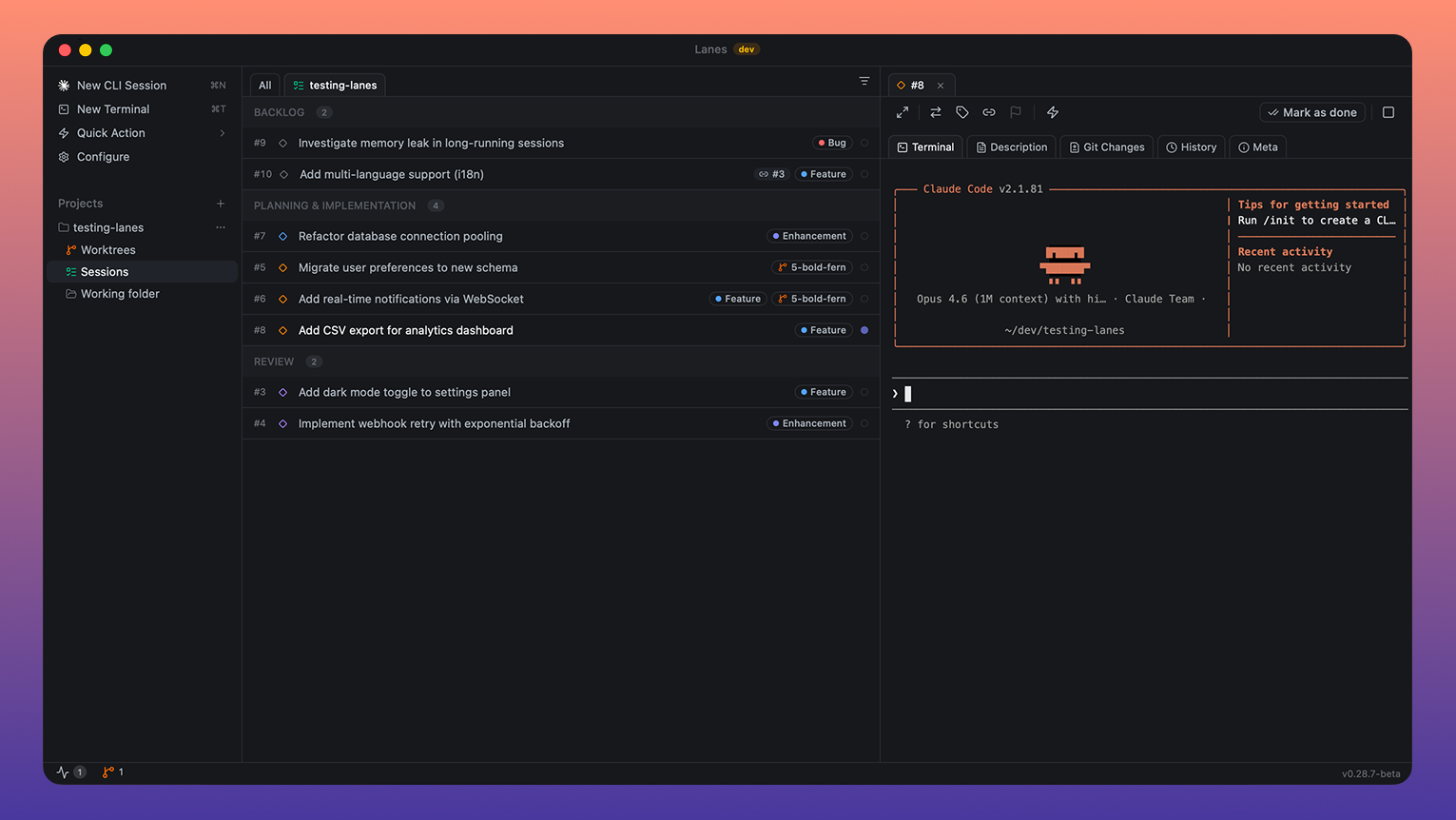
You have five AI coding agents running across eight terminal tabs. One is waiting for input. One finished ten minutes ago and you didn't notice. Two are doing overlapping work. The only thing keeping it all together is your short-term memory, and it just failed.
AI agents got powerful. The workflow around them didn't.
Lanes is a native desktop app that puts every AI coding session on an issue board. Each card is a task. Each task can have a live agent terminal attached. You see what's running, what's blocked, what's waiting, and what shipped, in one window, at a glance.
No context switching. No lost terminals. No wondering what that tab was doing. Just drag work through your pipeline while your agents execute.
It's the layer that was missing between you and your fleet of AI agents.
brew install --cask lanes-sh/lanes/lanes && open -a Lanes
Requires macOS Ventura or later. Native on Apple Silicon and Intel.
Join our Discord community for updates, to share feedback, ask questions, and connect with other users. We're iterating fast and Discord is the best way to stay in the loop.
Drag issues through workflow columns, Planning, Implementation, Review, Done, plus Backlog and Misc. Multi-select with Shift+Click and Cmd+Click for bulk operations. Right-click context menus, sorting options, and collapsible columns. Board tabs scoped per project directory and worktree.
Every issue runs an AI session in a real PTY-backed terminal. Start sessions in plan mode or implement mode. Resume Claude sessions across restarts. Drag files onto the terminal to inject paths. Real-time status detection: busy, awaiting input, stopped, exited, error.
Auto-create git worktrees per issue with generated branch names, or select existing worktrees. Status overview in the status bar showing uncommitted and unmerged state. Auto-cleanup on issue completion. Per-project base branch detection with manual override.
Create, rename, and assign labels with 13 color options. Filter the board by label, working directory, or workflow step. Clear all filters in one action.
Link issues as dependencies via a multi-select picker. Cycle detection prevents circular chains. Dependent issues stay blocked until all prerequisites reach Done.
Preset and custom commands with keyboard shortcuts Cmd+Alt+1–9. Two types: claude (injected into CLI session) and terminal (run as shell command). Built-in defaults shipped with new installs, fully customizable in Settings.
Sidebar file tree for the selected issue's working directory. Monaco editor with tabbed editing, dirty file tracking, syntax highlighting, and save on Cmd+S.
Diff view with two modes: Changes (uncommitted working tree diff) and History (committed diffs). Monaco-powered inline diff viewer. Automatic branch detection from the issue's worktree.
Discover running CLI processes across the system. Three-way classification: Tracked (managed by Lanes), Orphan (has issue ID but no active session), External (unrelated). Kill individual processes or stop all sessions at once.
Claude Code, Anthropic's CLI for Claude.
Support for Codex CLI, Gemini CLI, and other terminal-based AI tools is on the roadmap.
Lanes ships a built-in Model Context Protocol server so agents like Claude Code and Codex can read your board and drive sessions directly. Enable it in Settings > Local MCP, then click Connect Claude Code or Connect Codex for one-click config injection.
| Server name | lanes-local (legacy lanes still works) |
| Transport | SSE (Server-Sent Events) |
| Endpoint | http://localhost:5353/sse |
| Protocol version | 2024-11-05 |
| Server version | 1.0.0 |
| Tool count | 30 (18 workspace + 6 GitHub + 6 Linear) |
| Auth | None — localhost-only, never leaves your machine |
npx claudepluginhub lanes-sh/app --plugin lanes-desktopLanes Forms: provision form endpoints and fill them in on a user's behalf, from Claude Code
 lanes-sh
Lanes skills and slash commands for Claude Code
lanes-shLanes skills and slash commands for Claude Code
lanes-shTask distribution, agent coordination, progress monitoring - executes plans via subagents. Requires AI Maestro for inter-agent messaging.
 Emasoft
Repowire mesh usage skills for AI coding agents: cross-agent review and planning, delegate, usage patterns, and install/update. Backend-agnostic and parameterised on the agent you choose.
 prassanna-ravishankar
Multi-agent development workflow (/crew) — planning, implementation, review, documentation, evals, and audit gates. Commands, agents, and skills are auto-discovered from the repo.
 Spiris-Innovation-Tech-Dev
Git-native spec and issue management for AI-assisted development. Track issues, specs, and feedback with smart anchoring.
 sudocode-ai
iTerm2 Torque agent session and task management
 runtorque
'%20stop-opacity%3D'0.16'%2F%3E%3Cstop%20offset%3D'1'%20stop-color%3D'rgb(200%2C90%2C60)'%20stop-opacity%3D'0.03'%2F%3E%3C%2FlinearGradient%3E%3C%2Fdefs%3E%3Crect%20width%3D'320'%20height%3D'200'%20fill%3D'url(%23g)'%2F%3E%3Ccircle%20cx%3D'250'%20cy%3D'56'%20r%3D'92'%20fill%3D'rgb(200%2C90%2C60)'%20fill-opacity%3D'0.06'%2F%3E%3Ccircle%20cx%3D'64'%20cy%3D'172'%20r%3D'58'%20fill%3D'rgb(200%2C90%2C60)'%20fill-opacity%3D'0.05'%2F%3E%3C%2Fsvg%3E)