Growth Kit


Turn your blog posts into social media content - automatically
Stop manually converting your blog posts into tweets, LinkedIn posts, and Medium articles. Growth Kit does it for you with a single command.
🚀 Zero Dependencies: Works in Python, Rust, Go, ANY repo - no Node.js/npm required!
Works with: Markdown files, PDFs, blog URLs, or any text content.
What You Can Do
🐦 Generate X/Twitter threads - Copy-pastable tweets with optimal formatting
💼 Create LinkedIn posts - Professional posts ready to publish
📝 Convert to Medium - Medium-ready articles with proper formatting
🔗 Generate Dev.to RSS - Auto-import blog posts to Dev.to
📊 Set up Vercel Analytics - Add analytics in seconds
All from a single command. No configuration needed.
Quick Start
1. Requirements
Claude Code (required): Install here - it's free
That's it! No other dependencies.
- ✅ Works in ANY repo: Python, Rust, Go, JavaScript, Java, C++, etc.
- ✅ No Node.js/npm required - Claude uses only built-in tools
- ✅ No package.json needed - Works in non-JavaScript projects
- ✅ Universal: Uses only
bash, curl, sed, grep (standard everywhere)
- ✅ Just needs blog content (markdown files, PDFs, or URLs)
2. Install Growth Kit
Open Claude Code in your project and run:
# Add Growth Kit marketplace
/plugin marketplace add kanaerulabs/growth-kit

# Install plugins
/plugin install publisher
/plugin install analytics
3. Updating Growth Kit
Get the latest features and fixes:
# Update the marketplace
/plugin marketplace update kanaerulabs/growth-kit

# Reinstall plugins to get updates
/plugin uninstall publisher
/plugin install publisher
Or update from Claude Code UI:
- Open Claude Code settings
- Go to "Plugins" tab
- Find "growth-kit-marketplace"
- Click "Update" button
- Reinstall plugins
For detailed instructions with screenshots: Claude Code Plugin Management
4. Configure (Optional - LinkedIn API Only)
X/Twitter, Medium, and Dev.to need ZERO configuration - they just work!
For LinkedIn API automated posting (optional):
cp .env.example .env
# Edit .env with your LinkedIn app credentials from https://www.linkedin.com/developers/apps

LINKEDIN_CLIENT_ID=your_client_id
LINKEDIN_CLIENT_SECRET=your_secret
BLOG_BASE_URL=https://yourblog.com
Without API setup: LinkedIn command still generates the post content - you just copy-paste manually.
4. Use It
# Generate X/Twitter thread from your blog post
/publisher:x my-blog-post

# Or from any markdown file
/publisher:x path/to/article.md

# Or from a URL
/publisher:x https://yourblog.com/article

# Generate Dev.to RSS feed (one-time setup)
/publisher:devto

# Create content for ALL platforms at once
/publisher:all my-blog-post
That's it! Growth Kit will:
- Find and read your content
- Generate platform-specific formats
- Open preview files in your browser
Note: All commands work in ANY repo type. Claude generates everything using only Read, Write, and Bash tools!
All Commands
Content Distribution
| Command | What It Does | Example |
|---|
/publisher:x | X/Twitter thread | /publisher:x my-post |
/publisher:linkedin | LinkedIn post | /publisher:linkedin my-post |
/publisher:linkedin | LinkedIn with custom file | /publisher:linkedin my-post path/to/image.png |
/publisher:medium | Medium article | /publisher:medium my-post |
/publisher:devto | Dev.to RSS feed | /publisher:devto |
/publisher:all | All platforms | /publisher:all my-post |
Analytics
| Command | What It Does |
|---|
/analytics:vercel | Set up Vercel Analytics |
Language Support
Add ja for Japanese, en for English (default):
/publisher:x my-post ja    # Japanese
/publisher:x my-post en    # English
Visual Examples
See exactly what you get with each command:
X/Twitter Posts
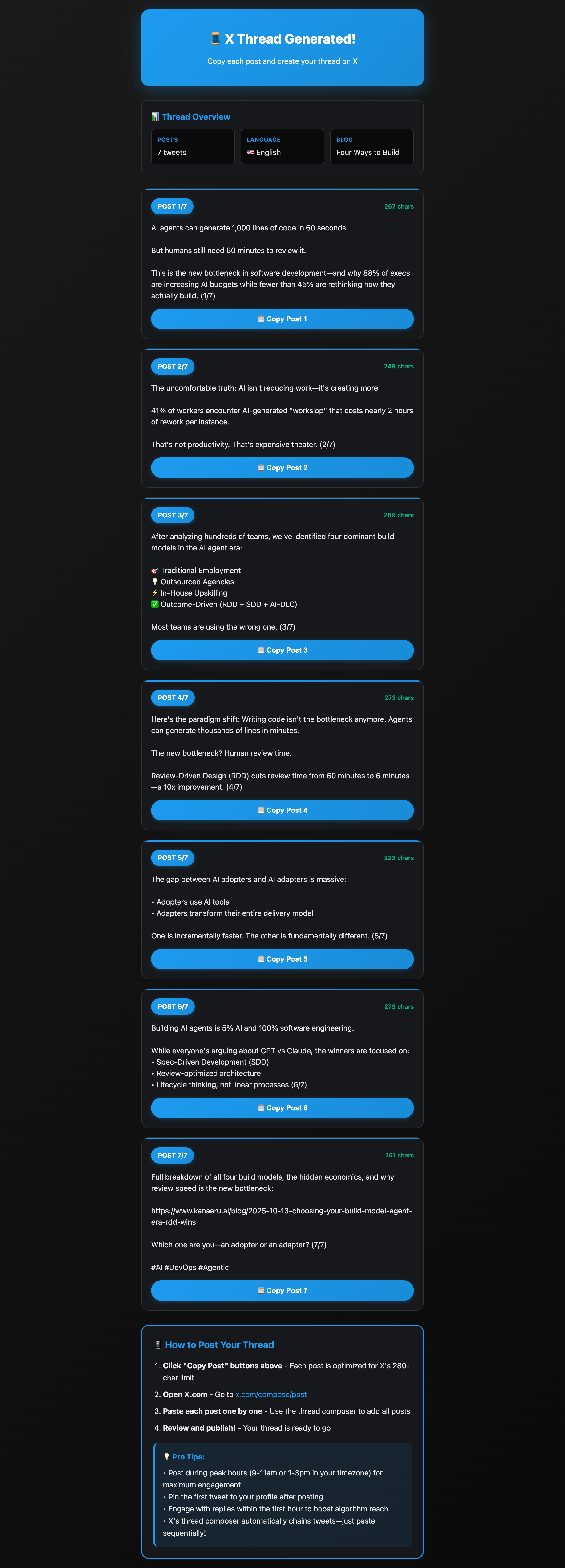
What you get - THREE versions in one command:
- Thread - 5-8 tweet thread optimized for engagement
- Single Long - Structured format with sections (Premium accounts)
- Single Short - Concise ~280 char announcement
Features:
- Beautiful HTML preview with tab switcher
- Copy buttons for each format
- Character counts for all versions
- Choose the format that fits your audience
- Automatically opens X.com for posting
LinkedIn Post

 kanaerulabs
 JuliusBrussee
 wshobson
 Lucklyric
 xrf9268-hue
 guanyang
 anthropics
'%20stop-opacity%3D'0.16'%2F%3E%3Cstop%20offset%3D'1'%20stop-color%3D'rgb(200%2C90%2C60)'%20stop-opacity%3D'0.03'%2F%3E%3C%2FlinearGradient%3E%3C%2Fdefs%3E%3Crect%20width%3D'320'%20height%3D'200'%20fill%3D'url(%23g)'%2F%3E%3Ccircle%20cx%3D'250'%20cy%3D'56'%20r%3D'92'%20fill%3D'rgb(200%2C90%2C60)'%20fill-opacity%3D'0.06'%2F%3E%3Ccircle%20cx%3D'64'%20cy%3D'172'%20r%3D'58'%20fill%3D'rgb(200%2C90%2C60)'%20fill-opacity%3D'0.05'%2F%3E%3C%2Fsvg%3E)