Stats
Actions
Available In
Tags

Enforces cost controls or usage limits for AWS Bedrock API calls by running a rate limiter script on each user prompt submission.
This plugin requires configuration values that are prompted when the plugin is enabled. Sensitive values are stored in your system keychain.
modelModel name accepted by the configured OpenAI-compatible provider.
${user_config.model}api_keyAPI key for the external model provider used to evaluate or translate prompts.
${user_config.api_key}base_urlBase URL for the provider, such as https://api.openai.com/v1 or another OpenAI-compatible endpoint.
Own this plugin?
Verify ownership to unlock analytics, metadata editing, and a verified badge. GitHub access is read-only (username + org membership).
Sign in to claimOwn this plugin?
Verify ownership to unlock analytics, metadata editing, and a verified badge. GitHub access is read-only (username + org membership).
Sign in to claimBased on adoption, maintenance, documentation, and repository signals. Not a security audit or endorsement.
${user_config.base_url}timeout_msMaximum time to wait for the external model before letting the prompt continue without feedback.
${user_config.timeout_ms}source_languageYour native or source language. When set, the tutor produces a back-translation into this language whenever you write a prompt in another language, letting you verify your wording matches your intent. Leave empty to disable.
${user_config.source_language}target_languageThe language to translate prompts into or check grammar against. Default is English.
${user_config.target_language}max_prompt_charsPrompts longer than this are skipped to avoid sending large code blocks or logs to the external provider.
${user_config.max_prompt_chars}This repository contains two versions of the Language Coach plugin for Claude Code.
Write Claude Code prompts in languages you're not fluent in — with grammar checks, translation, and back-translation to verify your intent.
source_language to see a back-translation, so you can verify the translated prompt still means what you intended.Neither version modifies your input. The feedback is visible only to you and is never inserted into Claude's model context.
| Feature | Original (Recommended) | Statusline |
|---|---|---|
| Delivery | Inline system message in chat | CLI Status Line (footer) |
| UX | Delays Claude's response slightly | Instant response (runs in background) |
| Visibility | Prominent, before Claude's reply | Subtle, appears during/after reply |
| Setup | Configure API key, base URL, and model | Configure API + manual settings.json edit |
The classic version that provides blocking, inline feedback before each prompt.
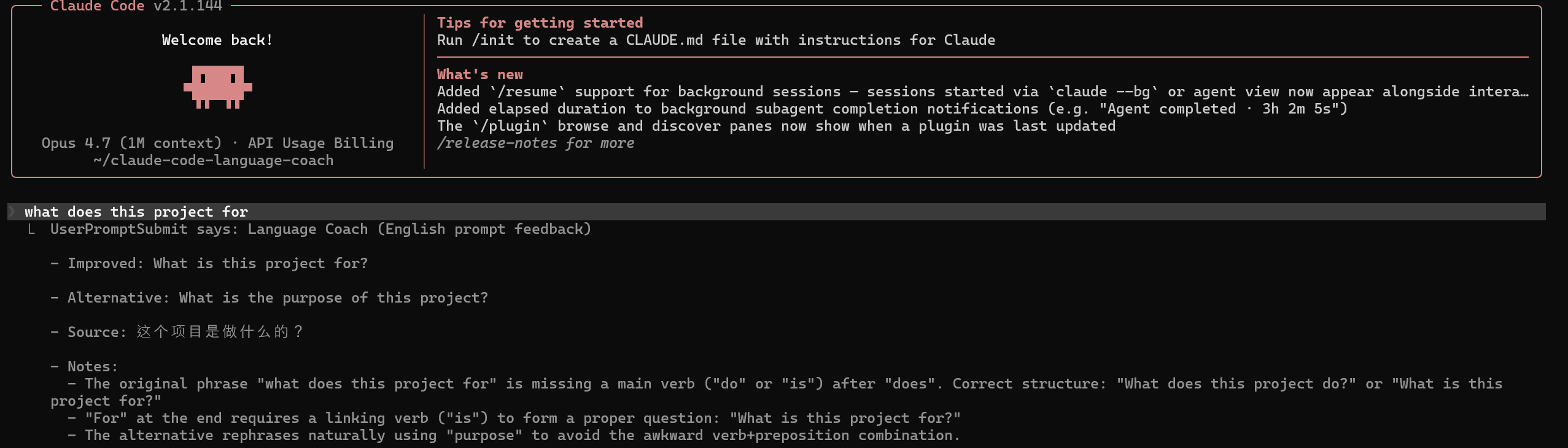
Install:
Add the marketplace:
/plugin marketplace add jiang1997/claude-code-language-coach
Install the plugin:
/plugin install language-coach@language-coach
Configure — open the plugin manager (/plugin → Installed → Language Coach) and set:
api_key: Your OpenAI-compatible API keybase_url: Provider base URL (e.g. https://api.openai.com/v1)model: Model name accepted by that providerThe non-blocking version that provides feedback in the CLI status line.

Install:
Add the marketplace:
/plugin marketplace add jiang1997/claude-code-language-coach
Install the plugin:
/plugin install language-coach-statusline@language-coach
Configure — same API settings as the Original version (api_key, base_url, model).
Mandatory Setup:
To see the feedback, you must add a statusLine entry to your ~/.claude/settings.json:
{
  "statusLine": {
    "type": "command",
    "command": "node /absolute/path/to/plugins/language-coach-statusline/scripts/language-statusline.js",
    "refreshInterval": 3
  }
}
(Tip: Use find ~/.claude/plugins -name language-statusline.js to find the absolute path after installation.)
Because this is a monorepo, you must point the CLI to a specific sub-directory when testing locally:
To develop the Original version:
claude --plugin-dir ./plugins/language-coach
To develop the Statusline version:
claude --plugin-dir ./plugins/language-coach-statusline
npx claudepluginhub jiang1997/claude-code-language-coach --plugin language-coachShows grammar suggestions and translates prompts into a configurable target language.
 jiang1997
Shows grammar suggestions and translates prompts into a configurable target language.
jiang1997AI-powered translation plugin with /tr command (--hq for high-quality)
 hiroro-work
Forces skill evaluation before every response
 umputun
Scores and rewrites every user prompt in your chosen target language (English, Chinese, Spanish, or Japanese) via a UserPromptSubmit hook. Feedback is shown to you only, not added to the model's context.
 12og3r
Wrap a prompt in <optimize>...</optimize> and it is rewritten into a sharper prompt before it runs (Claude Opus 4.8). Hook-based (UserPromptSubmit).
 johnpsasser
English language coach for non-native speakers — auto-corrects prompts, translates non-English, refines with :: prefix, tracks improvement over time
 xiaolai
'%20stop-opacity%3D'0.16'%2F%3E%3Cstop%20offset%3D'1'%20stop-color%3D'rgb(200%2C90%2C60)'%20stop-opacity%3D'0.03'%2F%3E%3C%2FlinearGradient%3E%3C%2Fdefs%3E%3Crect%20width%3D'320'%20height%3D'200'%20fill%3D'url(%23g)'%2F%3E%3Ccircle%20cx%3D'250'%20cy%3D'56'%20r%3D'92'%20fill%3D'rgb(200%2C90%2C60)'%20fill-opacity%3D'0.06'%2F%3E%3Ccircle%20cx%3D'64'%20cy%3D'172'%20r%3D'58'%20fill%3D'rgb(200%2C90%2C60)'%20fill-opacity%3D'0.05'%2F%3E%3C%2Fsvg%3E)