Stats
Actions
Available In
Tags

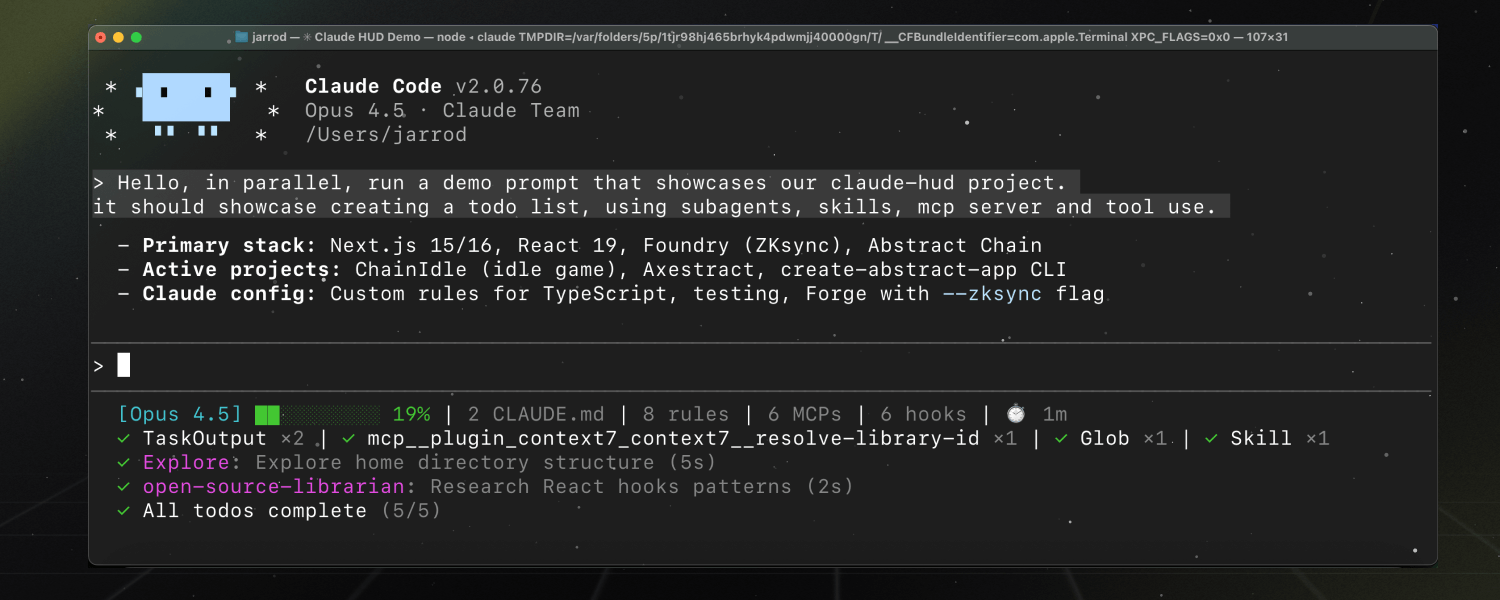
Monitor Claude Code sessions with a real-time HUD showing context health, tool activity, agent tracking, and todo progress, configurable via guided setup
Based on adoption, maintenance, documentation, and repository signals. Not a security audit or endorsement.
npx claudepluginhub jarrodwatts/claude-hud --plugin claude-hudA Claude Code plugin that shows what's happening — context usage, active tools, running agents, and todo progress. Always visible below your input.

🌐 English | 中文文档
Inside a Claude Code instance, run the following commands:
Step 1: Add the marketplace
/plugin marketplace add jarrodwatts/claude-hud
Step 2: Install the plugin
On Linux, /tmp is often a separate filesystem (tmpfs), which causes plugin installation to fail with:
EXDEV: cross-device link not permitted
Fix: Set TMPDIR before installing:
mkdir -p ~/.cache/tmp && TMPDIR=~/.cache/tmp claude
Then run the install command below in that session. This is a Claude Code platform limitation.
/plugin install claude-hud
After that, reload plugins:
/reload-plugins
Step 3: Configure the statusline
/claude-hud:setup
On Windows, Node.js LTS is the supported runtime for Claude HUD setup. If setup says no JavaScript runtime was found, install Node.js for your shell first:
winget install OpenJS.NodeJS.LTS
Then restart your shell and run /claude-hud:setup again.
Done! Restart Claude Code to load the new statusLine config, then the HUD will appear.
On Windows, make that a full Claude Code restart after setup writes the new statusLine config.
Claude HUD gives you better insights into what's happening in your Claude Code session.
| What You See | Why It Matters |
|---|---|
| Project path | Know which project you're in (configurable 1-3 directory levels) |
| Context health | Know exactly how full your context window is before it's too late |
| Tool activity | Watch Claude read, edit, and search files as it happens |
| Agent tracking | See which subagents are running and what they're doing |
| Todo progress | Track task completion in real-time |
[Opus] │ my-project git:(main*)
Context █████░░░░░ 45% │ Usage ██░░░░░░░░ 25% (1h 30m / 5h)
Bedrock, Vertex), project path, git branch/claude-hud:configure)◐ Edit: auth.ts | ✓ Read ×3 | ✓ Grep ×2 ← Tools activity
◐ explore [haiku]: Finding auth code (2m 15s) ← Agent status
▸ Fix authentication bug (2/5) ← Todo progress
Claude HUD uses Claude Code's native statusline API — no separate window, no tmux required, works in any terminal.
Claude Code → stdin JSON → claude-hud → stdout → displayed in your terminal
           ↘ transcript JSONL (tools, agents, todos)
Key features:
Customize your HUD anytime:
/claude-hud:configure
The guided flow handles layout, language, and common display toggles. Advanced overrides such as custom colors and thresholds are preserved there, but you set them by editing the config file directly:
| Preset | What's Shown |
|---|---|
| Full | Everything enabled — tools, agents, todos, git, usage, duration |
| Essential | Activity lines + git status, minimal info clutter |
| Minimal | Core only — just model name and context bar |
After choosing a preset, you can turn individual elements on or off.
Edit ~/.claude/plugins/claude-hud/config.json directly for advanced settings such as colors.*,
pathLevels, maxWidth, threshold overrides, display.timeFormat, and display.promptCacheTtlSeconds. Running /claude-hud:configure
preserves those manual settings while still letting you change language, layout, and the common
guided toggles.
Real-time statusline HUD for Claude Code - displays context usage, tool activity, agent tracking, and todo progress
 davepoon
Terminal HUD for Claude Code — real-time token, cost, git, and project monitor
 letsgojh0810
A comprehensive statusline dashboard for Claude Code — session summary, quota bars, agent tracker, MCP health, message history, and more. All at a glance, no slash commands needed.
 NYCU-Chung
Real-time session dashboard for Claude Code — cost tracking, analytics, and smart alerts
 hyeongjun-dev
Real-time statusline HUD for Claude Code with Cubence balance display
 nangongwentian-fe
Harness-native ECC plugin for engineering teams - 67 agents, 271 skills, 92 legacy command shims, reusable hooks, rules, MCP conventions, and operator workflows for Claude Code plus adjacent agent harnesses
 affaan-m
GPT expert subagents for Claude Code via Codex CLI. Five specialized experts: Architect, Plan Reviewer, Scope Analyst, Code Reviewer, Security Analyst.
 jarrodwatts
Own this plugin?
Verify ownership to unlock analytics, metadata editing, and a verified badge. GitHub access is read-only (username + org membership).
Sign in to claimOwn this plugin?
Verify ownership to unlock analytics, metadata editing, and a verified badge. GitHub access is read-only (username + org membership).
Sign in to claim
'%20stop-opacity%3D'0.16'%2F%3E%3Cstop%20offset%3D'1'%20stop-color%3D'rgb(200%2C90%2C60)'%20stop-opacity%3D'0.03'%2F%3E%3C%2FlinearGradient%3E%3C%2Fdefs%3E%3Crect%20width%3D'320'%20height%3D'200'%20fill%3D'url(%23g)'%2F%3E%3Ccircle%20cx%3D'250'%20cy%3D'56'%20r%3D'92'%20fill%3D'rgb(200%2C90%2C60)'%20fill-opacity%3D'0.06'%2F%3E%3Ccircle%20cx%3D'64'%20cy%3D'172'%20r%3D'58'%20fill%3D'rgb(200%2C90%2C60)'%20fill-opacity%3D'0.05'%2F%3E%3C%2Fsvg%3E)