Claude HUD Cubence
A fork of jarrodwatts/claude-hud with Cubence balance and API latency display.


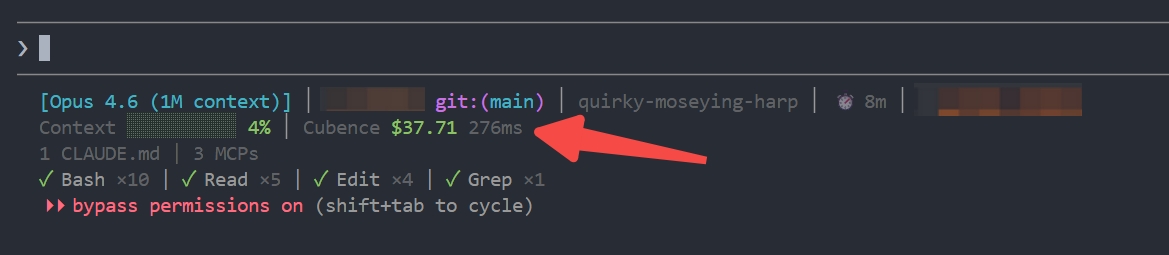
What's New
Adds a Cubence segment to the context line, showing your account balance and API latency:
Context █░░░░░░░░░ 5% │ Cubence $12.34 230ms
With subscription:
Context █░░░░░░░░░ 5% │ Cubence 5h $1.23/$5.00 bal $12.34 230ms
- Reads
ANTHROPIC_AUTH_TOKEN and ANTHROPIC_BASE_URL from ~/.claude/settings.json
- Calls Cubence API
/v1/user/subscription-info to fetch balance
- 180s file cache to avoid excessive API calls (statusline refreshes every ~300ms)
- API round-trip latency measured during balance fetch
- Graceful degradation: falls back to stale cache on API failure, hides if no token configured
Install
Inside Claude Code, run:
Step 1: Add the marketplace
/plugin marketplace add nangongwentian-fe/claude-hud-cubence
Step 2: Install the plugin
⚠️ Linux users: Click here first
On Linux, /tmp is often a separate filesystem (tmpfs), which causes plugin installation to fail with:
EXDEV: cross-device link not permitted
Fix: Set TMPDIR before installing:
mkdir -p ~/.cache/tmp && TMPDIR=~/.cache/tmp claude
Then run the install command below in that session.
/plugin install claude-hud-cubence
Step 3: Configure the statusline
/claude-hud:setup
⚠️ Windows users: Click here if setup says no JavaScript runtime was found
Install Node.js LTS first:
winget install OpenJS.NodeJS.LTS
Then restart your shell and run /claude-hud:setup again.
Done! Restart Claude Code to load the new statusLine config.
Enable Cubence Balance
After installing, enable the Cubence display in your HUD config:
Edit ~/.claude/plugins/claude-hud-cubence/config.json:
{
  "display": {
    "showCubenceBalance": true
  }
}
Your ~/.claude/settings.json must have the Cubence credentials:
{
  "env": {
    "ANTHROPIC_AUTH_TOKEN": "your-cubence-api-key",
    "ANTHROPIC_BASE_URL": "https://api.cubence.com"
  }
}
What is Claude HUD?
Claude HUD gives you better insights into what's happening in your Claude Code session.
| What You See | Why It Matters |
|---|
| Project path | Know which project you're in (configurable 1-3 directory levels) |
| Context health | Know exactly how full your context window is before it's too late |
| Cubence balance | Monitor your Cubence account balance and API latency in real-time |
| Tool activity | Watch Claude read, edit, and search files as it happens |
| Agent tracking | See which subagents are running and what they're doing |
| Todo progress | Track task completion in real-time |
What You See
Default (2 lines)
[Opus] │ my-project git:(main*)
Context █████░░░░░ 45% │ Cubence $12.34 230ms
- Line 1 — Model, provider/auth label when relevant, project path, git branch
- Line 2 — Context bar (green → yellow → red), Cubence balance and latency
Optional lines (enable via /claude-hud:configure)
◐ Edit: auth.ts | ✓ Read ×3 | ✓ Grep ×2        ← Tools activity
◐ explore [haiku]: Finding auth code (2m 15s)    ← Agent status
▸ Fix authentication bug (2/5)                   ← Todo progress
Configuration
Customize your HUD anytime:
/claude-hud:configure
Options
All options from the original claude-hud are supported, plus:
| Option | Type | Default | Description |
|---|
display.showCubenceBalance | boolean | false | Show Cubence account balance and API latency on the context line |
See the full option list in the original claude-hud documentation.
Example Configuration
{
  "lineLayout": "expanded",
  "pathLevels": 2,
  "gitStatus": {
    "enabled": true,
    "showDirty": true
  },
  "display": {
    "showCubenceBalance": true,
    "showTools": true,
    "showAgents": true,
    "showTodos": true
  }
}
Requirements
- Claude Code v1.0.80+
- Node.js 18+ or Bun
- Cubence account with API key (for balance display)
Development
git clone https://github.com/nangongwentian-fe/claude-hud-cubence
cd claude-hud-cubence
npm ci && npm run build
npm test
Credits
 jarrodwatts
 letsgojh0810
 NYCU-Chung
 AwesomeJun
 NoobyGains
 affaan-m
'%20stop-opacity%3D'0.16'%2F%3E%3Cstop%20offset%3D'1'%20stop-color%3D'rgb(200%2C90%2C60)'%20stop-opacity%3D'0.03'%2F%3E%3C%2FlinearGradient%3E%3C%2Fdefs%3E%3Crect%20width%3D'320'%20height%3D'200'%20fill%3D'url(%23g)'%2F%3E%3Ccircle%20cx%3D'250'%20cy%3D'56'%20r%3D'92'%20fill%3D'rgb(200%2C90%2C60)'%20fill-opacity%3D'0.06'%2F%3E%3Ccircle%20cx%3D'64'%20cy%3D'172'%20r%3D'58'%20fill%3D'rgb(200%2C90%2C60)'%20fill-opacity%3D'0.05'%2F%3E%3C%2Fsvg%3E)