Stats
Actions
Available In
Tags

Native Ghostty desktop notifications for Claude Code (idle input / permission request / turn finished) via OSC 777. Per-tab suppression and click-to-focus are handled natively by Ghostty. Runs only under Ghostty.
Native Ghostty desktop notifications for Claude Code — when Claude is waiting for your input, asks for permission, or finishes a turn.
Zero build, no compiled helper app, no Xcode. Just shell + Ghostty's native
notification support. The only runtime dependency is jq.
ghostty-notifyis the plugin shipped by this marketplace.
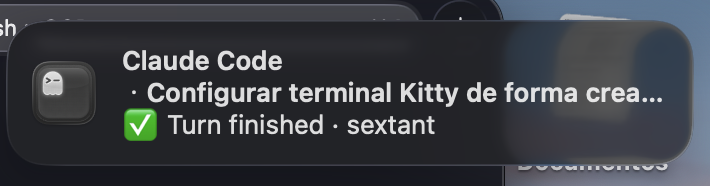
⌛ Waiting for your input — Claude has been idle waiting for you🔐 Permission for <tool>: <preview> — Claude wants to run a tool✅ Turn finished — Claude completed the turnClick-to-focus and per-tab suppression are handled natively by Ghostty's OSC 777 implementation (verified on Ghostty 1.3.x) — this plugin simply wires Claude Code's hooks to it, so there is nothing native to build or maintain.
desktop-notifications is on by default.jq (brew install jq).>= 2.1.141 use the terminalSequence hook output;
older versions fall back to writing to /dev/tty./plugin marketplace add ishtartec/claude-code-ghostty
/plugin install ghostty-notify@claude-code-ghostty
Then start a new Claude Code session (hooks load at session start). Manage or
toggle it anytime from /plugin.
So the banners actually appear on screen:
The plugin registers three Claude Code hooks (Notification with the
idle_prompt matcher, PermissionRequest, and Stop). Each builds a short
message and emits an OSC 777 notification sequence
(\033]777;notify;<title>;<body>\007). On Claude Code >= 2.1.141 it is
delivered via the terminalSequence hook-output field; otherwise it is written
to /dev/tty. Ghostty turns the sequence into a native macOS notification.
The plugin only acts under Ghostty (GHOSTTY_RESOURCES_DIR / TERM /
TERM_PROGRAM); in any other terminal it is a no-op.
Some Ghostty notification tools ship a small native helper app (e.g. in Swift)
that posts notifications through macOS's UNUserNotificationCenter and focuses
the exact pane via the Accessibility / AppleScript APIs. That buys per-pane
precision and works independently of Ghostty's OSC handling — at the cost of a
build step (Xcode Command Line Tools) and Accessibility permissions.
This plugin takes the opposite trade-off: no build, no extra permissions. It relies on Ghostty's own OSC 777 handling, which on recent Ghostty already does per-tab suppression and click-to-focus. The one thing it does not do is target a specific pane within a tab (Ghostty focuses the tab; a notification from a split pane may not focus the exact pane). If you need per-pane precision, a native helper-app approach is the better fit.
MIT — see LICENSE.
Matches all tools
Hooks run on every tool call, not just specific ones
Own this plugin?
Verify ownership to unlock analytics, metadata editing, and a verified badge. GitHub access is read-only (username + org membership).
Sign in to claimOwn this plugin?
Verify ownership to unlock analytics, metadata editing, and a verified badge. GitHub access is read-only (username + org membership).
Sign in to claimBased on adoption, maintenance, documentation, and repository signals. Not a security audit or endorsement.
npx claudepluginhub ishtartec/claude-code-ghostty --plugin ghostty-notifyUltra-compressed communication mode. Cuts ~75% of tokens while keeping full technical accuracy by speaking like a caveman.
 JuliusBrussee
Memory compression system for Claude Code - persist context across sessions
 thedotmack
Multi-model consensus engine integrating OpenAI Codex CLI, Gemini CLI, and Claude CLI for collaborative code review and problem-solving.
 xrf9268-hue
Curate auto-memory, promote learnings to CLAUDE.md and rules, extract proven patterns into reusable skills.
 alirezarezvani
'%20stop-opacity%3D'0.16'%2F%3E%3Cstop%20offset%3D'1'%20stop-color%3D'rgb(200%2C90%2C60)'%20stop-opacity%3D'0.03'%2F%3E%3C%2FlinearGradient%3E%3C%2Fdefs%3E%3Crect%20width%3D'320'%20height%3D'200'%20fill%3D'url(%23g)'%2F%3E%3Ccircle%20cx%3D'250'%20cy%3D'56'%20r%3D'92'%20fill%3D'rgb(200%2C90%2C60)'%20fill-opacity%3D'0.06'%2F%3E%3Ccircle%20cx%3D'64'%20cy%3D'172'%20r%3D'58'%20fill%3D'rgb(200%2C90%2C60)'%20fill-opacity%3D'0.05'%2F%3E%3C%2Fsvg%3E)