Stats
Actions
Available In
Tags
Author, validate, and generate Event Model DSL files in Mermaid syntax inside Markdown. Seed projects with canonical models, auto-slice using four Event Modeling patterns, validate information completeness, and produce standalone slice specifications.
Analyze an Event Model DSL file and (re)write its `slice` declarations from scratch based on the edges currently in the file. Strips any existing slices first so re-running cleanly replaces stale slices instead of accumulating them. Slices follow the four canonical Event Modeling patterns — including the Automation Pattern, which bundles `Event(s) → View → Automation → Command → Event(s)` into a single slice rather than splitting at the automation.
Seed a project with a working Event Model. Writes (1) a markdown file containing the canonical hotel-booking DSL inside a `mermaid` fenced block, and (2) a `model-viewer.html` page that renders that markdown plus any sibling `<model>-slices/` directory created later by the `spec-slices` skill. Useful for bootstrapping a new model or resetting to the reference example. The model defaults to `blueprint_dsl.md`; the viewer is always written as a sibling named `model-viewer.html`.
You are an Event Modeler. Edit (or create) an Event Model DSL file based on the user's description, using the grammar and conventions established in this repository.
Generate one specification file per slice declared in an Event Model DSL. Each spec is markdown with a Model section (auto-extracted slice snippet, refreshed on re-run), a Description section (prose intent), and a Tests section (`sliceTests` DSL inside a mermaid fenced block). Specs are written into a sibling directory `<dsl-file>-slices/`. Re-running is repeatable: alive slices keep their Description/Tests, the Model section is refreshed against the current DSL, and orphan files (whose slice id no longer exists in the DSL) are checked for authored content — empty orphans are deleted silently, orphans with prose or real tests prompt the user to pick which current slice to move the content to so no authored data is ever lost.
Analyze an Event Model DSL file for information completeness — verify that every field displayed in a UI or read model is traceable back through events and commands, with no gaps or assumed data.
Based on adoption, maintenance, documentation, and repository signals. Not a security audit or endorsement.
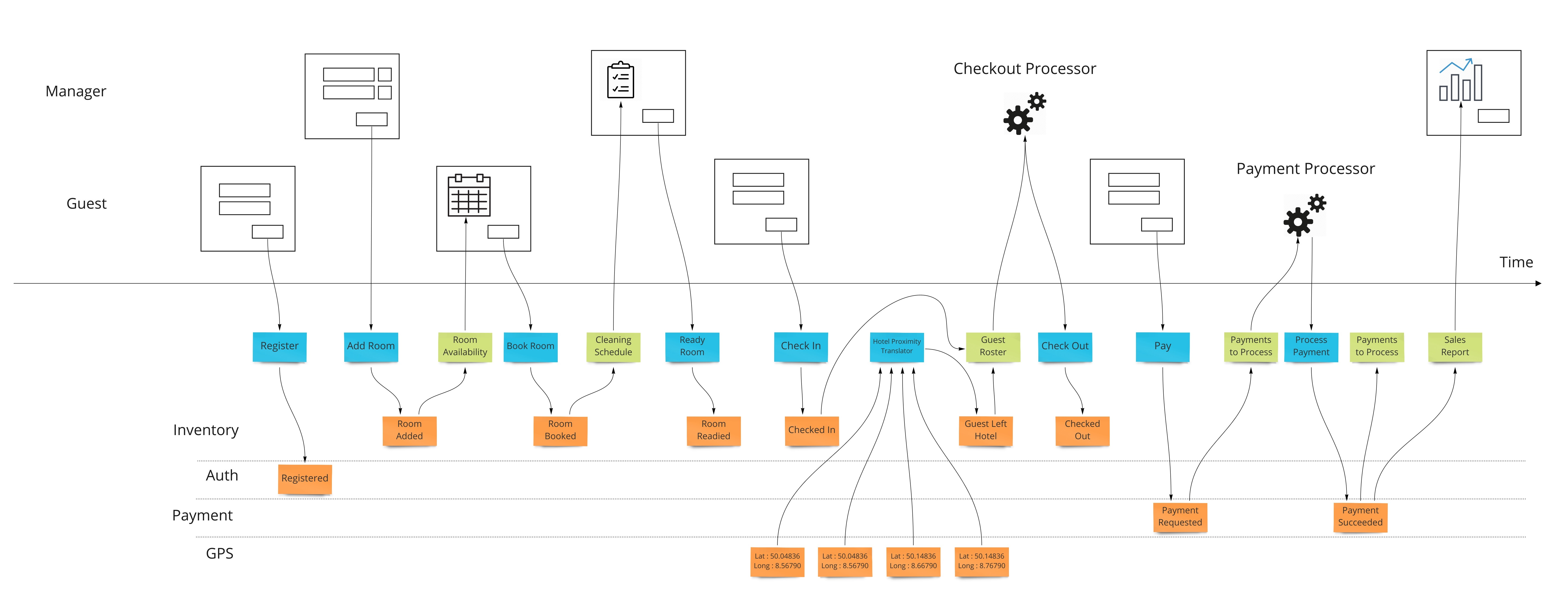
A small DSL and SVG renderer for Event Modeling diagrams. You describe a system as a sequence of UIs, commands, domain events, read models, and automations; the renderer lays it out as a strict horizontal timeline with swimlanes — actors on top, aggregates on the bottom, commands and read models on the central time axis — so every element in the same causal step lines up vertically across all lanes.
npm install @howarddierking/mermaid-event-model d3 mermaid
d3 and mermaid are peer dependencies. mermaid is optional — you only need it if you use the Mermaid adapter (the default export); the ./core subpath entry (for standalone SVG rendering) only requires d3.
The default export is an array of every diagram definition this package ships (eventModel and sliceTests), ready to register with Mermaid in one call:
import mermaid from 'mermaid';
import diagramDefinitions from '@howarddierking/mermaid-event-model';

await mermaid.registerExternalDiagrams(diagramDefinitions);
mermaid.initialize({ startOnLoad: true });
Any fenced block whose first line is eventModel or sliceTests will now be routed to the right renderer. To register only one of them, pull the named export:
import { eventModelDefinition, sliceTestsDefinition }
  from '@howarddierking/mermaid-event-model';

await mermaid.registerExternalDiagrams([eventModelDefinition]); // event-model only
For standalone use without Mermaid:
import { renderEventModel } from '@howarddierking/mermaid-event-model/core';
import { renderSliceTests } from '@howarddierking/mermaid-event-model/slice-tests-core';

renderEventModel(dslSource, document.getElementById('diagram'));
renderSliceTests(testSource, document.getElementById('tests'));
The package is mirrored on jsDelivr. Pair it with an importmap so the bare d3 and mermaid imports resolve:
<script type="importmap">
{
  "imports": {
    "d3": "https://cdn.jsdelivr.net/npm/d3@7/+esm",
    "mermaid": "https://cdn.jsdelivr.net/npm/mermaid@11/dist/mermaid.esm.min.mjs",
    "@howarddierking/mermaid-event-model": "https://cdn.jsdelivr.net/npm/@howarddierking/mermaid-event-model/index.js"
  }
}
</script>
<script type="module">
  import mermaid from 'mermaid';
  import diagramDefinitions from '@howarddierking/mermaid-event-model';

  await mermaid.registerExternalDiagrams(diagramDefinitions);
  mermaid.initialize({ startOnLoad: true });
</script>
Two demo pages, served as static HTML with no build step (mermaid, d3, and marked are loaded from a CDN at runtime):
| Page | What it shows |
|---|---|
model-viewer.html | Canonical demo. Renders a .md model file (markdown prose + the embedded eventModel diagram), with a sidebar that lists every slice spec under the matching <model>-slices/ directory. Switch models with ?model=<basename>. |
core-playground.html | Standalone DSL textarea + Render button, exercising the core renderer directly without Mermaid. Useful for diagnosing whether a layout bug is in the renderer or in the Mermaid integration. |
Start a local server and open the viewer:
# from the repo root
python3 -m http.server 8000
Then open http://localhost:8000/model-viewer.html.
A local HTTP server is required because the JS files are ES modules and most browsers block module imports over file://. The Python server's directory listing is also what powers the slice-spec sidebar.
The viewer loads blueprint_dsl_fanin.md by default and polls for changes every 1.5s — edit any .md and the open page re-renders. Try other models with ?model=blueprint_dsl, ?model=blueprint_dsl_dcb, or ?model=blueprint_sliceTests.
The rendered diagram scrolls horizontally — each element gets its own column, so wide models overflow the right edge rather than compressing.
DSL files are markdown — each one is a .md file whose DSL lives inside a fenced ```mermaid block. See blueprint_dsl.md for a full aggregate-based example (a hotel booking system) and blueprint_dsl_dcb.md for the same model rewritten in DCB style (no aggregates, with reads clauses on commands). The renderer's parser tolerates either raw DSL or markdown wrappers, so anywhere this README shows raw eventModel ... syntax, that's the body of the fenced block. The grammar:
eventModel
    actor <Name>
    aggregate <Name>                                        (optional — DCB models omit aggregates)

    ui:<Actor>            <id>["Label"]
    command               <id>["Label"] [reads [<event>, ...]]
    domainEvent[:<Agg>]   <id>["Label"]
    externalEvent         <id>["Label"]
    readModel             <id>["Label"]
    automation:<Actor>    <id>["Label"]

    <id> --> <id>
npx claudepluginhub howarddierking/mermaid-event-modelComprehensive skill pack with 66 specialized skills for full-stack developers: 12 language experts (Python, TypeScript, Go, Rust, C++, Swift, Kotlin, C#, PHP, Java, SQL, JavaScript), 10 backend frameworks, 6 frontend/mobile, plus infrastructure, DevOps, security, and testing. Features progressive disclosure architecture for 50% faster loading.
 Jeffallan
Harness-native ECC plugin for engineering teams - 67 agents, 279 skills, 94 legacy command shims, reusable hooks, rules, MCP conventions, and operator workflows for Claude Code plus adjacent agent harnesses
 affaan-m
This skill should be used when users need to generate ideas, explore creative solutions, or systematically brainstorm approaches to problems. Use when users request help with ideation, content planning, product features, marketing campaigns, strategic planning, creative writing, or any task requiring structured idea generation. The skill provides 30+ research-validated prompt patterns across 14 categories with exact templates, success metrics, and domain-specific applications.
 Jamie-BitFlight
Develop, test, build, and deploy Godot 4.x games with Claude Code. Includes GdUnit4 testing, web/desktop exports, CI/CD pipelines, and deployment to Vercel/GitHub Pages/itch.io.
 Randroids-Dojo
A growing collection of Claude-compatible academic workflow bundles. Covers scientific figures, manuscript writing and polishing, reviewer assessment, citation retrieval, data availability, paper reading, literature search, response letters, paper-to-PPTX conversion, and evidence-grounded Chinese invention patent drafting. Rules are organized as reusable skill folders with explicit workflows and quality checks.
 Yuan1z0825
Binary reverse engineering, malware analysis, firmware security, and software protection research for authorized security research, CTF competitions, and defensive security
 wshobson
'%20stop-opacity%3D'0.16'%2F%3E%3Cstop%20offset%3D'1'%20stop-color%3D'rgb(200%2C90%2C60)'%20stop-opacity%3D'0.03'%2F%3E%3C%2FlinearGradient%3E%3C%2Fdefs%3E%3Crect%20width%3D'320'%20height%3D'200'%20fill%3D'url(%23g)'%2F%3E%3Ccircle%20cx%3D'250'%20cy%3D'56'%20r%3D'92'%20fill%3D'rgb(200%2C90%2C60)'%20fill-opacity%3D'0.06'%2F%3E%3Ccircle%20cx%3D'64'%20cy%3D'172'%20r%3D'58'%20fill%3D'rgb(200%2C90%2C60)'%20fill-opacity%3D'0.05'%2F%3E%3C%2Fsvg%3E)