claude-carbon


Track the carbon footprint of your Claude Code sessions.
1. Install (or update):
curl -fsSL https://raw.githubusercontent.com/gwittebolle/claude-carbon/main/install.sh | bash
Same command to install and to update to the latest version.
2. Restart Claude Code. Your CO2 appears in the status line:
claude-carbon ⌥ main | 🟢 Opus 4.7 ▓▓▓░░░░░░░ 35% | $0.50 · 65g CO₂ | Use 24% ↻13:00
Segments, left to right: project + git branch, model + context window %, session cost + CO2, 5h block usage % + reset time. A 🔥 prefix appears when the sustained burn rate would overshoot 100% of the limit by the end of the 5h block (after a 15 min grace window, only once usage reaches 15%).
Terminal and IDE only. claude-carbon runs through the Claude Code status line and shell hooks, which execute in the terminal CLI and IDE extensions. They do not run in the web app (claude.ai/code) or the desktop app, so no CO2 is displayed or recorded there.
5h quota source. The percentage comes directly from Anthropic's /api/oauth/usage endpoint (the same data Claude Code displays in /usage). No heuristic, no token-limit file to seed. Two sources in order:
- stdin (preferred): if Claude Code injects
rate_limits.five_hour.used_percentage in the statusline JSON, that value is used straight away.
- OAuth API fallback:
GET https://api.anthropic.com/api/oauth/usage with the bearer token from macOS Keychain, CLAUDE_CODE_OAUTH_TOKEN, or ~/.claude/.credentials.json. Cached 60s in ~/.claude/claude-carbon/oauth-usage.json.
Accurate on every plan, including Max 20x.
3. Use the slash commands:
/carbon-report - text report with totals, equivalences, top sessions/carbon-card - generate shareable PNG report cards (requires playwright-core, see Dependencies)/carbon-update - update to the latest version and re-price history (see Updating)
What it does
- Adds a live CO2 estimate to the Claude Code status line, next to the session cost
- Persists each session to a local SQLite database
- Backfills historical data from existing
~/.claude transcripts
- Two slash commands:
/carbon-report (text) and /carbon-card (PNG)
Example report
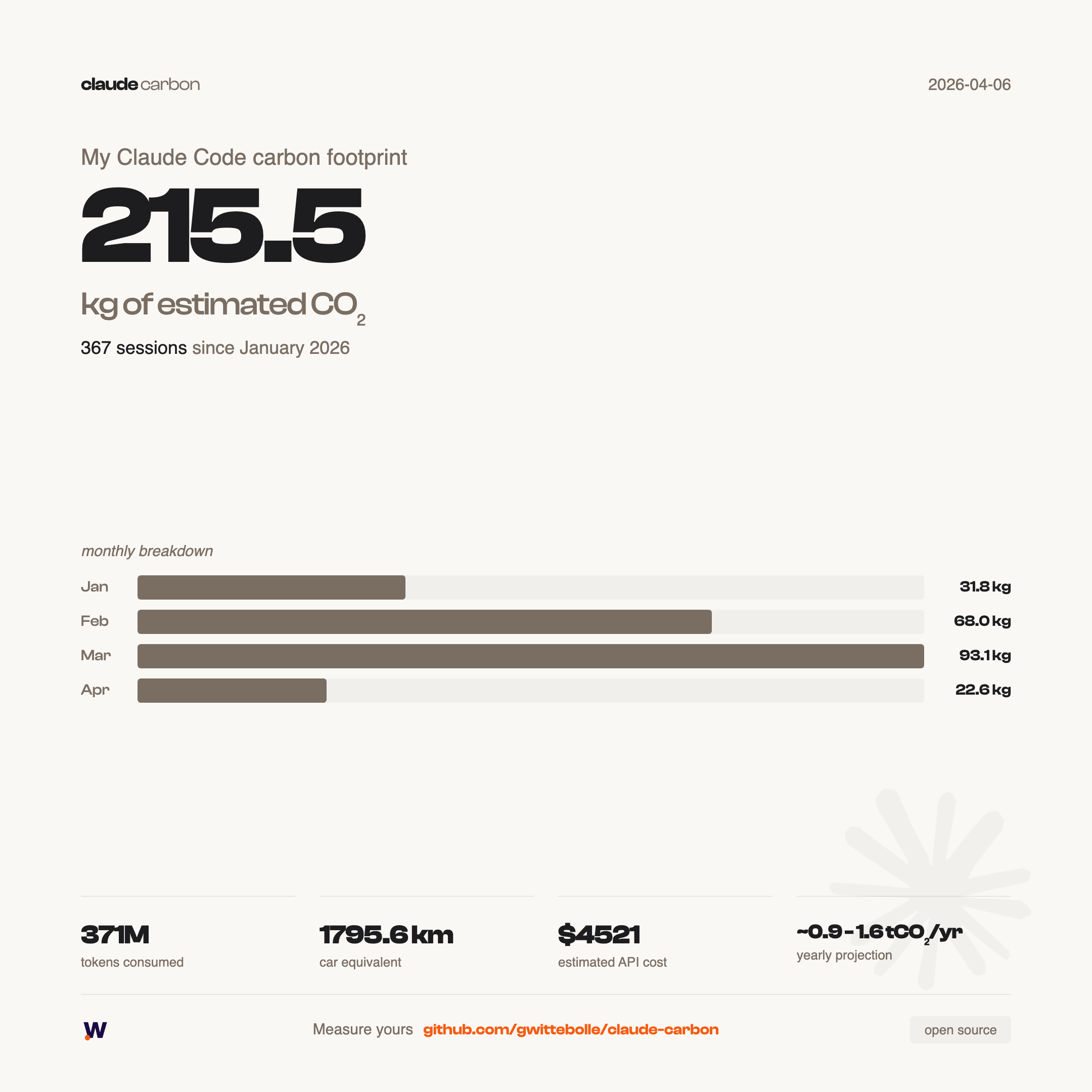
Generate yours with /carbon-card in Claude Code. Exports summary and detailed PNGs to exports/.
Advanced options (CLI)
# Since a specific date
bash ~/code/claude-carbon/scripts/generate-report.sh --since 2026-03-01

# All time
bash ~/code/claude-carbon/scripts/generate-report.sh --all
Custom install directory
CLAUDE_CARBON_DIR=~/my-path/claude-carbon curl -fsSL https://raw.githubusercontent.com/gwittebolle/claude-carbon/main/install.sh | bash
Manual install
git clone https://github.com/gwittebolle/claude-carbon.git ~/code/claude-carbon
bash ~/code/claude-carbon/scripts/setup.sh
Then add to ~/.claude/settings.json:
{
  "statusLine": {
    "type": "command",
    "command": "~/code/claude-carbon/scripts/statusline.sh"
  },
  "hooks": {
    "Stop": [
      {
        "matcher": "",
        "hooks": [
          {
            "type": "command",
            "command": "~/code/claude-carbon/scripts/persist-session.sh"
          }
        ]
      }
    ]
  }
}
Restart Claude Code.
How it works
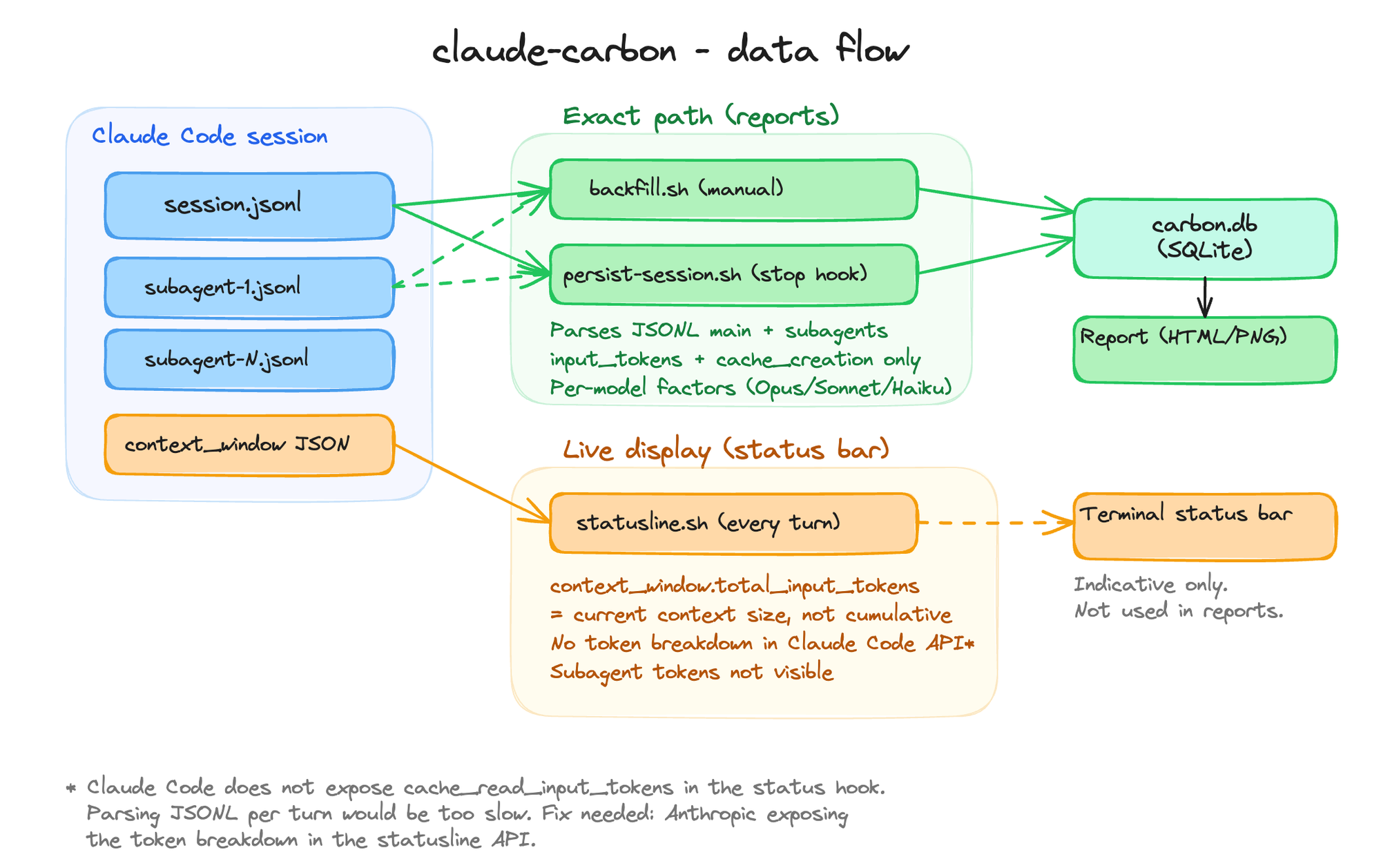
Three data paths, two levels of accuracy:
| Script | Trigger | Data source | Subagents | Cache reads | Accuracy |
|---|
backfill.sh | Manual / setup | JSONL files | Included | Counted (8% energy) | Best estimate |
persist-session.sh | Stop hook (session end) | JSONL files | Included | Counted (8% energy) | Best estimate |
statusline.sh | Every turn (live) | context_window JSON | Not included | Included (approx) | Approximate |

 hyeongjun-dev
 Astro-Han
 AgenticSec
 NYCU-Chung
 tombelieber
 uppinote20
'%20stop-opacity%3D'0.16'%2F%3E%3Cstop%20offset%3D'1'%20stop-color%3D'rgb(200%2C90%2C60)'%20stop-opacity%3D'0.03'%2F%3E%3C%2FlinearGradient%3E%3C%2Fdefs%3E%3Crect%20width%3D'320'%20height%3D'200'%20fill%3D'url(%23g)'%2F%3E%3Ccircle%20cx%3D'250'%20cy%3D'56'%20r%3D'92'%20fill%3D'rgb(200%2C90%2C60)'%20fill-opacity%3D'0.06'%2F%3E%3Ccircle%20cx%3D'64'%20cy%3D'172'%20r%3D'58'%20fill%3D'rgb(200%2C90%2C60)'%20fill-opacity%3D'0.05'%2F%3E%3C%2Fsvg%3E)