EverMem Plugin for Claude Code
Persistent memory for Claude Code. Automatically saves and recalls context from past coding sessions.
Features
- Automatic Memory Save - Conversations are saved when Claude finishes responding
- Automatic Memory Retrieval - Relevant memories are retrieved when you submit a prompt
- Session Context - Recent work summary loaded on session start
- Memory Search - Manually search your memory history
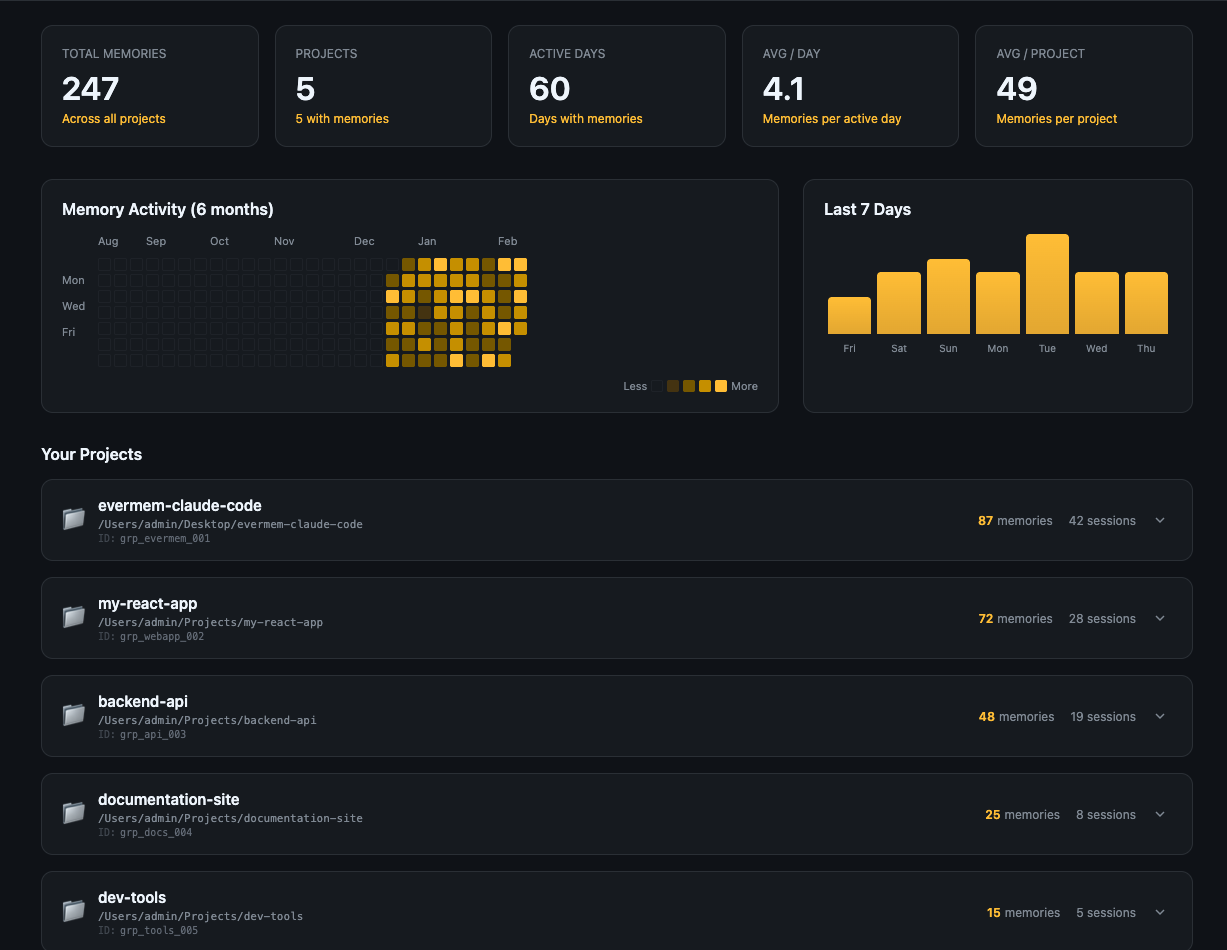
- Memory Hub - Visual dashboard to explore and manage memories
Quick Install
curl -fsSL https://raw.githubusercontent.com/EverMind-AI/evermem-claude-code/main/install.sh | bash
This will:
- Prompt for your EverMem API key
- Save it to your shell profile
- Install the plugin via Claude Code's plugin system
Get your API key: console.evermind.ai
Manual Installation
1. Get Your API Key
Visit console.evermind.ai to create an account and get your API key.
2. Configure Environment Variable
Add to your shell profile (~/.zshrc or ~/.bashrc):
export EVERMEM_API_KEY="your-api-key-here"
Reload your shell:
source ~/.zshrc # or source ~/.bashrc
3. Install the Plugin
# Add marketplace from GitHub (tracks updates automatically)
claude plugin marketplace add https://github.com/EverMind-AI/evermem-claude-code

# Install the plugin
claude plugin install evermem@evermem --scope user
To update the plugin later:
claude plugin marketplace update evermem
claude plugin update evermem@evermem
4. Verify Installation
Run /evermem:help to check if the plugin is configured correctly.
Usage
Commands
| Command | Description |
|---|
/evermem:help | Show setup status and available commands |
/evermem:search <query> | Search your memories for specific topics |
/evermem:ask <question> | Ask about past work (combines memory + context) |
/evermem:hub | Open the Memory Hub dashboard |
/evermem:debug | View debug logs for troubleshooting |
/evermem:projects | View your Claude Code projects table |
Automatic Behavior
The plugin works automatically in the background:
On Session Start:
💡 EverMem: Last session (2h ago): "Implementing JWT authentication..." | 3 memories
Recent memories and last session summary are loaded to provide context.
On Prompt Submit:
You: "How should I handle authentication?"
         ↓
📝 Memory Retrieved (2):
  • [0.85] (2 days ago) Discussion about JWT token implementation
  • [0.72] (1 week ago) Auth middleware setup decisions
         ↓
Claude receives the relevant context and responds accordingly
On Response Complete:
💾 EverMem: Memory saved (4 messages)
Memory Hub
The Memory Hub provides a visual interface to explore your memories:
- Activity heatmap (GitHub-style, 6 months)
- Memory statistics (Total, Projects, Active Days, Avg/Day, Avg/Project)
- Last 7 Days growth chart
- Project-based memory grouping with expandable cards
- Timeline view within each project (grouped by date)
- Load more pagination for large projects
To use the hub, run /evermem:hub and follow the instructions.
Configuration
Environment Variables
| Variable | Description | Required |
|---|
EVERMEM_API_KEY | Your EverMem API key | Yes |
Project-Specific Settings
Create .claude/evermem.local.md in your project root for per-project configuration:
---
group_id: "my-project"
---

Project-specific notes here.
Troubleshooting
API Key Not Configured
# Check if the key is set
echo $EVERMEM_API_KEY

# If empty, add to your shell profile and reload
export EVERMEM_API_KEY="your-key-here"
source ~/.zshrc
No Memories Found
- Memories are only recalled after you've had previous conversations
- Short prompts (less than 3 words) are skipped
- Check that your API key is valid at console.evermind.ai
API Errors
- 403 Forbidden: Invalid or expired API key
- 502 Bad Gateway: Server temporarily unavailable, try again
Debug Mode
Enable debug logging to troubleshoot issues:
# Set environment variable
export EVERMEM_DEBUG=1

# View logs in real-time
tail -f /tmp/evermem-debug.log

# Clear logs
> /tmp/evermem-debug.log
Run /evermem:debug to view recent debug logs directly.
Links
License
MIT
Technical Details
The following sections explain how EverMem works internally. This is useful for developers who want to understand the implementation or contribute to the project.

 davegoldblatt
 strvmarv
 kunickiaj
 Chachamaru127
 Lyzr-Cognis
 RohiRIK
'%20stop-opacity%3D'0.16'%2F%3E%3Cstop%20offset%3D'1'%20stop-color%3D'rgb(200%2C90%2C60)'%20stop-opacity%3D'0.03'%2F%3E%3C%2FlinearGradient%3E%3C%2Fdefs%3E%3Crect%20width%3D'320'%20height%3D'200'%20fill%3D'url(%23g)'%2F%3E%3Ccircle%20cx%3D'250'%20cy%3D'56'%20r%3D'92'%20fill%3D'rgb(200%2C90%2C60)'%20fill-opacity%3D'0.06'%2F%3E%3Ccircle%20cx%3D'64'%20cy%3D'172'%20r%3D'58'%20fill%3D'rgb(200%2C90%2C60)'%20fill-opacity%3D'0.05'%2F%3E%3C%2Fsvg%3E)