Stats
Actions
Available In
Tags

Persists architectural decisions, conventions, and project knowledge across Claude Code sessions using Cognis, with commands to save and recall context manually or automatically via hooks and index the codebase.
Index the current codebase and save a summary to Cognis memory for future reference.
Remove stored Cognis API credentials from global settings.
Show memory statistics — total stored memories, session history, and storage breakdown.
Configure Cognis settings for the current project (.claude/.cognis-claude/config.json).
Recall context from your last session to pick up where you left off.
Admin access level
Server config contains admin-level keywords
Own this plugin?
Verify ownership to unlock analytics, metadata editing, and a verified badge. GitHub access is read-only (username + org membership).
Sign in to claimOwn this plugin?
Verify ownership to unlock analytics, metadata editing, and a verified badge. GitHub access is read-only (username + org membership).
Sign in to claimBased on adoption, maintenance, documentation, and repository signals. Not a security audit or endorsement.



/claude-cognis:recall/claude-cognis:memory-stats1. Get your API key at studio.lyzr.ai
2. Install the plugin
In Claude Code, run:
/plugin marketplace add Lyzr-Cognis/claude-cognis
/plugin install claude-cognis
3. Set your API key
export LYZR_API_KEY="your-api-key"
Or save it permanently in ~/.cognis-claude/settings.json:
{ "apiKey": "your-api-key" }
That's it. Cognis will automatically load memories when you start a session and save them when you stop.
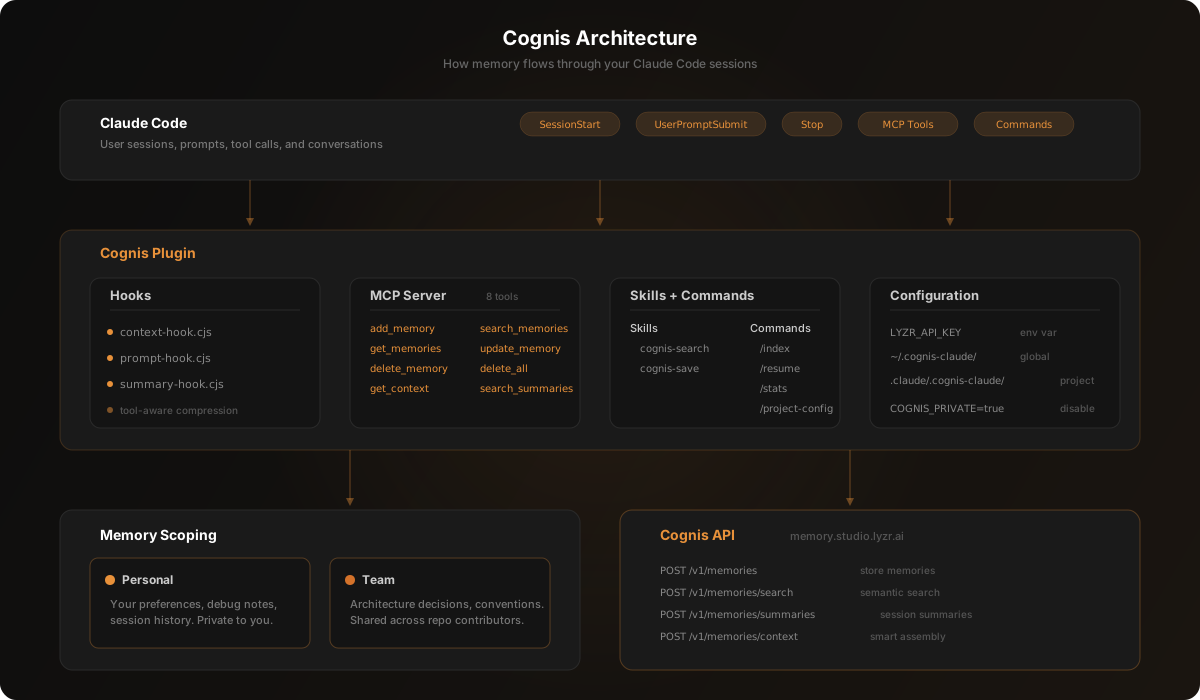
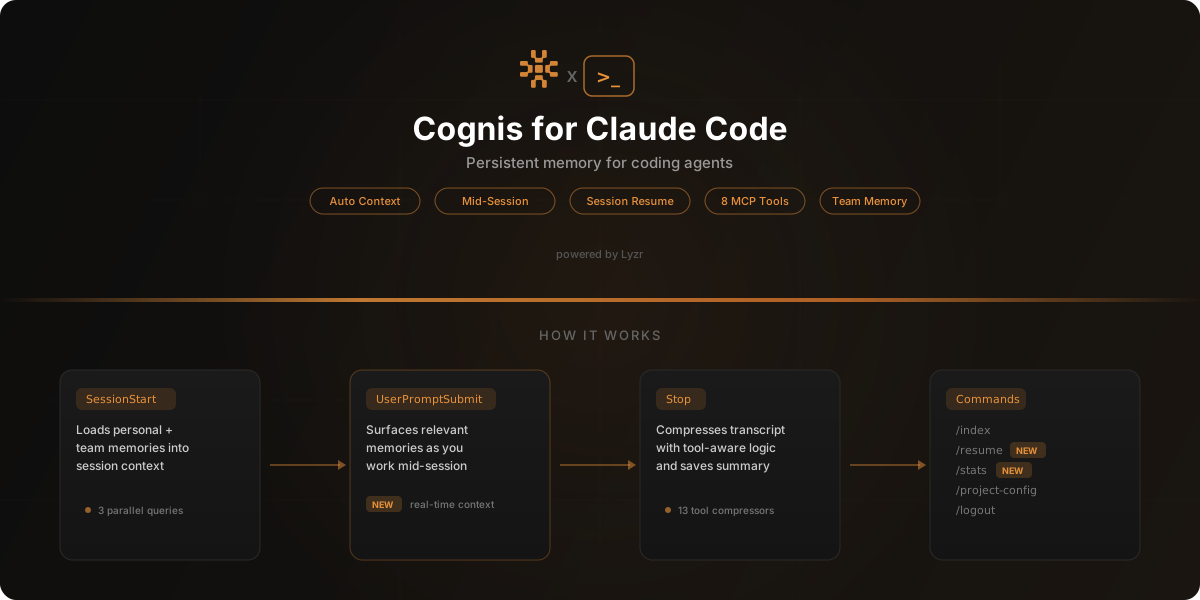
Cognis uses Claude Code's hook system to work automatically in the background.
| Hook | Trigger | What it does |
|---|---|---|
SessionStart | Every new session | Loads relevant personal and team memories into context |
UserPromptSubmit | Each user message | Surfaces relevant memories mid-session based on what you're working on |
Stop | Session ends | Summarizes the conversation and saves it to memory with tool-aware compression |
Natural language triggers — just talk to Claude and the right skill activates.
| Skill | Trigger phrases | What it does |
|---|---|---|
cognis-search | "what did I work on?", "find that decision about..." | Searches your memories using semantic search |
cognis-save | "remember this", "save this as project knowledge" | Saves specific information to persistent memory |
For advanced usage, Cognis exposes 8 tools via the Model Context Protocol.
| Tool | Description |
|---|---|
add_memory | Store information in long-term memory |
search_memories | Semantic search across personal and/or team memories |
get_memories | List stored memories without a search query |
update_memory | Update an existing memory's content or metadata |
delete_memory | Delete a specific memory by ID |
delete_all_memories | Clear all memories for a session (requires confirmation) |
get_context | Intelligent context assembly combining short-term and long-term memory |
search_summaries | Search past session summaries and key decisions |
| Command | Description |
|---|---|
/claude-cognis:index | Analyze and index the current codebase |
/claude-cognis:recall | Recall last session context to pick up where you left off |
/claude-cognis:memory-stats | Show memory statistics and recent session history |
/claude-cognis:project-config | Configure per-project settings |
/claude-cognis:logout | Remove stored API credentials |
Stored in ~/.cognis-claude/settings.json:
npx claudepluginhub lyzr-cognis/claude-cognis --plugin claude-cognisPersistent memory across Claude Code sessions using Supermemory
 supermemoryai
Persistent memory for Claude Code. Capture work across sessions and recall relevant context.
 kunickiaj
Memory compression system for Claude Code - persist context across sessions
 thedotmack
OpenLTM — Long-Term Memory for AI coding agents: semantic search, context injection, session learning
 RohiRIK
Persistent memory system for Claude Code with enforced context
 blas0
blas0Persistent memory for AI coding agents. Survives across sessions and compactions.
 Gentleman-Programming
'%20stop-opacity%3D'0.16'%2F%3E%3Cstop%20offset%3D'1'%20stop-color%3D'rgb(200%2C90%2C60)'%20stop-opacity%3D'0.03'%2F%3E%3C%2FlinearGradient%3E%3C%2Fdefs%3E%3Crect%20width%3D'320'%20height%3D'200'%20fill%3D'url(%23g)'%2F%3E%3Ccircle%20cx%3D'250'%20cy%3D'56'%20r%3D'92'%20fill%3D'rgb(200%2C90%2C60)'%20fill-opacity%3D'0.06'%2F%3E%3Ccircle%20cx%3D'64'%20cy%3D'172'%20r%3D'58'%20fill%3D'rgb(200%2C90%2C60)'%20fill-opacity%3D'0.05'%2F%3E%3C%2Fsvg%3E)