Stats
Actions
Available In
Tags
Marketing analysis suite with 7 skills and 4 parallel agents — audit paid campaigns, find SEO opportunities, detect churn signals, and generate branded PDF reports. Powered by a tested analysis engine (ds_utils.py, 113 functions). Works automatically with Dataslayer MCP or manually with CSV/JSON data.
Subagent that extracts content performance data from GA4 and Search Console via Dataslayer MCP. Returns structured findings only, no interpretation or recommendations.
Subagent that extracts organic search data from Search Console and GA4 via Dataslayer MCP. Returns structured findings only, no interpretation or recommendations.
Subagent that extracts paid media data from Google Ads, Meta Ads, and LinkedIn Ads via Dataslayer MCP. Returns structured findings only, no interpretation or recommendations.
Subagent that extracts subscription health and retention data from Stripe (and optionally internal database) via Dataslayer MCP. Returns structured findings only, no interpretation or recommendations.
Internal development tool that performs a comprehensive quality audit of all marketing skills and agents. Reviews description overlap, format consistency, feature adoption, and structural patterns. Use when the user says "audit skills", "skill quality review", "check skill health", "are my skills consistent", "monthly skill review", or before releasing a new version of the skills repo.
Use this skill when the user wants a strategic, cross-functional analysis that connects paid, organic, content, and retention into one unified view. This is NOT a weekly summary — it is a decision engine that finds the hidden connections between channels. Activate when the user says "full marketing review", "how is everything doing", "weekly brain", "give me the full picture", "marketing intelligence report", "what should I focus on this week", "retention and acquisition together", "connect the dots across channels", or any request that implies synthesizing all marketing dimensions into one strategic recommendation. Do NOT use for simple weekly overviews or single-channel questions — those belong to ds-channel-report or the individual channel skills. This skill launches parallel subagents. Works best with Dataslayer MCP connected. Also works with manual data.
Use this skill when the user wants a quick, factual weekly or periodic overview of marketing metrics across channels. This is a lightweight report with numbers and anomalies — no subagents, no strategic synthesis. Activate when the user says "weekly report", "how did we do this week", "give me a marketing summary", "cross-channel report", "what happened with our marketing", "channel performance", "marketing digest", "weekly metrics", or asks for a combined view of organic and paid results. Do NOT use when the user wants strategic recommendations or cross-channel connections — that belongs to ds-brain. Works best with Dataslayer MCP connected. Also works with manual data.
Use this skill when the user wants to identify accounts at risk of churning, understand why users are cancelling, or find early warning signals before churn happens. Activate when the user says "churn analysis", "who might cancel", "accounts at risk", "why are people leaving", "usage drop", "inactive accounts", "retention analysis", "predict churn", or asks about subscription health, cancellation patterns, or which users are disengaged. Works best with Dataslayer MCP connected (Stripe + analytics). Also works with manual data.
Use this skill when the user wants to understand how their blog or content is performing in terms of traffic, engagement, and conversions. Activate when the user says "how is our blog doing", "which posts are driving trials", "content performance", "is our content working", "what should we write next", "which articles bring the most signups", "content audit", "blog SEO", "content SEO performance", or asks about the relationship between content and registrations or conversions. Works best with Dataslayer MCP connected (GA4 + Search Console). Also works with manual data.
Uses power tools
Uses Bash, Write, or Edit tools
Own this plugin?
Verify ownership to unlock analytics, metadata editing, and a verified badge. GitHub access is read-only (username + org membership).
Sign in to claimOwn this plugin?
Verify ownership to unlock analytics, metadata editing, and a verified badge. GitHub access is read-only (username + org membership).
Sign in to claimBased on adoption, maintenance, documentation, and repository signals. Not a security audit or endorsement.
Marketing analysis skills with a real analysis engine. Audit paid campaigns, find SEO opportunities, detect churn signals, and generate branded PDF reports — powered by 113 tested functions that handle the math deterministically.
Works with any data: connect the Dataslayer MCP for automatic data fetching from 50+ platforms, or paste your own CSV/JSON manually.
Compatible with Claude Desktop (Cowork), Claude Code, Cursor, Windsurf, and any agent that supports the Agent Skills spec.
| Plugin (1 file, everything included) | Individual skills (1 file per skill) | |
|---|---|---|
| What you get | All 7 skills + 4 agents + analysis engine | One skill at a time |
| File | dataslayer-marketing-skills.zip | See table below |
| Where it works | Claude Desktop with Cowork plan | claude.ai web, Claude Desktop (any plan) |
| Upload path | Customize → Personal plugins → + → Upload plugin | Customize → Skills → + → Upload skill |
Don't know which to choose? If you have Cowork, use the plugin — it's one download and you get everything. If not, install the individual skills you need.
Requires: Claude Desktop with a Cowork plan.
Download dataslayer-marketing-skills.zip
Open Claude Desktop → click Customize in the left sidebar
Under Personal plugins, click the + button → Upload plugin
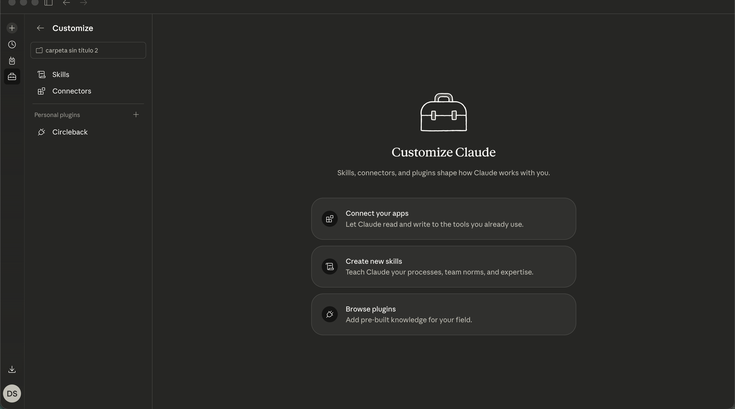
Select the .zip file and click Upload
Done — all 7 skills, 4 agents, and the analysis engine are ready.
Note: The file must have a
.zipextension —.pluginis not accepted (known issue).
Works on: claude.ai web and Claude Desktop — no Cowork required.
Download the skill you need from the table below
Go to Customize → Skills → + → Upload skill
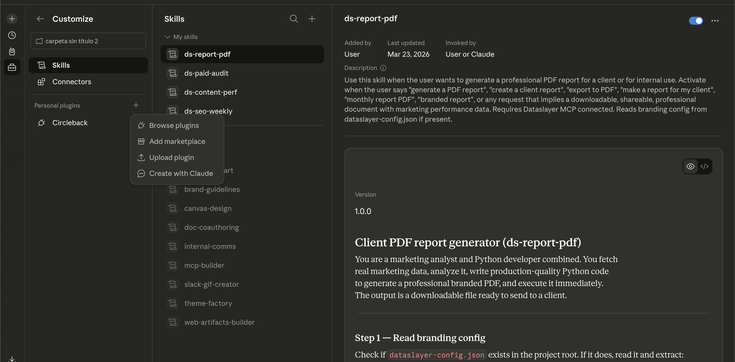
Select the .zip file and click Upload
Repeat for each skill you want
npx claudepluginhub dataslayer-ai/marketing-skillsMulti-host paid advertising audit & optimization skill conforming to the Agent Skills open standard. Verified on Claude Code; experimental on Codex CLI, Cursor, Windsurf, Gemini CLI, Goose. 250+ checks across Google, Meta, YouTube, LinkedIn, TikTok, Microsoft, Apple & Amazon Ads with weighted scoring, parallel agents, 12 industry templates, AI creative generation, PPC math, A/B test design, PDF reports, attribution + server-side tracking deep dives, and a 41-test pytest eval harness.
 AgriciDaniel
Complete paid advertising toolkit with 14 skills (orchestrator + 12 sub-skills + infographic-v2) and 6 parallel audit subagents. Covers Google Ads (74 checks), Meta/Facebook (46 checks), LinkedIn B2B (25 checks), TikTok (25 checks), YouTube video ads, and Microsoft/Bing (20 checks). Includes cross-platform audit orchestration, budget allocation with 70/20/10 rule, creative audit with brand context collection and ad creative generation via infographic-v2, landing page optimization, strategic planning with 15 industry templates, and competitive intelligence via Ad Libraries.
 naveedharri
The official Google Ads + Meta Ads + SEO + GEO plugin from NotFair. SEO analysis, Google Ads management, Meta (Facebook + Instagram) Ads management, keyword research, content optimization, schema markup tools, broken link checker, single-page deep audit, and Generative Engine Optimization (GEO) for AI search engines — powered by Google Search Console, Google Ads, and Meta Marketing APIs.
 nowork-studio
Marketing skills for AI agents — conversion optimization, copywriting, SEO, paid ads, ad creative, and growth
 coreyhaines31
Open-source AI marketing plugin for agencies & in-house teams — 158 skills, 25 agents, 12-Part Strategy Flow, Cowork team-persistent, EU AI Act Article 50 ready. Runs on Claude Code, Codex, Cursor, Copilot CLI, Antigravity, Hermes Agent, OpenClaw + 40+ Agent Skills platforms.
 indranilbanerjee
Production performance marketing automation for Claude. Audit accounts, launch campaigns, rotate creative, and diagnose underperformers across Google Ads, Meta Ads, GA4, Shopify, HubSpot, and 20+ more. Approval-gated writes.
 markifact
'%20stop-opacity%3D'0.16'%2F%3E%3Cstop%20offset%3D'1'%20stop-color%3D'rgb(200%2C90%2C60)'%20stop-opacity%3D'0.03'%2F%3E%3C%2FlinearGradient%3E%3C%2Fdefs%3E%3Crect%20width%3D'320'%20height%3D'200'%20fill%3D'url(%23g)'%2F%3E%3Ccircle%20cx%3D'250'%20cy%3D'56'%20r%3D'92'%20fill%3D'rgb(200%2C90%2C60)'%20fill-opacity%3D'0.06'%2F%3E%3Ccircle%20cx%3D'64'%20cy%3D'172'%20r%3D'58'%20fill%3D'rgb(200%2C90%2C60)'%20fill-opacity%3D'0.05'%2F%3E%3C%2Fsvg%3E)