app-it
Turn a local web project into a macOS Dock-launchable .app bundle — a native window, its own Dock icon, and clean start/stop — without Electron, Tauri, or a rewrite.
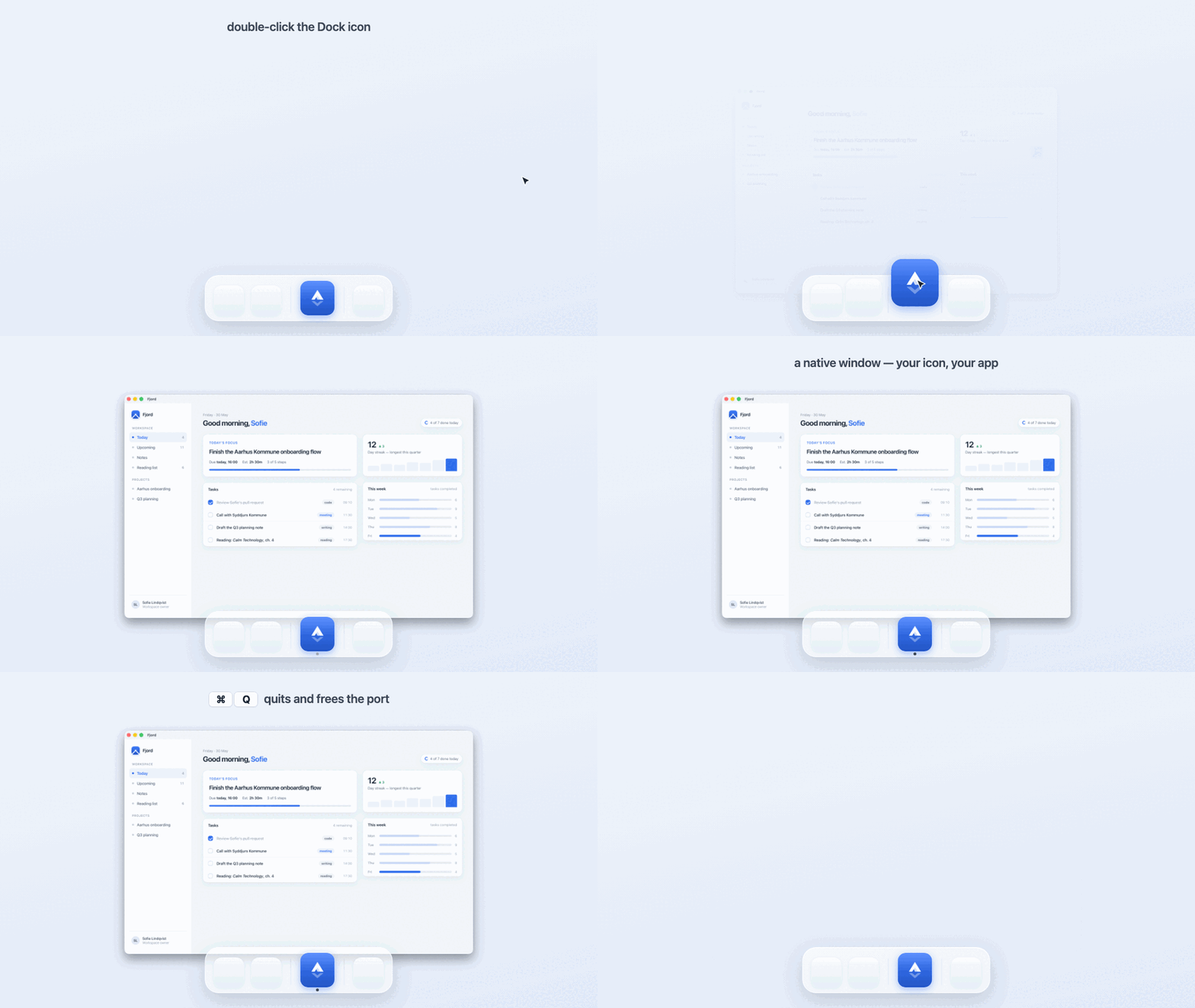
A real app-it build, in motion. Fjord is an ordinary local web project (node server.js); app-it turns it into a native macOS app — double-click launches it, the window opens with its own Dock icon, and ⌘Q quits the app and frees the dev-server port. The actual generated app, not a mockup.
Status — Working, in daily use. The launcher templates are battle-tested across 12+ real projects; v0.1.0 is the first standalone, marketplace-installable release. macOS only, by design.
Windows beta — macOS is in daily use; Windows is scaffolded as an honest beta and looking for a maintainer. A complete sibling plugin (plugins/app-it-windows/), gated by a required windows-latest CI job (build · PowerShell lint · manifest parse · icon round-trip), mirrors the macOS contract with Windows primitives — but the author runs only macOS, so it has never been run on real Windows hardware. If you're on Windows and want to help finish it, the doorway is docs/WINDOWS.md.
Local-only — app-it reads your project on your machine to choose a launcher strategy. It uploads nothing, runs no telemetry, adds no runtime dependencies, and never touches your business-logic source. The only thing it produces is an .app on your own Dock.
app-it is an assistant-agnostic plugin/skill. It works with Claude Code and Codex, and builds a small, repeatable launcher around an existing local project so that double-clicking starts the dev server, opens a native window, keeps the Dock icon as your app, and cleans up when you quit.
What app-it is not
- Not Electron, Tauri, or a native rewrite. It wraps your existing dev setup; it doesn't replace it, migrate it, or add a bundler to your dependency tree.
- Not a way to ship apps to other people. No notarization, no App Store, no auto-update, no signed distribution. These are personal, ad-hoc-signed, local-use launchers.
- Not cross-platform. macOS only — and on purpose. Windows is a genuinely different problem (WebView2,
.lnk, .ico, SmartScreen), so it belongs in a separate plugin rather than a blurred promise. See Compatibility.
- Not a hosted service. Nothing runs in the cloud and there is no live demo to visit — the proof is the apps on your own Dock (the Stack further down is real).
How it works
  WHAT YOU HAVE               WHAT APP-IT DOES           WHAT YOU GET
  ───────────────────────     ──────────────────────     ───────────────────────────
  a local web project         inspects it from disk,     YourApp.app on your Dock
  Vite, Next, or a static     picks a strategy, then     · its own icon
  site, run with          ──▶ builds & signs a .app  ──▶ · native window, one click
  `npm run dev` in a tab      around a WebKit shell      · ⌘Q quits & frees the port
Under the hood, app-it:
- Inspects before it touches anything — project type, dev scripts, ports, browser-API needs, icon sources.
- Picks a launcher strategy — a native Swift
WKWebView shell by default (so the Dock icon stays yours), Chrome --app mode only when a project needs Chromium-only APIs.
- Copies proven, hard-won templates into the project rather than re-deriving fragile launcher logic each time.
- Builds and ad-hoc-signs a real
.app — universal (arm64 + x86_64), Gatekeeper-friendly, with a generated .icns.
- Gets the lifecycle right — closing the window (⌘W / red-X) leaves the dev server warm for a ~250 ms re-launch; ⌘Q quits the app and frees the port.
- Writes a report explaining every change and exactly how to undo it.
Finished app? There's a lighter companion. app-it runs your project's dev server — perfect while you're still building. Once an app is done, it doesn't need one: the app-it-static companion serves the built output (dist/, build/, out/, …) so a finished app costs ~15 MB instead of a dev server's ~300–700 MB. Same native window, same Dock Stack — reach for it only when an app is done. How it works →
Requirements
- macOS.
- Claude Code or Codex for marketplace installation.
swiftc (Xcode Command Line Tools) for the native WebKit shell — xcode-select --install.python3 (also from the Xcode Command Line Tools) for app-it-static's server mode.- Chrome only if a project needs the Chrome fallback path.
Install
Claude Code:
claude plugin marketplace add Christian-Katzmann/app-it
claude plugin install app-it@app-it
Codex:
 Christian-Katzmann
 XueshiQiao
 devsforge
 rohitg00
 sjungling
 viticci
'%20stop-opacity%3D'0.16'%2F%3E%3Cstop%20offset%3D'1'%20stop-color%3D'rgb(200%2C90%2C60)'%20stop-opacity%3D'0.03'%2F%3E%3C%2FlinearGradient%3E%3C%2Fdefs%3E%3Crect%20width%3D'320'%20height%3D'200'%20fill%3D'url(%23g)'%2F%3E%3Ccircle%20cx%3D'250'%20cy%3D'56'%20r%3D'92'%20fill%3D'rgb(200%2C90%2C60)'%20fill-opacity%3D'0.06'%2F%3E%3Ccircle%20cx%3D'64'%20cy%3D'172'%20r%3D'58'%20fill%3D'rgb(200%2C90%2C60)'%20fill-opacity%3D'0.05'%2F%3E%3C%2Fsvg%3E)