Stats
Actions
Available In
Tags

Search, analyze, and summarize your iMessage history on macOS with natural language queries, relationship insights, and year-in-review stories — all running locally with privacy controls.
Uses power tools
Uses Bash, Write, or Edit tools
Own this plugin?
Verify ownership to unlock analytics, metadata editing, and a verified badge. GitHub access is read-only (username + org membership).
Sign in to claimOwn this plugin?
Verify ownership to unlock analytics, metadata editing, and a verified badge. GitHub access is read-only (username + org membership).
Sign in to claimBased on adoption, maintenance, documentation, and repository signals. Not a security audit or endorsement.
Executables (bin/) — files in this plugin's bin/directory are added to the Bash tool's PATH while the plugin is enabled.





26 tools for locally exploring your iMessage history with AI.

if this helped you, star it. it helps others find it.
An MCP server that gives AI assistants read-only access to your local iMessage database. Nothing is written, modified, or uploaded. Your messages stay on your Mac; the AI only sees what you ask about.
Read-only access to 2 local files (
chat.db+AddressBook). Zero network requests. Nothing is written, uploaded, or shared. All 26 tools are annotatedreadOnlyHint: true— your MCP client can auto-approve every call without prompts.
npm install -g imessage-mcp
Or run without installing:
npx imessage-mcp doctor
Smithery: One-click install via the Smithery registry — search for imessage-mcp.
# Claude Code (one command)
claude mcp add imessage -- npx -y imessage-mcp
# Claude Desktop — add to ~/Library/Application Support/Claude/claude_desktop_config.json
{
  "mcpServers": {
    "imessage": {
      "command": "npx",
      "args": ["-y", "imessage-mcp"]
    }
  }
}
See Setup for Cursor, Windsurf, VS Code, Codex CLI, Cline, JetBrains, and Zed.
For slash commands and agents:
claude plugin add anipotts/imessage-mcp
node --version)chat.db with its Application Data permission. Grant access in: System Settings > Privacy & Security > Full Disk Access and enable the app running the MCP server (your terminal, Claude Desktop, or Cursor). GUI apps like Claude Desktop and Cursor may already have this permission.imessage-mcp reads your local iMessage database in read-only mode. No data leaves your machine. Nothing is written, modified, uploaded, or shared.
| Path | Access | Purpose |
|---|---|---|
~/Library/Messages/chat.db | Read-only | Your iMessage database |
~/Library/Application Support/AddressBook/ | Read-only | Contact name resolution |
No other files are accessed. No external APIs are called.
chat.db --> [imessage-mcp] --> stdio/http --> [Your MCP Client] --> AI Provider
  ^                                              ^
  Your Mac only                         Already authorized by you
Once connected, ask your AI assistant anything about your messages in plain language:
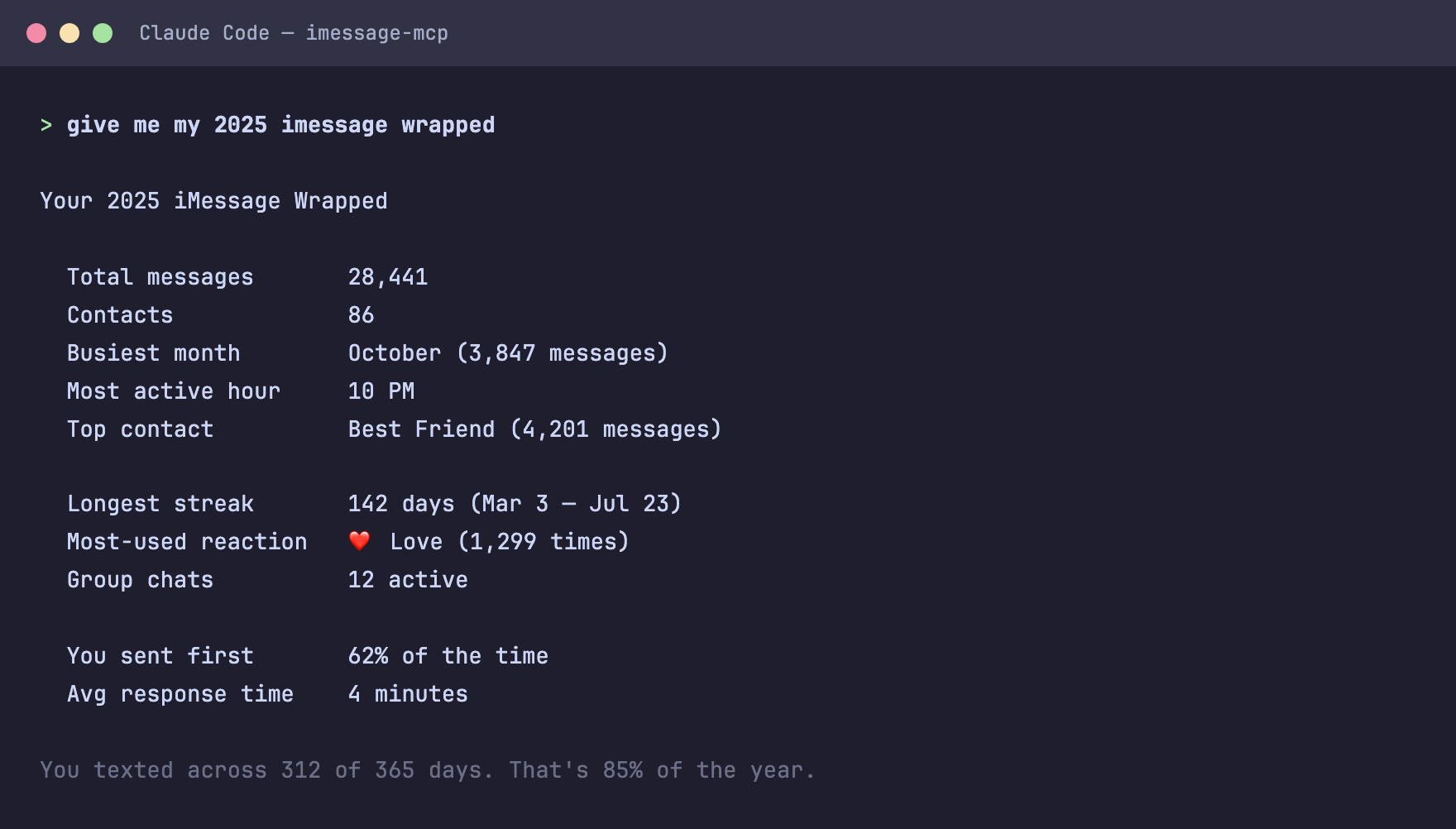
26 tools across 10 categories. All read-only. All annotated with readOnlyHint: true.
npx claudepluginhub anipotts/imessage-mcpTools to maintain and improve CLAUDE.md files - audit quality, capture session learnings, and keep project memory current.
 anipotts
C/C++ language server (clangd) for code intelligence
anipottsAutomated code review for pull requests using multiple specialized agents with confidence-based scoring
anipottsClaude Agent SDK Development Plugin
anipottsUpstash Context7 MCP server for up-to-date documentation lookup. Pull version-specific documentation and code examples directly from source repositories into your LLM context.
anipottsUnified capability management center for Skills, Agents, and Commands.
 guanyang
Standalone image generation plugin using Nano Banana MCP server. Generates and edits images, icons, diagrams, patterns, and visual assets via Gemini image models. No Gemini CLI dependency required.
 Lucklyric
Multi-model consensus engine integrating OpenAI Codex CLI, Gemini CLI, and Claude CLI for collaborative code review and problem-solving.
 xrf9268-hue
Ultra-compressed communication mode. Cuts 65% of output tokens (measured) while keeping full technical accuracy by speaking like a caveman.
 JuliusBrussee
Memory compression system for Claude Code - persist context across sessions
 thedotmack
Comprehensive UI/UX design plugin for mobile (iOS, Android, React Native) and web applications with design systems, accessibility, and modern patterns
 wshobson
'%20stop-opacity%3D'0.16'%2F%3E%3Cstop%20offset%3D'1'%20stop-color%3D'rgb(200%2C90%2C60)'%20stop-opacity%3D'0.03'%2F%3E%3C%2FlinearGradient%3E%3C%2Fdefs%3E%3Crect%20width%3D'320'%20height%3D'200'%20fill%3D'url(%23g)'%2F%3E%3Ccircle%20cx%3D'250'%20cy%3D'56'%20r%3D'92'%20fill%3D'rgb(200%2C90%2C60)'%20fill-opacity%3D'0.06'%2F%3E%3Ccircle%20cx%3D'64'%20cy%3D'172'%20r%3D'58'%20fill%3D'rgb(200%2C90%2C60)'%20fill-opacity%3D'0.05'%2F%3E%3C%2Fsvg%3E)
