Claude HUD Enhanced
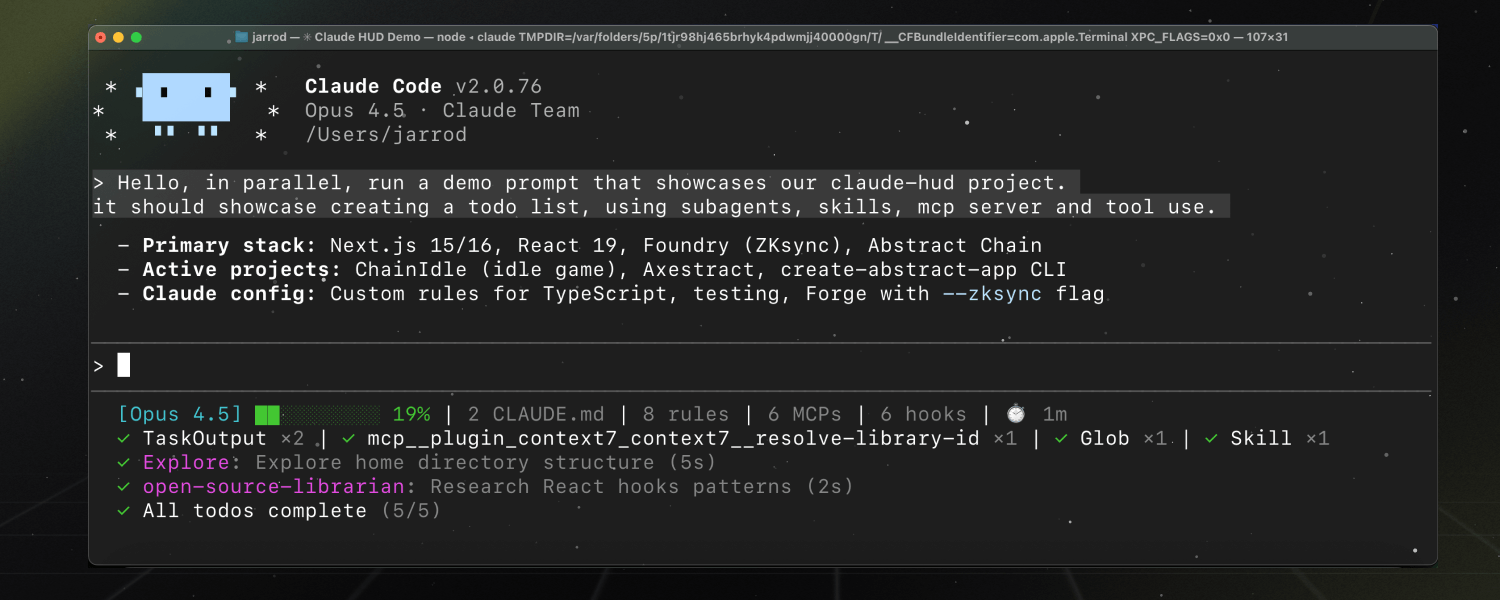
An enhanced Claude Code plugin that shows what's happening — context usage, active tools, running agents, todo progress, and detailed usage limits with time-to-reset countdowns. Always visible below your input.


Install
Inside a Claude Code instance, run the following commands:
Step 1: Add the enhanced marketplace
/plugin marketplace add alwinpaul1/claude-hud-enhanced
Step 2: Install the plugin
/plugin install claude-hud-enhanced
Step 3: Configure the statusline
/claude-hud-enhanced:setup
Done! The HUD appears immediately — no restart needed.
What is Claude HUD Enhanced?
Claude HUD Enhanced gives you better insights into what's happening in your Claude Code session, with additional features for tracking usage limits.
| What You See | Why It Matters |
|---|
| Project path | Know which project you're in (configurable 1-3 directory levels) |
| Context health | Know exactly how full your context window is before it's too late |
| Tool activity | Watch Claude read, edit, and search files as it happens |
| Agent tracking | See which subagents are running and what they're doing |
| Todo progress | Track task completion in real-time |
| 5h & 7d usage | Always see both rate limits with reset times |
| Model quotas | Track Opus 4.5 and other compute-intensive model limits |
| Max tier info | See Max5/Max20 tier with tokens-per-window |
Enhanced Features (vs Original)
| Feature | Original | Enhanced |
|---|
| 7-day usage | Only shown when ≥80% | Always visible |
| 5h limit reached | Basic countdown | Reset time (e.g., "Resets 8:32 PM") |
| 7d reset | Not shown | Date/time (e.g., "Resets Fri 12:30 PM") |
| Credential source | File only | File + macOS Keychain |
| Model quotas | ❌ | ✅ Shows Opus 4.5 limits |
| Max tier detection | ❌ | ✅ Max5/Max20 with tokens/window |
What Each Line Shows
Session Info
[Opus 4.5 | Pro] █████░░░░░ 45% 90k/200k | my-project git:(main) | 5h: 25% (3h 28m) | 7d: 51% (Resets Fri 12:30 PM) | ⏱️ 5m
- Model — Current model in use (shown first)
- Plan name — Your subscription tier (Pro, Max, Team) when usage enabled
- Context bar — Visual meter with color coding (green → yellow → red as it fills)
- Token count — Current/total tokens (e.g.,
90k/200k)
- Project path — Configurable 1-3 directory levels (default: 1)
- Git branch — Current branch name (configurable on/off)
- 5h usage — 5-hour rate limit with countdown (e.g., "3h 28m"), or reset time when limit reached
- 7d usage — 7-day rate limit with reset date/time (e.g., "Resets Fri 12:30 PM")
- Duration — How long the session has been running
When Limit is Reached
[Opus 4.5 | Pro] ░░░░░░░░░░ 0% 0/200k | my-project git:(main) | ⚠ 5h limit Resets 8:32 PM | 7d: 51% (Resets Fri 12:30 PM) | ⏱️ 1h 48m
- Shows warning with reset time for 5h limit
- 7-day usage with reset date/time always visible alongside
Tool Activity
✓ TaskOutput ×2 | ✓ mcp_context7 ×1 | ✓ Glob ×1 | ✓ Skill ×1
- Running tools show a spinner with the target file
- Completed tools aggregate by type with counts
Agent Status
✓ Explore: Explore home directory structure (5s)
✓ open-source-librarian: Research React hooks patterns (2s)
- Agent type and what it's working on
- Elapsed time for each agent
Todo Progress
✓ All todos complete (5/5)
- Current task or completion status
- Progress counter (completed/total)
How It Works
Claude HUD uses Claude Code's native statusline API — no separate window, no tmux required, works in any terminal.
Claude Code → stdin JSON → claude-hud → stdout → displayed in your terminal
           ↘ transcript JSONL (tools, agents, todos)
Key features:
- Native token data from Claude Code (not estimated)
- Parses the transcript for tool/agent activity
- Updates every ~300ms
Configuration
Customize your HUD anytime:
/claude-hud-enhanced:configure
The guided flow walks you through customization — no manual editing needed:
- First time setup: Choose a preset (Full/Essential/Minimal), then fine-tune individual elements
- Customize anytime: Toggle items on/off, adjust git display style, switch layouts
- Preview before saving: See exactly how your HUD will look before committing changes
Presets

 jarrodwatts
 affaan-m
 wshobson
 OthmanAdi
 anthropics
 UitbreidenOS
'%20stop-opacity%3D'0.16'%2F%3E%3Cstop%20offset%3D'1'%20stop-color%3D'rgb(200%2C90%2C60)'%20stop-opacity%3D'0.03'%2F%3E%3C%2FlinearGradient%3E%3C%2Fdefs%3E%3Crect%20width%3D'320'%20height%3D'200'%20fill%3D'url(%23g)'%2F%3E%3Ccircle%20cx%3D'250'%20cy%3D'56'%20r%3D'92'%20fill%3D'rgb(200%2C90%2C60)'%20fill-opacity%3D'0.06'%2F%3E%3Ccircle%20cx%3D'64'%20cy%3D'172'%20r%3D'58'%20fill%3D'rgb(200%2C90%2C60)'%20fill-opacity%3D'0.05'%2F%3E%3C%2Fsvg%3E)