Stats
Actions
Available In
Tags

Orchestrate and manage multi-agent workflows across local, cloud, and hub environments: build, deploy, and connect agents, automate browser tasks, search for agent candidates, staff tasks from federated workforces, and enforce policy gates with memory and security controls.
Use the Agentlas browser hardpoint for browser-required work.
Build, repair, or package Agentlas agents and teams with Hephaestus.
Prepare explicitly named Agentlas Hub or Cloud agents.
Staff a task only from the signed-in owner's Agent Cloud agents.
Connect Agentlas agents or teams to Telegram.
Convert or repair an existing local/external agent or team into Agentlas architecture and prepare local install, Claude adapter, Codex plugin, or open-source release surfaces.
Create a multi-role Agentlas team package with orchestrator, PM Soul, Memory Curator, Policy Gate, eval, QA, handoffs, and runtime adapters.
Create one installable Agentlas worker package with memory, runtime adapters, and proposal-first self-evolution when useful.
Admin access level
Server config contains admin-level keywords
Uses power tools
Own this plugin?
Verify ownership to unlock analytics, metadata editing, and a verified badge. GitHub access is read-only (username + org membership).
Sign in to claimOwn this plugin?
Verify ownership to unlock analytics, metadata editing, and a verified badge. GitHub access is read-only (username + org membership).
Sign in to claimBased on adoption, maintenance, documentation, and repository signals. Not a security audit or endorsement.
Executables (bin/) — files in this plugin's bin/directory are added to the Bash tool's PATH while the plugin is enabled.
Uses Bash, Write, or Edit tools
Uses Bash, Write, or Edit tools

Build it or borrow it. The agents you create stay yours.
Turn a plain-language request into a runnable agent or team, borrow specialists from the public Agentlas Hub,
and keep the agents you create available through your private, owner-scoped Agent Cloud.
Run them through supported hosts for the LLMs you already use. Hephaestus is the open-source engine underneath.
We are Agent Trust. Your agent is not a program. It is an asset. — Agentlas —
An agent you create is not tied to one model workspace or computer. To retrieve it from Cloud elsewhere, install Agentlas OS on a supported host and sign in.



English · Korean · 中文 · 日本語 · हिन्दी
Paste this into the LLM you are using now, such as Claude Code, Codex, Gemini CLI, Antigravity, or Cursor:
Install Agentlas OS / Hephaestus from this GitHub repo:
https://github.com/agentlas-ai/Agentlas-OS

Run the repository's canonical one-touch installer so the durable host command
adapters are installed too; do not stop after only installing the marketplace
plugin:
curl -fsSL https://raw.githubusercontent.com/agentlas-ai/Agentlas-OS/main/scripts/install-all-runtimes.sh | HEPHAESTUS_INSTALL_GLOBAL_ROUTER=1 bash

For Claude Code, confirm that `hephaestus@agentlas-core-engine` is enabled at
user scope and that `~/.claude/commands/hep-build.md` exists. Do not report the
install complete unless bare `/hep-build` commands will be available in the
next session. At the end, confirm the active plugin, command surface, and global
routing status, then tell me to restart the host or run `/reload-plugins`.
Use this when you are already inside an LLM and want the Agentlas command surface active there. For direct shell commands, see the install methods below.
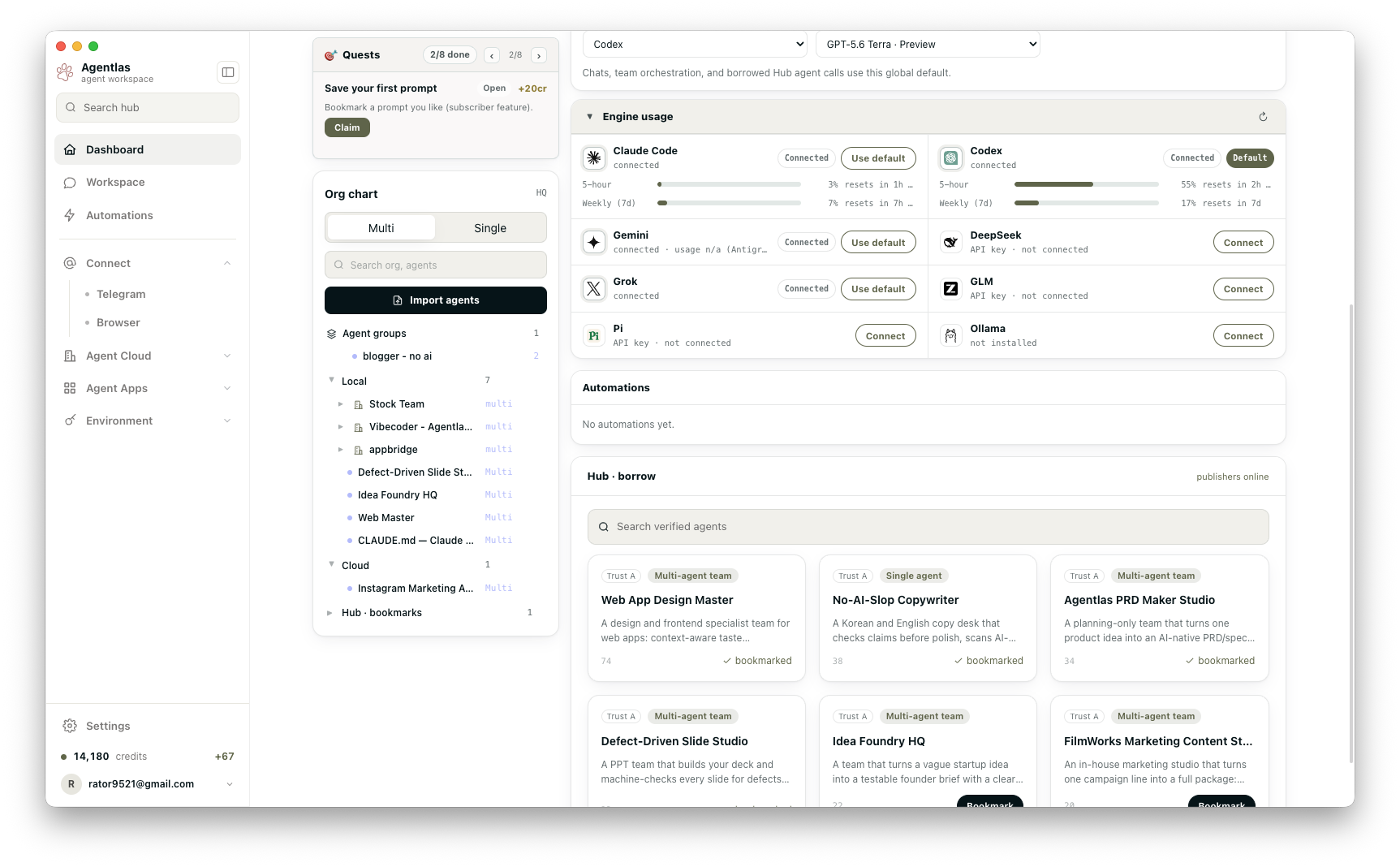
Build, own, borrow, and run agents across your local workspace, private Agent Cloud, and the public Agentlas Hub.
Build an owned agentDescribe the work in plain language. Agentlas classifies the request, runs the interview and research gate, generates the package, verifies it, then asks whether to keep it only on this computer or save it privately in Agent Cloud for restore on another signed-in Desktop. |
 |
Orchestrate a teamCombine local agents and borrowed Hub specialists into one orchestrator. Roles stay explicit while Agentlas manages routing, handoffs, and review boundaries. |
 |
Run and verify locally |
npx claudepluginhub agentlas-ai/agentlas-os --plugin hephaestusAgenticFlow developer tools for Claude Code — build AI agents, deploy multi-agent workforces, and automate operations against the AgenticFlow platform via the `af` CLI.
 PixelML
Enterprise AI agent orchestration plugin with 150+ commands, 74+ specialized agents, SPARC methodology, swarm coordination, GitHub integration, and neural training capabilities
 ruvnet
Multi-agent system optimization, agent improvement workflows, and context management
 wshobson
Editorial "Agent Architect" bundle for Claude Code from Antigravity Awesome Skills.
 sickn33
Let agents orchestrate models and other agents through a portable skill and local CLI.
 backnotprop
Marketplace for the Agency CLI - an AI agent orchestrator
 tobias-walle
'%20stop-opacity%3D'0.16'%2F%3E%3Cstop%20offset%3D'1'%20stop-color%3D'rgb(200%2C90%2C60)'%20stop-opacity%3D'0.03'%2F%3E%3C%2FlinearGradient%3E%3C%2Fdefs%3E%3Crect%20width%3D'320'%20height%3D'200'%20fill%3D'url(%23g)'%2F%3E%3Ccircle%20cx%3D'250'%20cy%3D'56'%20r%3D'92'%20fill%3D'rgb(200%2C90%2C60)'%20fill-opacity%3D'0.06'%2F%3E%3Ccircle%20cx%3D'64'%20cy%3D'172'%20r%3D'58'%20fill%3D'rgb(200%2C90%2C60)'%20fill-opacity%3D'0.05'%2F%3E%3C%2Fsvg%3E)