Claude Code Usage Dashboard
A self-hosted dashboard to visualize and share Claude Code usage across your team.
A Stop hook automatically parses transcripts at session end, collecting token consumption, skill / MCP / sub-agent usage, and estimated costs into interactive charts.
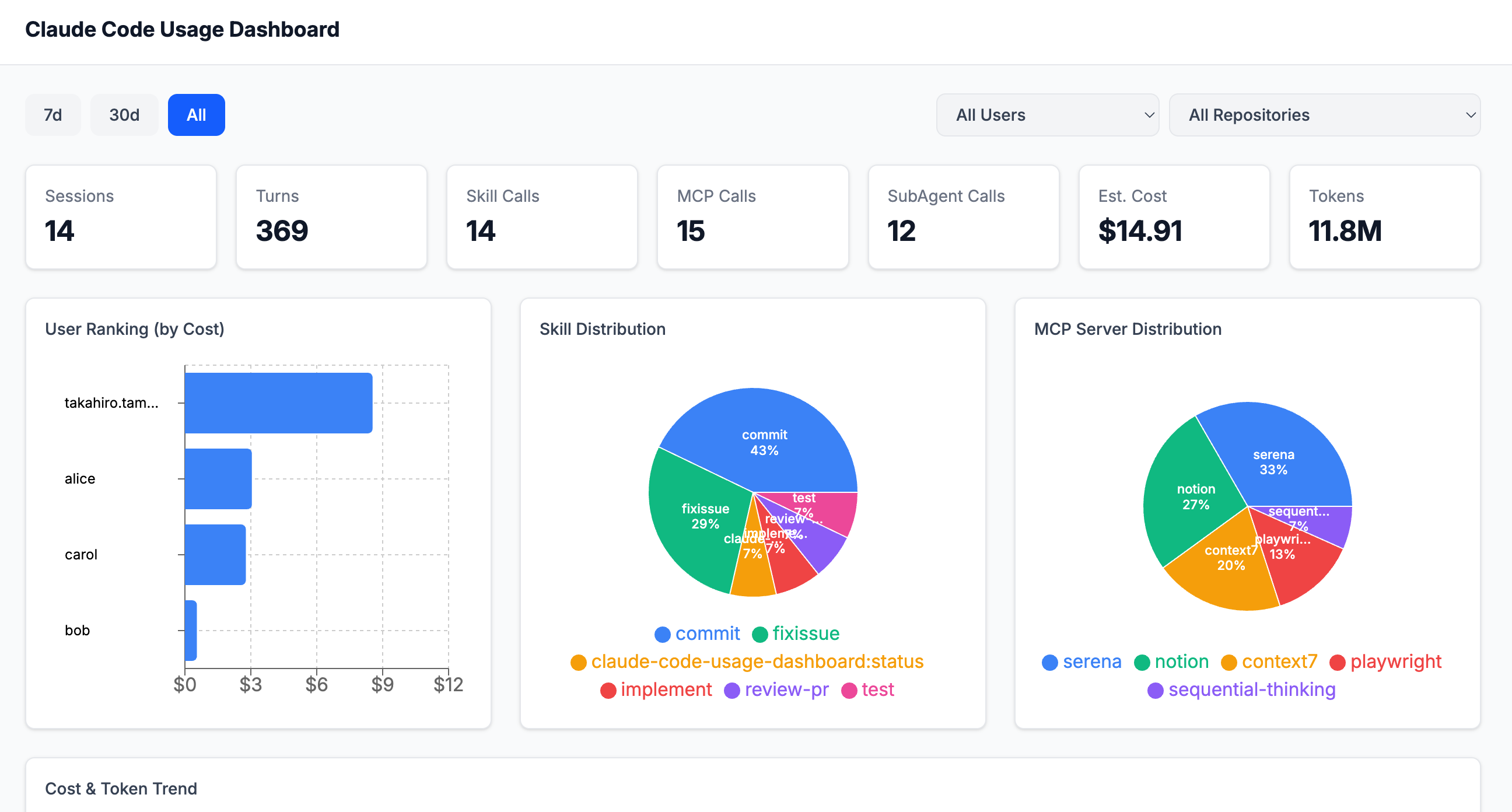
Features
- Data Collection — Zero-config data collection via Stop hook
- Token & Cost Tracking — Input / output / cache read / cache creation tokens with per-model cost estimation
- Skill Analysis — Invocation frequency of
/commit and other slash commands
- MCP Server Analysis — Call counts by MCP server name and method
- Sub-agent Analysis — Agent tool usage (Explore, Plan, etc.)
- Team Overview — Per-user cost ranking, daily trends, model distribution
Setup
1. Install the plugin
Installing the plugin enables automatic data submission to the dashboard when a Claude Code session ends.
# Register the marketplace (only registered locally, not published externally)
claude plugin marketplace add https://github.com/AgenticSec/ClaudeCodeUsageDashboard.git

# Install the plugin (applies to all projects)
claude plugin install claude-code-usage-dashboard-plugin@AgenticSec
2. Set environment variables
Create ~/.claude-code-usage-dashboard/env with your dashboard URL. This config is shared across all projects.
mkdir -p ~/.claude-code-usage-dashboard
cp .env.example ~/.claude-code-usage-dashboard/env
Then edit ~/.claude-code-usage-dashboard/env:
# For local development (cd dashboard && npm run dev)
CLAUDE_CODE_USAGE_DASHBOARD_URL=http://localhost:5173

# For a deployed dashboard
CLAUDE_CODE_USAGE_DASHBOARD_URL=https://dashboard.your-account.workers.dev

# Optional: restrict to specific directories (fnmatch patterns, comma-separated)
# If unset, all projects are allowed.
CLAUDE_CODE_USAGE_DASHBOARD_ALLOWED_DIRS=/Users/me/work/*,/Users/me/oss/*
Verify setup
You can verify the setup completed successfully:
- Plugin:
claude plugin list includes claude-code-usage-dashboard-plugin
- Environment:
~/.claude-code-usage-dashboard/env exists and CLAUDE_CODE_USAGE_DASHBOARD_URL is set
- Auth:
claude auth status shows your email (used for user identification)
In-session check: Run /claude-code-usage-dashboard:status in any Claude Code session to see whether the dashboard is enabled for the current process. This reports plugin status, config, auth, and whether the project directory is allowed.
Uninstall
claude plugin uninstall claude-code-usage-dashboard-plugin
Running the dashboard locally
Prerequisites: Node.js 18+, Wrangler CLI (npm install -g wrangler)
cd dashboard
npm install

# Apply migrations to local D1
npx wrangler d1 migrations apply claude-code-usage-dashboard --local

# Start the dev server
npm run dev
The application will be available at http://localhost:5173.
Local testing
To test with a local clone of this repository instead of the remote:
# Register from local path (run from the repository root)
claude plugin marketplace add ./

# Install the plugin
claude plugin install claude-code-usage-dashboard-plugin@AgenticSec
Architecture
Claude Code session ends
  │
  ▼
Stop hook (session-uploader.py)
  │  Parses ~/.claude/projects/{hash}/{session_id}.jsonl
  │  Extracts tokens, skills, MCP calls, sub-agent events
  │
  ▼
POST /api/v1/usage/ingest
  │
  ▼
Web application (React Router v7 SSR)
  │
  ▼
Database (SQLite)
  │
  ▼
Dashboard UI (Recharts)
Data Collection Hook
The Stop hook (hooks/session-uploader.py) runs automatically when a Claude Code session ends.
Collected Data
| Data | Description |
|---|
| Session info | session_id, project, branch, model, timestamps, conversation turns |
| Tokens | input, output, cache_read, cache_creation |
| Skill events | /commit etc. (extracted from <command-message> tags) |
| MCP events | Server name, method name (e.g. notion/notion-fetch) |
| Sub-agent events | Agent type (Explore, Plan, etc.) |
Estimated costs are not stored in the DB. They are calculated dynamically at display time using token counts, models, and a pricing table.
How the Hook Works
- Stop hook fires at session end
- Parses
~/.claude/projects/{hash}/{session_id}.jsonl
- Extracts skill usage, MCP tool usage, sub-agent usage, and token counts
- Retrieves email via
claude auth status
- POSTs to the API with Service Token headers (runs in background)
Hook Configuration
Verify the Stop hook is registered in .claude/settings.json:
{
  "hooks": {
    "Stop": [
      {
        "hooks": [
          {
            "type": "command",
            "command": "$CLAUDE_PROJECT_DIR/.claude/hooks/session-uploader.py"
          }
        ]
      }
    ]
  }
}

 jimkeecn
 tombelieber
 hyeongjun-dev
 anthropics
 netil
netil FlorianBruniaux
'%20stop-opacity%3D'0.16'%2F%3E%3Cstop%20offset%3D'1'%20stop-color%3D'rgb(200%2C90%2C60)'%20stop-opacity%3D'0.03'%2F%3E%3C%2FlinearGradient%3E%3C%2Fdefs%3E%3Crect%20width%3D'320'%20height%3D'200'%20fill%3D'url(%23g)'%2F%3E%3Ccircle%20cx%3D'250'%20cy%3D'56'%20r%3D'92'%20fill%3D'rgb(200%2C90%2C60)'%20fill-opacity%3D'0.06'%2F%3E%3Ccircle%20cx%3D'64'%20cy%3D'172'%20r%3D'58'%20fill%3D'rgb(200%2C90%2C60)'%20fill-opacity%3D'0.05'%2F%3E%3C%2Fsvg%3E)