Stats
Actions
Available In
Tags

Provides 872 on-demand cybersecurity skills for CTF, pentest, bug bounty, DFIR, detection engineering, cloud security, and red/blue team operations. Skills activate by task without consuming context, covering vulnerability assessment, exploitation, forensics, threat hunting, and compliance.
Analyzes firmware images for embedded malware, backdoors, and unauthorized modifications targeting routers, IoT devices, UEFI/BIOS, and embedded systems. Covers firmware extraction, filesystem analysis, binary reverse engineering, and bootkit detection. Activates for requests involving firmware security analysis, IoT malware investigation, UEFI rootkit detection, or embedded device compromise assessment.
Perform coverage-guided fuzzing of compiled binaries using AFL++ (American Fuzzy Lop Plus Plus) to discover memory corruption, crashes, and security vulnerabilities. The tester instruments target binaries with afl-cc/afl-clang-fast, manages input corpora with afl-cmin and afl-tmin, runs parallel fuzzing campaigns with afl-fuzz, and triages crashes using CASR or GDB scripts. Activates for requests involving binary fuzzing, crash discovery, coverage-guided testing, or AFL++ fuzzing campaigns.
Perform GCP security testing using GCPBucketBrute for storage bucket enumeration, gcloud IAM privilege escalation path analysis, and service account permission auditing
Performing comprehensive security assessments of Google Cloud Platform environments using Forseti Security, Security Command Center, and gcloud CLI to audit IAM policies, firewall rules, storage permissions, and compliance against CIS GCP Foundations Benchmark.
Execute and test GraphQL depth limit attacks using deeply nested recursive queries to identify denial-of-service vulnerabilities in GraphQL APIs.
Own this plugin?
Verify ownership to unlock analytics, metadata editing, and a verified badge. GitHub access is read-only (username + org membership).
Sign in to claimOwn this plugin?
Verify ownership to unlock analytics, metadata editing, and a verified badge. GitHub access is read-only (username + org membership).
Sign in to claimnpx claudepluginhub 26zl/cybersec-toolkit --plugin cybersec-toolkitBased on adoption, maintenance, documentation, and repository signals. Not a security audit or endorsement.


    /\   /\        ______      __              _____
   (o ) ( o)      / ____/_  __/ /_  ___  _____/ ___/___  _____
    \ \_/ /      / /   / / / / __ \/ _ \/ ___/\__ \/ _ \/ ___/
  <==\   /==>   / /___/ /_/ / /_/ /  __/ /   ___/ /  __/ /__
     \ V /      \____/\__, /_.___/\___/_/   /____/\___/\___/
     /_ _\           /____/                          by 26zl
      |_|                     Toolkit
“I am a friend of virtue, not of fortune.”
— Gjergj Kastrioti · Skanderbeg (1405–1468)
Cybersecurity toolkit with built-in AI integration. An embedded MCP (Model Context Protocol) server lets MCP-capable clients query the tool registry, check install status, recommend tools for a CTF category or bug-bounty target, and run installed tools through a governed execution path. Jump to MCP Server (AI Integration).
Bundled with a modular installer for Linux and Termux (Android) covering 580+ tools, 18 modules, 14 profiles, and 12 install methods.
What makes it different: most toolkits stop at installing tools. Here an AI can also drive them — infer the problem type, pick the right tools from all modules/profiles, and work with you as an interactive companion. When you explicitly authorize it, the same MCP toolchain can enter an autonomous solver loop. Companion by default; autonomous only when you ask.
| Client | Integration | Label |
|---|---|---|
| Claude Code | .mcp.json (tracked) + .claude/skills/ | Native configuration included |
| Claude Desktop | claude_desktop_config.json | Configuration example documented |
| OpenCode | opencode.jsonc (tracked) + .agents/skills/ | Live tested |
| Codex | .codex/config.toml (tracked) | Native configuration included |
| Gemini CLI | GEMINI.md + .gemini/settings.json (tracked) | Native configuration included |
| GitHub Copilot | .mcp.json (CLI) + .github/copilot-instructions.md | CLI live tested; VS Code documented |
| Hermes Agent | User ~/.hermes/config.yaml | Live tested |
| OpenClaw | User ~/.openclaw/openclaw.json + .agents/skills/ | Live tested |
| Cursor / Cline / Goose | Client MCP settings + Agent Skills | Compatible through MCP; skills supported |
| Continue | Client MCP settings; rules/prompts for context | Compatible through MCP |
| LM Studio (>=0.3.17) | mcp.json; manual or MCP-provided context | Compatible through MCP |
| Ollama | MCP host in front of it | Compatible through an MCP host |
| Aider | — | Not applicable |
| Open WebUI | MCP-to-OpenAPI bridge | Compatible through MCP host or bridge |
See docs/AI_CLIENTS.md for detailed configuration per client.
Two entry points share one tool registry. An operator runs the bash installer to put tools on disk; an AI agent talks to the MCP server to discover, recommend, and execute those same tools through its governed tool path. tools_config.json is the single source of truth the modules define and the MCP advisors read, and CI validators keep the Python and bash sides in sync.
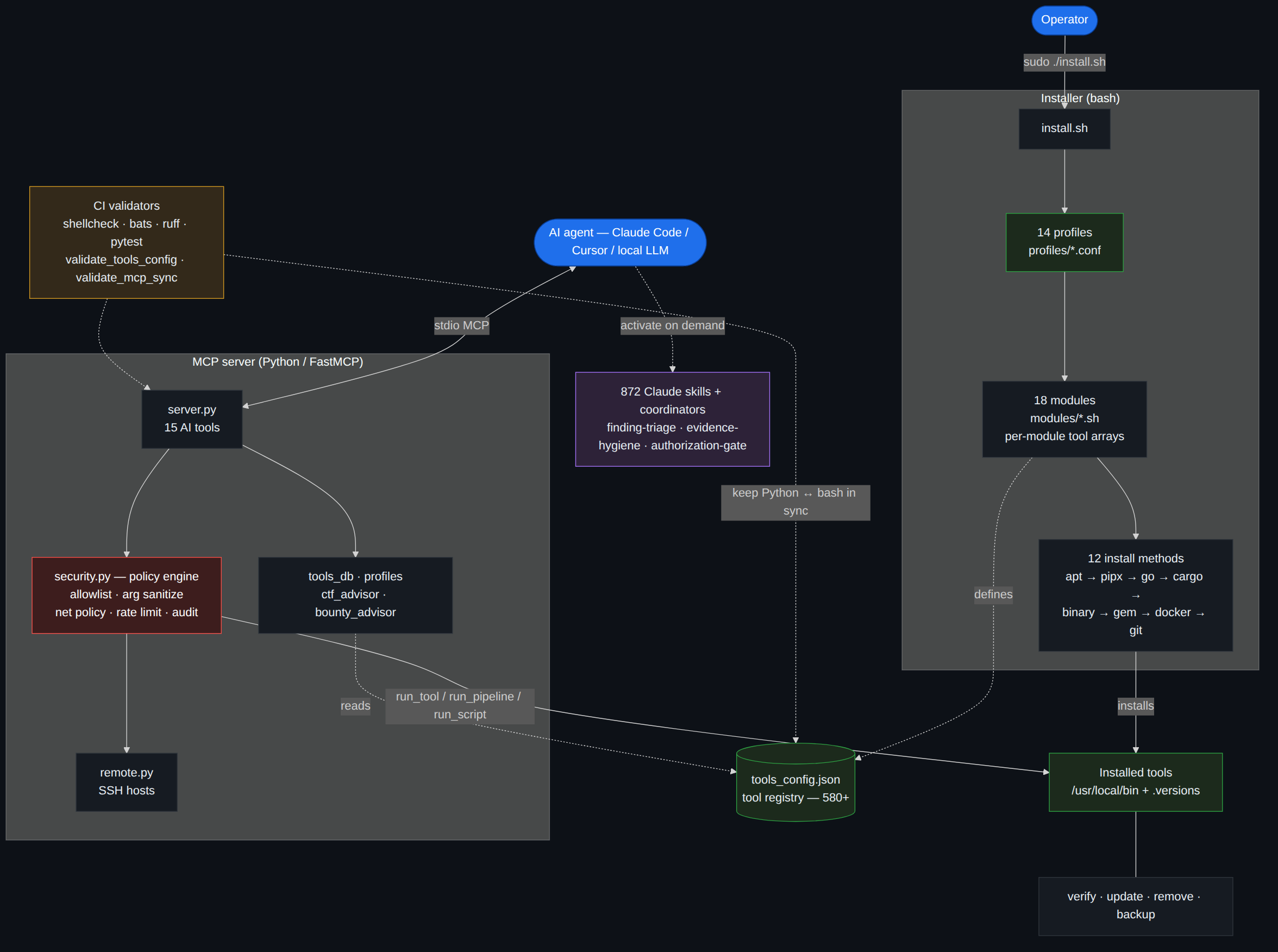
Mermaid source: assets/how-it-works.mmd.
Portable coding-agent skills for consistent implementation and verification workflows.
 26zl
26zl817 cybersecurity skills covering web security, pentesting, DFIR, threat intelligence, cloud security, malware analysis, and more.
 mukul975
A complete cybersecurity toolkit: 19 skills spanning reconnaissance, vulnerability assessment, exploit development, reverse engineering, malware analysis, threat hunting, incident response, network/web/cloud security, SOC automation, log analysis, cryptography, red and blue team operations, and AI/LLM, mobile, OT/ICS, and GRC security.
 Masriyan
Editorial "Security Engineer" bundle for Claude Code from Antigravity Awesome Skills.
 sickn33
734+ 网络安全技能,涵盖 Web 安全、渗透测试、DFIR、威胁情报、云安全、恶意软件分析等领域。中文版本。
 killvxk
Professional security tools for Claude Code: vulnerability scanning, compliance, cryptography audit, container & API security
 jeremylongshore
82-skill bug-hunting & external red-team bundle for Claude Code — 57 hunt-* web/vuln-class + framework skills, enterprise platform attack chains (M365/Entra, Okta, SharePoint, vCenter, SSL-VPN, APK/iOS), recon/OSINT, reporting & validation gates, and Burp MCP integration. Skills auto-load by topic; 15 slash commands included.
 elementalsouls
'%20stop-opacity%3D'0.16'%2F%3E%3Cstop%20offset%3D'1'%20stop-color%3D'rgb(200%2C90%2C60)'%20stop-opacity%3D'0.03'%2F%3E%3C%2FlinearGradient%3E%3C%2Fdefs%3E%3Crect%20width%3D'320'%20height%3D'200'%20fill%3D'url(%23g)'%2F%3E%3Ccircle%20cx%3D'250'%20cy%3D'56'%20r%3D'92'%20fill%3D'rgb(200%2C90%2C60)'%20fill-opacity%3D'0.06'%2F%3E%3Ccircle%20cx%3D'64'%20cy%3D'172'%20r%3D'58'%20fill%3D'rgb(200%2C90%2C60)'%20fill-opacity%3D'0.05'%2F%3E%3C%2Fsvg%3E)
