Stats
Actions
Available In
Tags
.NET development plugin for Claude Code — Roslyn semantic analysis, DI/architecture/EF Core guards, 16 skills, convention-aware scaffolders, security/performance/refactoring agents, and project lifecycle commands.
Add an endpoint to an existing controller or endpoint group.
Plan and generate an EF Core migration safely — validates chain, detects breaking changes, targets correct DbContext.
Add a new project to the solution with correct references and layer placement.
Create a service with interface, implementation, DI registration, and test scaffold.
Diagnose and iteratively fix dotnet build errors. Max 5 repair iterations.
🔧 Scaffolds API controllers or minimal API endpoints with DTOs, validation, DI registration, and OpenAPI attributes.
🏛️ Solution-level architecture guardian — enforces clean architecture boundaries, validates project references, detects layer violations.
🔧 Autonomous iterative build-error fixing — parses dotnet build/test output, diagnoses root causes, and applies minimal targeted fixes. Max 5 iterations before halting.
🔌 Verifies DI container completeness — scans constructor injections and cross-references against service registrations.
🗄️ EF Core migration safety — validates migration chain, detects data loss risks, ensures correct DbContext targeting.
ASP.NET Core API patterns — controllers vs minimal API, middleware, error handling, versioning, and authentication setup.
JWT bearer auth, ASP.NET Identity, OIDC, and policy-based authorization patterns for ASP.NET Core APIs.
Blazor component patterns — v2 placeholder for Server and WebAssembly render modes, state management, and JS interop.
HybridCache (.NET 9+), output caching, cache-aside pattern, and IMemoryCache — registration, usage, invalidation, and key strategy.
.NET clean architecture enforcement — layer rules, dependency direction, DI registration patterns, and project reference validation.
Executes bash commands
Hook triggers when Bash tool is used
Modifies files
Hook triggers on file write and edit operations
Own this plugin?
Verify ownership to unlock analytics, metadata editing, and a verified badge. GitHub access is read-only (username + org membership).
Sign in to claimOwn this plugin?
Verify ownership to unlock analytics, metadata editing, and a verified badge. GitHub access is read-only (username + org membership).
Sign in to claimBased on adoption, maintenance, documentation, and repository signals. Not a security audit or endorsement.
Uses power tools
Uses Bash, Write, or Edit tools
Uses power tools
Uses Bash, Write, or Edit tools
Runs pre-commands
Contains inline bash commands via ! syntax
Runs pre-commands
Contains inline bash commands via ! syntax
Bash prerequisite issue
Uses bash pre-commands but Bash not in allowed tools
Bash prerequisite issue
Uses bash pre-commands but Bash not in allowed tools
A .NET development assistant plugin for Claude Code
Roslyn-backed DI verification · EF Core migration safety · Clean-architecture enforcement · Convention-aware scaffolders



29 commands · 14 specialized agents · 11 hooks · 16 skill packs · 16 Roslyn MCP tools
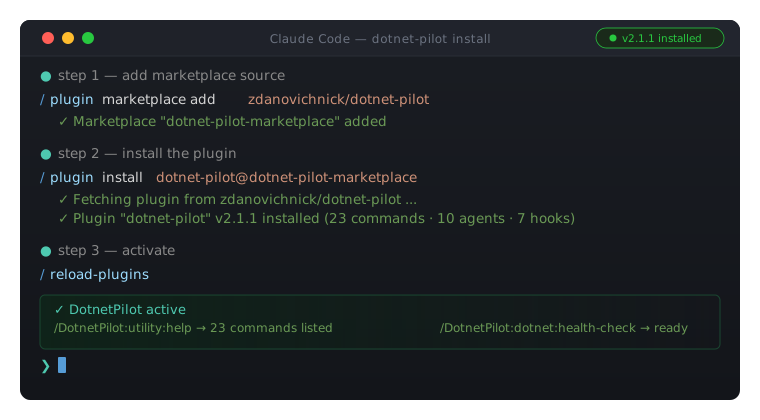
/plugin marketplace add zdanovichnick/dotnet-pilot
/plugin install dotnet-pilot@dotnet-pilot-marketplace
/reload-plugins
dotnet tool install -g DotnetPilot.Mcp.Roslyn   # first install
dotnet tool update  -g DotnetPilot.Mcp.Roslyn   # update to latest
Strongly recommended — enable auto-update (one-time setup). GitHub-sourced marketplaces have auto-update disabled by default; without this step you'll have to update manually each release. Add to ~/.claude/settings.json:
{
  "extraKnownMarketplaces": {
    "dotnet-pilot-marketplace": { "autoUpdate": true }
  }
}
That's it. Open Claude Code in your .sln / .slnx directory and run /DotnetPilot:utility:help.
AI coding tools make these .NET mistakes constantly — DotnetPilot fixes them at the source:
| Without DotnetPilot | With DotnetPilot |
|---|---|
| Creates services, forgets DI registration | dnp-di-wiring-checker catches it immediately |
| Manually edits EF migration files (breaks the chain) | add-migration always uses dotnet ef migrations add |
| Puts domain models in the wrong project layer | dnp-architect enforces clean architecture in real time |
Skips dotnet build verification | Build hook verifies after every scaffold |
| Ignores existing patterns in your codebase | Every scaffolder reads your conventions before writing code |
/plugin marketplace add zdanovichnick/dotnet-pilot
/plugin install dotnet-pilot@dotnet-pilot-marketplace
/reload-plugins
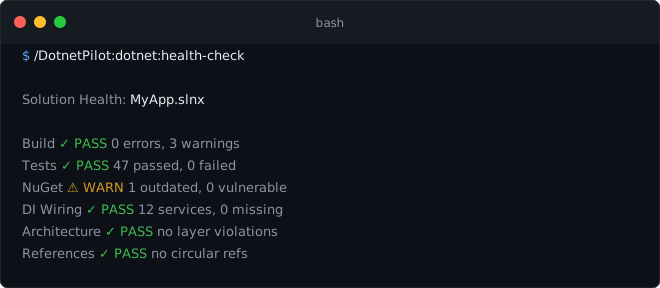
Verify it worked:
/DotnetPilot:utility:help            → should list 29 commands
/DotnetPilot:dotnet:health-check     → validates build, tests, DI, architecture
Keeping it up to date.
Easiest: Open the plugin manager (/plugin → Installed tab → dotnet-pilot) and click "Update now". Then /reload-plugins to activate.
CLI alternative:
/plugin marketplace update dotnet-pilot-marketplace
/reload-plugins
Auto-update (GitHub-sourced marketplaces disable it by default). Enable once via the /plugin UI (Marketplaces tab → dotnet-pilot-marketplace → Enable auto-update), or persist it in .claude/settings.json:
{
  "extraKnownMarketplaces": {
    "dotnet-pilot-marketplace": { "autoUpdate": true }
  }
}
Once the plugin lands in
claude-plugins-official, the install collapses to/plugin install dotnet-pilot— auto-update on by default.
Alternative: install from a local clone
Use this when you cloned the repo and want to run your own build, or contribute changes.
# Windows  (type in Claude Code chat)
/plugin marketplace add C:\path\to\dotnet-pilot

# macOS / Linux
/plugin marketplace add /path/to/dotnet-pilot
Then activate:
/plugin install dotnet-pilot@dotnet-pilot-marketplace
/reload-plugins
Session-only (plugin active only while this Claude Code process is running):
# Windows
claude --plugin-dir "C:\path\to\dotnet-pilot"

# macOS / Linux
claude --plugin-dir "/path/to/dotnet-pilot"
After editing plugin source (commands, agents, hooks), run
/reload-pluginsto pick up changes without restarting.
dotnet tool install -g DotnetPilot.Mcp.Roslyn   # first install
dotnet tool update  -g DotnetPilot.Mcp.Roslyn   # update to the latest release
The plugin's .mcp.json auto-starts dnp-roslyn when Claude Code loads. It requires a .sln or .slnx file in your working directory.
In Claude Code, enable the Context7 MCP server at the account level — planning agents use it for live NuGet / ASP.NET Core / EF Core documentation.
/DotnetPilot:utility:help            → should list 29 commands
/DotnetPilot:dotnet:health-check     → validates build, tests, DI, architecture
/DotnetPilot:project:init
npx claudepluginhub zdanovichnick/dotnet-pilot --plugin dotnet-pilotComprehensive skill pack with 66 specialized skills for full-stack developers: 12 language experts (Python, TypeScript, Go, Rust, C++, Swift, Kotlin, C#, PHP, Java, SQL, JavaScript), 10 backend frameworks, 6 frontend/mobile, plus infrastructure, DevOps, security, and testing. Features progressive disclosure architecture for 50% faster loading.
 Jeffallan
Harness-native ECC plugin for engineering teams - 67 agents, 279 skills, 94 legacy command shims, reusable hooks, rules, MCP conventions, and operator workflows for Claude Code plus adjacent agent harnesses
 affaan-m
Access thousands of AI prompts and skills directly in your AI coding assistant. Search prompts, discover skills, save your own, and improve prompts with AI.
 f
fConsult multiple AI coding agents (Gemini, OpenAI, Grok, Perplexity, plus codex, antigravity, and grok CLIs when installed) to get diverse perspectives on coding problems
 hex
hexProduction-grade engineering skills for AI coding agents — covering the full software development lifecycle from spec to ship.
 addyosmani
Lazy senior dev mode. Forces the simplest, shortest solution that actually works: YAGNI, stdlib first, no unrequested abstractions.
 DietrichGebert
'%20stop-opacity%3D'0.16'%2F%3E%3Cstop%20offset%3D'1'%20stop-color%3D'rgb(200%2C90%2C60)'%20stop-opacity%3D'0.03'%2F%3E%3C%2FlinearGradient%3E%3C%2Fdefs%3E%3Crect%20width%3D'320'%20height%3D'200'%20fill%3D'url(%23g)'%2F%3E%3Ccircle%20cx%3D'250'%20cy%3D'56'%20r%3D'92'%20fill%3D'rgb(200%2C90%2C60)'%20fill-opacity%3D'0.06'%2F%3E%3Ccircle%20cx%3D'64'%20cy%3D'172'%20r%3D'58'%20fill%3D'rgb(200%2C90%2C60)'%20fill-opacity%3D'0.05'%2F%3E%3C%2Fsvg%3E)
