Stats
Actions
Available In
Tags

Orchestrate multiple Claude Code sessions across repositories with voice control, smart routing, and persistent checkpoints. Track work progress, dispatch commands hands-free, resume interrupted tasks, and generate status reports for standups.
Scan for new project repos and add them to the Manager's project index. Use when you want to discover repos that aren't yet tracked.
Send a message/command to a specific session by ID. This skill is for the Manager session inside Workstation app. If you're in a standalone Claude Code session, suggest the user open the Workstation app and use this skill from the Manager terminal.
Show detailed status of a specific project by reading its archive, project_plan, and issues. Use for deep dive into one project's state.
Show all projects with current status. Manager-specific skill for cross-project visibility.
Auto-route a message to the best matching session based on repo name, task ID, or context. This skill is for the Manager session inside Workstation app. If you're in a standalone Claude Code session, suggest the user open the Workstation app and use this skill from the Manager terminal.
Matches all tools
Hooks run on every tool call, not just specific ones
Own this plugin?
Verify ownership to unlock analytics, metadata editing, and a verified badge. GitHub access is read-only (username + org membership).
Sign in to claimOwn this plugin?
Verify ownership to unlock analytics, metadata editing, and a verified badge. GitHub access is read-only (username + org membership).
Sign in to claimBased on adoption, maintenance, documentation, and repository signals. Not a security audit or endorsement.
Control Claude Code from your phone. An agentic coding orchestrator with AI agent integration, voice control, and multi-session management.
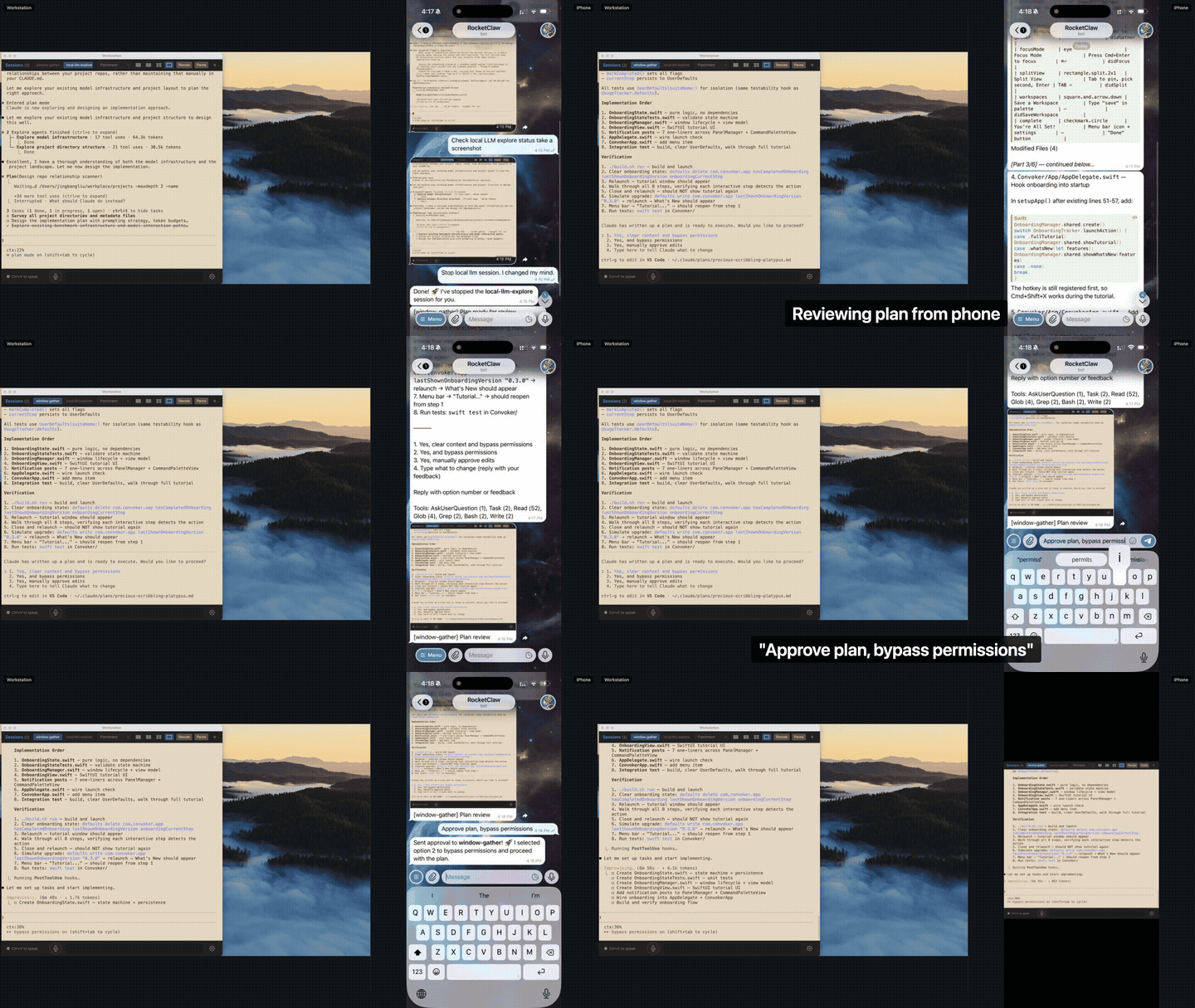
Connect an AI agent like OpenClaw to dispatch commands, approve plans, and monitor progress from Telegram or WhatsApp — while your Mac codes autonomously. Pair with native voice control for a completely hands-free coding experience.
Requirements: macOS 12+, Claude Code CLI
The desktop app bundles the plugin — no separate plugin install needed.
Download from GitHub Releases:
*-arm64.dmg*-x64.dmgOpen the DMG and drag Workstation to Applications.
Launch the app. All Claude Code sessions started from Workstation automatically have the plugin skills available.
macOS Gatekeeper: If macOS blocks the app on first launch:
- macOS 14 and earlier: Right-click the app > Open > click Open
- macOS 15 (Sequoia): System Settings > Privacy & Security > "Open Anyway"
If you prefer to start with the Claude Code plugin (adds skills to standalone Claude Code sessions too):
/plugin marketplace add https://github.com/varie-ai/workstation
/plugin install varie-workstation@varie-workstation
Restart Claude Code. The Workstation app downloads and launches automatically on your next session. To disable: /workstation autolaunch off
git clone https://github.com/varie-ai/workstation.git
cd workstation
npm install
npm run dev
Workstation uses native macOS capabilities that require your explicit approval. macOS will show permission prompts on first use — here's what they are and why they're needed.
| Permission | When prompted | Why it's needed |
|---|---|---|
| Accessibility | First launch | Required for Workstation to manage terminal sessions and capture keyboard shortcuts (voice control hotkey, etc.) |
| Microphone | First voice command | Voice control needs mic access for speech recognition. All audio is processed on-device. |
| Speech Recognition | First voice command | Apple Speech engine requires this system permission. Audio stays on your Mac. |
| Screen Recording | When using full-screen screenshots | Only needed if you want the agent to capture your entire display (not just the Workstation window). Session-mode screenshots use Electron's built-in capture and need no extra permission. |
To manage permissions: System Settings > Privacy & Security > select the permission category > enable/disable Workstation.
npx claudepluginhub varie-ai/workstation --plugin varie-workstationHarness-native ECC plugin for engineering teams - 67 agents, 277 skills, 93 legacy command shims, reusable hooks, rules, MCP conventions, and operator workflows for Claude Code plus adjacent agent harnesses
 affaan-m
Supergraph enforces a complete, evidence-based coding pipeline — scan → plan → TDD → fix → verify → review — grounded in real codebase analysis at every step. It combines AST dependency graphs, LSP-level code intelligence, and a structured skill chain so Claude never guesses about impact before making a change.
 datit309
Claude harness - A harness for solo developers (Vibecoders) to handle full-cycle contract development.
 Chachamaru127
Core skills library for Claude Code: TDD, debugging, collaboration patterns, and proven techniques
 obra
obraSuperpowers Plus core skills library for Claude Code: planning, execution routing, TDD, debugging, and collaboration workflows
 xhyqaq
Plugin-safe Claude Code distribution of Antigravity Awesome Skills with 1,850 supported skills.
 sickn33
'%20stop-opacity%3D'0.16'%2F%3E%3Cstop%20offset%3D'1'%20stop-color%3D'rgb(200%2C90%2C60)'%20stop-opacity%3D'0.03'%2F%3E%3C%2FlinearGradient%3E%3C%2Fdefs%3E%3Crect%20width%3D'320'%20height%3D'200'%20fill%3D'url(%23g)'%2F%3E%3Ccircle%20cx%3D'250'%20cy%3D'56'%20r%3D'92'%20fill%3D'rgb(200%2C90%2C60)'%20fill-opacity%3D'0.06'%2F%3E%3Ccircle%20cx%3D'64'%20cy%3D'172'%20r%3D'58'%20fill%3D'rgb(200%2C90%2C60)'%20fill-opacity%3D'0.05'%2F%3E%3C%2Fsvg%3E)