Stats
Actions
Available In
Tags

Production-grade academic research pipeline for Claude Code: research → write → review → revise → finalize. 4 skills, 27 modes, 39-agent ensemble, v3.7.3 + v3.8 L3 claim-faithfulness gate, v3.9.0 cross-index triangulation, v3.10 triangulation policy layer, v3.11 deterministic citation verification gate (#182).
ARS deep-research `three-way-scan` mode — WHY / HOW / WHAT paper comparison
ARS academic-paper `abstract-only` mode — bilingual abstract + keywords
ARS /ars-cache-invalidate — drop cached verification entries for a citation key
ARS academic-paper `citation-check` mode — citation error report
ARS academic-paper `disclosure` mode — venue-specific AI-usage statement
Kimi K2 CLI + tmux multi-agent parallel dev platform with sengoku military hierarchy
Transforms research findings into polished APA 7.0 academic reports; activated in Phase 4 and Phase 6
Designs the methodological blueprint; selects research paradigm, method, data strategy, and analytical framework
Integrates findings across sources, resolves evidence conflicts, and maps knowledge gaps
Delivers changes incrementally. Use when implementing any feature or change that touches more than one file. Use when you're about to write a large amount of code at once, or when a task feels too big to land in one step.
Drives development with tests. Use when implementing any logic, fixing any bug, or changing any behavior. Use when you need to prove that code works, when a bug report arrives, or when you're about to modify existing functionality.
Tests in real browsers via Chrome DevTools MCP. Use when building or debugging anything that runs in a browser. Use when you need to inspect the DOM, capture console errors, analyze network requests, profile performance, or verify visual output with real runtime data. Requires the chrome-devtools MCP server to be configured.
Instruments code so production behavior is visible and diagnosable. Use when adding logging, metrics, tracing, or alerting. Use when shipping any feature that runs in production and you need evidence it works. Use when production issues are reported but you can't tell what happened from the available data.
Structures git workflow practices. Use when making any code change. Use when committing, branching, resolving conflicts, or when you need to organize work across multiple parallel streams.
Executes bash commands
Hook triggers when Bash tool is used
Modifies files
Hook triggers on file write and edit operations
Own this plugin?
Verify ownership to unlock analytics, metadata editing, and a verified badge. GitHub access is read-only (username + org membership).
Sign in to claimOwn this plugin?
Verify ownership to unlock analytics, metadata editing, and a verified badge. GitHub access is read-only (username + org membership).
Sign in to claimBased on adoption, maintenance, documentation, and repository signals. Not a security audit or endorsement.
Uses power tools
Uses Bash, Write, or Edit tools
Uses power tools
Uses Bash, Write, or Edit tools
Command your AI army like a feudal warlord.
Run 10 AI coding agents in parallel — Claude Code, OpenAI Codex, GitHub Copilot, Kimi Code, OpenCode, Cursor, Antigravity — orchestrated through a samurai-inspired hierarchy with zero coordination overhead.
Talk Coding, not Vibe Coding. Speak to your phone, AI executes.



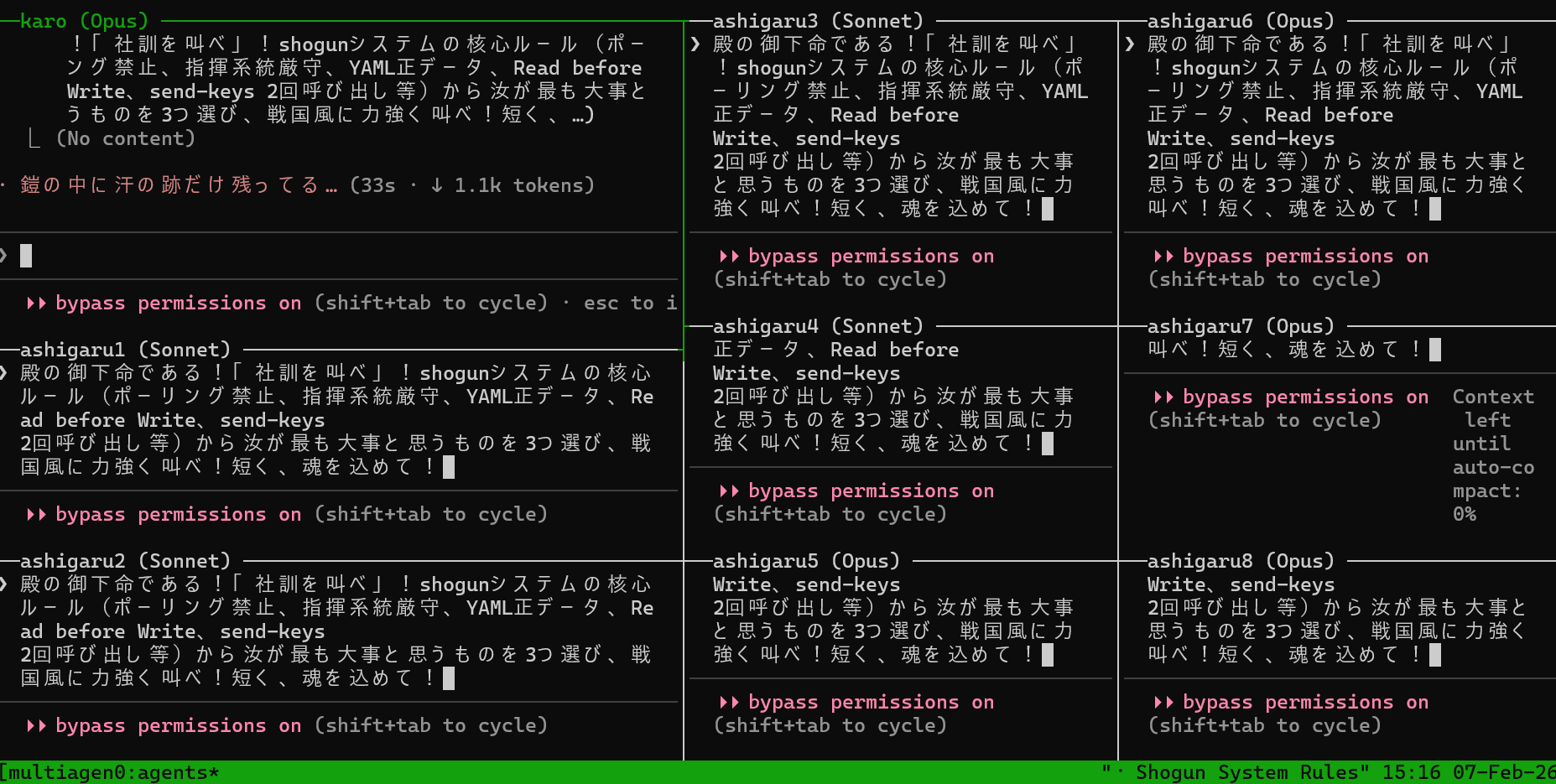
One Orchestrator (manager) coordinating 9 specialists (including Council consensus) — real session, no mock data.
Requirements: tmux, bash 4+, at least one of: Claude Code / Codex / Copilot / Kimi / OpenCode / Antigravity
git clone https://github.com/yohey-w/multi-agent-shogun
cd multi-agent-shogun
bash first_setup.sh                        # one-time setup: config, dependencies, MCP
source ~/.bashrc                           # reload PATH
claude --dangerously-skip-permissions      # first run only: OAuth + accept Bypass Permissions → /exit
bash depart.sh                # launch all agents
For full install steps (incl. Windows) and the first-30-minutes walkthrough, see 🚀 Quick Start and the basic usage section below.
Type a command in the Shogun pane:
"Build a REST API for user authentication"
Shogun delegates → Orchestrator breaks it down → 7 specialists execute in parallel. You watch the dashboard. That's it.
Want to go deeper? The rest of this README covers architecture, configuration, memory design, and multi-CLI setup.
multi-agent-shogun is a system that runs multiple AI coding CLI instances simultaneously, orchestrating them like a feudal Japanese army. Supports Claude Code, OpenAI Codex, GitHub Copilot, Kimi Code, OpenCode, Cursor, and Antigravity.
Why use it?
        You (Lord)
             │
             ▼  Give orders
      ┌─────────────┐
      │   SHOGUN    │  ← Receives your command, delegates instantly
      └──────┬──────┘
             │  YAML + tmux
      ┌──────▼──────┐
      │ ORCHESTRATOR │  ← Coordinates specialists, owns dashboard
      └──────┬──────┘
             │
   ┌───┬───┬─┴─┬───┬───┬───┬───┬───┐
   │   │   │   │   │   │   │   │   │
   ▼   ▼   ▼   ▼   ▼   ▼   ▼   ▼   ▼
surveyor critic architect experimentalist analyst ablation_planner writer observer council
 (find) (review) (design)  (experiment)   (analyze)   (ablate)    (write) (observe) (consensus)
Most multi-agent frameworks burn API tokens on coordination. Shogun doesn't.
npx claudepluginhub titipakorn/multi-agent-shogunConsult multiple AI coding agents (Gemini, OpenAI, Grok, Perplexity, plus codex, antigravity, and grok CLIs when installed) to get diverse perspectives on coding problems
 hex
hexv9.52.0 - Reliability wave: tangle contextual review correction loop with hard round ceiling, progress-supervised review rounds (per-agent stall watch, descendant-tree kills), council diversity and agy pin fixes, marketplace generator source-of-truth fix, provider troubleshooting runbook and cost-expectations docs. Run /octo:setup.
 nyldn
nyldnComplete creative writing suite with 10 specialized agents covering the full writing process: research gathering, character development, story architecture, world-building, dialogue coaching, editing/review, outlining, content strategy, believability auditing, and prose style/voice analysis. Includes genre-specific guides, templates, and quality checklists.
 greyhaven-ai
Upstash Context7 MCP server for up-to-date documentation lookup. Pull version-specific documentation and code examples directly from source repositories into your LLM context.
 upstash
Comprehensive startup business analysis with market sizing (TAM/SAM/SOM), financial modeling, team planning, and strategic research
 wshobson
Comprehensive .NET development skills for modern C#, ASP.NET, MAUI, Blazor, Aspire, EF Core, Native AOT, testing, security, performance optimization, CI/CD, and cloud-native applications
 wshaddix
'%20stop-opacity%3D'0.16'%2F%3E%3Cstop%20offset%3D'1'%20stop-color%3D'rgb(200%2C90%2C60)'%20stop-opacity%3D'0.03'%2F%3E%3C%2FlinearGradient%3E%3C%2Fdefs%3E%3Crect%20width%3D'320'%20height%3D'200'%20fill%3D'url(%23g)'%2F%3E%3Ccircle%20cx%3D'250'%20cy%3D'56'%20r%3D'92'%20fill%3D'rgb(200%2C90%2C60)'%20fill-opacity%3D'0.06'%2F%3E%3Ccircle%20cx%3D'64'%20cy%3D'172'%20r%3D'58'%20fill%3D'rgb(200%2C90%2C60)'%20fill-opacity%3D'0.05'%2F%3E%3C%2Fsvg%3E)
