
slaude join https://<workspace>.slack.com/archives/D1KFZ7GJ0/p1773303415258849
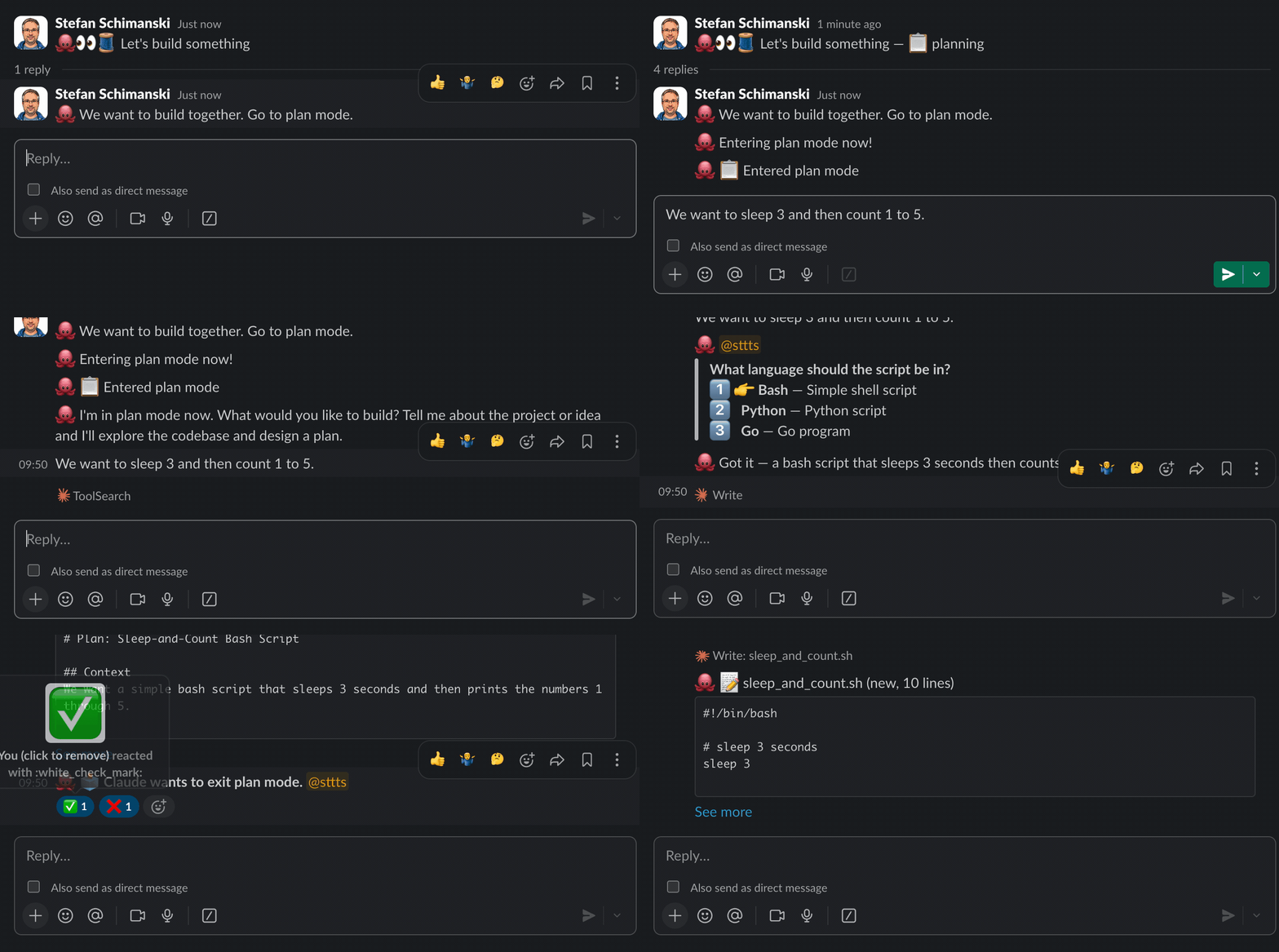
slagent (go library) & slaude (CLI)
[!CAUTION]
Experimental — slaude exposes your Claude Code session to Slack. Likely insecure. Use at your own risk.
slagent is a Go library for streaming agent sessions to Slack threads. slaude is a CLI built on slagent that mirrors Claude Code sessions to Slack — so your team can watch, comment, and steer from Slack while Claude works.




Quick Start — slaude
Install
# Homebrew
brew tap sttts/slagent https://github.com/sttts/slagent
brew install sttts/slagent/slaude

# or go install
go install github.com/sttts/slagent/cmd/slaude@latest

# or build from source
go build -o slaude ./cmd/slaude/
Check your version:
slaude version # or: slaude --version
Set up Slack credentials
slaude auth              # extract from local Slack app (recommended)
slaude auth --manual     # or paste a token manually
Run
# Start a Claude session mirrored to a Slack channel
slaude start #general "design the API"

# With a Slack URL (workspace auto-detected)
slaude start https://team.slack.com/archives/C123 "design the API"

# DM a user
slaude start @alice "review this PR"

# With Claude flags (everything after -- goes to Claude)
slaude start #general -- --permission-mode plan "refactor the auth module"

# Join an existing Slack thread (new agent instance)
slaude join https://team.slack.com/archives/C123/p1234567890 "help with tests"

# Resume a previous session (URL with cursor from exit output)
slaude resume https://team.slack.com/archives/C123/p1234567890#[email protected] -- --resume SESSION_ID

# No channel? Interactive picker shows available channels
slaude start "refactor the auth module"
Commands
| Command | Description |
|---|
slaude start [target] [topic] | Start a new Slack thread (target: URL, #channel, @user, or ID) |
slaude join URL [topic] | Join an existing thread with a new agent instance |
slaude resume URL#id[@ts] | Resume a previous session in a Slack thread |
slaude auth | Set up Slack credentials |
slaude channels | List accessible channels |
slaude share FILE -c CHANNEL | Post a plan file to Slack |
slaude status | Show current configuration |
Everything after -- is passed through to the Claude subprocess. This means slaude doesn't need to know about every Claude flag — you control --permission-mode, --resume, --system-prompt, etc. directly.
Access Modes
Sessions start locked (owner-only) by default. Control who can interact:
slaude start --locked #general "design the API"    # 🔒 owner only (default)
slaude start --open #general "design the API"      # 🔓 everyone can interact
slaude start --observe #general "watch and learn"   # 👀 reads all, responds to owner
Change at runtime from Slack: :fox_face: /open, :fox_face: /open <@user> (grant one person), :fox_face: /lock, :fox_face: /observe. See Thread Access Control for details.
Multi-Instance Threads
Multiple slaude instances can share a Slack thread. Each instance gets a unique identity emoji (e.g. 🦊, 🐶). To address a specific instance, use :shortcode: prefix:
:fox_face: focus on the auth module     →  addressed to 🦊 (others see it but ignore)
:fox_face: /compact                     →  /command sent exclusively to 🦊
Messages without prefix                 →  broadcast to all instances
Regular messages with :shortcode: prefix are delivered to all instances, but the system prompt tells non-targeted instances to ignore them. Commands (/something) are instance-exclusive — only the targeted instance receives them.
Thread Access Control
Access has two independent axes:
Base mode — who the agent responds to:
- Locked (default for
start): owner only
- Selective: owner + listed users
- Open: everyone
Observe flag — who the agent sees:
- Off (default): non-authorized messages filtered out
- On: all messages delivered for passive learning, agent still only responds to authorized users
Use /open, /lock, and /observe to control access (via :shortcode: targeting):

 sttts
sttts sttts
sttts tomeraitz
 aaronn
 agentchannels
 vildanbina
 ir272
ir272 redhat-community-ai-tools
'%20stop-opacity%3D'0.16'%2F%3E%3Cstop%20offset%3D'1'%20stop-color%3D'rgb(200%2C90%2C60)'%20stop-opacity%3D'0.03'%2F%3E%3C%2FlinearGradient%3E%3C%2Fdefs%3E%3Crect%20width%3D'320'%20height%3D'200'%20fill%3D'url(%23g)'%2F%3E%3Ccircle%20cx%3D'250'%20cy%3D'56'%20r%3D'92'%20fill%3D'rgb(200%2C90%2C60)'%20fill-opacity%3D'0.06'%2F%3E%3Ccircle%20cx%3D'64'%20cy%3D'172'%20r%3D'58'%20fill%3D'rgb(200%2C90%2C60)'%20fill-opacity%3D'0.05'%2F%3E%3C%2Fsvg%3E)