Stats
Actions
Available In
Tags

Claude Code plugin for TIL learning workflow — research, backlog, spaced repetition review, dashboard
View learning backlog and show progress. Use when the user asks 'what's left to learn', 'show my progress', 'learning todo', or wants to check remaining topics in their study plan.
Today I Learned — research a topic, learn interactively, then save as TIL markdown. Use when the user wants to learn about a topic, says 'teach me', 'what is X', 'deep dive into X', or asks to study something and save it as a TIL note.
Learning dashboard — stats, activity heatmap, categories, backlog progress. Use when the user asks 'my stats', 'how much have I learned', 'show my streak', 'learning summary', or wants an overview of their TIL activity.
oh-my-til unified setup — seeds SCHEMA.md and configures deployment
Research a topic to identify key concepts and terms, then organize as a learning backlog. Use when the user wants a learning roadmap, study plan, curriculum, or asks 'what should I learn about X' — focuses on planning what to learn, not learning itself.
Own this plugin?
Verify ownership to unlock analytics, metadata editing, and a verified badge. GitHub access is read-only (username + org membership).
Sign in to claimOwn this plugin?
Verify ownership to unlock analytics, metadata editing, and a verified badge. GitHub access is read-only (username + org membership).
Sign in to claimBased on adoption, maintenance, documentation, and repository signals. Not a security audit or endorsement.


English | 한국어
A Claude Code plugin for AI-powered TIL (Today I Learned) learning workflow. Works as a standalone CLI (npx oh-my-til) or as an Obsidian plugin with embedded Claude Code terminal.
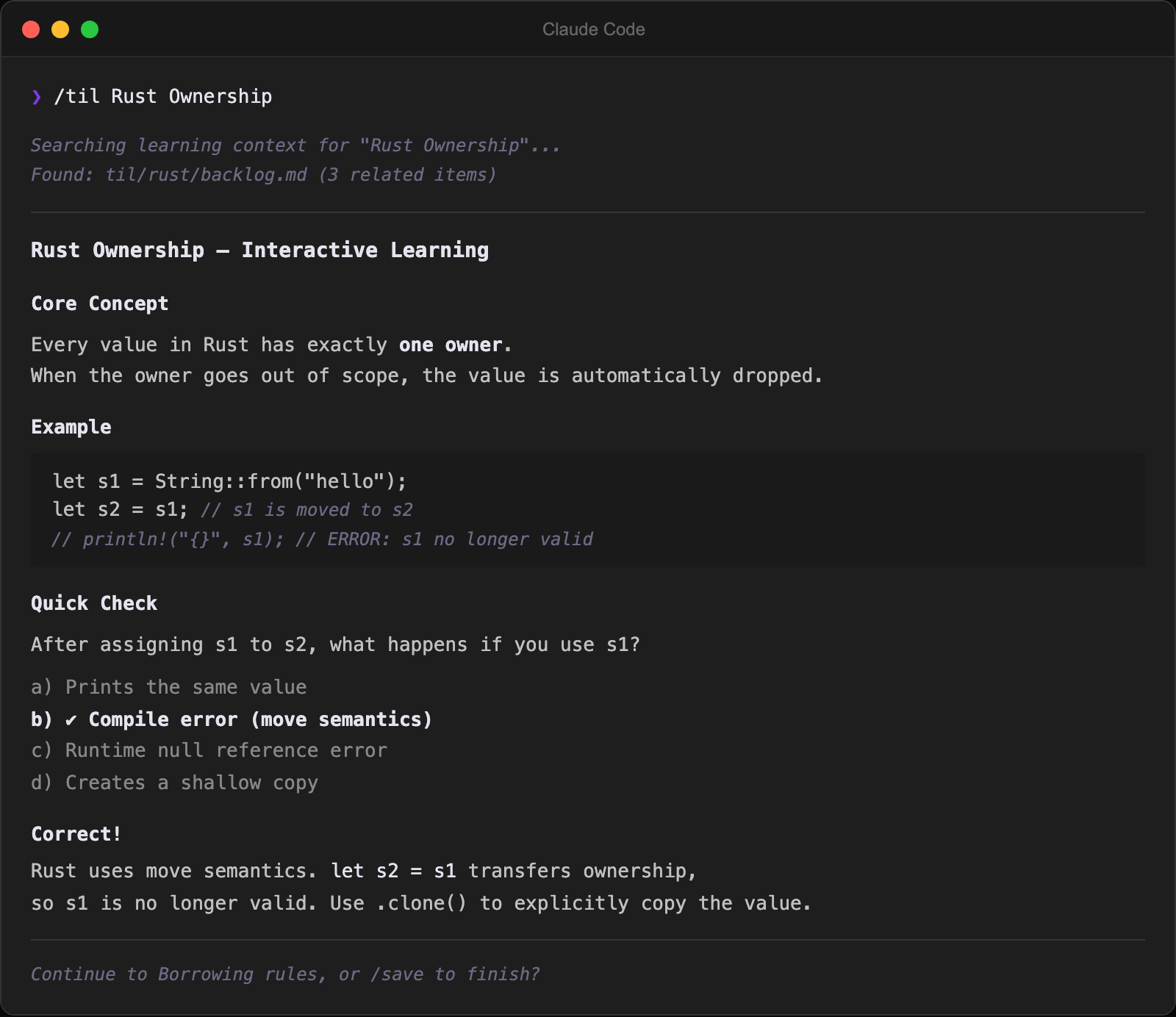
/til, /research, /backlog, /save, /til-review, /til-lint, /dashboard commands ready out of the box[text](path) links in terminal are clickable and open notes (CJK-aware)Command Palette → Open Terminal → Claude Code starts
→ Run /til, /backlog, /research, /save, /til-review, /til-lint, /dashboard skills
→ Claude researches → interactive learning → saves TIL markdown
→ New file detected → opens in editor
Install directly as a Claude Code plugin — skills, MCP server, and hooks are auto-registered.
Prerequisites: Node.js 18+ / Claude Code v1.0.33+
# Add marketplace (project scope recommended — only active in this TIL vault)
claude plugin marketplace add https://github.com/SongYunSeop/oh-my-til.git --scope project

# Install plugin
claude plugin install oh-my-til@oh-my-til --scope project
Skills are namespaced: /oh-my-til:til, /oh-my-til:research, /oh-my-til:backlog, etc.
Prerequisites: Node.js 18+ / Claude Code CLI (claude)
Install the Claude Code plugin (Option A above) — skills and MCP server are auto-registered.
Start Claude Code and use /til, /research, /backlog skills right away:
cd ~/my-til
claude
(Optional) Register MCP server — lets Claude Code query your TIL files (stdio mode, works with Claude Desktop):
claude mcp add oh-my-til -- npx oh-my-til mcp ~/my-til
Prerequisites: Obsidian v1.5.0+ / Node.js 18+ / Claude Code CLI (claude)
Install the Obsidian plugin directly:
npx oh-my-til install-obsidian /path/to/your/vault
Electron version is auto-detected on macOS. To override:
ELECTRON_VERSION=37.10.2 npx oh-my-til install-obsidian /path/to/your/vault
To find your Electron version, open Obsidian's Developer Tools (Ctrl+Shift+I) and run
process.versions.electron.
git clone https://github.com/SongYunSeop/oh-my-til.git
cd oh-my-til
npm install
ELECTRON_VERSION=<your-electron-version> npm run deploy -- /path/to/your/vault
After installation, restart Obsidian and enable Oh My TIL in Settings > Community plugins.
The plugin includes a built-in MCP server so Claude Code can access your vault directly:
claude mcp add --transport http oh-my-til http://localhost:22360/mcp
| Setting | Default | Description |
|---|---|---|
| Shell Path | System default | Shell to use in the terminal |
| Auto Launch Claude | true | Run claude when terminal opens |
| Resume Last Session | false | Resume previous Claude session (--continue) |
| Font Size | 13 | Terminal font size (px) |
| Font Family | Menlo | Terminal font (Menlo, SF Mono, Fira Code, JetBrains Mono, etc.) |
| Line Height | 1.0 | Terminal line spacing (1.0 = default, up to 2.0) |
| TIL Path | til | TIL folder path. Skills follow it automatically (resolved CLI-first: --til-path → TIL_PATH env → oh-my-til.json → Obsidian setting → default) |
| Auto Open New TIL | true | Open new TIL files in editor automatically |
| Open Dashboard on Startup | false | Open learning dashboard when Obsidian starts |
| Claude Args | (empty) | Additional arguments passed to claude command |
When the MCP server is connected, Claude Code can use these tools:
npx claudepluginhub songyunseop/oh-my-tilSelf-improving learning loop across Claude sessions — retrieval, capture, consolidation, and cross-project transfer
 robinslange
Second Brain OS — 16 skills for knowledge management, deep thinking, and vault operations powered by Obsidian.
 sonthanh
Automatic Claude Code -> Obsidian second brain: zero-config session capture, hybrid search, autonomous recall, daily/lessons/preferences.
 m3talux
AI thinking partner for your Obsidian vault — process, recall, synthesize, research with evidence-backed learning science
 tuan3w
Create and edit Obsidian vault files including Markdown, Bases, and Canvas. Use when working with .md, .base, or .canvas files in an Obsidian vault.
 breferrari
Archive learnings from Claude Code sessions to Obsidian vault as Zettelkasten notes and use vault knowledge as conversational context
 hamsurang
'%20stop-opacity%3D'0.16'%2F%3E%3Cstop%20offset%3D'1'%20stop-color%3D'rgb(200%2C90%2C60)'%20stop-opacity%3D'0.03'%2F%3E%3C%2FlinearGradient%3E%3C%2Fdefs%3E%3Crect%20width%3D'320'%20height%3D'200'%20fill%3D'url(%23g)'%2F%3E%3Ccircle%20cx%3D'250'%20cy%3D'56'%20r%3D'92'%20fill%3D'rgb(200%2C90%2C60)'%20fill-opacity%3D'0.06'%2F%3E%3Ccircle%20cx%3D'64'%20cy%3D'172'%20r%3D'58'%20fill%3D'rgb(200%2C90%2C60)'%20fill-opacity%3D'0.05'%2F%3E%3C%2Fsvg%3E)
