Stats
Actions
Available In
Tags

Generates self-contained HTML visualizations from markdown implementation plans showing BEFORE/AFTER architecture, diff-marked components, key decisions, and risks
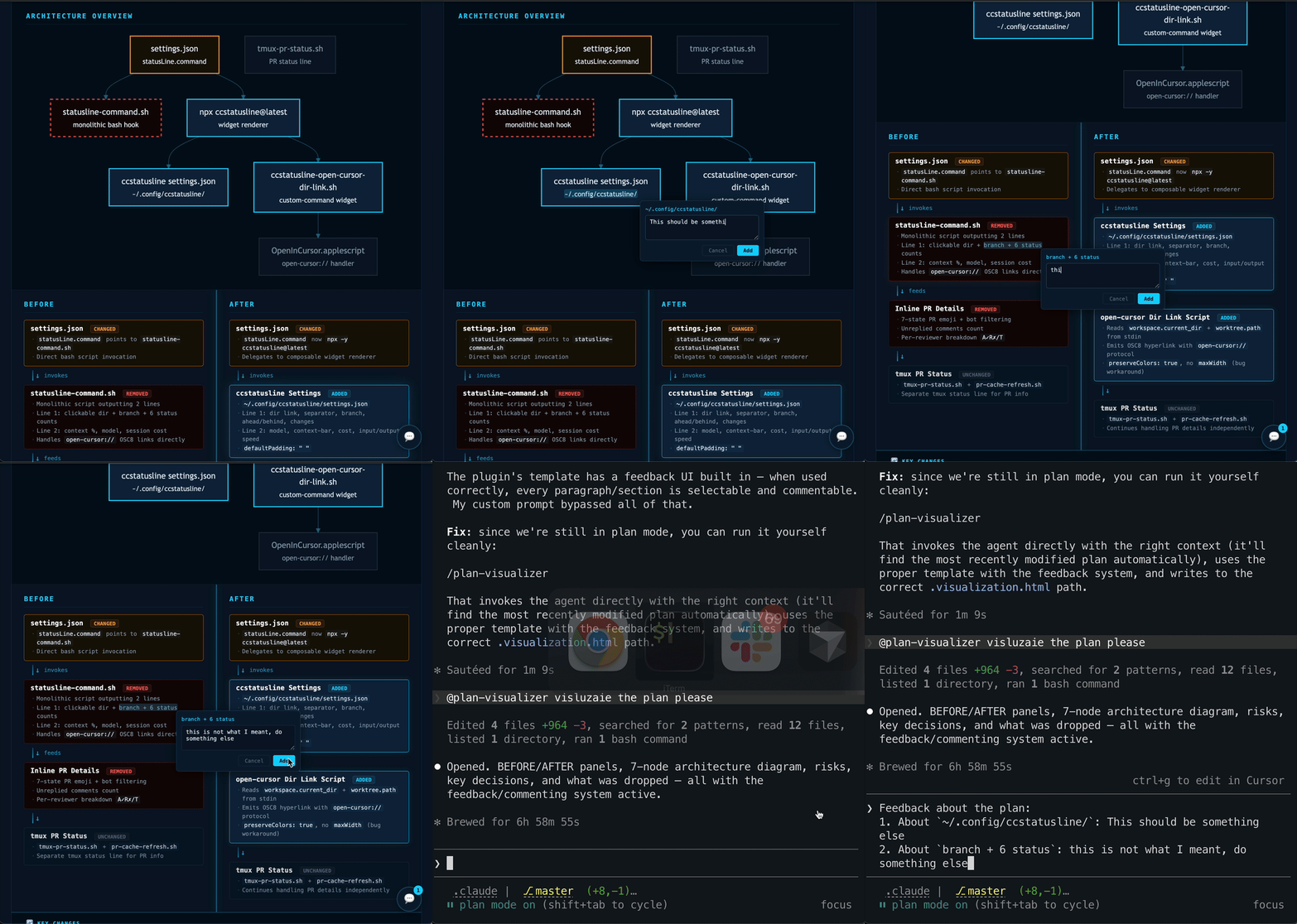
Generates HTML visualizations from markdown implementation plans. Opens in any browser — shows BEFORE/AFTER architecture with diff-marked components, mermaid architecture diagrams, key decisions, risks, and interactive feedback annotations.
Add the marketplace to Claude Code:
/plugin marketplace add omril321/claude-plan-visualizer
Then install the plugin:
/plugin install plan-visualizer@claude-plan-visualizer
Create ~/.claude/plan-visualizer.json to customize the URL protocol for plan file links:
{"url_protocol": "open-cursor"}
Supported protocols: file (default), open-cursor, vscode, or any custom protocol handler.
If this file doesn't exist, the plugin defaults to file:// links.
Invoke the agent manually by asking Claude to visualize a plan:
Visualize the plan at plans/my-plan.md
Or use it programmatically from a planning skill by invoking the plan-visualizer:plan-visualizer agent with the plan file path.
~/.claude/plan-visualizer.json for URL protocol preferenceplan-basename.visualization.html alongside the plan fileA single HTML file with:
The generated HTML includes an interactive annotation system:
Feedback about the plan:
1. About `<selected text>`: <your comment>
2. About `<another selection>`: <your comment>
When a plan has 3+ components with relationships, the agent generates a mermaid architecture overview diagram showing:
Mermaid.js is loaded from unpkg CDN (requires internet connection).
Works best with plans containing:
## Summary with a **Goal:** line**What changes:** bullet list of files/components**Key decisions:** and **Risks:** sub-fields## Steps with ### Step N headings and verify criteria## Assumptions and ## Success Criteria## Scope Definition with In Scope / Out of ScopeAlso handles plans without these sections via graceful fallback.
The agent skips visualization when the plan:
| Component | Purpose |
|---|---|
plan-visualizer agent | Reads plan markdown, generates HTML visualization |
knowledge/plan-visualizer-template.html | HTML/CSS/JS template with mermaid support and feedback system |
~/.claude/plan-visualizer.json | User config file for URL protocol (outside plugin) |
MIT
Uses power tools
Uses Bash, Write, or Edit tools
Own this plugin?
Verify ownership to unlock analytics, metadata editing, and a verified badge. GitHub access is read-only (username + org membership).
Sign in to claimOwn this plugin?
Verify ownership to unlock analytics, metadata editing, and a verified badge. GitHub access is read-only (username + org membership).
Sign in to claimBased on adoption, maintenance, documentation, and repository signals. Not a security audit or endorsement.
npx claudepluginhub sheeeng/omril321-claude-plan-visualizer --plugin plan-visualizerDirect browser control via CDP. Drives the user's real Chrome (or a Browser Use cloud browser) with coordinate clicks, screenshots, and Python helpers — no selector hunting. Requires the one-time `browser-harness` CLI install (see the skill's references/install.md).
 sheeeng
Complete creative writing suite with 10 specialized agents covering the full writing process: research gathering, character development, story architecture, world-building, dialogue coaching, editing/review, outlining, content strategy, believability auditing, and prose style/voice analysis. Includes genre-specific guides, templates, and quality checklists.
 greyhaven-ai
Comprehensive skill pack with 66 specialized skills for full-stack developers: 12 language experts (Python, TypeScript, Go, Rust, C++, Swift, Kotlin, C#, PHP, Java, SQL, JavaScript), 10 backend frameworks, 6 frontend/mobile, plus infrastructure, DevOps, security, and testing. Features progressive disclosure architecture for 50% faster loading.
 Jeffallan
Intelligent draw.io diagramming plugin with AI-powered diagram generation, multi-platform embedding (GitHub, Confluence, Azure DevOps, Notion, Teams, Harness), conditional formatting, live data binding, and MCP server integration for programmatic diagram creation and management.
 markus41
A growing collection of Claude-compatible academic workflow bundles. Covers scientific figures, manuscript writing and polishing, reviewer assessment, citation retrieval, data availability, paper reading, literature search, response letters, paper-to-PPTX conversion, and evidence-grounded Chinese invention patent drafting. Rules are organized as reusable skill folders with explicit workflows and quality checks.
 Yuan1z0825
Upstash Context7 MCP server for up-to-date documentation lookup. Pull version-specific documentation and code examples directly from source repositories into your LLM context.
 upstash
Comprehensive PR review agents specializing in comments, tests, error handling, type design, code quality, and code simplification
 anthropics
'%20stop-opacity%3D'0.16'%2F%3E%3Cstop%20offset%3D'1'%20stop-color%3D'rgb(200%2C90%2C60)'%20stop-opacity%3D'0.03'%2F%3E%3C%2FlinearGradient%3E%3C%2Fdefs%3E%3Crect%20width%3D'320'%20height%3D'200'%20fill%3D'url(%23g)'%2F%3E%3Ccircle%20cx%3D'250'%20cy%3D'56'%20r%3D'92'%20fill%3D'rgb(200%2C90%2C60)'%20fill-opacity%3D'0.06'%2F%3E%3Ccircle%20cx%3D'64'%20cy%3D'172'%20r%3D'58'%20fill%3D'rgb(200%2C90%2C60)'%20fill-opacity%3D'0.05'%2F%3E%3C%2Fsvg%3E)