Stats
Actions
Available In
Tags

Guides AI-augmented development through the V-Model workflow: business analysis, requirements engineering, architecture decisions (MADR/arc42), backlog management, security audits (OWASP), and reverse-engineering of legacy codebases.
Creates Architecture Decision Records (ADRs) in MADR format and arc42 documentation. Generates plan-context.md as the context bridge to Claude Code. Use this skill when the user mentions "architecture", "ADR", "arc42", "Architecture Decision", "tech stack", "solution design", "system design", "architecture review", "plan-context", or similar. Also when requirements exist and the next step is technical structuring. This skill creates PROPOSALS. Claude Code makes the final decisions based on the real state of the codebase.
Conducts structured business analyses: problem and stakeholder analysis, as-is/to-be gap analysis, user personas, scope definition. Creates BA documents as the foundation for requirements engineering. Uses innovation phases EXPLORATION, IDEATION, and VALIDATION. Use this skill when the user mentions "Business Analysis", "BA", "Stakeholder Analysis", "Problem Analysis", "As-Is Analysis", "Gap Analysis", "User Personas", "Define Scope", "Analyze Project", "Explore", "How might we", "Value Proposition", "Idea Potential", "Innovation", or similar. Also when the user wants to start a new project and does not yet have a clear requirement. This skill helps understand the problem before discussing solutions.
Handoff skill and bug-capture entry point: loads plan-context.md and all design artifacts, performs a critical review against the real codebase, and ensures continuous writeback to the artifacts during and after implementation. Also the entry point when a bug is reported outside of an active implementation run -- captures the FIX artefact (BACKLOG row + FIX detail file + branch) without forcing an immediate fix. Use this skill when the user mentions "implement", "code", "realize plan-context", "build feature", "Bug gefunden", "es gibt einen Fehler", "Fix erfassen", or similar, and either a plan-context.md / FEATURE spec exists OR a bug surfaced. This skill does NOT take over the coding workflow -- the Default Claude Code agent remains responsible for the actual implementation. This skill ensures the context is critically reviewed, cleanly handed off, and artifacts stay up to date.
Verifies the V-Model artifact graph is intact: BA sections, Epics, Features, Success Criteria, ADRs, arc42 sections, PLANs, Backlog, Wayfinder rows, and code references. Two modes: syntactic (links, IDs, Refs) and semantic (content coherence via an agent). Default syntactic at the end of every skill phase. Semantic before release or on explicit request. Use this skill when the user mentions "consistency check", "graph check", "check references", "dead links", "orphan features", "graph-health", or when another V-Model skill completes a phase and wants to verify the artifact graph before handoff.
Bootstrap context for the Digital Innovation Agents V-Model workflow. Auto-loaded at session start by the SessionStart hook (unless mode = off). Carries the entry-point catalog, the helper-script path resolution rule, the activation contract, and opt-out behaviour. The user does not invoke this skill manually.
Own this plugin?
Verify ownership to unlock analytics, metadata editing, and a verified badge. GitHub access is read-only (username + org membership).
Sign in to claimOwn this plugin?
Verify ownership to unlock analytics, metadata editing, and a verified badge. GitHub access is read-only (username + org membership).
Sign in to claimBased on adoption, maintenance, documentation, and repository signals. Not a security audit or endorsement.
When code costs almost nothing, the plan becomes the product.
A V-Model workflow that walks your AI coding assistant through Business Analysis, Requirements Engineering, Architecture, Coding, Testing, and a Security Audit, with quality-gated handoffs between every phase.
Full documentation: pssah4.github.io/digital-innovation-agents
Shipping code is a solved problem. What most teams still lack is evidence that the features they ship matter to a real user. Digital Innovation Agents pair a battle-tested innovation methodology with a state-of-the-art coding workflow, so your AI never builds the wrong thing at speed. Works across Claude Code, Cursor, Codex, OpenCode, Gemini CLI, and GitHub Copilot.
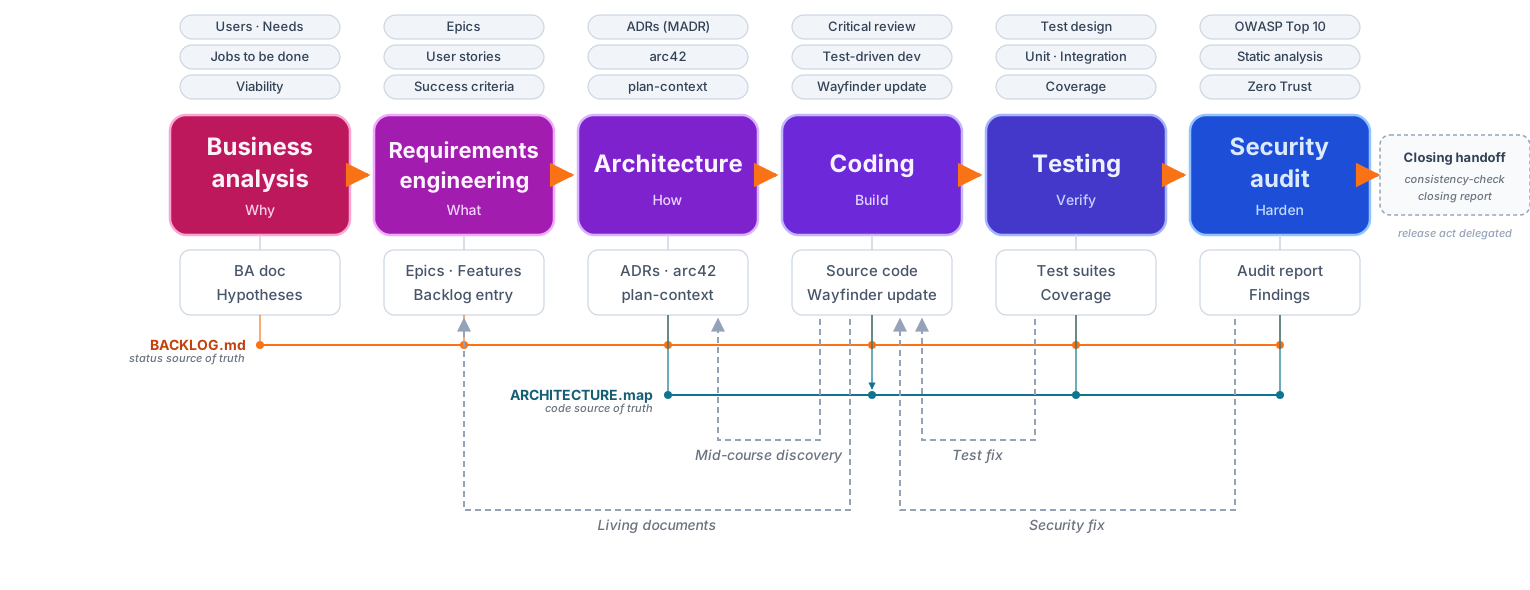
The project ships thirteen skills that run inside your AI coding
assistant. Six are V-Model phase skills (business analysis,
requirements engineering, architecture, coding, testing, security
audit). Two are entry-point skills for non-greenfield projects
(reverse engineering, dia-migration). One is the on-demand workflow
guide (/dia-guide). Four are foundation skills (project conventions,
consistency check, humanizer, dia-bootstrap). Every
phase skill owns one part of the V-Model, has its own quality gates,
and hands off a structured artifact to the next phase. The guide is
called separately whenever the user wants an orientation read.
Every decision stays traceable from a real user problem through
requirements, architecture, code, tests, and a security audit.
Three entry points cover greenfield, brownfield, and migration projects:
/business-analysis starts with structured discovery
(users, needs, insights, critical hypotheses) and walks forward
through the V-Model./reverse-engineering walks the V backwards over an
existing codebase and produces plan-context, ADRs, an arc42 snapshot,
a FEATURE inventory, a backlog seed, and an evidence-based BA draft.
Every claim is sourced to a file path or doc section. Nothing invented./dia-migration brings an older DIA project (v1) or a
pre-existing V-Model variant up to current conventions: cleans
status drift, normalises ID schemas, flattens analysis/, regenerates
the backlog as single source of truth.The BA and RE agents ship a catalog of 32 innovation methods (qualitative interviews, extreme users, fly on the wall, cultural probes, persona synthesis, stakeholder maps, jobs to be done, brainwriting, TRIZ, wizard of oz, pre-mortem, value proposition quantification, and more) organised as method cards in the docs.
During a BA or RE session, when your answers go thin, the agent stops the interview and proposes the matching field method with a one-page card: what it produces, when to reach for it, how to run it, team and time, things that go wrong, and what to bring back to the session. The actual research work stays human-to-human: interviews with real users, observations in the real context, prototypes on real hands. The agent's job is to spot the gap and pick the right method, not to replace the work.
Pick your platform. Each installer drops the same thirteen skills with the same templates and quality gates into your tool of choice.
/plugin lives in the Claude Code CLI, not in the VS Code or
JetBrains extensions. If claude --version returns
command not found, install the CLI first:
curl -fsSL https://claude.ai/install.sh | bash    # official installer
# or: brew install --cask claude-code              # macOS Homebrew
# or: npm install -g @anthropic-ai/claude-code     # any OS with Node
Reopen your shell (source ~/.zshrc or ~/.bashrc), then install the
plugin:
claude
/plugin marketplace add https://github.com/pssah4/digital-innovation-agents.git
/plugin install digital-innovation-agents@pssah4-skills
Type / in any new session to see the skills in autocomplete. The
dia-bootstrap skill loads automatically at session
start as a brief orientation.
npx claudepluginhub pssah4/digital-innovation-agents --plugin digital-innovation-agentsArchitecture analysis, brainstorming, ADR generation, LLM-as-judge comparison, and spec gap resolution.
 existential-birds
You work with me (Claude) - I guide your workflow and suggest next actions.
 h315uk3
Theory-grounded product-thinking discipline for AI agents. 49 skills, 15 theory gates, six diamond scales (Purpose to Market). Discovery to delivery with evidence gates that block on insufficient evidence.
 haabe
haabeComplete SDLC framework with 58 specialized agents for software development lifecycle management. Phase-based workflows (Inception→Elaboration→Construction→Transition), security reviews, testing orchestration, and deployment automation.
 jmagly
Requirements-driven development workflow with quality gates for practical feature implementation
 stellarlinkco
Verification-first engineering toolkit for Claude Code. 15 skills across a 5-phase spine (Investigate → Design → Implement → Verify → Ship), 8 specialist agents, an interactive setup wizard. Every skill has rationalizations + evidence requirements. Built for senior ICs and tech leads.
 duthaho