Inference Builder
Overview
Inference Builder is a tool that automatically generates inference pipelines and integrates them into either a microservice or a standalone application. It takes an inference configuration file and an OpenAPI specification (when integrated with an HTTP server) as inputs, and may also require custom code snippets in certain cases.
The output of the tool is a Python package that can be used to build a microservice container image with a customized Dockerfile.
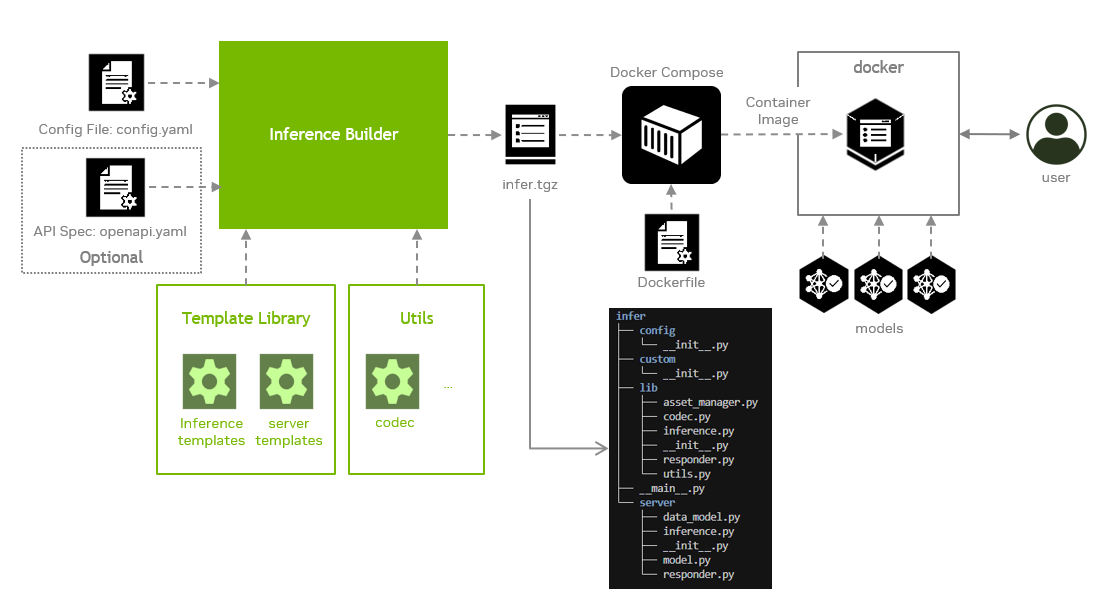
The Inference Builder consists of three major components:
- Code templates: These are reusable modules for various inference backends and frameworks, as well as for API servers. They are optimized and tested, making them suitable for any model with specified inputs, outputs, and configuration parameters.
- Common inference flow: It serves as the core logic that standardizes the end-to-end inference process—including data loading and pre-processing, model inference, post-processing, and integration with the API server. It supports pluggable inference backends and frameworks, enabling flexibility and performance optimization.
- Command line tool: It generates a source code package by combining predefined code templates with the Common Inference Flow. It also automatically produces corresponding test cases and evaluation scripts to support validation and performance assessment.
Visit our documentation for more details:
Getting started
First, be sure your system meets the requirement.
| Operating System | Python | CPU | GPU1 |
|---|
| Ubuntu 24.04 | 3.12 | x86, aarch64 | Nvidia ADA, Hopper, Blackwell |
Next, follow these steps to get started:
Install prerequisites
sudo apt update
sudo apt install protobuf-compiler
sudo apt install python3.12-venv python3.12-dev
Docker environment must be properly set up with below packages for building and running the examples:
Ensure nvidia runtime added to /etc/docker/daemon.json to run GPU-enabled containers
{
    "runtimes": {
        "nvidia": {
            "args": [],
            "path": "nvidia-container-runtime"
        }
    }
}
The docker group must exist in your system, please check if it has been created using getent group docker. Your current user must belong to the docker group, If not, run the command below, then log out and back in for the group change to take effect.
sudo usermod -aG docker $USER
Note for TEGRA users: If you're using a TEGRA device, you'll also need to install the Docker buildx plugin:
sudo apt install docker-buildx
Note for Jetson Orin users: External storage integration is required to support the execution of the DeepStream microservice on the Jetson Orin platform.
Download and install the NGC CLI from the NGC page and follow the NGC CLI Guide to set up the tool.
Clone the repository
git clone https://github.com/NVIDIA-AI-IOT/inference_builder
Set up the virtual environment
cd inference_builder
git submodule update --init --recursive
python3 -m venv .venv
source .venv/bin/activate
pip3 install -r requirements.txt
Play with the examples
Now you can try our examples to learn more. These examples span all supported backends and demonstrate their distinct inference flows.
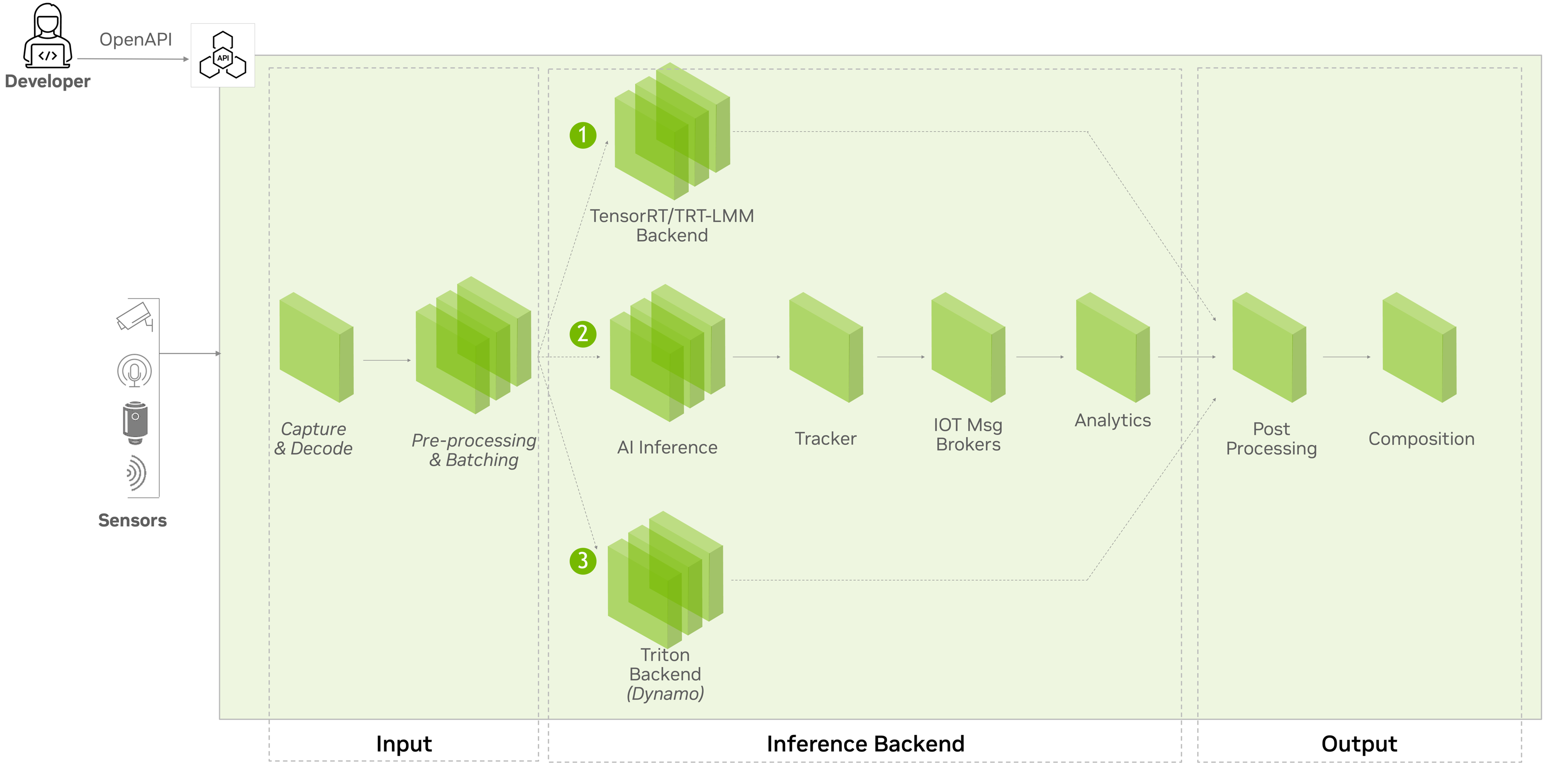
Benefit of using Inference Builder
 NVIDIA-TAO
 vanman2024
 togethercomputer
 roboflow
 NVIDIA
 replicate
'%20stop-opacity%3D'0.16'%2F%3E%3Cstop%20offset%3D'1'%20stop-color%3D'rgb(200%2C90%2C60)'%20stop-opacity%3D'0.03'%2F%3E%3C%2FlinearGradient%3E%3C%2Fdefs%3E%3Crect%20width%3D'320'%20height%3D'200'%20fill%3D'url(%23g)'%2F%3E%3Ccircle%20cx%3D'250'%20cy%3D'56'%20r%3D'92'%20fill%3D'rgb(200%2C90%2C60)'%20fill-opacity%3D'0.06'%2F%3E%3Ccircle%20cx%3D'64'%20cy%3D'172'%20r%3D'58'%20fill%3D'rgb(200%2C90%2C60)'%20fill-opacity%3D'0.05'%2F%3E%3C%2Fsvg%3E)