sq data wrangler





sq is a command line tool that provides jq-style access to
structured data sources: SQL databases, or document formats like CSV or Excel.
It is the lovechild of SQL+jq.
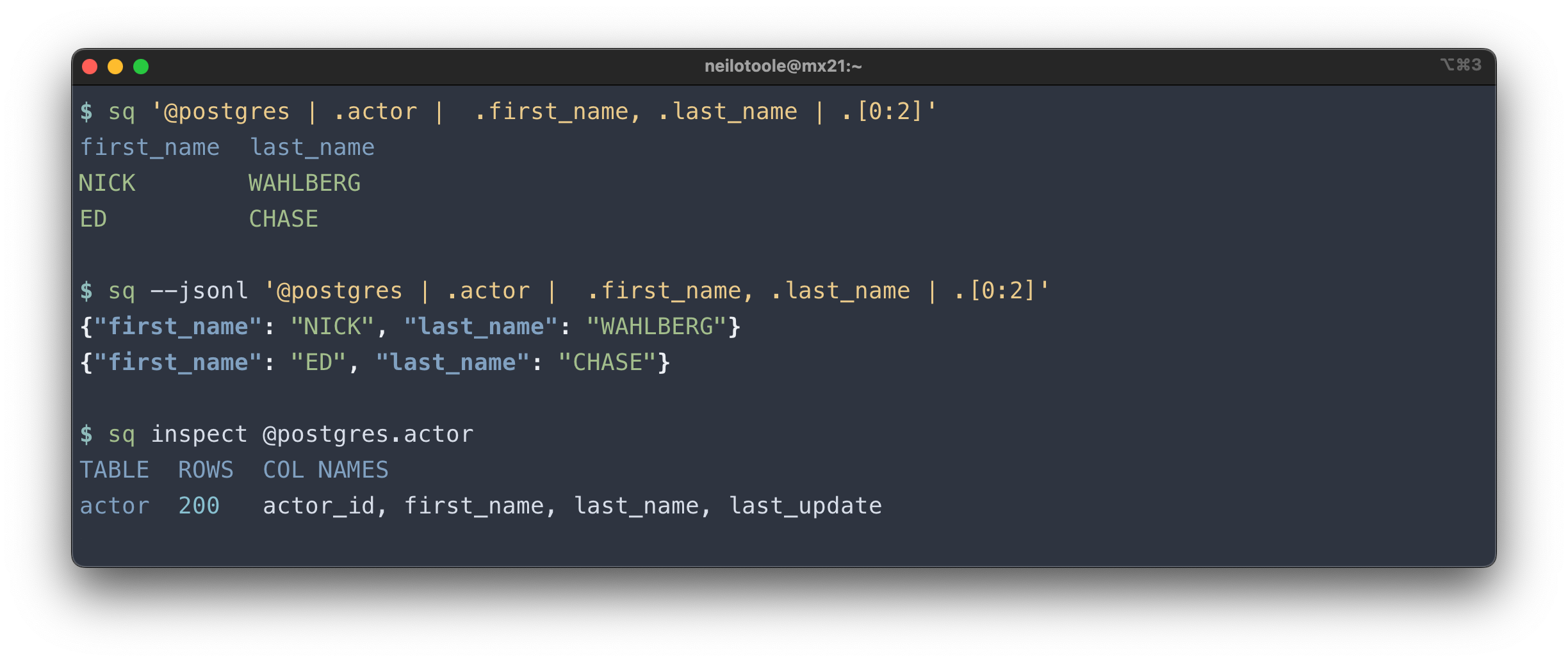
sq executes jq-like queries, or database-native
SQL. It can join
across sources: join a CSV file to a Postgres table, or MySQL with Excel.
sq outputs to a multitude of formats
including JSON,
Excel, CSV,
HTML, Markdown
and XML, and can insert query
results directly to a SQL database.
sq can also inspect sources to view metadata about the
source structure (tables, columns, size). You can use sq diff
to compare tables, or entire databases. sq has commands for common database operations to
copy, truncate,
and drop tables.
Find out more at sq.io.
[!TIP]
The rest of this doc is mainly for sq end users and first-timers. Contributors
(bug reports, feature requests, pull requests), see CONTRIBUTING.md.
Drivers
sq knows how to deal with a data source type via a driver
implementation. To view the installed/supported drivers:
$ sq driver ls
DRIVER      DESCRIPTION
sqlite3     SQLite
rqlite      rqlite
postgres    PostgreSQL
sqlserver   Microsoft SQL Server
mysql       MySQL
clickhouse  ClickHouse
oracle      Oracle
duckdb      DuckDB
csv         Comma-Separated Values
tsv         Tab-Separated Values
json        JSON
jsona       JSON Array: LF-delimited JSON arrays
jsonl       JSON Lines: LF-delimited JSON objects
xlsx        Microsoft Excel XLSX
Install
macOS
brew install sq
[!IMPORTANT]
sq is now a core brew formula. Previously,
sq was available via brew install neilotoole/sq/sq. If you have installed sq this way,
you should uninstall it (brew uninstall neilotoole/sq/sq) before installing the new formula
via brew install sq.
Linux
/bin/sh -c "$(curl -fsSL https://sq.io/install.sh)"
Windows
scoop bucket add sq https://github.com/neilotoole/sq
scoop install sq
Go
go install github.com/neilotoole/sq
Docker
The ghcr.io/neilotoole/sq
image is preloaded with sq and a handful of related tools like jq.
Local
# Shell into a one-time container.
$ docker run -it ghcr.io/neilotoole/sq zsh

# Start detached (background) container named "sq-shell".
$ docker run -d --name sq-shell ghcr.io/neilotoole/sq
# Shell into that container.
$ docker exec -it sq-shell zsh
Kubernetes
Running sq in a Kubernetes environment is useful for DB migrations,
as well as general data wrangling.
# Start pod named "sq-shell".
$ kubectl run sq-shell --image ghcr.io/neilotoole/sq
# Shell into the pod.
$ kubectl exec -it sq-shell -- zsh
See other install options.
Agent skills
An Agent Skills skill for this repo lives under
skills/sq/ and helps coding assistants use an installed sq
(CLI patterns, references/ for drivers). User-facing install and usage are
documented at sq.io/docs/agent-skills.
Quick install from GitHub:
npx skills add neilotoole/sq
Documentation site (sq.io)
User-facing docs at sq.io are built from the site/ directory
in this repository (Hugo + Bun + Netlify). To work on the website locally, see
site/README.md. The standalone sq-web repository is archived;
open issues and pull requests here against neilotoole/sq for doc and site changes.
Overview

 duckdb
 datafusion-contrib
 sjungling
 dathere
 gemini-cli-extensions
 oxy-hq
'%20stop-opacity%3D'0.16'%2F%3E%3Cstop%20offset%3D'1'%20stop-color%3D'rgb(200%2C90%2C60)'%20stop-opacity%3D'0.03'%2F%3E%3C%2FlinearGradient%3E%3C%2Fdefs%3E%3Crect%20width%3D'320'%20height%3D'200'%20fill%3D'url(%23g)'%2F%3E%3Ccircle%20cx%3D'250'%20cy%3D'56'%20r%3D'92'%20fill%3D'rgb(200%2C90%2C60)'%20fill-opacity%3D'0.06'%2F%3E%3Ccircle%20cx%3D'64'%20cy%3D'172'%20r%3D'58'%20fill%3D'rgb(200%2C90%2C60)'%20fill-opacity%3D'0.05'%2F%3E%3C%2Fsvg%3E)