Status: 0.1.x — early, actively developed. APIs and config may shift between minor versions; pet behavior is stable.
See CHANGELOG.md for recent changes.
Why Code Pet?
- Company for long sessions. Hours with an AI feel less lonely when
something in the corner is keeping you company.
- Glanceable state. Know at a glance whether Claude is working, stuck on
a permission prompt, or done — without switching windows.
- Zero friction. Fully transparent, click-through, always-on-top. It
never steals focus and never interrupts your flow.
- See what you actually use. A private,
local log of every skill and MCP tool you call — find which ones you
actually depend on and which you forgot you installed.
Install
1. Add the marketplace (one-time):
/plugin marketplace add mradovic95/code-pet
2. Install the plugin:
/plugin install code-pet
3. Quit Claude Code and reopen it so it loads the new hooks.
On the first session after the restart you'll see a one-line message —
Code Pet: Installing Electron (~85MB)… — while Electron downloads in the
background (one-time, ~30 s on a fast connection). The pet appears on the
next session after the download finishes.
Having trouble? See docs/installation.md#troubleshooting.
To uninstall:
claude plugin remove code-pet
Meet the pets
More pets on the way.
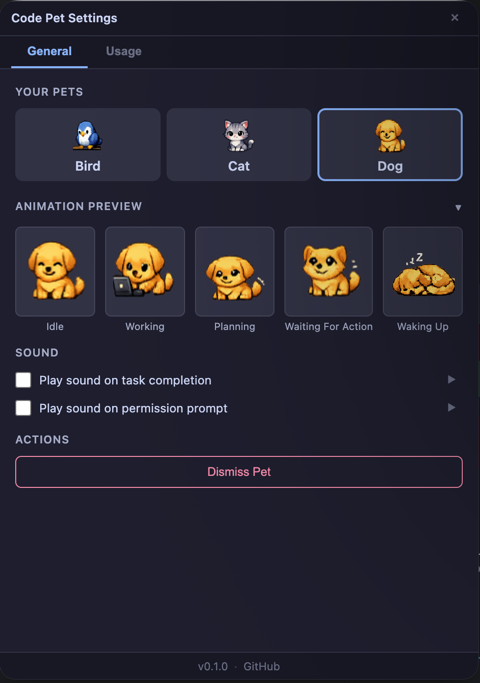
Customize your pet
Double-click the pet to open Settings. From the General tab you can
switch pets, toggle sounds, or dismiss the pet for this project.
How it works
Your pet watches Claude Code and reacts in real time. Here's what happens in
each moment of a session:
| When you… | Your pet… | Animation |
|---|
| Start a session | Wakes up and settles in |  → →  |
| Send a prompt | Gets to work |  |
| Send a prompt in plan mode | Starts thinking instead |  |
| Hit a permission prompt | Looks at you and waits |  |
| Get a reply from Claude | Finishes and rests | |
| End the session | Falls asleep and closes the overlay | — |
The overlay is transparent, frameless, always-on-top, click-through, and
never steals focus. Plan mode is auto-detected, and the pet stays put if a
session ends while Claude is still working — it only tucks in when you're
truly idle.
See what you actually use
🔒 Privacy: All usage data lives only at ~/.code-pet/usage.log. Code Pet has no telemetry and makes no network calls.
Code Pet keeps a private, local log of every skill and MCP tool you call,
visible in Settings → Usage (double-click the pet). Find out:

 zigizhujian
 ramarivera
 chuilishi
 fiorastudio
 sebyul2
 TeXmeijin




'%20stop-opacity%3D'0.16'%2F%3E%3Cstop%20offset%3D'1'%20stop-color%3D'rgb(200%2C90%2C60)'%20stop-opacity%3D'0.03'%2F%3E%3C%2FlinearGradient%3E%3C%2Fdefs%3E%3Crect%20width%3D'320'%20height%3D'200'%20fill%3D'url(%23g)'%2F%3E%3Ccircle%20cx%3D'250'%20cy%3D'56'%20r%3D'92'%20fill%3D'rgb(200%2C90%2C60)'%20fill-opacity%3D'0.06'%2F%3E%3Ccircle%20cx%3D'64'%20cy%3D'172'%20r%3D'58'%20fill%3D'rgb(200%2C90%2C60)'%20fill-opacity%3D'0.05'%2F%3E%3C%2Fsvg%3E)