Stats
Actions
Available In
Tags

Build secure Rust applications integrating Azure services: authenticate with Entra ID, manage Key Vault secrets/keys/certificates, perform CRUD on Cosmos DB documents and Blob Storage, and stream data via Event Hubs using official SDK patterns and code examples.
Azure Cosmos DB SDK for Rust (NoSQL API). Use for document CRUD, queries, containers, and globally distributed data. Triggers: "cosmos db rust", "CosmosClient rust", "container", "document rust", "NoSQL rust", "partition key".
Azure Event Hubs SDK for Rust. Use for sending and receiving events, streaming data ingestion. Triggers: "event hubs rust", "ProducerClient rust", "ConsumerClient rust", "send event rust", "streaming rust".
Azure Identity SDK for Rust authentication. Use for DeveloperToolsCredential, ManagedIdentityCredential, ClientSecretCredential, and token-based authentication. Triggers: "azure-identity", "DeveloperToolsCredential", "authentication rust", "managed identity rust", "credential rust".
Azure Key Vault Certificates SDK for Rust. Use for creating, importing, and managing certificates. Triggers: "keyvault certificates rust", "CertificateClient rust", "create certificate rust", "import certificate rust".
Azure Key Vault Keys SDK for Rust. Use for creating, managing, and using cryptographic keys. Triggers: "keyvault keys rust", "KeyClient rust", "create key rust", "encrypt rust", "sign rust".
Own this plugin?
Verify ownership to unlock analytics, metadata editing, and a verified badge. GitHub access is read-only (username + org membership).
Sign in to claimOwn this plugin?
Verify ownership to unlock analytics, metadata editing, and a verified badge. GitHub access is read-only (username + org membership).
Sign in to claimBased on adoption, maintenance, documentation, and repository signals. Not a security audit or endorsement.



[!NOTE] Work in Progress — This repository is under active development. More skills are being added, existing skills are being updated to use the latest SDK patterns, and tests are being expanded to ensure quality. Contributions welcome!
Skills, custom agents, AGENTS.md templates, and MCP configurations for AI coding agents working with Azure SDKs and Microsoft AI Foundry.
Blog post: Context-Driven Development: Agent Skills for Microsoft Foundry and Azure
🔍 Skill Explorer: Browse all 132 skills with 1-click install
npx skills add microsoft/skills
Select the skills you need from the wizard. Skills are installed to your chosen agent's directory (e.g., .github/skills/ for GitHub Copilot) and symlinked if you use multiple agents.
Manual installation (git clone)
# Clone and copy specific skills
git clone https://github.com/microsoft/skills.git
cp -r agent-skills/.github/skills/azure-cosmos-db-py your-project/.github/skills/

# Or use symlinks for multi-project setups
ln -s /path/to/agent-skills/.github/skills/mcp-builder /path/to/your-project/.github/skills/mcp-builder

# Share skills across different agent configs in the same repo
ln -s ../.github/skills .opencode/skills
ln -s ../.github/skills .claude/skills
Coding agents like Copilot CLI and GitHub Copilot in VS Code are powerful, but they lack domain knowledge about your SDKs. The patterns are already in their weights from pretraining. All you need is the right activation context to surface them.
[!IMPORTANT] Use skills selectively. Loading all skills causes context rot: diluted attention, wasted tokens, conflated patterns. Only copy skills essential for your current project.
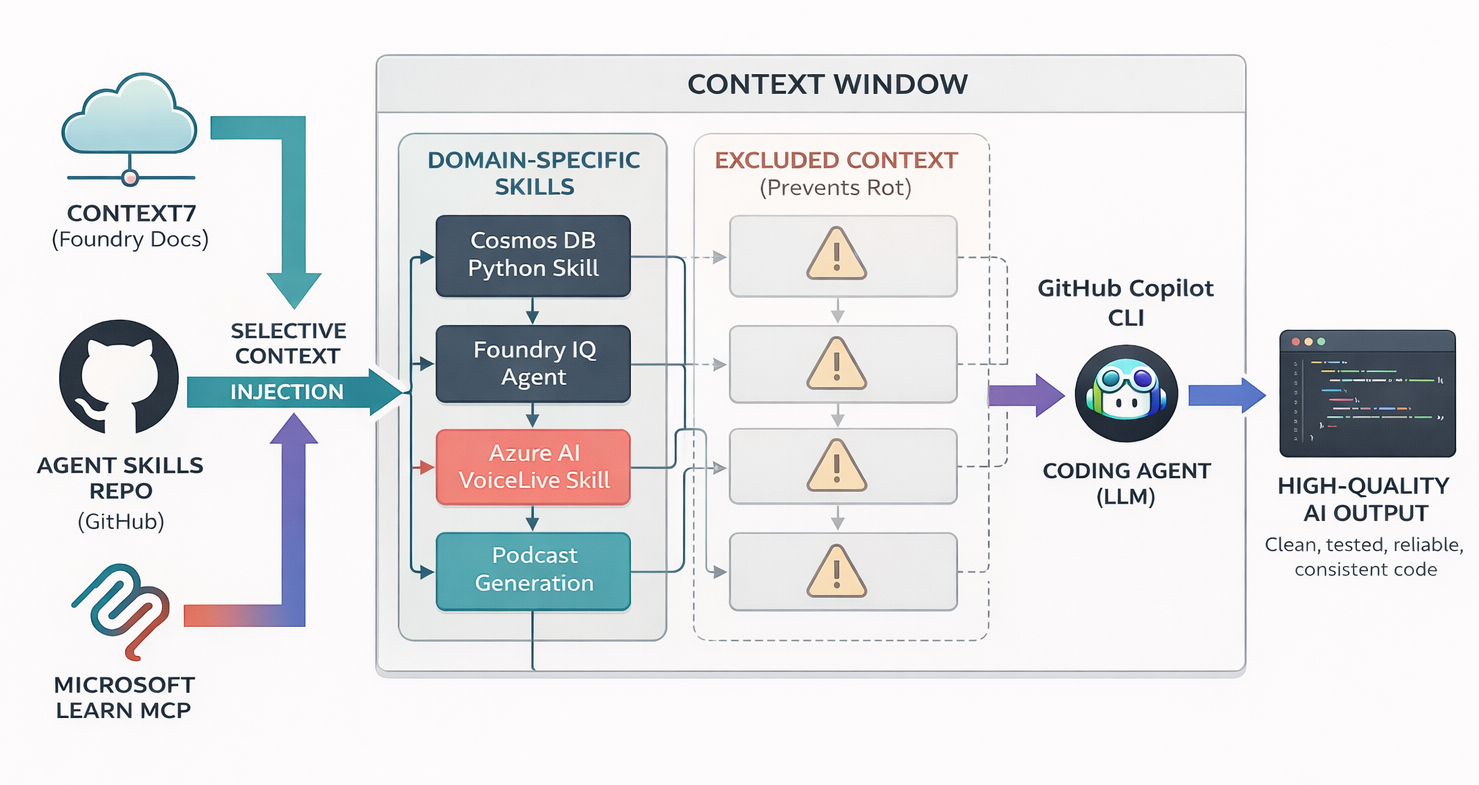
| Resource | Description |
|---|---|
| 128 Skills | Domain-specific knowledge for Azure SDK and Foundry development |
| Plugins | Installable plugin packages (deep-wiki, azure-skills and more) |
| Custom Agents | Role-specific agents (backend, frontend, infrastructure, planner) |
| AGENTS.md | Template for configuring agent behavior in your projects |
| MCP Configs | Pre-configured servers for docs, GitHub, browser automation |
| Documentation | Repo docs and usage guides |
132 skills in
.github/skills/— flat structure with language suffixes for automatic discovery
| Language | Count | Suffix |
|---|---|---|
| Core | 9 | — |
| Python | 41 | -py |
| .NET | 28 | -dotnet |
| TypeScript | 25 | -ts |
| Java | 25 | -java |
| Rust | 7 | -rust |
9 skills — tooling, infrastructure, language-agnostic
npx claudepluginhub microsoft/skills --plugin azure-sdk-rustTurn your coding agent into a SOTA browser agent. Drives a local Playwright workspace via one bash command at a time, saving screenshots and an action log into final_runs/run_<id>/, and visually self-verifies the result.
microsoftAGT governance hooks and MCP tools for Claude Code sessions
microsoftAI-powered wiki generator for code repositories. Generates comprehensive, Mermaid-rich documentation with dark-mode VitePress sites, onboarding guides, deep research, and source citations. Inspired by OpenDeepWiki and deepwiki-open.
microsoftAzure SDK patterns and best practices for Python developers covering AI, storage, identity, monitoring, messaging, and management libraries.
microsoftAzure SDK patterns and best practices for Java developers covering AI, communication, storage, identity, monitoring, and management libraries.
microsoftAzure SDK patterns and best practices for TypeScript/Node.js developers covering AI, storage, identity, monitoring, and messaging libraries.
microsoftIntegrated Rust development skills for multiple domains (UI, Robotics, etc.)
 ZhangHanDong
Meta-plugin that installs all skills from all plugins in the marketplace
 vinnie357
Editorial "Azure AI & Cloud" bundle for Claude Code from Antigravity Awesome Skills.
 sickn33
Collection of agent skills
 Tyler-R-Kendrick
Skills for building agents with the Microsoft 365 Agents SDK for TypeScript/JavaScript
microsoft