Stats
Actions
Available In
Tags

Real-time PowerShell diagnostics in Claude Code: as Claude edits a .ps1/.psm1/.psd1, it runs PowerShell Editor Services + PSScriptAnalyzer over that file and surfaces syntax errors and lint fixes inline. Hover, go-to-definition, and find-references serve natively through an opt-in handshake shim (userConfig nativeServe, off by default).
This plugin requires configuration values that are prompted when the plugin is enabled. Sensitive values are stored in your system keychain.
ps_hostExecutable used to host PowerShell Editor Services. Recommended: 'pwsh' (PowerShell 7+, the default, tested) or 'powershell' (Windows PowerShell 5.1). See docs/configuration.md#ps_host.
${user_config.ps_host}rulesetRule set on the live edit path when no repo settings resolve. Values: 'pses-default' (default), 'base' (broader shipped set). See docs/configuration.md#ruleset.
${user_config.ruleset}Modifies files
Hook triggers on file write and edit operations
Own this plugin?
Verify ownership to unlock analytics, metadata editing, and a verified badge. GitHub access is read-only (username + org membership).
Sign in to claimOwn this plugin?
Verify ownership to unlock analytics, metadata editing, and a verified badge. GitHub access is read-only (username + org membership).
Sign in to claimBased on adoption, maintenance, documentation, and repository signals. Not a security audit or endorsement.
keepLastNSessionStart sweeps each rolling log family down to this many newest files. Default 10. See docs/configuration.md#keeplastn.
${user_config.keepLastN}orgPolicyAbsolute path to an org-wide PSScriptAnalyzerSettings.psd1 whose ExcludeRules win over local config and cannot be re-enabled locally. Empty (default) = off. See docs/configuration.md#orgpolicy.
${user_config.orgPolicy}timeoutMsTotal milliseconds the PostToolUse client waits before degrading to log-only. Default 5000. See docs/configuration.md#timeoutms.
${user_config.timeoutMs}debounceMsEdits landing within this many milliseconds fold into one analysis pass. Default 150. See docs/configuration.md#debouncems.
${user_config.debounceMs}idleTtlMinThe daemon self-terminates after this many minutes with no diagnostics request. Default 30. See docs/configuration.md#idlettlmin.
${user_config.idleTtlMin}perFileCapMax diagnostics reported per file; the rest collapse into an 'and N more' line. '0' = no cap. Default 20. See docs/configuration.md#perfilecap.
${user_config.perFileCap}enableStatsAppend one JSONL timing line per analyzed edit to logs/stats.jsonl; observe-only, never changes diagnostics. Values: 'false' (default), 'true'. See docs/configuration.md#enablestats.
${user_config.enableStats}nativeServeNative nav (hover, go-to-definition, find-references) via a stdio shim around upstream #1359; 'off' is a byte-exact relay. Values: 'off' (default), 'shim'. See docs/configuration.md#nativeserve.
${user_config.nativeServe}ruleExcludeComma-separated PSScriptAnalyzer rule codes to suppress (e.g. 'PSAvoidUsingWriteHost'); empty (default) = none. See docs/configuration.md#ruleexclude.
${user_config.ruleExclude}ruleIncludeIf set, report ONLY these comma-separated PSScriptAnalyzer rule codes (e.g. 'PSUseApprovedVerbs,PSAvoidUsingCmdletAliases'); empty (default) = all. See docs/configuration.md#ruleinclude.
${user_config.ruleInclude}scopeToEditFilter surfaced diagnostics to the lines the edit touched; fails open to whole-file when the range is unknown. Values: 'true' (default), 'false'. See docs/configuration.md#scopetoedit.
${user_config.scopeToEdit}formatOnEditInvoke-Formatter after edits: 'suggest' surfaces a diff only; 'apply' performs a guarded write-back. Values: 'off' (default), 'suggest', 'apply'. See docs/configuration.md#formatonedit.
${user_config.formatOnEdit}settingsPathAbsolute path to a PSScriptAnalyzerSettings.psd1 to honor, overriding auto-discovery; a relative value is ignored. Empty (default) = auto-discover. See docs/configuration.md#settingspath.
${user_config.settingsPath}moduleAwarenessHints when the edited file calls a command from a known module that is not installed on this machine. Values: 'off' (default), 'suggest'. See docs/configuration.md#moduleawareness.
${user_config.moduleAwareness}editContextLinesExtra context lines kept above and below the touched range when scopeToEdit is on; raise to widen the window. Default 0. See docs/configuration.md#editcontextlines.
${user_config.editContextLines}severityThresholdLeast-severe level to report; more-severe levels are always included. Values: 'Error', 'Warning', 'Information', 'Hint' (default). See docs/configuration.md#severitythreshold.
${user_config.severityThreshold}referenceSurfacingSurfaces bare per-function facts (referenced-by-N, exported, defined-in) from a session workspace index. Values: 'off' (default), 'counts'. See docs/configuration.md#referencesurfacing.
${user_config.referenceSurfacing}




As Claude edits a .ps1, .psm1, or .psd1, this plugin runs real PowerShell
Editor Services + PSScriptAnalyzer over that file and feeds the result -- syntax
errors and lint findings, with fix suggestions -- straight back into Claude's
context, so a mistake gets caught and corrected in the same turn. It is language
tooling, not project tooling: near-zero always-on token cost, a language server
spawns only when a PowerShell file is open, and one warm process serves the whole
session, so each edit pays a fast pipe round-trip instead of a cold start.
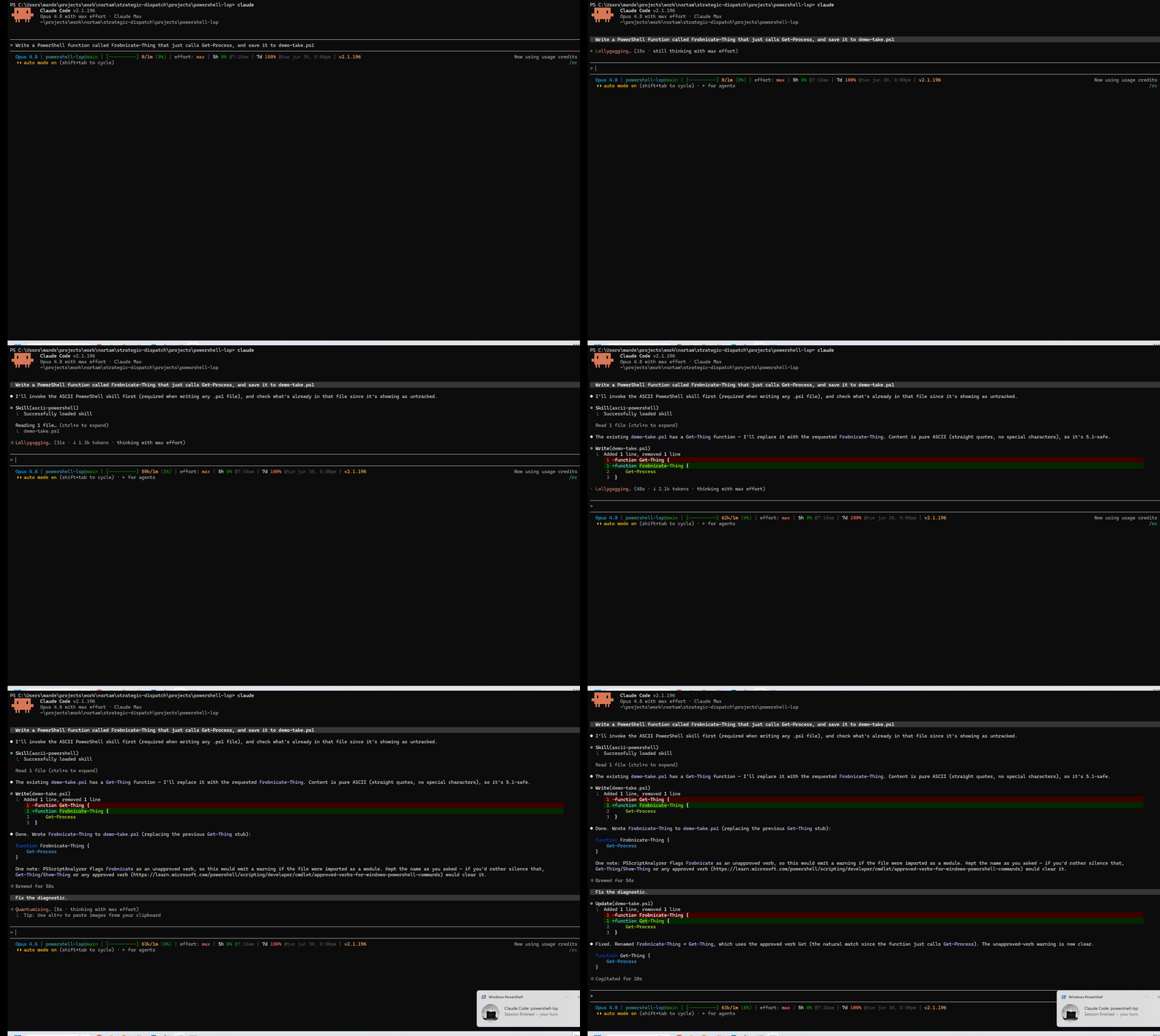
See it catch something. Ask Claude to write:
function Frobnicate-Thing { Get-Process }
and the PostToolUse hook returns, right in Claude's context:
The cmdlet 'Frobnicate-Thing' uses an unapproved verb. (PSUseApprovedVerbs)
Claude sees its own mistake and corrects it without you switching tools.
Install in under a minute. Requires pwsh (PowerShell 7+) on your PATH; then,
in Claude Code:
/plugin marketplace add manderse21/claude-powershell-lsp
/plugin install powershell-lsp@claude-powershell-lsp
/plugin enable powershell-lsp
Start a new session and you are running. The full prerequisites, the self-bootstrap sequence, and the preflight doctor are in Quick start below.
What works today. The per-file diagnostic loop above is live on every supported host right now. Hover, go-to-definition, and find-references now also serve to Claude Code's native LSP client through an opt-in handshake shim (
nativeServe = shim) that works around the upstream Claude Code client init-handshake bug locally; it is off by default while that upstream fix is pending, and workspace-wide analysis remains on the roadmap. Details: Native serve and Why a hook, not native registration.
Check these before you start; the Quick start below runs them in order.
pwsh) on your PATH. As of 1.1.1 the plugin's hooks launch
under pwsh; Windows PowerShell 5.1 alone cannot bootstrap them. Check with
pwsh -v; if it is missing, step 1 of the Quick start installs it.unavailable banner instead of failing
silently (see Diagnostics status).unavailable rather than crashing. See Troubleshooting.Windows PowerShell 5.1 can still serve as the PSES child host (set ps_host to
powershell); it simply cannot launch the hooks themselves. See
Platform support.
Copy-paste, top to bottom:
# 1. Prerequisite (run in a terminal) -- skip if `pwsh -v` already works:
winget install Microsoft.PowerShell

# 2. In Claude Code -- add the marketplace, install, then enable the plugin:
/plugin marketplace add manderse21/claude-powershell-lsp
/plugin install powershell-lsp@claude-powershell-lsp
/plugin enable powershell-lsp

# 3. Start a new session (or run /reload-plugins) so the hooks load and the first
#    SessionStart bootstraps PSES + the warm daemon.
npx claudepluginhub manderse21/claude-powershell-lsp --plugin powershell-lspMemory compression system for Claude Code - persist context across sessions
 thedotmack
45% cost reduction measured. Cache expiry prevention, SubTask auto-delegation, zero-cost context restoration, real-time cost dashboard. The only Claude Code plugin built from CC source analysis.
 ww-w-ai
Unified capability management center for Skills, Agents, and Commands.
 guanyang
Rust language server
 boostvolt
Validation and quality enforcement for Tailwind CSS projects with comprehensive utility-first CSS patterns and best practices.
 TheBushidoCollective
YAML language server
boostvolt'%20stop-opacity%3D'0.16'%2F%3E%3Cstop%20offset%3D'1'%20stop-color%3D'rgb(200%2C90%2C60)'%20stop-opacity%3D'0.03'%2F%3E%3C%2FlinearGradient%3E%3C%2Fdefs%3E%3Crect%20width%3D'320'%20height%3D'200'%20fill%3D'url(%23g)'%2F%3E%3Ccircle%20cx%3D'250'%20cy%3D'56'%20r%3D'92'%20fill%3D'rgb(200%2C90%2C60)'%20fill-opacity%3D'0.06'%2F%3E%3Ccircle%20cx%3D'64'%20cy%3D'172'%20r%3D'58'%20fill%3D'rgb(200%2C90%2C60)'%20fill-opacity%3D'0.05'%2F%3E%3C%2Fsvg%3E)
